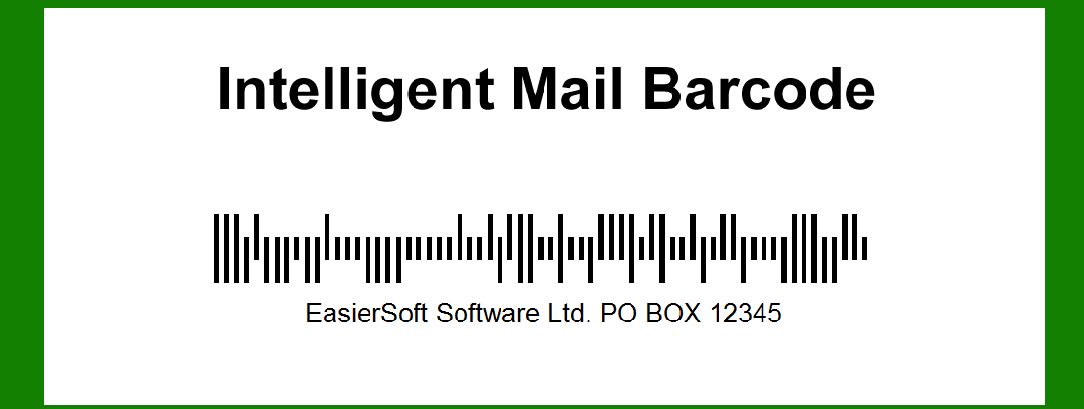
The Intelligent Mail barcode (IMb) is a barcode technology used by the United States Postal Service (USPS) to encode and sort mail for efficient processing and delivery. |
It combines the functionality of several older barcode types, including POSTNET and PLANET codes, into a single barcode format. Originally known as OneCode, it was designed to streamline and enhance the USPS's ability to track and manage mail throughout its delivery process. |
|
History and Development |
The development of the Intelligent Mail barcode stemmed from a need to improve the efficiency of mail sorting and tracking within the USPS. Prior to its introduction, the USPS utilized separate barcode systems like POSTNET (Postal Numeric Encoding Technique) for encoding ZIP codes and PLANET (Postal Alpha Numeric Encoding Technique) for tracking mailpieces. |
The concept of consolidating these separate barcodes into a single, more versatile barcode format began to take shape in the early 2000s. The USPS aimed to simplify the process of addressing, tracking, and delivering mail, while also providing more comprehensive data to both mailers and recipients. |

|
Barcode Structure and Components |
The Intelligent Mail barcode is a 65-bar barcode that can encode a range of information, including ZIP codes, delivery point routing, and tracking data. It consists of four main components: |
1.Barcode Identifier (ID): A two-digit field that identifies the type of service or mail class. 2.Service Type Identifier (STID): A three-digit field indicating the specific service or special handling option for the mailpiece. 3.Mailer Identifier (MID): A six- or nine-digit field assigned by the USPS to identify the mailer or sender. 4.Serial Number: A unique sequence of digits (up to 15 digits long) assigned by the mailer to differentiate individual mailpieces. |
|
Encoding and Data Capacity |
The IMb barcode uses a combination of bars and spaces to encode data. It can encode up to 31 digits or characters per barcode, allowing for extensive tracking and sorting information to be included. This data capacity makes it suitable for a wide range of mail classes and services offered by the USPS. |
|
Benefits and Features |
The adoption of the Intelligent Mail barcode offers several key benefits to both mailers and the USPS: |
Improved Efficiency: By consolidating multiple barcodes into one, the IMb simplifies the sorting and tracking process, reducing errors and improving delivery accuracy. Enhanced Tracking: Provides real-time tracking information for mailpieces throughout the USPS network, offering greater visibility to both senders and recipients. Cost Savings: Streamlines operations for mailers by reducing the need for multiple barcode applications and associated costs. |

|
Implementation and Usage |
The USPS phased in the use of the Intelligent Mail barcode starting in 2006, with full implementation achieved by 2013. Today, the IMb is required for automation discounts on bulk mailings and is widely used for various classes of mail, including First-Class Mail, Marketing Mail, and Periodicals. |

|
Technical Specifications |
The technical specifications of the Intelligent Mail barcode are defined by the USPS in the Intelligent Mail Barcode Specification, which outlines requirements for barcode size, placement, and encoding standards. Compliance with these specifications ensures that the barcode can be accurately scanned and processed by USPS sorting equipment. |

|
Applications and Industry Impact |
The adoption of the IMb has had a significant impact on the mailing industry, enabling businesses and organizations to track mail more effectively and integrate mail tracking data with their own systems. This has been particularly valuable for businesses that rely on timely and accurate delivery of mail, such as financial institutions, retailers, and government agencies. |

|
Future Developments |
Looking ahead, the USPS continues to explore enhancements to the Intelligent Mail barcode system, including potential integration with emerging technologies like RFID (Radio Frequency Identification) for even more advanced tracking capabilities. As technology evolves, the IMb is likely to remain a cornerstone of USPS mail processing and delivery operations. |

|
Conclusion |
The Intelligent Mail barcode represents a significant advancement in mail sorting and tracking technology, providing a unified solution for encoding, tracking, and managing mailpieces within the USPS network. Its adoption has streamlined operations for both the USPS and mailers, improving efficiency, accuracy, and visibility throughout the mail delivery process. As a versatile barcode format, the IMb continues to play a pivotal role in the modernization of mail handling and delivery services in the United States. |
 cs@easiersoft.com