Barcode Technology

Barcode History

Barcode Label Paper

Barcode Printer

Barcode Application

Inventory Management

AI Barcode QRCode

Barcode Scanner

Barcode Software

Barcode Software B

Barcode Software C

Barcode Software D

Barcode Software E

New Technology A

New Technology B

Robot Technology

Barcode Types

Barcode Types B

Barcode Types C

Barcode Types D

Barcode Types E

Barcode Types F

Electronic Technology

Psychology at Work

Barcode Technology and Barcode Software Related   <<< Back to Directory <<<

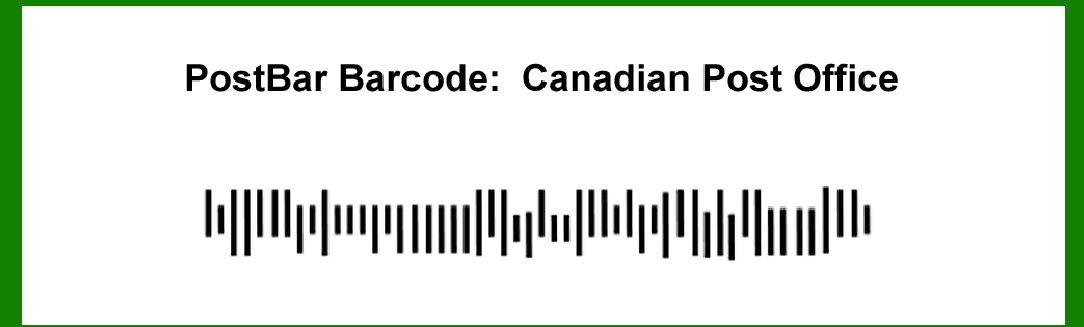
Structures of Canadian PostBar barcode

The PostBar barcode, used by the Canadian Post office, is designed to efficiently encode and represent postal information for sorting and delivery purposes. Here's a detailed description of its components and structure:

Components of PostBar Barcode:

1.Start Code (Left Frame):

Located on the left side of the barcode.

Indicates the beginning of the barcode and helps in initial scanning alignment.

2.Data Fields:

Contains encoded postal information such as postal code, delivery point, and other relevant data.

Data fields are structured to ensure accurate sorting and delivery of mail.

3.Check Digit:

Verifies the accuracy of the encoded data.

Calculated based on a specific algorithm applied to the data fields.

4.Stop Code (Right Frame):

Positioned on the right side of the barcode.

Indicates the end of the barcode and assists in proper termination during scanning.

5.Quiet Zones:

Clear, blank areas on both sides of the barcode.

Ensure that no other marks or elements interfere with the scanning process.

Structure of PostBar Barcode:

The PostBar barcode typically consists of the following elements arranged in a specific order:

1.Start Frame:

Marks the beginning of the barcode.

Provides a reference point for scanning initiation.

2.Data Fields:

Encodes postal information essential for sorting and delivery.

Includes components like postal code, delivery point, and possibly additional data fields depending on the application.

3.Check Digit:

Numeric value calculated from the encoded data fields.

Used to verify data accuracy and integrity during scanning and processing.

4.Stop Frame:

Signals the end of the barcode.

Ensures proper termination of scanning and decoding operations.

Example of PostBar Barcode Structure:

Let's consider an example to illustrate the structure and components of a PostBar barcode used by the Canadian Post office:

Start Code: Positioned on the left side, initiates scanning.

Data Fields: Encode specific postal information:

Postal Code: A unique identifier for a geographic area.

Delivery Point: Additional details specifying exact delivery location.

Check Digit: Calculated based on a mathematical formula applied to the encoded data fields.

Stop Code: Located on the right side, terminates scanning.

Detailed Breakdown:

Start Frame (Left Frame):

Provides scanning reference.

Ensures proper alignment and initiation of barcode reading.

Data Fields:

Example Postal Code: 'M5V 2T6' (Toronto downtown area).

Example Delivery Point: 'Apt 301, 123 Main St.'

Encodes specific details essential for accurate mail sorting and delivery.

Check Digit:

Example Calculation:

Postal Code 'M5V 2T6'

Delivery Point 'Apt 301, 123 Main St.'

Algorithm applied to derive a numeric check digit (e.g., using modulus 10 calculation).

Stop Frame (Right Frame):

Indicates the end of barcode data.

Facilitates proper scanning termination.

Conclusion:

The PostBar barcode used by the Canadian Post office employs a structured format comprising start and stop frames, encoded data fields such as postal code and delivery point, and a check digit for data accuracy verification. This structured approach ensures efficient mail handling, sorting, and delivery operations within Canada's postal system.


EasierSoft Barcode Label Design & Bulk Printing Software

---- Use Excel Data to Batch Print Barcodes on Label Sheets or Roll Labels  

---- How to use this barcode software

Download:  Free Barcode Software + Barcode Label Designer

Download Free Barcode Software at Softonic

     Download at CNET

Once you obtain a GS1/UPC/EAN barcode, or other barcode type and QR code, you can use our free software to batch print barcode labels onto Roll label paper using a professional label printer, or to batch print barcodes onto Avery 5160 label sheets using a regular laser or inkjet printer. Our software has free and paid versions.

The free version fully meets your needs for batch printing GS1/UPC/EAN barcodes. The paid version can import data from Excel and databases to batch print barcode labels with different values.

How to Start

Input Data

Import Excel Data

Print Barcode

Barcode Format

Label Designer

All Screen Shot

Export Barcode Image

Save Template

Output Word Excel

How to Use & FAQ:

Configuring Barcode Size

Auto Calculate the Barcode Size

Export Barcode images

Export Barcode Image Format

File Names for Exported Barcode

Resolution of Exported Barcode Images

Fixed Folder for Exporting Barcode

Default Barcode Image Export Format

Print bulk barcodes quickly

Print barcodes to Avery 5160 label

How to bulk Barcode Printing

Sample - Avery 5162 (2x7) Label Sheet

Example: Print barcodes to 5*3cm roll

Example: Print barcodes to 5161 label

Example: Print barcodes to 5162 label

Example: Print barcodes to 5163 label

Example: Print barcodes to 5164 label

Example: Print portrait orientation 5164

Example: Print barcodes to 5167 label

Example: Print barcodes to 5168 label

Example: Print portrait orientation 5168

Example: Print barcodes to 5169 label

Example: Print barcodes to 5660 label

Example: Print barcodes to 5661 label

Example: Print barcodes to 5662 label

Example: Print barcodes to 5663 label

Example: Print barcodes to 5664 label

Example: Print portrait orientation 5664

Example: Print barcodes to 5873 label

Example: Print barcodes to 5874 label

Two ways to import Excel data

Import Excel Data - Pro Edition

Import Excel Data - Std Edition

Import Data from Excel - Detail

Load Data From Excel File

Data Editing Table

Copy Data From Excel

Four ways to input barcode data

Add ASCII Key E

Input Multiple Lines of Text for Barcodes

Generates Sequential Serial Numbers

Import or copy data from Excel sheets

Special sequence number generation

Std Details: Simple Input Form

Std Details: Multiple Line Text Input

Details: Sequence Barcode Generator

Examples: Sequence Barcode Generator

Import Data From Excel Spreadsheet

Barcode Data Correspondence Diagram

Data Editor

Highlights

Excel integration: Import data directly from Excel to generate and print barcodes in bulk.

Label designer: Create complex labels with multiple barcodes, text, logos, and shapes.

Batch printing: Print thousands of barcodes at once using standard inkjet/laser printers or professional barcode printers.


Flexible editions:

Standard Edition: Simple batch printing with Excel data.

Professional Edition: Adds command-line automation for workflow integration.

Label Designer Edition: Advanced design features for complex labels.


Why Choose Our Barcode Solutions?

Cost-effective: Free online generator and permanent free desktop version available.

Easy to use: No technical expertise required—just input data and print.

Versatile: Supports nearly all 1D and 2D barcode types, including QR codes.

Trusted: Recommended by CNET and widely downloaded by users worldwide.


Suitable Use Cases

Small businesses and startups needing quick barcode labels for products.

Retailers and online sellers managing inventory with batch barcode printing.

Manufacturers requiring sequential or custom barcode labels for packaging.

Educational and testing environments where barcodes are used for tracking.


CONTACT

cs@easiersoft.com

If you have any question, please feel free to email us.


https://free-barcode.com


<<< Back to Directory <<<     Barcode Generator     Barcode Freeware     Privacy Policy