T he Code 16K barcode, also known as Code 16K or Code 16K Optical Barcode, is a high-density, two-dimensional (2D) barcode symbology developed by Intermec Technologies (now part of Honeywell) primarily for use in logistics and industrial applications where high data capacity and robustness are essential. This barcode format is designed to encode large amounts of alphanumeric and binary data in a compact, reliable format. Here's a detailed exploration of its components and structures: |

|
1. Structure Overview |
Code 16K is based on a matrix or grid pattern of dark and light elements, allowing it to store significantly more data compared to traditional linear barcodes. The barcode is composed of modules arranged in rows and columns, with each module representing a binary value or part of a character. |
2. Module Composition |
Modules: The basic units of a Code 16K barcode are modules, which are small squares or rectangles arranged in a grid. Each module can be either black (dark) or white (light), representing binary values (0s and 1s). Grid Arrangement: Modules are arranged in a grid structure, typically rectangular, although variations in shape can occur depending on the specific application requirements and encoding method. |

|
3. Encoding Method |
Data Encoding: Code 16K uses a method called high-density stacking, where data is encoded by stacking rows of characters on top of each other. This stacking allows for efficient use of space, maximizing data capacity per unit area. Character Set: It supports a wide range of characters, including alphanumeric characters (letters and numbers), special symbols, and control characters. The exact character set and encoding method can vary based on the specific implementation and industry standards. |
4. Error Correction |
Error Correction: To enhance reliability and robustness, Code 16K includes error correction capabilities. Error correction techniques allow the barcode to withstand minor damages or distortions, ensuring accurate data retrieval even under less-than-ideal conditions. |

|
5. Quiet Zone and Margins |
Quiet Zone: Like other barcode types, Code 16K requires a quiet zone around its perimeter. The quiet zone is a clear space free from any printing or other markings, ensuring reliable scanning and decoding. |
Margins: In addition to the quiet zone, Code 16K typically includes margins that delineate the edges of the barcode. These margins help define the boundaries of the barcode and prevent interference from adjacent elements. |

|
6. Applications and Use Cases |
Logistics and Inventory Management: Code 16K is widely used in logistics and supply chain management for tracking shipments, inventory items, and logistical processes. Its high data capacity and error correction capabilities make it suitable for environments where data integrity and efficiency are critical. |
Industrial Automation: In industrial settings, Code 16K facilitates the identification and tracking of components, parts, and assemblies throughout the manufacturing process. It supports the integration of automated systems for inventory control and quality assurance. |

|
7. Printing and Scanning Considerations |
Printing: Code 16K can be printed using various technologies, including thermal transfer, inkjet, and laser printing methods. The barcode's compact size and high data density require precise printing techniques to ensure readability. |
Scanning: Scanning and decoding Code 16K barcodes require imaging scanners capable of reading 2D barcodes. These scanners capture the entire barcode image and decode it using specialized software algorithms that interpret the pattern of dark and light modules. |

|
8. Example of Code 16K Structure |
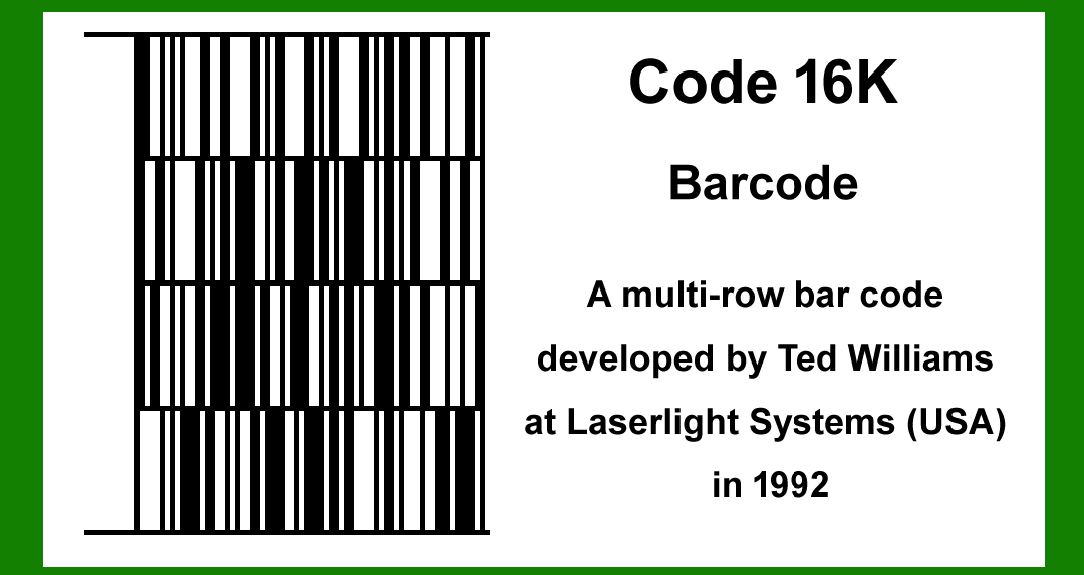
Below is a simplified example illustrating the structure of a Code 16K barcode: |
This example provides a visual representation of the grid structure typical of Code 16K barcodes. Each block represents a module that can either be black or white, encoding data based on its position and color. The actual content and encoding method within each module would vary based on the specific data being encoded. |
|
Conclusion |
Code 16K barcode technology exemplifies the evolution of barcode systems to meet the demands of modern industrial and logistical applications requiring high data capacity and robust error correction. Its structured grid of modules, encoding methods, and error correction capabilities make it a reliable choice for scenarios where accurate and efficient data management is crucial. |
This detailed exploration of Code 16K's components and structures highlights its role in advancing barcode technology to support complex data encoding and retrieval needs in various industrial and logistical environments. |
 cs@easiersoft.com