Barcode Technology

Barcode History

Barcode Label Paper

Barcode Printer

Barcode Application

Inventory Management

AI Barcode QRCode

Barcode Scanner

Barcode Software

Barcode Software B

Barcode Software C

Barcode Software D

Barcode Software E

New Technology A

New Technology B

Robot Technology

Barcode Types

Barcode Types B

Barcode Types C

Barcode Types D

Barcode Types E

Barcode Types F

Electronic Technology

Psychology at Work

Barcode Technology and Barcode Software Related   <<< Back to Directory <<<

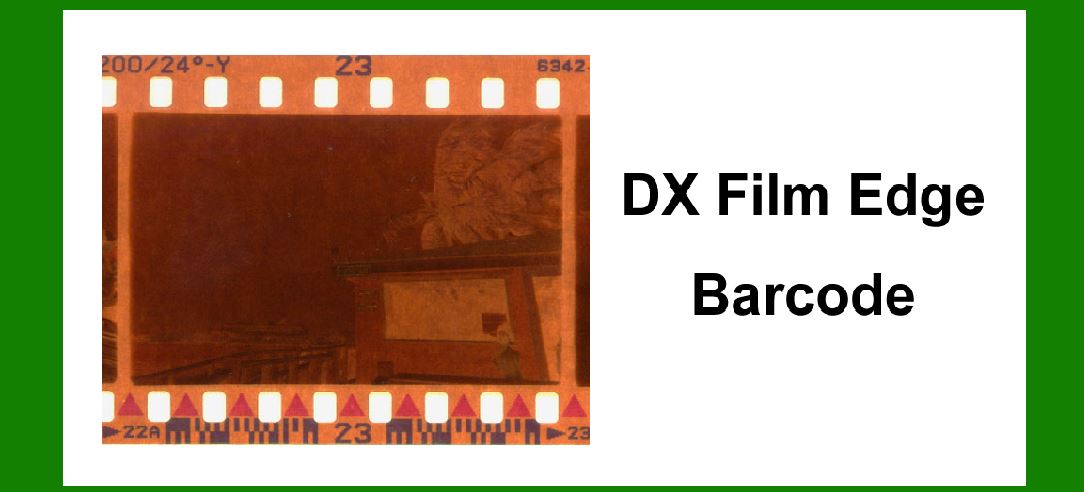
Structures of DX film edge barcode

Components and Structures of DX Film Edge Barcode

The DX film edge barcode, primarily used in analog film photography, serves as a key identifier for film processing and printing instructions. This barcode system is crucial for automating the processing of film rolls in labs and studios, ensuring efficient handling and accurate printing of photographic images. Below is a detailed breakdown of its components and structures:

1.Barcode Format and Type:

The DX film edge barcode typically follows a standardized format to ensure compatibility across different film brands and processing equipment.

It is often a 2D barcode, capable of storing more information than traditional linear barcodes, which is essential for encoding details like film type, ISO speed, number of exposures, and other metadata.

2.Encoding Scheme:

The barcode uses a specific encoding scheme designed to accommodate the range of information necessary for film processing.

Information encoded includes:

Film speed (ISO rating)

Number of exposures

Film type (e.g., color negative, black and white)

Manufacturer-specific details

Processing instructions (e.g., push/pull processing)

3.Physical Structure:

The DX film edge barcode is located along the edge of the film strip, usually on the non-emulsion side to avoid interference with the image area.

It is typically a narrow strip, designed to fit within the confines of the film edge without obstructing the perforations or causing damage during handling.

The barcode strip is printed or etched onto the film during manufacturing, ensuring durability and resistance to wear during the film's lifecycle.

4.Symbol Characteristics:

The barcode symbols within the DX system are designed to be read by automated film processing equipment.

They consist of a series of dark and light bars arranged in a specific pattern that conforms to a recognized symbology standard.

The bars represent binary data that encode the film's characteristics and processing parameters.

5.Positioning and Alignment:

The barcode is positioned at a precise location along the film edge to ensure consistent reading by processing machines.

Alignment marks or timing marks may accompany the barcode to aid in accurate detection and interpretation by optical sensors.

6.Compatibility and Standards:

The DX film edge barcode adheres to industry standards set forth by organizations such as the International Imaging Industry Association (I3A).

These standards ensure interoperability across different film brands and processing equipment, allowing for seamless integration into automated workflow systems.

7.Readability and Error Correction:

To mitigate errors in barcode reading, the DX system incorporates error detection and correction mechanisms.

This ensures reliable data retrieval even in the presence of minor damage or contamination on the barcode surface.

8.Usage and Application:

DX film edge barcodes are integral to modern film processing workflows, enabling labs and studios to automate the handling, developing, and printing of photographic film.

The barcode's encoded data streamlines the identification of film properties and processing requirements, enhancing operational efficiency and reducing manual errors.

In conclusion, the DX film edge barcode is a critical component in analog photography, facilitating automated film processing and printing through its standardized encoding scheme and precise physical structure. Its integration into film manufacturing ensures compatibility and reliability, supporting the seamless operation of film labs and studios worldwide.


EasierSoft Barcode Label Design & Bulk Printing Software

---- Use Excel Data to Batch Print Barcodes on Label Sheets or Roll Labels  

---- How to use this barcode software

Download:  Free Barcode Software + Barcode Label Designer

Download Free Barcode Software at Softonic

     Download at CNET

Once you obtain a GS1/UPC/EAN barcode, or other barcode type and QR code, you can use our free software to batch print barcode labels onto Roll label paper using a professional label printer, or to batch print barcodes onto Avery 5160 label sheets using a regular laser or inkjet printer. Our software has free and paid versions.

The free version fully meets your needs for batch printing GS1/UPC/EAN barcodes. The paid version can import data from Excel and databases to batch print barcode labels with different values.

How to Start

Input Data

Import Excel Data

Print Barcode

Barcode Format

Label Designer

All Screen Shot

Export Barcode Image

Save Template

Output Word Excel

How to Use & FAQ:

Example: Print barcodes to 5163 label

Example: Print barcodes to 5164 label

Example: Print portrait orientation 5164

Example: Print barcodes to 5167 label

Example: Print barcodes to 5168 label

Example: Print portrait orientation 5168

Example: Print barcodes to 5169 label

Example: Print barcodes to 5660 label

Example: Print barcodes to 5661 label

Example: Print barcodes to 5662 label

Example: Print barcodes to 5663 label

Example: Print barcodes to 5664 label

Example: Print portrait orientation 5664

Example: Print barcodes to 5873 label

Example: Print barcodes to 5874 label

Two ways to import Excel data

Import Excel Data - Pro Edition

Import Excel Data - Std Edition

Import Data from Excel - Detail

Load Data From Excel File

Data Editing Table

Copy Data From Excel

Four ways to input barcode data

Add ASCII Key E

Input Multiple Lines of Text for Barcodes

Generates Sequential Serial Numbers

Import or copy data from Excel sheets

Special sequence number generation

Std Details: Simple Input Form

Std Details: Multiple Line Text Input

Details: Sequence Barcode Generator

Examples: Sequence Barcode Generator

Import Data From Excel Spreadsheet

Barcode Data Correspondence Diagram

Data Editor

Editing a Single Row Data in Form

Batch Editing Multiple Rows of Data

Batch Data Editing - Example 2

Design & print complex barcode labels

Configuring Text Elements on Label

Configuring Barcode Elements on Label

Configuring Image Elements on Label

Setting Line Elements on Label

Designing Labels for 5164 Sheet

Advanced Page Layout Settings

Add Barcode Elements to a Label

Configuring Parameters of a Barcode

Entering Multiple Values for a Barcode

Print barcode labels

Print bulk barcodes - How to start

Highlights

Excel integration: Import data directly from Excel to generate and print barcodes in bulk.

Label designer: Create complex labels with multiple barcodes, text, logos, and shapes.

Batch printing: Print thousands of barcodes at once using standard inkjet/laser printers or professional barcode printers.


Flexible editions:

Standard Edition: Simple batch printing with Excel data.

Professional Edition: Adds command-line automation for workflow integration.

Label Designer Edition: Advanced design features for complex labels.


Why Choose Our Barcode Solutions?

Cost-effective: Free online generator and permanent free desktop version available.

Easy to use: No technical expertise required—just input data and print.

Versatile: Supports nearly all 1D and 2D barcode types, including QR codes.

Trusted: Recommended by CNET and widely downloaded by users worldwide.


Suitable Use Cases

Small businesses and startups needing quick barcode labels for products.

Retailers and online sellers managing inventory with batch barcode printing.

Manufacturers requiring sequential or custom barcode labels for packaging.

Educational and testing environments where barcodes are used for tracking.


CONTACT

cs@easiersoft.com

If you have any question, please feel free to email us.


https://free-barcode.com


<<< Back to Directory <<<     Barcode Generator     Barcode Freeware     Privacy Policy