1. Appearance and Design of Softstrip 2D Barcode |
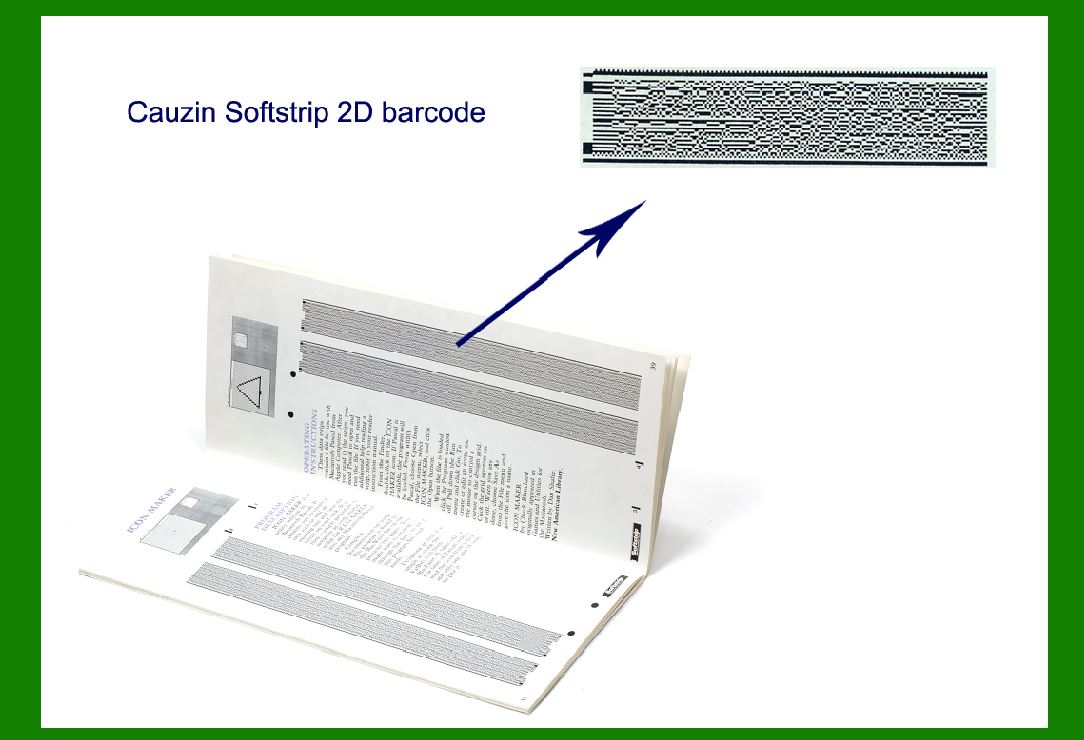
The Cauzin Softstrip 2D Barcode is a visually distinct and technologically advanced system designed to encode data in a two-dimensional matrix format. Unlike traditional barcodes, which rely on linear bars or dots, the Softstrip design utilizes a combination of compact geometric patterns that allow for efficient encoding of a significant amount of information within a small area. |
1.1 Visual Structure |
The Softstrip 2D barcode features a highly compact design that maximizes the amount of data encoded per unit area. The barcode is comprised of rows and columns of square or rectangular data modules, similar to other 2D barcode technologies like QR codes or Data Matrix. However, what sets the Softstrip apart is its highly optimized layout that maximizes readability while minimizing spatial requirements. |
Each module is designed with precision to ensure that data can be densely packed while still maintaining legibility during scanning. This compactness allows the barcode to be printed at a very small scale or embedded within other designs, making it ideal for applications that require space efficiency. |
1.2 Encoding Method |
The design of the Softstrip 2D barcode incorporates multiple layers of encoding, often utilizing error correction algorithms that ensure high data integrity. It can store alphanumeric characters, symbols, and binary data, making it versatile for a wide range of applications. The choice of encoding format allows for a high error tolerance, meaning the barcode can still be read accurately even if part of it is damaged or obscured. |
1.3 Color and Contrast |
Visually, the Softstrip barcode typically uses a high-contrast color scheme, commonly black on a white or light-colored background, though it can also be adapted to different colors depending on the printing technology. The color contrast ensures that the barcode is highly visible and easily detectable by scanners under a wide range of lighting conditions. |
1.4 Shape and Orientation |
The overall design of the Softstrip is rectangular or linear in appearance, with the modules being organized in a series of horizontal and vertical arrays. The shape is designed to be easily scannable by both fixed-position and handheld scanners, allowing for flexibility in how the barcode is used. The physical layout and orientation of the barcode are optimized for both horizontal and vertical scanning, which is particularly useful in applications where items are scanned from various angles. |
|
2. Print Quality and Scanning Performance |
2.1 Printing Precision |
The print quality of the Softstrip 2D barcode is highly dependent on the precision of the printer used. High-resolution printing methods are required to ensure the clarity of the small data modules, especially when the barcode is printed at a smaller size. The individual modules are typically less than a millimeter in width, so printing devices need to have a high DPI (dots per inch) to render them accurately. |
2.2 Impact of Print Quality on Scanning |
Poor print quality can negatively affect the ability of scanners to read the barcode. If the data modules are not distinct enough-either due to ink bleeding, misalignment, or resolution loss-the scanner may struggle to detect the barcode or return inaccurate results. Therefore, it is essential to ensure that the printing process is optimized for high contrast and sharp definition. |
2.3 Scanning Technology |
The scanning performance of the Softstrip 2D barcode depends on the type of reader employed. Most modern barcode scanners, especially those that use image-based or camera-based technology, can decode Softstrip barcodes with great accuracy. However, older laser-based scanners may not be able to read Softstrip barcodes because they are not designed to interpret the two-dimensional patterns. |
2.4 Error Correction and Resilience |
The barcode's robust error correction system significantly improves scanning reliability in less-than-ideal conditions. Even if part of the barcode is obscured or damaged, advanced algorithms embedded within the barcode structure can allow the scanner to reconstruct the missing data. This makes the Softstrip ideal for environments where wear and tear might damage labels, such as in industrial or outdoor settings. |
2.5 Scanning Speed |
The design of the Softstrip allows it to be read quickly, even when encoded with large amounts of data. This is achieved by optimizing the layout of the modules to allow for rapid scanning and decoding by modern scanners. The compact design means that the scanning process is faster compared to other 2D barcodes that may have a larger area or more complex patterns. |

|
3. Adaptability to Different Materials and Environments |
3.1 Material Flexibility |
One of the standout features of the Softstrip 2D barcode is its adaptability to a wide variety of materials. Whether the barcode is printed on paper, plastic, metal, or fabric, it maintains readability and durability. This is achieved through specialized printing techniques that can adapt to the properties of the surface, whether it is smooth, rough, flexible, or rigid. |
3.2 Environmental Conditions |
Softstrip barcodes can be effectively used in diverse environmental conditions. In extreme temperatures, high humidity, or harsh outdoor conditions, the barcode's design ensures that it remains readable. It can withstand exposure to sunlight, moisture, and other environmental factors that might degrade traditional barcodes. This makes it suitable for applications in the logistics, automotive, and construction industries, where labels are exposed to challenging conditions. |
3.3 Surface Texture and Shape |
Softstrip barcodes are engineered to maintain legibility even on curved, uneven, or textured surfaces. This is a significant advantage over traditional linear barcodes, which often fail to scan correctly when printed on non-flat surfaces. Whether printed on a cylindrical bottle or a textured fabric, Softstrip can be decoded with minimal error. |
3.4 Industrial and Outdoor Applications |
In industrial and outdoor settings, where barcodes may face exposure to dirt, oil, or chemicals, the Softstrip 2D barcode excels. The ability to print these barcodes with durable inks or coatings that resist fading or wear extends their usability in these sectors. Additionally, the barcode's data capacity allows for storing more information directly on the item, reducing the need for frequent updates or replacements of labels. |

|
4. Printing Methods: Flexibility in Production |
4.1 Types of Printers Used |
Softstrip 2D barcodes can be printed using a variety of methods depending on the application and material. Some of the most common printing technologies used for Softstrip include thermal transfer, inkjet, laser printing, and flexographic printing. Each printing method offers different advantages in terms of speed, cost, and quality. |
4.2 Flexibility in Production Volumes |
Whether a company requires a small batch of barcodes or mass production, Softstrip barcodes can be efficiently produced with minimal adjustments. The versatility of the printing methods allows companies to scale their production depending on the demand. For instance, inkjet printers can produce large quantities of Softstrip barcodes quickly, while thermal transfer printers provide higher durability for smaller runs that require precise detail. |
4.3 Integration with Automated Systems |
In many modern manufacturing and logistics environments, barcodes need to be integrated into automated systems, such as conveyors or robotic arms. Softstrip barcodes are well-suited for this purpose because their compact and standardized design allows for seamless integration into automated production lines. The barcode data can be easily linked to databases or supply chain management systems, providing real-time tracking and data collection. |
4.4 Customization for Specific Applications |
The printing flexibility of Softstrip extends beyond material types to include customization of the design itself. Depending on the brand, industry, or specific use case, Softstrip barcodes can be tailored in terms of size, color, and layout. For example, in the fashion industry, the barcodes may be printed on fabric labels with specific colors and patterns to match the product design, while in pharmaceuticals, the barcodes may be printed on small packaging with high-resolution precision. |
4.5 Durability of Printed Softstrip Barcodes |
The choice of printing methods also impacts the durability of the barcode. High-quality, durable printing methods ensure that the barcode remains intact even when exposed to various environmental stressors such as abrasion, heat, or moisture. Thermal transfer printing, for instance, uses heat to transfer ink onto the material, resulting in a highly durable and long-lasting print. This is especially important in industries where barcodes need to withstand rough handling or exposure to chemicals. |
 cs@easiersoft.com