1. Types of Scanners Compatible with Cauzin Softstrip 2D Barcode |
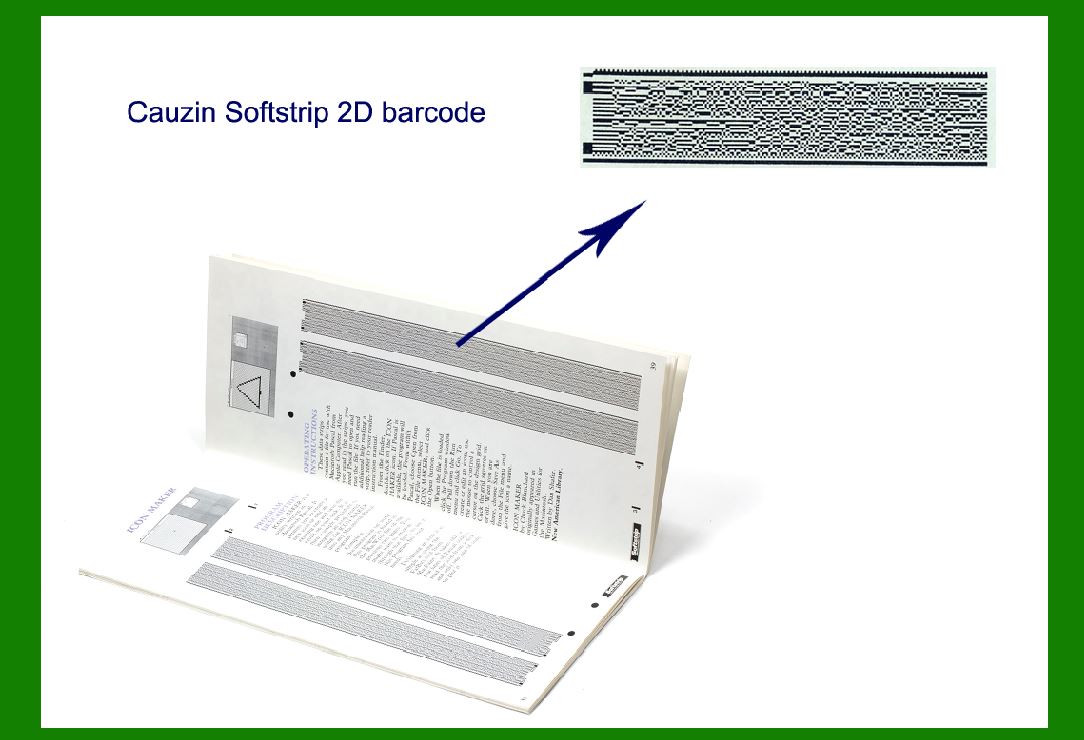
Cauzin Softstrip 2D barcode is designed to be compatible with a wide range of barcode scanning technologies. Its unique structure allows for efficient reading even in challenging environments, and it's versatile enough to be used with various scanning devices. Here's a breakdown of the types of scanners that can read this barcode: |
1.1. Laser Scanners |
Laser scanners, which rely on a laser beam to scan a barcode, are compatible with the Cauzin Softstrip 2D barcode. These scanners are ideal for environments where speed is a priority, and the barcode is relatively stable in position. The technology works by using the laser to read the barcode's reflective surfaces and convert the data into a readable format. |
While laser scanners are traditionally known for scanning 1D barcodes, modern models have been designed to support 2D codes, including the Cauzin Softstrip. Laser scanners are often employed in retail and warehouse environments where high-speed scanning is necessary. |
Strengths of Laser Scanners for Cauzin Softstrip |
Speed: Laser scanners are capable of reading codes quickly, which is crucial in fast-paced environments. |
Precision: Due to their focused laser beam, they can achieve a high degree of precision in barcode reading. |
Durability: These scanners are generally built to withstand tough conditions, such as dust or vibration. |
Limitations |
Dependence on Line of Sight: Laser scanners require a direct line of sight to the barcode, which may cause difficulty in scanning if the barcode is not positioned properly. |
Limited Range for Complex Barcodes: While they work for 2D barcodes like the Softstrip, they are less efficient than imaging scanners when it comes to reading complex or distorted barcodes. |
|
1.2. CCD (Charge-Coupled Device) Scanners |
CCD scanners are another common type of scanner used for reading Cauzin Softstrip 2D barcodes. Unlike laser scanners, CCD scanners use a series of small light sensors to capture the entire barcode at once. These sensors convert the light reflected from the barcode into an electrical signal, which is then processed and decoded. |
CCD scanners offer better flexibility when it comes to scanning various types of barcodes. They do not require a direct line of sight like laser scanners and can handle barcode distortions more effectively. |
Strengths of CCD Scanners for Cauzin Softstrip |
Omnidirectional Scanning: CCD scanners can read the barcode from various angles, making them versatile in dynamic environments where the barcode may be misaligned. |
Wide Scanning Area: Unlike laser scanners, which typically focus on a narrow point, CCD scanners can read the barcode over a larger area, reducing the need for precise alignment. |
Resistant to Interference: CCD scanners perform well in low-light or high-ambient light environments. |
Limitations |
Slower Speed: Compared to laser scanners, CCD scanners may operate slower, which could affect performance in high-volume scanning situations. |
Lower Resolution: In some cases, CCD scanners may struggle with high-density 2D barcodes if the barcode's resolution exceeds the scanning capacity of the CCD sensors. |

|
1.3. Imaging (Camera-based) Scanners |
Imaging scanners, also referred to as camera-based or 2D imagers, are one of the most versatile types of barcode scanners. These devices use a camera to capture the image of a barcode and then decode it. Imaging scanners can read both 1D and 2D barcodes, including those with complex structures like the Cauzin Softstrip. |
Imaging scanners use advanced software algorithms to detect, decode, and process barcodes. They can read barcodes from a wide range of angles and distances, which makes them ideal for more challenging scanning conditions. |
Strengths of Imaging Scanners for Cauzin Softstrip |
Wide Range of Barcode Types: Imaging scanners are designed to decode a variety of 1D and 2D barcodes, making them highly versatile. |
Longer Scanning Range: Imaging scanners are generally capable of reading barcodes at greater distances compared to CCD or laser scanners, which is useful for certain applications. |
High Performance with Damaged or Distorted Codes: Due to their advanced image processing algorithms, imaging scanners are more efficient at reading barcodes that are partially damaged or distorted, which can be common in real-world environments. |
Limitations |
Higher Cost: Camera-based scanners tend to be more expensive than laser or CCD scanners due to the added complexity of their imaging sensors. |
Power Consumption: Imaging scanners may require more power to operate due to the processing capabilities needed to decode 2D barcodes. |

|
1.4. Mobile Device Scanners |
With the increasing reliance on mobile devices, scanning technologies are increasingly embedded into smartphones and tablets. Mobile scanners for the Cauzin Softstrip 2D barcode are typically based on the device's camera, combined with scanning software that processes the captured image. |
Mobile device scanners offer the added benefit of portability, making them an excellent option for on-the-go applications, such as in field service or inventory tracking. Many modern apps are capable of decoding a variety of 2D barcode formats, including the Cauzin Softstrip. |
Strengths of Mobile Device Scanners for Cauzin Softstrip |
Portability: Since smartphones and tablets are ubiquitous, they make excellent mobile barcode scanners for workers who need to scan in various locations. |
Versatility: Many apps allow for multiple types of barcode decoding, which increases the flexibility of the mobile device. |
Integration with Cloud and IoT: Mobile devices can easily integrate with cloud services and IoT platforms, enabling real-time data tracking and analytics. |
Limitations |
Processing Power: While smartphones and tablets are increasingly powerful, they may not always provide the same processing capabilities as dedicated barcode scanners, which can lead to slower scanning in some cases. |
Lighting Conditions: Mobile devices can struggle in certain lighting conditions, especially in direct sunlight or low-light environments. |

|
2. Scanning Efficiency: Speed and Accuracy |
The efficiency of a barcode scanner, particularly in terms of speed and accuracy, plays a significant role in its overall performance. For the Cauzin Softstrip 2D barcode, scanning efficiency is a critical factor for its adoption across industries like logistics, manufacturing, and retail. Let's dive into these two parameters in detail: |
2.1. Scanning Speed |
The speed of scanning is crucial for operational efficiency, especially in environments where high throughput is necessary, such as warehouses, distribution centers, and retail checkouts. The Cauzin Softstrip 2D barcode is designed to be read quickly, but the actual scanning speed will depend on the type of scanner being used. |
Laser Scanners: Laser scanners tend to offer the highest scanning speed for 1D barcodes. When reading 2D barcodes like the Softstrip, laser scanners are generally fast but may not be as efficient in terms of accuracy when dealing with heavily damaged or misaligned codes. The scanning speed typically ranges from 100 to 1000 scans per second, depending on the model and environment. |
CCD Scanners: CCD scanners typically operate at moderate speeds but can achieve faster results when dealing with simple barcodes. For the Cauzin Softstrip, they can read barcodes at speeds ranging from 30 to 100 scans per second. However, performance may slow down when scanning barcodes in suboptimal conditions. |
Imaging Scanners: Camera-based scanners have a scanning speed of about 30 to 200 scans per second. However, their advanced image-processing algorithms allow them to read damaged, distorted, or poorly printed barcodes, which makes them more reliable in challenging environments but may lead to slightly slower scanning speeds compared to simpler laser or CCD scanners. |

|
2.2. Scanning Accuracy |
Accuracy refers to how reliably the scanner can read a barcode and produce the correct output. The Cauzin Softstrip barcode is designed to be read accurately in diverse environments, but its accuracy is influenced by various factors, including the type of scanner used. |
Laser Scanners: These scanners are highly accurate in ideal conditions but may struggle with barcodes that are heavily worn or distorted. They are also sensitive to misalignment or angles outside the optimal range. While their scanning speed is fast, accuracy may decrease when scanning at angles or with poorly printed codes. |
CCD Scanners: CCD scanners are generally more accurate in various lighting conditions and with slightly damaged barcodes. Their ability to capture the entire barcode at once makes them more accurate in terms of angle tolerance and distortion correction. |
Imaging Scanners: Imaging scanners tend to provide the highest accuracy in reading barcodes, particularly in cases where the barcode is damaged or misaligned. Advanced error-correction algorithms allow imaging scanners to reconstruct the barcode data, leading to improved accuracy even in challenging conditions. |
 cs@easiersoft.com