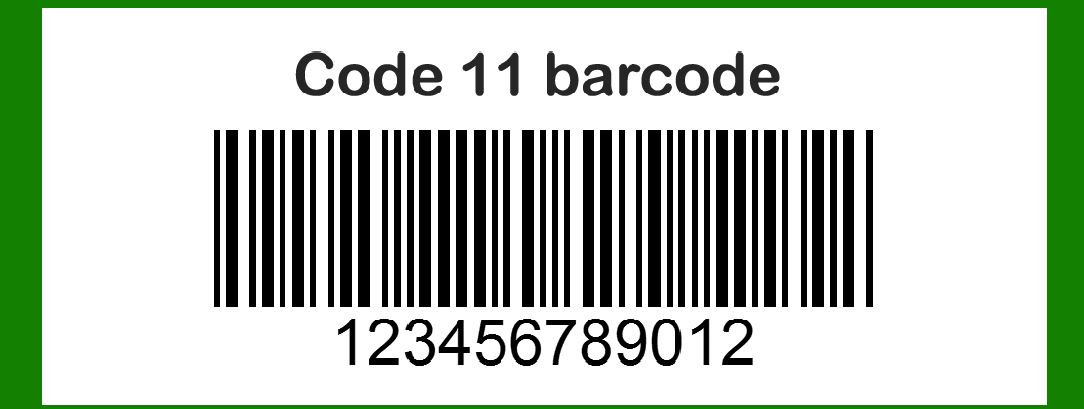
Code 11 barcode, developed by Intermec in 1977, was initially designed for telecommunications and industrial applications. |
While it's not as widely used today due to its limitations compared to more modern symbologies, it remains relevant in specific niche applications. Here's a detailed exploration of the Code 11 barcode technology, its structure, encoding principles, applications, advantages, and limitations. |
|
Overview and History |
Code 11, also known as USD-8, was created by Intermec to meet the needs of industries requiring a barcode symbology capable of encoding numeric data efficiently. Unlike many modern barcodes that encode alphanumeric characters, Code 11 is limited to numeric digits (0-9) and a special character ('-'). It includes provisions for one or two modulo-11 check digits to enhance data integrity. |

|
Structure and Encoding |
1.Character Set: Code 11 can encode digits 0 through 9 and the dash character '-'. This restricts its use primarily to numeric data, making it less versatile than newer barcode formats that support alphanumeric and even binary data. 2.Start/Stop Character: The Code 11 symbology uses a special start/stop character, often represented as '*', to denote the beginning and end of the barcode. This character is crucial for scanners to identify where the barcode starts and ends. 3.Check Digits: Optional modulo-11 check digits can be appended to the encoded data string. These check digits help validate the accuracy of the scanned data, reducing the risk of errors in data transmission and storage. |
Encoding Process |
The encoding process for Code 11 involves converting numeric data into a series of bars and spaces that represent the encoded information. Each character in the input data is translated into a unique pattern of bars and spaces according to predefined rules. The start/stop character marks the beginning and end of the barcode, ensuring scanners can correctly interpret the data. |
|
Applications |
Telecommunications |
Originally, Code 11 found significant use in telecommunications equipment and related industries. It was used for labeling components, equipment, and cables, where numeric identification was sufficient for tracking and inventory management purposes. |
Industrial Applications |
In industrial environments, Code 11 was employed for inventory control, asset tracking, and process automation. Its simplicity and reliability made it suitable for environments where durability and ease of scanning were essential. |
Niche Uses |
While its usage has diminished over time, Code 11 still finds application in specialized industries where numeric data encoding is adequate. Examples include: |
Inventory Management: Tracking numeric identifiers for products, parts, and components. Warehouse Management: Labeling shelves, bins, and inventory items with numeric codes. Document Management: Numeric indexing and identification in document tracking systems. |

|
Advantages of Code 11 |
1.Simplicity: Code 11 is straightforward to generate and decode, requiring minimal computational resources compared to more complex symbologies. 2.Compactness: The barcode's structure is relatively compact, making it suitable for applications where space constraints are a concern. 3.Readability: Code 11 barcodes are robust against printing and scanning variations, ensuring reliable readability in diverse environments. |
Limitations of Code 11 |
1.Numeric Limitation: It can only encode numeric digits and a dash, restricting its use in applications requiring alphanumeric or binary data encoding. 2.Error Correction: While it supports check digits for error detection, Code 11 lacks advanced error correction capabilities found in newer barcode formats. 3.Industry Standard: It has been largely superseded by more versatile symbologies like Code 39, Code 128, and QR codes, which support broader character sets and data types. |
|
Comparison with Modern Symbologies |
Code 39 |
Code 39 offers a wider character set, including alphanumeric characters and symbols, making it more versatile for diverse applications such as logistics, healthcare, and retail. |
Code 128 |
Code 128 provides higher data density and efficiency compared to Code 11, supporting numeric, alphanumeric, and binary data. It's widely used in shipping, packaging, and inventory management due to its robustness and flexibility. |
QR Code |
QR codes can store significantly more data than linear barcodes like Code 11. They support various data types, including URLs, text, and binary data, making them ideal for mobile scanning applications and marketing campaigns. |
|
Future Outlook |
As technology evolves, the demand for barcodes that can store more data types and offer better error correction capabilities continues to grow. While Code 11 remains relevant in specific niche applications, its use is gradually giving way to more advanced symbologies that better meet modern requirements for data storage, retrieval, and analysis. |
|
Conclusion |
Code 11 barcode technology, developed by Intermec in 1977, represents a significant advancement in barcode symbologies tailored for numeric data encoding. Originally designed for telecommunications and industrial applications, it continues to find niche uses in environments where numeric identification suffices. Despite its limitations in character set and error correction compared to modern symbologies like Code 128 and QR codes, Code 11 remains a reliable choice for applications requiring simple, numeric data encoding and decoding. |
In summary, while Code 11 has been largely supplanted by more versatile barcode formats, its legacy persists in industries where numeric data encoding meets specific operational needs effectively. |
 cs@easiersoft.com