Code 93 is a continuous, variable-length barcode symbology that was designed as an enhancement to Code 39. |
It offers higher data density and a more robust error-checking mechanism compared to its predecessor. Below is a comprehensive exploration of the Code 93 barcode technology, covering its history, structure, encoding, applications, advantages, and more. |
|
History and Development |
Code 93 was developed by Intermec Corporation in 1982 as an advancement over Code 39. It was designed to provide higher data density and better error checking capabilities while maintaining compatibility with Code 39. This barcode type was initially proprietary to Intermec but has since become widely adopted due to its versatility and reliability in various applications. |

|
Structure and Encoding |
Structure |
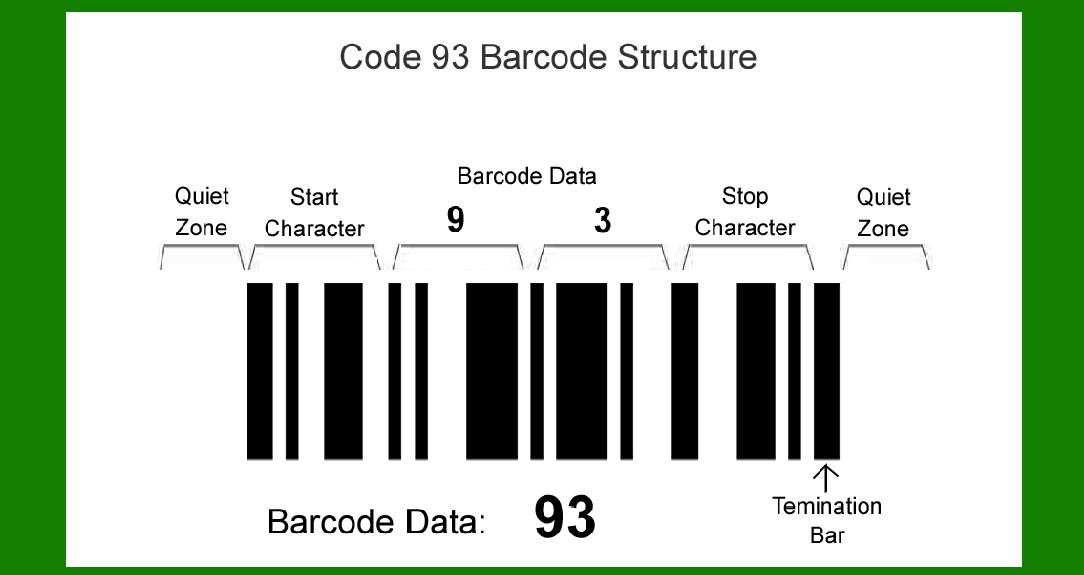
Code 93 is a continuous, variable-length barcode that consists of: |
Start and stop characters (encoded as asterisks '*'). Data characters (including alphanumeric characters and a few special symbols). Check characters for error detection. |
The barcode does not include a self-checking feature, so a modulo-47 check character is used to ensure data integrity. |
Encoding Scheme |
Code 93 uses a set of full bars and half bars to encode characters. Each character is represented by a unique combination of bars and spaces. The encoding scheme allows for high-density data representation, making it suitable for encoding extended character sets beyond the basic Latin alphabet. |

|
Character Set |
Code 93 supports a wide range of characters, including: |
Alphanumeric characters (A-Z, 0-9) Special characters (such as '-', '.', '$', '/', '%', '+', and space) Control characters for data structure (start/stop characters) |
The barcode can encode up to 43 characters (including start, stop, and check characters) per symbol, allowing for efficient data representation in various industries. |

|
Encoding Process |
Step-by-Step Encoding |
1.Start Character: The barcode begins with a start character ('*') to indicate the beginning of data transmission. 2.Data Characters: Each alphanumeric character is represented by a unique set of bars and spaces according to the Code 93 encoding table. 3.Check Character: A modulo-47 check character is calculated based on the weighted sum of all data characters to verify the accuracy of the barcode. 4.Stop Character: The barcode ends with a stop character ('*') to signify the conclusion of data transmission. |

|
Advantages of Code 93 |
1.High Data Density: Code 93 offers higher data density than Code 39, allowing more information to be encoded within a smaller space. 2.Error Detection: The barcode includes a check character for error detection, enhancing data accuracy and reliability. 3.Extended Character Set: Code 93 supports an extended character set, making it suitable for encoding alphanumeric data and special characters. 4.Flexibility: It supports variable-length data encoding, accommodating different data lengths without predefined constraints. 5.Compatibility: Code 93 maintains backward compatibility with Code 39, allowing existing systems to upgrade to the newer standard seamlessly. |

|
Applications |
Industry Applications |
Inventory Management: Used in warehouses and retail for tracking inventory items and managing stock levels. Shipping and Logistics: Applied in shipping labels to track packages and shipments through automated scanning systems. Healthcare: Utilized on medical equipment and patient identification for efficient data management and tracking. Automotive: Used in manufacturing processes for parts identification and inventory control. |
Practical Uses |
Retail: Used on product packaging for inventory management and pricing information. Transportation: Applied on airline tickets, boarding passes, and luggage tags for passenger and baggage tracking. Utilities: Utilized in utility bills for accurate billing and payment processing. Identification: Used on employee badges and access control cards for secure identification and access management. |

|
Implementation Guidelines |
Printing and Scanning |
Printing: Code 93 barcodes can be printed using standard barcode printers on various surfaces, including paper, plastic, and metal. Scanning: Scanners capable of reading 1D barcodes (such as laser scanners) can decode Code 93 barcodes quickly and accurately. |
Size and Placement |
Size: The size of Code 93 barcodes varies depending on the amount of data encoded and the required scanning distance. Placement: Barcodes should be placed in a clear, unobstructed location for optimal scanning efficiency. |

|
Standards and Compliance |
Code 93 barcode technology complies with international standards, including those set by organizations such as ISO (International Organization for Standardization) and GS1 (Global Standards One). Compliance ensures interoperability and reliability across different industries and geographic regions. |

|
Challenges and Considerations |
Limitations |
Data Density: While offering higher data density than Code 39, Code 93 may not be as compact as other 2D barcode technologies for encoding large amounts of data. Readability: Barcode readability can be affected by printing quality, surface material, and environmental factors such as lighting and scanner compatibility. |
Integration |
System Compatibility: Integrating Code 93 barcodes into existing systems may require software updates and compatibility checks with hardware devices (such as scanners and printers). |

|
Future Outlook |
Code 93 continues to be a reliable choice for industries requiring efficient data encoding and reliable scanning capabilities. As technology advances, enhancements in barcode scanning and printing technologies will further improve the efficiency and accuracy of Code 93 barcode systems. |

|
Conclusion |
In conclusion, Code 93 barcode technology offers a robust solution for encoding alphanumeric data with enhanced error checking capabilities. Its versatility, high data density, and compatibility make it suitable for a wide range of applications across industries, from retail and healthcare to logistics and manufacturing. As barcode technology evolves, Code 93 remains a dependable choice for organizations seeking efficient data management and tracking solutions. |
 cs@easiersoft.com