1. Introduction to ColorCode Technology |
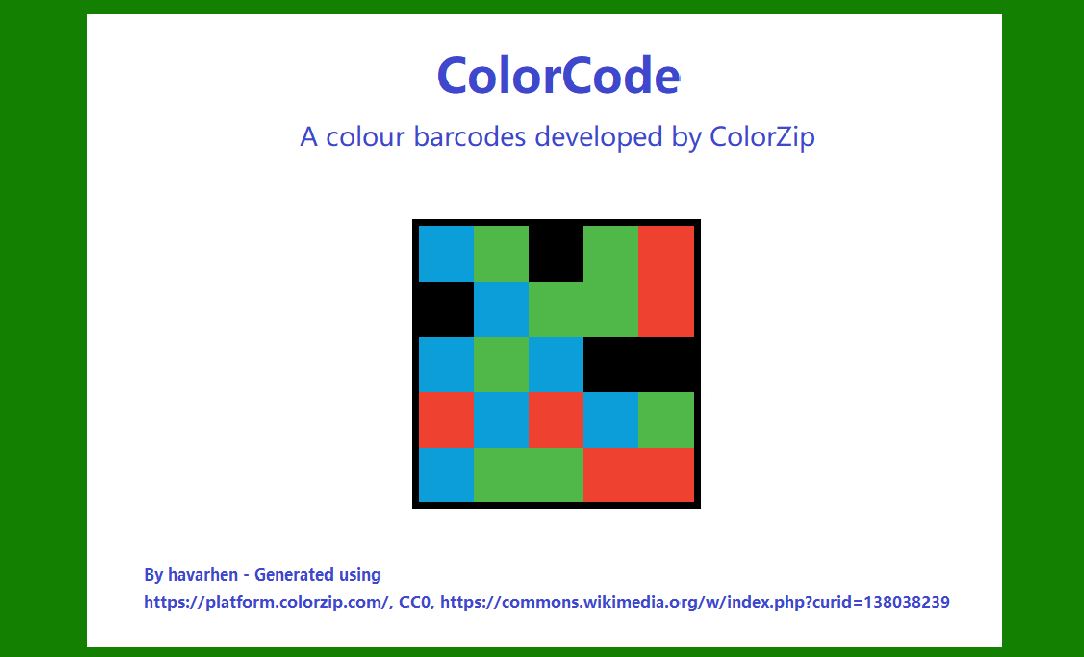
ColorCode is a barcode system that differs from traditional black-and-white linear barcodes or QR codes by utilizing colors to encode data. This visual approach leverages human vision's ability to distinguish between a wide range of colors, providing an alternative to standard monochrome encoding systems. |
1.1 Overview of Barcode Systems |
A brief introduction to various barcode systems like 1D and 2D codes, and how ColorCode fits into this ecosystem. |
1.2 The Need for Color-based Encoding |
ColorCode provides several advantages in environments where traditional barcodes may be unsuitable, including enhanced data density, increased visual appeal, and potential applications in color-sensitive industries (e.g., retail, packaging). |
|
2. Data Representation in ColorCode |
ColorCode uses a grid-based system to represent data through colors. This grid of cells is the fundamental structure that stores the encoded information. |
2.1 Grid Layout and Dimensions |
The ColorCode's grid is composed of rows and columns, with each cell within the grid representing a single piece of data. The size of the grid is determined by the amount of data to be encoded, ranging from simple alphanumeric strings to complex data arrays. |
2.2 Data Types Encoded |
The encoding process can handle different types of data, such as URLs, text, numeric values, or binary data. The system can encode and decode information efficiently by representing it as a series of color transitions within the grid. |

|
3. Encoding Process |
The encoding process transforms raw data into a series of colors that represent binary data in a way that is both readable by machines and visually interpretable by humans. |
3.1 Converting Data to Binary |
The first step in the encoding process is the conversion of the input data (e.g., text or numeric values) into a binary format. Each character or symbol is converted into a string of bits using standard encoding schemes such as ASCII or UTF-8. |
3.2 Mapping Binary Data to Color Palette |
Once the data is in binary form, it must be mapped to a color palette. ColorCode uses a predefined set of colors, where each color represents a specific binary value. These colors are chosen to be distinct enough to avoid misinterpretation by the human eye or by machine decoders. The palette typically includes a mix of primary and secondary colors, each corresponding to specific binary sequences. |
3.3 Grid Construction and Color Assignment |
The binary data is then placed in a grid pattern, with each binary unit being represented by a specific color. The grid size is dynamically determined based on the data length and the number of colors needed for accurate encoding. Special algorithms ensure that the grid remains symmetrical and properly aligned. |
3.4 Error Correction and Redundancy |
Like other barcode systems, ColorCode incorporates error correction to ensure the integrity of the data. This is particularly important because color-based encoding may be more susceptible to degradation under certain conditions (e.g., printing quality, wear). Error correction algorithms are built into the grid's design, adding redundancy to the encoded data. Common techniques, such as Hamming codes or Reed-Solomon codes, are used to detect and correct errors that may arise during scanning. |

|
4. ColorCode's Unique Features |
Several factors distinguish ColorCode from other encoding systems, particularly the use of color as a key element of the encoding and decoding process. |
4.1 Color Palette Selection |
The color palette is a critical aspect of the system's design. The choice of colors must ensure that each color is distinguishable by both human eyes and optical scanning devices. This is typically achieved by selecting colors that differ significantly in hue, saturation, and brightness. |
4.2 Human Perception of Colors |
Human vision has varying sensitivity to different wavelengths of light, which can impact how well certain colors are perceived. ColorCode takes this into account, designing its encoding system to be readable in a wide range of lighting conditions. |
4.3 Visual Appeal and Branding Opportunities |
Unlike traditional monochrome barcodes, ColorCode offers a more visually engaging and customizable solution. This makes it ideal for applications where aesthetics matter, such as in advertising, product packaging, or event promotion. |

|
5. Decoding Process |
The decoding process is the reverse of encoding. It involves reading the colors in the grid and converting them back into the original data format. |
5.1 Scanning and Detection of Colors |
The first step in decoding is the optical detection of colors. This can be done using a standard camera, smartphone, or specialized scanner that can differentiate between the colors used in the ColorCode grid. |
5.2 Interpreting the Color Values |
Once the colors are detected, the system translates them back into binary data. This is accomplished using a lookup table or algorithm that maps each color back to its corresponding binary value. The accuracy of this step is crucial to ensure that the decoded data matches the original input data. |
5.3 Error Detection and Correction |
The decoding process also involves error checking. If the ColorCode has been damaged or degraded (e.g., due to printing errors, smudges, or low contrast), the error correction algorithms come into play. These algorithms attempt to reconstruct the original data, even if parts of the ColorCode are unreadable. |
5.4 Reconstructing the Original Data |
After the binary data has been reconstructed, it is converted back into its original format, whether text, a URL, or another data type. This is the final step in decoding, and it ensures that the information encoded in the ColorCode is made usable. |

|
6. Challenges and Limitations |
Despite its unique advantages, ColorCode faces certain challenges in practical applications. |
6.1 Color Perception and Environmental Factors |
One of the primary challenges of ColorCode is the potential for color misidentification. Variations in lighting conditions, device quality, and even the angle of viewing can affect how the colors are perceived, leading to errors in decoding. |
6.2 Printer and Display Quality |
For ColorCode to function correctly, high-quality printing or display technology is required. Poor resolution or color inaccuracies can lead to problems in scanning, especially in consumer-grade devices. |
6.3 Compatibility with Existing Systems |
Since ColorCode is a relatively new technology, integrating it into existing barcode and QR code scanning systems can be challenging. Specialized scanners or apps are often needed to read ColorCodes, which may limit its adoption in some industries. |

|
7. Applications of ColorCode |
ColorCode has been adopted in various fields, primarily where the unique visual appeal and additional data density offer clear benefits. |
7.1 Marketing and Advertising |
Companies use ColorCode in marketing materials to create visually striking and engaging campaigns. The colorful nature of the code makes it more appealing than traditional black-and-white barcodes, increasing consumer interaction. |
7.2 Product Packaging |
ColorCode is used on product packaging to enhance the aesthetic value and provide additional product-related information in a visually accessible format. This is particularly popular in the cosmetic, fashion, and food industries. |
7.3 Authentication and Security |
In security applications, ColorCode can be used to encode sensitive information, such as access credentials or digital signatures, in a visually complex format that is harder to counterfeit. |

|
8. Future of ColorCode Technology |
As ColorCode continues to evolve, it may find more widespread use across different sectors. Innovations in scanning technology, improved error correction algorithms, and the growing prevalence of color-sensitive devices will likely contribute to its future success. |
8.1 Advances in Optical Recognition |
Future developments in optical recognition technology could make ColorCode more reliable and versatile, even in challenging environments. |
8.2 Potential Integration with Augmented Reality |
ColorCode may eventually integrate with augmented reality (AR) technologies, allowing users to scan and interact with the codes in real-time using AR glasses or smartphone apps. |
8.3 Adoption in IoT and Smart Devices |
As the Internet of Things (IoT) and smart devices become more common, ColorCode may be used to encode device-specific data, making it an important component of the smart technology ecosystem. |
 cs@easiersoft.com