1. Introduction to ColorCode |
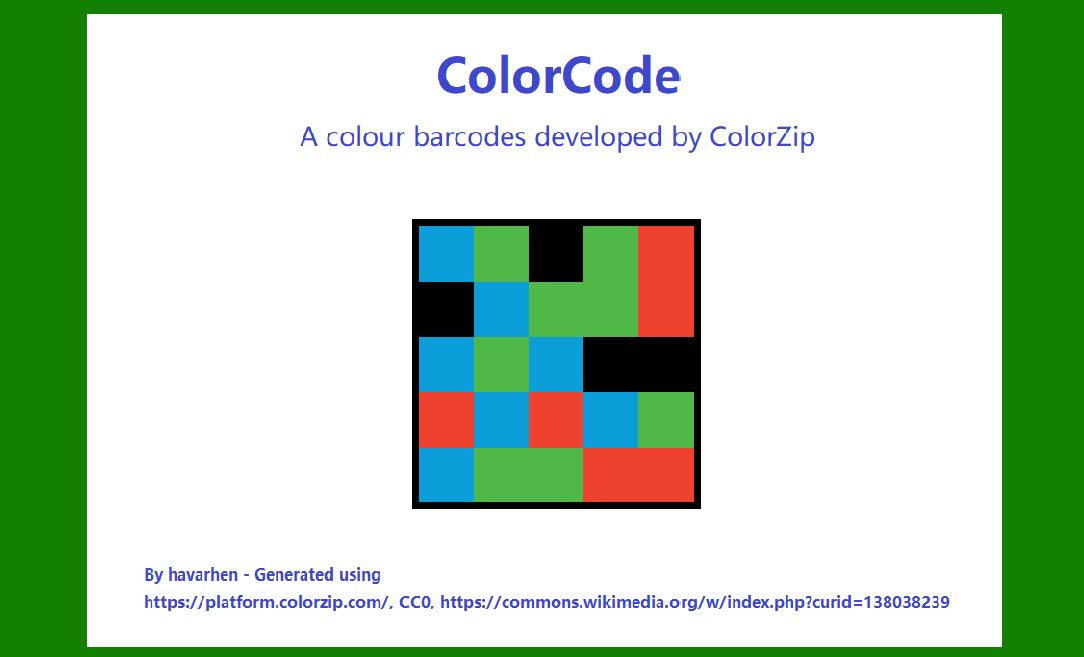
ColorCode is a two-dimensional (2D) barcode technology that uses color as a key encoding feature. It diverges from traditional black-and-white barcodes like QR Codes or Data Matrix by incorporating multiple colors to represent data, offering a broader data capacity in a visually compact space. This technology is particularly useful in areas where space efficiency and visual distinction are critical, such as advertising, product packaging, and access control. |
In ColorCode, data is encoded in the form of a matrix or grid of color modules, each representing a bit of information. The combination of these modules creates a complex yet efficient way of storing and transmitting data. |
|
2. ColorCode's Structure and Layout |
2.1 Color Grid Design |
The grid of ColorCode is composed of small individual cells, referred to as modules, each of which is a colored unit. These modules are arranged in rows and columns, forming a rectangular or square grid pattern. The size of the grid varies based on the level of data being encoded. Smaller grids are typically used for simple or smaller data sets, while larger grids are employed for encoding more complex or voluminous information, such as URLs, text strings, or even multimedia data. |
Each cell within the grid represents a discrete bit of data, and the state of that bit is encoded by the color of the module. The color assigned to each module is based on a predetermined set of rules, creating a unique pattern that can be decoded by a compatible scanner. |
The size of the grid depends on the data density. A more extensive data set requires more modules (larger grid), whereas a smaller data set can be encoded with fewer modules (smaller grid). The color-coded structure allows for more data to be compacted into a given space than traditional black-and-white barcodes. |
2.2 Color Palette |
The choice of colors used in ColorCode is one of the defining characteristics of its design. While the palette can be customized depending on the specific implementation, most ColorCode barcodes employ a standard set of colors. These typically include: |
Red |
Green |
Blue |
Yellow |
Each of these colors is mapped to represent a specific binary value or bit. For example, red may correspond to binary '00,' green to '01,' blue to '10,' and yellow to '11.' This combination of colors and their corresponding binary values enables the encoding of larger data sets compared to traditional monochrome barcodes. |
The color palette is designed to be easily distinguishable under various lighting conditions. Contrast is essential, and the colors are chosen to be vibrant and visually distinct, even when printed on colored backgrounds or subjected to slight distortion during scanning. |
In advanced implementations, ColorCode's color palette can be expanded to include more colors, offering an even greater potential for encoding data. However, this requires more sophisticated scanning and decoding systems that are capable of interpreting the extended palette. |
2.3 Grid Configuration and Data Encoding |
ColorCode uses a grid layout where each intersection (module) in the grid is assigned a color. The entire grid represents the encoded data, and the combination of colors across these modules forms a unique pattern that can be scanned and interpreted. To encode a message, the data is first converted into a binary sequence, which is then mapped to the ColorCode matrix. |
A few key features of the grid configuration are: |
Module Size and Density: Each module's size is consistent across the grid, but the grid's overall size varies. For larger data sets, the grid may have more rows and columns, leading to a more dense pattern of colored cells. The density impacts the readability, as higher-density grids can be more challenging to scan if the quality of the print is poor. |
Data Segmentation: The data is divided into smaller segments, with each segment representing a subset of the total encoded information. The segments are then distributed across the grid, ensuring the encoding process is systematic and efficient. This also allows for error correction and redundant encoding, which will be covered later. |
Color Representation: Each color represents a specific binary value, and the arrangement of these colors follows a predefined system. This is done to ensure the accuracy and reliability of the barcode when decoded. |
|
3. Error Correction Mechanisms |
3.1 Introduction to Error Correction |
In any data encoding technology, error correction is a critical feature to ensure that the data can still be reliably decoded even when the barcode is damaged or partially occluded. This is particularly important in environments where the barcode might experience wear, such as on packaging, labels, or other high-traffic items. |
ColorCode incorporates sophisticated error correction algorithms, similar to those found in QR codes. These algorithms enable the barcode to remain readable even when a portion of the barcode is missing or distorted. The error correction is based on the concept of redundant encoding, where the same data is encoded multiple times in slightly different ways to ensure that the decoder can recover the original data. |
3.2 Types of Error Correction |
There are typically two types of error correction methods used in ColorCode: |
Reed-Solomon Error Correction: This is a widely used error correction technique in many modern barcode systems, including QR Code. It adds redundancy by encoding additional parity symbols into the barcode, which can be used to detect and correct errors. ColorCode employs this method to allow for the recovery of data even if up to a certain percentage of the barcode is damaged. |
FEC (Forward Error Correction): This technique is applied during the transmission of the data and allows for the correction of errors without needing to retransmit the data. In ColorCode, FEC algorithms ensure that even if part of the barcode is unreadable or degraded, the scanner can still extract the full data using surrounding intact segments. |

|
4. Decoding ColorCode Barcodes |
4.1 Decoding Process Overview |
To decode a ColorCode, a scanner (or a camera-equipped device like a smartphone) captures an image of the barcode. The decoder then analyzes the image to detect the grid of colors and assigns binary values based on the colors present in each module. Once the binary values have been extracted, the data is reconstructed and output in its original form. |
The decoding process typically involves several stages: |
1.Image Processing: The captured image is preprocessed to enhance contrast and sharpness, making the barcode's color distinctions clearer. |
2.Color Detection: The colors of the individual modules are identified and mapped to their respective binary values. |
3.Error Correction: If errors are detected in the decoded data (e.g., due to missing or damaged sections), the error correction algorithm is used to recover the original data. |
4.Data Reconstruction: Once the binary sequence has been reconstructed, it is converted back into the original encoded data (e.g., a URL, text string, or other types of information). |
4.2 Scanner Requirements |
To read ColorCode barcodes effectively, scanners need to be capable of identifying and distinguishing between the various colors used in the barcode. While standard black-and-white barcode scanners cannot read ColorCode barcodes, many modern scanners (including smartphone cameras) are designed to detect and decode the color-based patterns. |
The decoder's software needs to be optimized for recognizing the specific colors used in the ColorCode, which may require adjustments in lighting or camera settings to ensure optimal readability. |

|
5. Applications of ColorCode |
5.1 Marketing and Advertising |
One of the most popular uses of ColorCode barcodes is in marketing and advertising. Due to their visually striking design, ColorCode barcodes are well-suited for integration into print media, including posters, flyers, and product packaging. The colorful design helps them stand out, making them more likely to attract attention compared to traditional black-and-white barcodes. |
For instance, ColorCode barcodes can link to promotional content, websites, or product information, providing a seamless interactive experience for consumers. |
5.2 Product Packaging |
ColorCode's compact design makes it an ideal candidate for product packaging, especially in industries where space is limited, and product labels need to include as much information as possible. By using color as a data encoding method, more information can be encoded into a small space, which is particularly useful for food and beverage packaging, pharmaceuticals, and electronics. |
5.3 Inventory Management |
In logistics and inventory management, ColorCode barcodes can be used to track products in a warehouse or during transit. The ability to store large amounts of data in a small space makes ColorCode a viable option for industries with extensive supply chains. |
 cs@easiersoft.com