1. Introduction to Code 93 Barcode |
1.1. Overview of Code 93 |
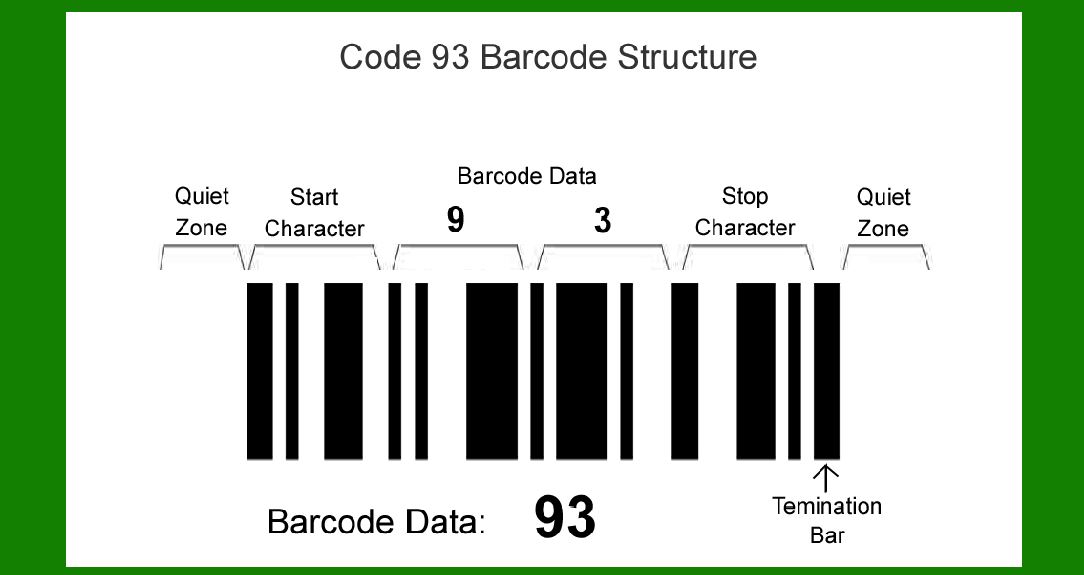
Code 93 is a continuous, variable-length symbology that was developed by Intermec in 1982 as an enhancement to Code 39. Code 93 encodes 47 different characters, including 26 uppercase letters (A-Z), 10 digits (0-9), and a set of special characters. The primary advantages of Code 93 over Code 39 are its higher information density and improved data integrity, achieved through advanced error correction techniques. |
|
2. Error Correction Techniques in Code 93 |
2.1. Error Detection and Correction Fundamentals |
Error detection and correction are critical components in barcoding systems to ensure data accuracy and reliability. Code 93 uses a combination of check characters to detect and correct errors. These check characters are calculated based on the data being encoded and appended to the end of the data string. |

|
2.2. Check Characters in Code 93 |
Code 93 employs two check characters, referred to as 'C' and 'K'. These check characters are integral to the barcode and serve to verify the integrity of the data. |
2.2.1. Calculation of Check Character 'C' |
The 'C' check character is the first level of error correction in Code 93. It is calculated using a weighted sum of the encoded data characters, with weights assigned from right to left. |
2.2.1.1. Weight Assignment |
Each character in the data string is assigned a weight that increases sequentially from right to left, starting at 1 and increasing up to 20. If the length of the data string exceeds 20 characters, the weights wrap around and continue from 1 again. |
Example: For a data string 'CODE93', the weights are assigned as follows: C (1), O (2), D (3), E (4), 9 (5), 3 (6) 2.2.1.2. Character Value Mapping |
Each character in Code 93 has an associated value. For instance: C = 12 O = 24 D = 13 E = 14 9 = 9 3 = 3 |
2.2.1.3. Weighted Sum Calculation |
The weighted sum is calculated by multiplying each character value by its assigned weight and summing the results. |
Weighted Sum = (C * 1) + (O * 2) + (D * 3) + (E * 4) + (9 * 5) + (3 * 6) = (12 * 1) + (24 * 2) + (13 * 3) + (14 * 4) + (9 * 5) + (3 * 6) = 12 + 48 + 39 + 56 + 45 + 18 = 218 |
2.2.1.4. Modulo Operation |
The weighted sum is then divided by 47, and the remainder is taken as the value for the check character 'C'. C = 218 % 47 = 30 The value 30 corresponds to a specific character in the Code 93 character set, which is appended to the data string as the first check character. |
2.2.2. Calculation of Check Character 'K' |
The 'K' check character provides an additional layer of error correction and is calculated in a similar manner to 'C', but includes the 'C' character in the weighted sum calculation. |
2.2.2.1. Extended Weight Assignment |
The weights for 'K' start from 1 and increase sequentially up to 15, then wrap around if necessary. |
Example: For a data string 'CODE93' with the 'C' check character included, the weights are assigned as follows: C (1), O (2), D (3), E (4), 9 (5), 3 (6), [C (7)] |
2.2.2.2. Extended Weighted Sum Calculation |
The weighted sum includes the 'C' check character value. |
Extended Weighted Sum = (C * 1) + (O * 2) + (D * 3) + (E * 4) + (9 * 5) + (3 * 6) + ([C] * 7) = 12 + 48 + 39 + 56 + 45 + 18 + (30 * 7) = 12 + 48 + 39 + 56 + 45 + 18 + 210 = 428 |
2.2.2.3. Modulo Operation |
The extended weighted sum is then divided by 47, and the remainder is taken as the value for the check character 'K'. K = 428 % 47 = 6 The value 6 corresponds to a specific character in the Code 93 character set, which is appended to the data string after the 'C' check character. |

|
2.3. Role of Check Characters in Error Detection |
The check characters 'C' and 'K' play a crucial role in detecting errors. When a Code 93 barcode is scanned, the scanner recalculates the 'C' and 'K' values based on the scanned data and compares them with the appended check characters. If there is a discrepancy, it indicates that an error has occurred. |
2.3.1. Single Error Detection Code 93 is capable of detecting single character errors. If a single character is incorrectly scanned, the recalculated check characters will not match the appended check characters, signaling an error. |
2.3.2. Multiple Error Detection While Code 93's primary design is for single error detection, the combination of 'C' and 'K' check characters can also detect some multiple character errors. The likelihood of undetected errors decreases significantly with the use of two check characters. |

|
3. Practical Examples |
3.1. Example 1: Encoding and Error Correction |
3.1.1. Data String: 'HELLO123' Let's encode the data string 'HELLO123' and calculate the 'C' and 'K' check characters. |
3.1.1.1. Weight Assignment H (1), E (2), L (3), L (4), O (5), 1 (6), 2 (7), 3 (8) |
3.1.1.2. Character Value Mapping H = 17, E = 14, L = 21, L = 21, O = 24, 1 = 1, 2 = 2, 3 = 3 |
3.1.1.3. Weighted Sum Calculation for 'C' Weighted Sum = (H * 1) + (E * 2) + (L * 3) + (L * 4) + (O * 5) + (1 * 6) + (2 * 7) + (3 * 8) = (17 * 1) + (14 * 2) + (21 * 3) + (21 * 4) + (24 * 5) + (1 * 6) + (2 * 7) + (3 * 8) = 17 + 28 + 63 + 84 + 120 + 6 + 14 + 24 = 356 |
3.1.1.4. Modulo Operation for 'C' C = 356 % 47 = 25 The value 25 corresponds to the character 'T' in Code 93. |
3.1.1.5. Extended Weighted Sum Calculation for 'K' Including 'C' character (25): H (1), E (2), L (3), L (4), O (5), 1 (6), 2 (7), 3 (8), [C (25)] |
Extended Weighted Sum = (H * 1) + (E * 2) + (L * 3) + (L * 4) + (O * 5) + (1 * 6) + (2 * 7) + (3 * 8) + (25 * 9) = 17 + 28 + 63 + 84 + 120 + 6 + 14 + 24 + 225 = 581 |
3.1.1.6. Modulo Operation for 'K' K = 581 % 47 = 17 The value 17 corresponds to the character 'H' in Code 93. |
3.1.2. Final Encoded Data The final encoded data string 'HELLO123' with check characters 'C' and 'K' appended: |

|
3.2. Example 2: Error Detection |
3.2.1. Data String: 'HELLO123TH' (Incorrectly Scanned as 'HELLO12XTH') |
3.2.1.1. Recalculation of Check Characters Assuming the scanned string 'HELLO12XTH' has an error, let's recalculate the check characters. H = 17, E = 14, L = 21, L = 21, O = 24, 1 = 1, 2 = 2, X = 33, T = 25, H = 17 Weights for 'C': H (1), E (2), L (3), L (4), O (5), 1 (6), 2 (7), X (8), T (9), H (10) Weighted Sum for 'C': Weighted Sum = (17 * 1) + (14 * 2) + (21 * 3) + (21 * 4) + (24 * 5) + (1 * 6) + (2 * 7) + (33 * 8) + (25 * 9) + (17 * 10) = 17 + 28 + 63 + 84 + 120 + 6 + 14 + 264 + 225 + 170 = 991 Modulo Operation for 'C': C = 991 % 47 = 6 Value 6 corresponds to 'F' (should be 'T' if correctly scanned). Weights for 'K': H (1), E (2), L (3), L (4), O (5), 1 (6), 2 (7), X (8), T (9), H (10), C (11) Weighted Sum for 'K': Extended Weighted Sum = (17 * 1) + (14 * 2) + (21 * 3) + (21 * 4) + (24 * 5) + (1 * 6) + (2 * 7) + (33 * 8) + (25 * 9) + (17 * 10) + (6 * 11) = 17 + 28 + 63 + 84 + 120 + 6 + 14 + 264 + 225 + 170 + 66 = 1057 Modulo Operation for 'K': K = 1057 % 47 = 20 Value 20 corresponds to 'U' (should be 'H' if correctly scanned). |
3.2.2. Discrepancy Detection |
The recalculated check characters ('F' and 'U') do not match the expected check characters ('T' and 'H'), indicating that an error has occurred during scanning. |

|
4. Conclusion |
4.1. Robustness of Code 93 Error Correction |
The use of dual check characters ('C' and 'K') in Code 93 enhances the robustness of error detection, making it a reliable barcode symbology for various applications. The structured approach to assigning weights, calculating weighted sums, and performing modulo operations ensures that most errors are detected and corrected effectively. |
4.2. Practical Implications |
By understanding and utilizing the error correction mechanisms in Code 93, users can significantly reduce the risk of data inaccuracies in their barcode systems. This detailed insight into the error correction process serves as a valuable guide for implementing and troubleshooting Code 93 barcodes in real-world scenarios. |

|
 cs@easiersoft.com