Error Correction of the Facing Identification Mark (FIM) Barcode |
1. Introduction to FIM Barcodes |
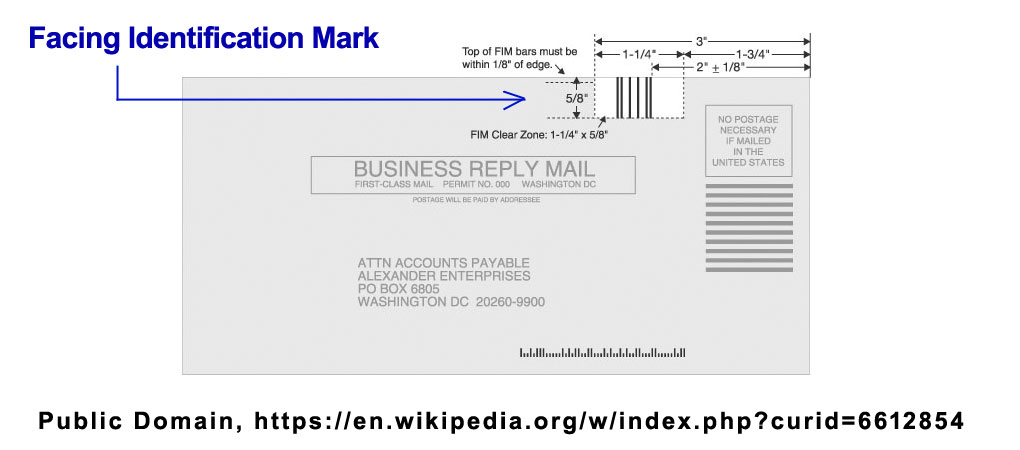
The Facing Identification Mark (FIM) barcode is a specialized postal code used primarily by the United States Postal Service (USPS). It is designed to facilitate the automated processing of mail by identifying and orienting the mailpiece correctly. FIM codes consist of a series of vertical bars in a specific pattern located near the upper right corner of the envelope. The most common types of FIM codes are FIM A, FIM B, FIM C, and FIM D, each serving a specific purpose related to the type of mail and its handling requirements. |
|
2. Importance of Error Correction in FIM Barcodes |
Error correction is crucial in any barcode system to ensure data integrity and accurate processing. For FIM barcodes, error correction mechanisms help maintain the reliability and efficiency of mail sorting and delivery. Since FIM codes are essential for the correct orientation and identification of mailpieces, any errors in reading these codes can lead to delays, misrouting, or additional manual handling. |

|
3. Types of Errors in FIM Barcodes |
Error correction in FIM barcodes must address various types of errors that can occur during the printing, scanning, and processing stages. These errors can be broadly categorized into: |
3.1 Printing Errors |
Ink Smudging: Poor quality printing can cause bars to smudge or blur. Misalignment: Bars may be misaligned or printed at incorrect intervals. Incomplete Printing: Some bars may be partially or entirely missing. |
3.2 Scanning Errors |
Poor Resolution: Low-resolution scanners may not accurately capture all bars. Angle of Scan: If the mailpiece is not fed correctly, the scan angle can cause misreading. Environmental Factors: Dust, dirt, or other contaminants on the mailpiece or scanner. |
3.3 Processing Errors |
Mechanical Issues: Problems with mail sorting machines can lead to incorrect reading. Software Bugs: Errors in the software algorithms that interpret FIM codes. |

|
4. Error Detection Mechanisms |
Before error correction can take place, it is essential to detect the errors accurately. FIM barcodes utilize various error detection mechanisms to identify potential issues: |
4.1 Redundancy |
FIM barcodes incorporate redundancy by using multiple bars to represent information. This redundancy helps in identifying errors if one or more bars are misread. |
4.2 Check Digits |
While FIM barcodes are relatively simple and do not use traditional check digits like other barcode systems, they rely on the unique pattern of bars to serve a similar function. The pattern itself can help detect anomalies. |
4.3 Consistency Checks |
The FIM barcode system performs consistency checks to ensure the pattern matches the expected format for the specific type of mailpiece. Any deviation from the expected pattern indicates a potential error. |

|
5. Error Correction Techniques |
Once an error is detected, various techniques can be employed to correct it. The error correction process for FIM barcodes involves several strategies, including: |
5.1 Pattern Recognition and Matching |
Template Matching: The scanning system compares the scanned FIM code against a set of predefined templates for FIM A, B, C, and D. If a discrepancy is found, the system attempts to correct it by aligning the scanned code with the closest matching template. Statistical Analysis: Advanced systems use statistical analysis to determine the likelihood of a certain pattern being correct based on historical data and common error patterns. |
5.2 Error Correction Algorithms |
Error Correction Codes (ECC): While FIM barcodes do not use traditional ECC like Reed-Solomon or Hamming codes, similar principles can be applied. The system can use the redundancy in the FIM code pattern to reconstruct the correct pattern if a bar is missing or distorted. Interleaved 2 of 5 Checksum: In cases where the FIM barcode is used in conjunction with other barcodes like Interleaved 2 of 5, checksum algorithms can help verify the integrity of the overall code. |

|
6. Practical Examples of Error Correction |
To illustrate how error correction works in practice, let's consider a few examples: |
6.1 Example 1: Ink Smudging |
Scenario: A FIM A barcode is printed with ink smudging, causing two of the bars to merge. |
Detection: The scanner identifies an unexpected pattern where bars are closer together than usual. |
Correction: |
The system compares the scanned pattern with the template for FIM A. It identifies that the merged bars likely represent two separate bars. The system adjusts the pattern to match the expected FIM A template and processes the mailpiece accordingly. |
6.2 Example 2: Misalignment |
Scenario: A FIM C barcode is printed with one bar slightly misaligned. Detection: The scanning system detects a deviation from the standard spacing of bars. Correction: The system uses template matching to align the scanned bars with the FIM C template. It corrects the misalignment by adjusting the position of the misaligned bar to match the expected spacing. The corrected pattern is then used for further processing. |
6.3 Example 3: Incomplete Printing |
Scenario: A FIM D barcode is missing one bar due to a printer malfunction. Detection: The scanner recognizes a missing bar based on the expected pattern for FIM D. Correction: The system uses the redundancy in the FIM D pattern to infer the missing bar's position. By comparing with the FIM D template, the system reconstructs the missing bar's position. The reconstructed pattern is used to correctly orient and process the mailpiece. |

|
7. Advanced Error Correction Techniques |
In addition to basic error correction strategies, advanced techniques can further enhance the reliability of FIM barcode reading and processing: |
7.1 Machine Learning |
Training Models: Machine learning algorithms can be trained on large datasets of FIM barcode scans to recognize common error patterns and improve correction accuracy. Adaptive Systems: These systems can adapt to new types of errors over time, becoming more robust and accurate. |
7.2 Image Processing |
Noise Reduction: Advanced image processing techniques can reduce noise and enhance the clarity of scanned FIM barcodes. Edge Detection: Sophisticated edge detection algorithms can accurately identify the edges of bars, even in poor quality scans. |
7.3 Hybrid Systems |
Combination of Techniques: Hybrid systems combine multiple error correction methods, such as template matching, statistical analysis, and machine learning, to achieve higher accuracy. Real-time Adjustments: These systems can make real-time adjustments based on the quality of the scan and the type of mailpiece. |

|
8. Implementation Challenges |
Implementing error correction for FIM barcodes involves several challenges: |
8.1 Diverse Mailpiece Conditions |
Variability: Mailpieces can vary significantly in size, shape, and quality, affecting the accuracy of FIM barcode scanning. Environmental Factors: Mailpieces are exposed to various environmental factors during transit, such as moisture, heat, and handling, which can degrade the quality of the FIM barcode. |
8.2 Technology Limitations |
Scanner Resolution: The resolution of scanners used in mail sorting facilities may limit the accuracy of FIM barcode reading. Processing Speed: High-speed mail sorting machines require fast and efficient error correction algorithms to keep up with the processing rate. |
8.3 Cost Considerations |
Implementation Costs: Developing and implementing advanced error correction systems can be costly. Maintenance: Regular maintenance and updates are required to ensure the error correction systems remain effective. |

|
9. Future Directions |
The future of error correction in FIM barcodes is likely to involve further advancements in technology and methodologies: |
9.1 Integration with Other Technologies |
RFID: Integrating FIM barcodes with RFID technology can provide an additional layer of error correction and tracking. IoT: Internet of Things (IoT) devices can be used to monitor and adjust mail sorting systems in real-time, enhancing error correction capabilities. |
9.2 Continuous Improvement |
Data Analytics: Using data analytics to continuously monitor and analyze error patterns can help improve error correction algorithms. Collaboration: Collaboration between postal services, technology providers, and research institutions can drive innovation in error correction techniques. |

|
10. Conclusion |
Error correction in FIM barcodes is a critical aspect of ensuring the efficient and accurate processing of mail. By utilizing a combination of redundancy, template matching, error correction algorithms, and advanced technologies, postal services can mitigate the impact of various types of errors. While there are challenges to implementing and maintaining effective error correction systems, ongoing advancements and innovations hold promise for further enhancing the reliability and efficiency of FIM barcode processing in the future. |

|
 cs@easiersoft.com