1. Introduction to Code 93 Barcode |
1.1 Overview |
Code 93 is a high-density barcode symbology developed in the early 1980s by Intermec Technologies Corporation. It is designed to provide a more compact and efficient alternative to Code 39, offering better error detection and a higher data encoding capacity. Code 93 is used primarily for inventory management, logistics, and tracking systems where space and readability are critical. |
1.2 Key Features |
The main feature of Code 93 is its ability to encode alphanumeric characters with a higher density than older barcode standards. It provides a high level of security due to its inclusion of a checksum for error detection, which ensures data integrity during transmission. The symbology supports both full ASCII character sets and extended symbols, which increases its versatility across different applications. |
1.3 Applications |
Code 93 is commonly used in industries like pharmaceuticals, libraries, and manufacturing, where the need for compact, reliable barcodes is essential. Its efficient space utilization makes it ideal for tracking small items or products where larger barcodes would be impractical. |
|
2. Structural Design of Code 93 Barcode |
2.1 Character Encoding |
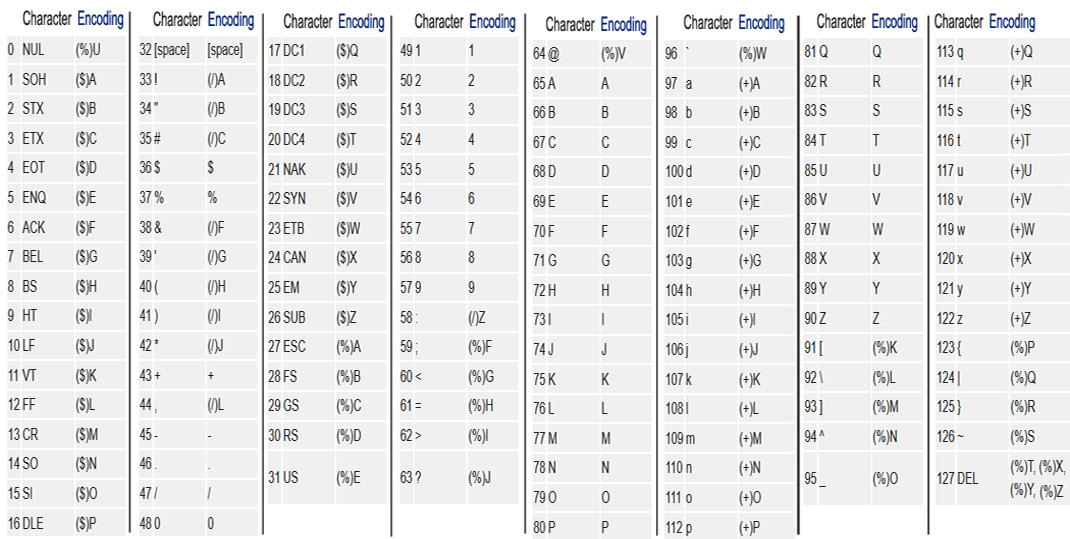
Code 93 uses a 9-character set for encoding data. The standard Code 93 encoding includes 43 characters, consisting of digits (0-9), uppercase letters (A-Z), and a few special symbols, such as space, '-', '$', '/', '+', '%', and others. The characters are encoded into a sequence of bars and spaces in a manner similar to Code 39, but with a different encoding scheme that results in a higher data density. |
2.2 Symbol Structure |
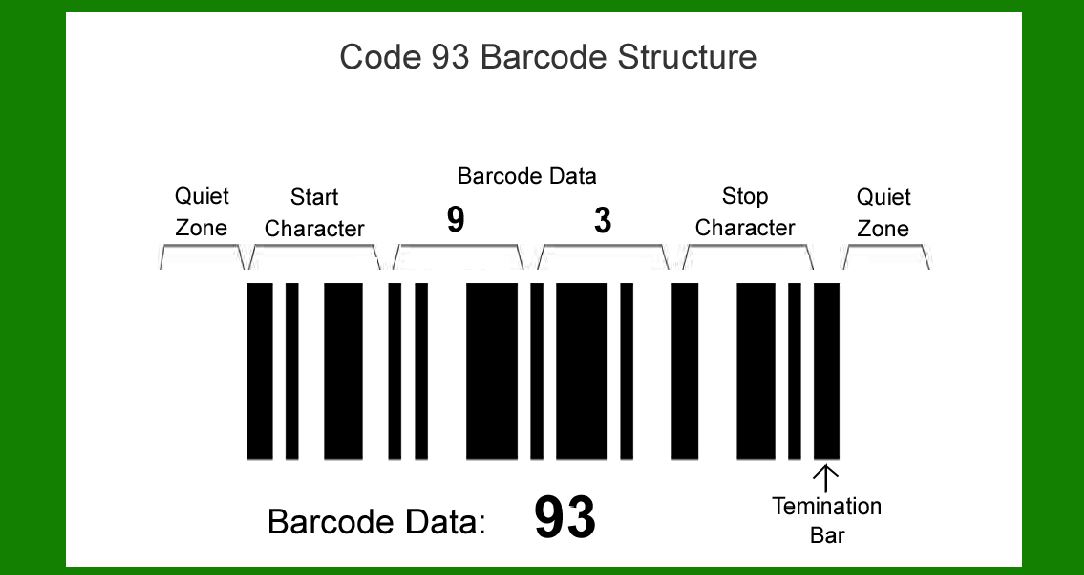
Each Code 93 barcode consists of a series of bars and spaces that represent the encoded characters. The width of each bar and the space between them can vary depending on the data being encoded. A Code 93 barcode typically contains a start character, data characters, and a stop character. |
Start and Stop Characters: |
Code 93 uses a unique start and stop character to signal the beginning and end of the barcode. These characters help scanners detect the barcode's orientation and determine its data length. |
Data Characters: |
Between the start and stop characters, the barcode consists of the actual encoded data. Each data character is represented by a combination of bars and spaces. Each character is encoded using a 9-bar/space pattern, which is where the '93' in the name of the barcode comes from. |
2.3 Check Digit |
In addition to the basic data encoding, Code 93 includes a check digit for error correction. The check digit is a form of redundancy that is calculated based on the values of the data characters and added to the barcode as a final character. This allows for the detection of errors that may occur during scanning or transmission. Code 93 uses modulo 47 for check digit calculation, which ensures a high level of reliability. |
2.4 Compactness |
The layout of Code 93 is compact in nature, designed to fit more data into a smaller space compared to earlier barcodes like Code 39. This allows for more efficient use of physical space and reduces the need for large label areas, making it suitable for small product packaging and items with limited labeling space. |
|
3. Code 93 Encoding Scheme |
3.1 Character Set |
Code 93 supports a set of 43 printable characters. This includes: |
Uppercase English letters: A-Z |
Digits: 0-9 |
Special symbols: (space), $ - / + %. |
Each of these characters is mapped to a unique 9-bar/space sequence, which is then encoded into the barcode. The set does not support lowercase letters or other non-printable characters. |
3.2 Encoding Process |
Each character in the input data is mapped to a specific 9-bit code, which consists of bars and spaces of different widths. The 9-bit codes are read from left to right in the order that they are input. The barcode reader detects the presence of these codes and decodes them into readable text. |
Start Character: A unique start pattern indicates the beginning of the barcode. It is typically represented as a combination of specific bars and spaces that are recognized by the barcode scanner. |
Stop Character: Similarly, the stop character indicates the end of the barcode. It ensures that the scanner knows when to cease scanning. |
3.3 Modular Encoding |
Code 93 uses a modular encoding technique, meaning the barcode consists of modules (bars and spaces) of uniform width. Each module can be either a bar or a space, and it corresponds to a specific character. The consistent module width allows for accurate scanning and decoding, even in cases where the barcode is printed at varying sizes or scanned from different angles. |
|
4. Error Detection and Check Digit Mechanism |
4.1 Error Detection |
The primary advantage of Code 93 over earlier barcode standards, such as Code 39, is its use of error detection through the check digit. This check digit is appended to the end of the barcode to ensure that the scanned data is valid. |
4.2 Modulo 47 Check Digit Calculation |
The check digit is calculated using modulo 47 arithmetic, which involves adding the values of the data characters and dividing the total by 47. The remainder of this division is the check digit, which is then appended to the barcode. This process ensures that errors such as misreads, duplicates, or omitted characters are identified during scanning. |
4.3 Error Correction |
While Code 93 does not provide full error correction (as some advanced 2D barcodes do), the inclusion of the check digit allows scanners to identify whether the data has been read correctly. If the check digit does not match the calculated value based on the data, an error is flagged, prompting the scanner to retry the read or alert the user to a potential error. |

|
5. Benefits of Code 93 Barcode |
5.1 Compactness |
The primary benefit of Code 93 is its compact design. The symbology allows for a high density of information to be encoded into a small space, which is essential for applications with limited labeling area. |
5.2 Error Detection |
The inclusion of the check digit makes Code 93 a reliable barcode for applications where data accuracy is crucial. This error detection capability is one of the key reasons why Code 93 is favored in industries like pharmaceuticals and logistics. |
5.3 Higher Data Density |
Compared to older symbologies like Code 39, Code 93 offers higher data density. This means that more information can be encoded in the same physical space, which reduces the overall size of the barcode while maintaining readability. |
5.4 Versatility in Applications |
Code 93 can encode both numbers and letters, making it versatile for a wide range of applications. It is commonly used in inventory management, warehouse tracking, and parts identification, where both letters and numbers are used for identification. |

|
6. Code 93 Scanning and Decoding Process |
6.1 Scanning Mechanism |
Barcode scanners equipped with laser or CCD (charge-coupled device) technology are used to read Code 93 barcodes. The scanner shines light on the barcode, and the reflected light is used to detect the presence of bars and spaces. |
6.2 Decoding Process |
The scanner decodes the bars and spaces in real-time, using the encoding scheme defined for Code 93. The start and stop characters help the scanner identify where the barcode begins and ends. The check digit is used to verify the accuracy of the scan. |
6.3 Environmental Considerations |
For accurate scanning, the barcode should be printed clearly and with high contrast against the background. Factors such as print quality, lighting conditions, and scanner type can impact the performance of Code 93 barcodes. In industrial settings, ensuring proper scanning conditions is essential to avoid errors. |
|
7. Variants of Code 93 |
7.1 Full ASCII Code 93 |
While the standard Code 93 supports a 43-character set, an extended version called 'Full ASCII Code 93' allows for the encoding of all 128 ASCII characters, including lowercase letters and control characters. This variant provides greater flexibility for applications that require a more comprehensive character set. |
7.2 Compact Code 93 |
There are also specialized variants of Code 93 that are designed for particularly compact or high-density barcode requirements. These versions optimize the space efficiency of the barcode further, though they may require more advanced scanning equipment. |

|
8. Encoding Nuances in Code 93 |
8.1 Bar and Space Widths |
In Code 93, the width of bars and spaces is not fixed but rather relative to each other. A barcode consists of 9 modules per character, but not all modules are identical in size. The relative width of bars and spaces (modules) ensures that the encoding density is high and optimized for space utilization. Each module in the barcode can have two possible states: a 'wide' module or a 'narrow' module. This variation allows for the dense encoding of information. |
Narrow vs. Wide Modules: |
The narrow modules represent a '1' in the binary pattern, while the wide modules represent a '0.' A combination of narrow and wide modules within the 9-module unit forms the encoded character. By varying the width between bars and spaces, Code 93 can achieve higher data densities, packing more information into the same amount of space. |
8.2 Pattern of Data Representation |
The data characters in Code 93 are represented by specific bar and space patterns that vary in width and arrangement. A unique feature of Code 93 is the high precision required in the printed patterns to ensure accuracy during scanning. Since the barcode uses nine elements (bars and spaces) for each character, there's little room for error in printing quality. Even a slight misalignment can cause misreads. |
8.3 Start and Stop Characters Specificity |
The start and stop characters in Code 93 are not just for delimiters-they also have specific patterns that help scanners synchronize the reading process. The start character is identified by a distinct pattern that is different from all the regular characters in the encoding set. Similarly, the stop character, which indicates the end of the barcode, has its own pattern that helps in detecting the conclusion of the barcode data. |

|
9. Error Detection and Data Integrity |
9.1 Modulo 47 Checksum Calculation |
The use of the Modulo 47 checksum is a defining characteristic of Code 93's error detection capabilities. The check digit is calculated by taking the sum of all the encoded characters and performing modulo 47 arithmetic. Here's how it works: |
Sum of Character Values: |
Each character in the Code 93 string has a specific numeric value assigned to it. This value is based on the character's position in the Code 93 set (ranging from 0 to 46, due to the 47-character set used in modulo 47). |
Modulo 47: |
The sum of these numeric values is divided by 47, and the remainder becomes the check digit. The check digit is appended to the barcode to complete the encoding process. When the barcode is scanned, the scanner recalculates the sum of the values (including the check digit) and checks whether the modulo 47 value matches the check digit. If the check digit doesn't match, an error is flagged, alerting the system or operator to a potential misread or corruption in the data. |
9.2 Impact of Error Detection on Reliability |
By using modulo 47 and appending the check digit to each Code 93 barcode, the system can detect misreads or errors that would otherwise go unnoticed. This reduces the likelihood of data corruption, especially in industrial environments where barcodes are often subject to harsh conditions, such as dirt, wear, and low-quality printing. Although Code 93 doesn't offer full error correction (i.e., it can't automatically fix errors), the check digit provides an important safeguard against faulty data reads. |
9.3 Data Integrity in Harsh Environments |
In environments where barcodes are printed on moving parts or subjected to environmental stress (e.g., warehouses, factories, outdoor settings), the inclusion of the check digit makes Code 93 a reliable choice. Even if parts of the barcode are slightly damaged (such as part of the bars becoming smudged), the presence of the check digit allows for quick detection of the error, prompting corrective action. |

|
10. Modulation Techniques: Narrow and Wide Modules |
10.1 Bar Width Modulation |
One of the technical advancements that Code 93 benefits from is its ability to adjust the modulation of the narrow and wide bars. This is a form of differential encoding, where different symbol combinations and the ratio of narrow to wide elements allow for better performance in real-world applications. |
Relative Bar to Space Width Ratio: |
In Code 93, the bar-to-space width ratio plays a critical role in maintaining a clean scan. The standard configuration often involves a 3:1 or 2:1 ratio of wide to narrow modules, which ensures that there's a distinct difference between the widths of the bars and spaces, allowing scanners to discern the information more easily. |
Error Tolerance: |
The choice of relative width for bars and spaces ensures that the barcode is more resilient to scanner noise. As long as the width ratio is maintained within an acceptable tolerance (typically 30%), scanners can read the barcode reliably, even in challenging conditions. The system is designed to tolerate minor distortions in print quality or barcode positioning. |
10.2 Scanner Calibration and Narrow Module Tolerances |
To read Code 93 effectively, barcode scanners must be calibrated to recognize the narrow module's tolerances accurately. Narrow modules are the smallest part of the Code 93 system, and while they are crucial to the barcode's ability to encode data densely, they also present a challenge for scanners. A barcode scanner that is not properly calibrated may misinterpret a narrow module as a space or vice versa, leading to errors. |
|
11. Size, Density, and Readability |
11.1 Barcode Size Flexibility |
Code 93's design is highly adaptable to a range of printing sizes, allowing users to scale the barcode to suit the available space. Due to its modular nature, Code 93 can be printed at a variety of resolutions. However, the smaller the barcode, the more critical the printer's precision and the scanner's sensitivity become. |
High Density for Small Labels: |
Code 93 is a high-density barcode, which means that a significant amount of information can be encoded into a small area. This makes it well-suited for applications that involve small labels, such as product packaging, library systems, and parts identification in mechanical or electronic systems. |
Minimum Bar Width: |
To ensure readability, Code 93 barcodes should have a minimum bar width of around 0.2mm for optimal scanning results. Reducing the size further could impact the scanner's ability to interpret the barcode correctly, especially in low-light conditions. |
11.2 Print Quality Requirements |
While Code 93 is a highly compact and versatile barcode, the readability of the printed barcode can be compromised if the print quality is not high enough. Blurry prints or excessive distortion can cause problems for scanners, especially when scanning from different angles or at a distance. |
Impact of Dot Density: |
High dot density printers are preferred when printing Code 93 barcodes, especially in industrial environments where the barcode may be subjected to wear and tear. Low-resolution printers could cause the barcode to lose its precision, impacting the scanner's ability to read it correctly. |
11.3 Environmental Factors |
Environmental factors such as temperature fluctuations, exposure to chemicals, and physical wear (e.g., abrasion, tearing) can all affect the readability of Code 93 barcodes. To mitigate these issues, barcodes should be printed using durable inks or materials that can withstand challenging conditions. |

|
12. Practical Considerations in Code 93 Barcode Usage |
12.1 Scanner Compatibility |
Not all barcode scanners are equally adept at reading Code 93. Older scanners may struggle to read high-density barcodes, especially if the print quality is not optimal. Modern barcode readers, particularly those with advanced imaging technology (CCD or laser scanners), are equipped to handle Code 93's unique characteristics, such as its variable bar widths and high-density encoding. |
12.2 Data Entry and Workflow Efficiency |
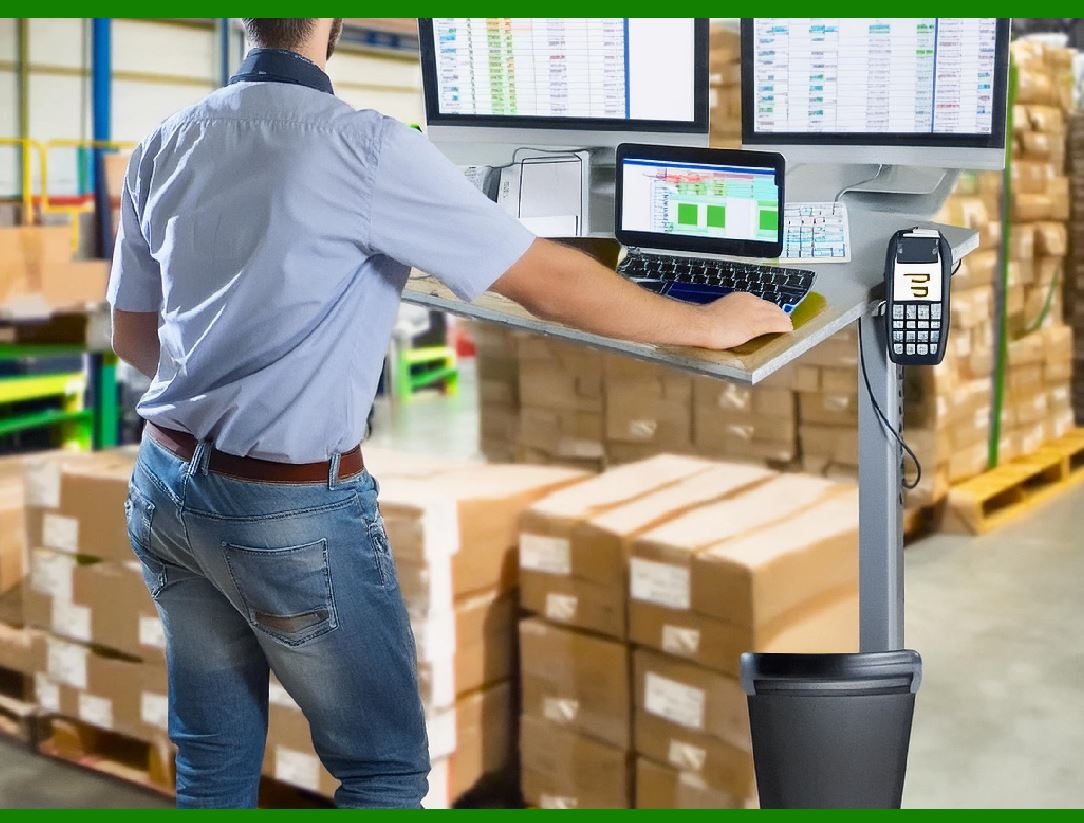
Code 93's error-detection features and relatively high-density encoding allow businesses to improve workflow efficiency. Scanning is faster and more reliable, leading to faster check-ins, stocktaking, and inventory management processes. In industries like logistics, where products are constantly moving through warehouses or shipping lanes, ensuring that each barcode is read without error reduces delays and the risk of shipping incorrect products. |
12.3 Security Applications |
Due to the inclusion of a checksum, Code 93 is also utilized in applications where security is a concern. The ability to verify data integrity through the check digit reduces the likelihood of errors in financial transactions, legal documents, or sensitive packages where data corruption could be costly. |
This deeper technical dive outlines how different encoding nuances, error correction techniques, and physical constraints impact the performance of Code 93 in real-world scenarios. |
|
13. Advanced Modulation Techniques in Code 93 |
13.1 Differential Modulation |
Code 93 uses a form of differential modulation in which the encoding of each character is determined by a combination of narrow and wide bars and spaces. The modulation allows for a more flexible encoding of information in a higher-density format, which maximizes the amount of data that can be stored in a limited physical space. |
Differential Encoding Explained: |
In differential encoding, the sequence of bars and spaces for each character depends on the relative position of the preceding character. The barcode reader interprets these relative differences to determine the correct data. For example, a change in the width of bars relative to the surrounding space is interpreted as a specific character. |
Advantages of Differential Modulation: |
The differential approach in Code 93 increases the data density and reduces the possibility of misreads caused by environmental factors, such as dirt or slight distortion. It also allows scanners to identify barcodes more efficiently, even when the barcode is printed at different sizes or orientations. |
13.2 Dynamic Modulation |
Code 93 employs dynamic modulation, meaning that the width of each module (bar or space) can change depending on the density of the encoded data. When fewer characters are encoded, the bar widths are relatively larger, whereas, in a high-density configuration, narrower bars are used to pack more data into a given space. |
Adaptive Scanning: |
Dynamic modulation enables scanners to adapt to different barcode sizes without requiring manual adjustments. The scanner's software dynamically adjusts to the printed barcode, recognizing the character patterns based on the relative widths, ensuring accurate data capture even when barcode sizes vary across different products or packaging. |
13.3 Symbol Density Scaling |
One of the key technical advantages of Code 93 is its ability to scale symbol density. Symbol density refers to how tightly the individual bars and spaces can be packed within a barcode. The density of a Code 93 barcode can be adjusted by changing the bar width ratio, allowing it to store more data while keeping the barcode compact. This scaling feature is particularly useful in environments where space is limited, such as product labeling or small packaging. |
Space Utilization: |
By scaling the symbol density, Code 93 ensures that every bit of space is used efficiently. This is critical in industries where every millimeter of space counts, such as in pharmaceuticals and consumer goods packaging, where small labels are used to fit on tiny product surfaces. |

|
14. System Integration and Compatibility with Other Systems |
14.1 Barcode Scanners and Reader Software |
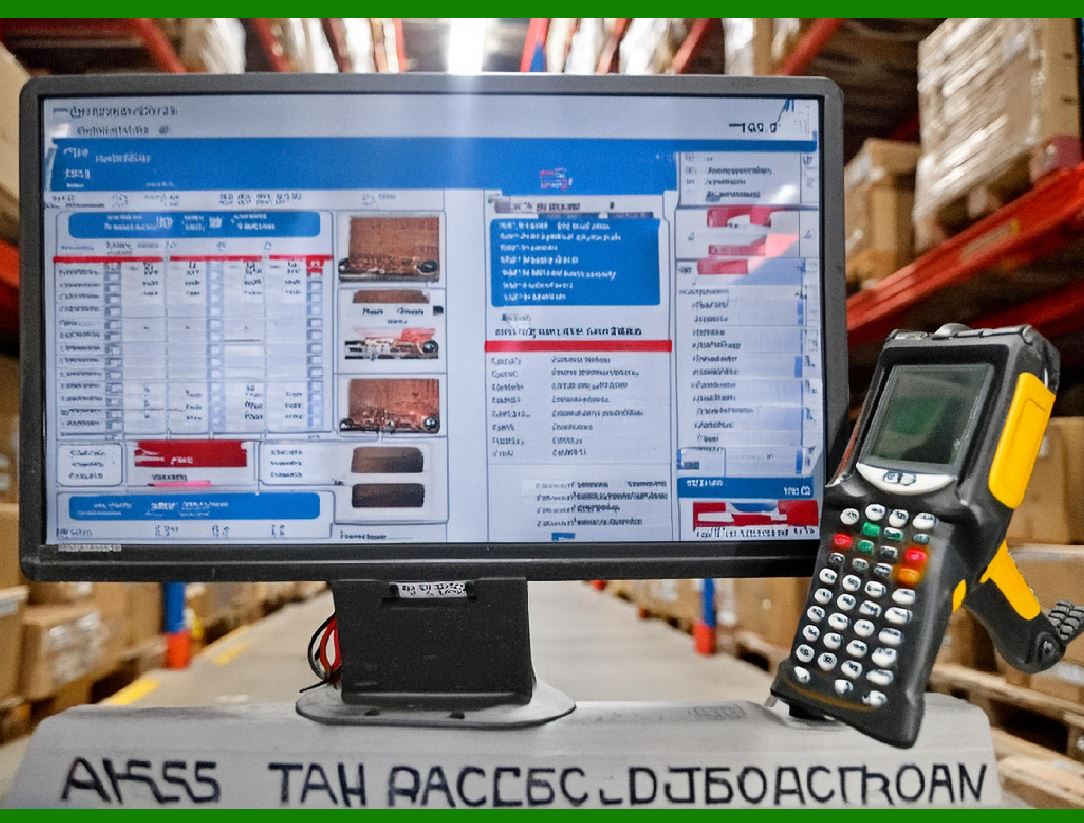
For proper functionality, Code 93 barcodes require barcode scanners that are specifically equipped to handle the unique features of this symbology. Modern scanners, whether handheld or fixed-position, come equipped with the ability to decode Code 93 and other barcode symbologies. |
Hardware Requirements: |
Barcode scanners should support 1D scanning technology (CCD or laser), with capabilities to read variable-width modules and high-density barcodes. Some scanners may also support the automatic adjustment of focus and resolution to ensure that Code 93 barcodes, which may vary in size, can be read accurately at different distances. |
Software Support: |
Beyond hardware, the software used for barcode scanning also plays a role in ensuring that Code 93 barcodes are interpreted correctly. Most modern point-of-sale (POS) systems and inventory management software include libraries or modules that support Code 93 decoding. These software packages ensure that the decoded data is accurately stored or used in the application, and they can also be used to verify the accuracy of scanned data, leveraging the check digit for error correction. |
14.2 Integration with Inventory and Supply Chain Management |
Code 93 barcodes are widely integrated into inventory and supply chain management systems, where they are used for tracking, shipping, and receiving goods. They integrate seamlessly with existing enterprise resource planning (ERP) systems, ensuring that products can be tracked through the supply chain with a high degree of accuracy. |
Compatibility with ERP Systems: |
When Code 93 barcodes are integrated with ERP or warehouse management systems (WMS), the barcode scanner can directly input product information, including part numbers, lot numbers, and expiration dates (for industries such as pharmaceuticals). This reduces human error and increases operational efficiency. |
Real-Time Data: |
Using Code 93 barcodes allows organizations to capture real-time data during each stage of product handling. Whether in a warehouse, during transit, or at the point of sale, the barcode acts as a reliable link between physical goods and digital records. |
14.3 Integration with Other Barcode Types |
In some industries, systems may be designed to accommodate multiple barcode types simultaneously. Code 93, being a widely accepted barcode standard, is often used in conjunction with other barcodes such as Code 39, QR Codes, or Data Matrix, depending on the application's data storage and scanning needs. |
Multi-Barcode Scanning: |
Barcode scanners that are capable of reading multiple barcode symbologies can handle systems that use both 1D (such as Code 93) and 2D barcodes. This integration enhances the versatility of barcode systems, allowing businesses to use the most appropriate barcode for each specific need, depending on the data density and available space. |

|
15. Code 93 Standards and Regulatory Compliance |
15.1 ISO/IEC 16388 Standard |
Code 93 is governed by the ISO/IEC 16388 standard, which defines the rules for encoding, printing, and reading the symbology. This standard ensures that Code 93 barcodes are interoperable across different scanners, applications, and industries, providing a unified framework for the technology. |
International Compatibility: |
The ISO standard ensures that Code 93 barcodes meet global interoperability requirements. This allows businesses to adopt Code 93 for international shipping and trade without worrying about scanner compatibility or data integrity issues. The standardization of Code 93 also ensures that barcodes remain readable under different environmental conditions and that the error-checking mechanisms are robust enough for various use cases. |
15.2 Regulatory Compliance in Specific Industries |
In regulated industries, such as pharmaceuticals and medical devices, barcodes must comply with additional standards set by regulatory authorities such as the FDA in the U.S. or the European Medicines Agency (EMA). Code 93 is often chosen for these applications due to its compactness, reliability, and error detection. |
Pharmaceuticals and Serialization: |
The use of Code 93 in pharmaceutical labeling is in line with the Drug Supply Chain Security Act (DSCSA) and similar regulations globally. These regulations mandate the use of barcodes to track and trace products in the supply chain to prevent counterfeit drugs and ensure consumer safety. Code 93's compact size and inclusion of a checksum make it an excellent choice for encoding batch numbers, serial numbers, expiration dates, and other critical data. |
Medical Devices: |
For medical device manufacturers, Code 93 is often employed to encode product identifiers, including serial numbers and lot numbers. This ensures traceability, which is crucial for safety and regulatory compliance in case of product recalls or adverse events. |
15.3 Compliance with GS1 Standards |
The Global Standards 1 (GS1) organization provides guidelines for barcode standards, and while GS1 mainly advocates for the use of GS1 DataBar and GS1-128, Code 93 can be used in certain applications where its higher density and error correction features are needed. As long as Code 93 complies with ISO/IEC 16388, it can be used in industries governed by GS1 standards. |

|
16. Real-World Applications of Code 93 |
16.1 Pharmaceutical Industry |
Code 93 is commonly used in the pharmaceutical industry, where it encodes product information such as the Drug Identification Number (DIN), batch number, and expiration date. These barcodes are critical for ensuring the safe distribution of medications and for compliance with regulatory standards like the FDA's Drug Supply Chain Security Act (DSCSA). |
Serialization: |
Serialization requires each individual package to have a unique identifier. Code 93's ability to pack more data into a smaller space makes it well-suited for serializing pharmaceutical products. In cases where space is limited on packaging, Code 93 allows manufacturers to encode the required data without requiring larger labels or compromising on readability. |
16.2 Library Systems |
Code 93 is used in libraries for book tracking and management. The barcode allows library staff to efficiently check in and check out books, monitor inventory, and manage shelf locations. Libraries benefit from Code 93's compact size, which helps to organize library cards and items with limited space for labeling. |
16.3 Automotive and Manufacturing |
In the automotive industry, Code 93 is used for parts identification, tracking assemblies, and ensuring proper inventory management. The ability to store serial numbers and part codes within a compact barcode allows manufacturers to track parts throughout the production process and into distribution. |
16.4 Retail and Point-of-Sale (POS) Systems |
Code 93 is also used in retail for products that require high-density barcodes for small packaging. Items such as cosmetics, electronics, and jewelry, which often have limited label space, can benefit from Code 93 barcodes to store product details efficiently while maintaining legibility. |
16.5 Logistics and Shipping |
Code 93 barcodes are used by logistics companies to track packages, shipments, and pallets in transit. The compact nature of Code 93 ensures that it can be printed on small shipping labels, allowing it to be scanned easily during transit, reducing errors in sorting and improving overall supply chain visibility. |

|
17. Challenges and Limitations |
17.1 High-Quality Printing Requirement |
One of the primary limitations of Code 93 is its dependency on high-quality printing. Since the barcode uses fine lines to encode data, poor print quality can lead to scanning errors. This is particularly problematic in environments with heavy wear, where labels can become damaged or obscured by dirt, leading to issues with readability. |
17.2 Distance and Orientation Sensitivity |
Code 93, while robust, is still susceptible to issues when scanned from improper angles or at a distance that is too far. The relative narrowness of some of its modules can make it harder for scanners to correctly interpret the barcode when it is tilted, skewed, or far from the scanner. |

|
Compare with code 39 |
When comparing Code 39 and Code 93, both are widely used 1D barcode symbologies, but they have distinct features, advantages, and use cases that differentiate them. Below is a detailed comparison between the two: |
1. Character Set |
1.1 Code 39 |
Code 39 (also known as 3 of 9) uses a set of 43 characters, which includes: |
A-Z (uppercase letters) |
0-9 (numeric digits) |
Seven special characters: -, *, ., space, $, /, + |
1.2 Code 93 |
Code 93 is an extension of Code 39 and includes 53 characters in its set: |
A-Z (uppercase letters) |
0-9 (numeric digits) |
Additional characters: -, *, ., $, /, +, %, &, and some control characters |
Additional Characters: Code 93's extended character set includes a greater variety of special characters than Code 39, allowing it to store more information in the same space. |

|
2. Data Density and Space Efficiency |
2.1 Code 39 |
Code 39 is relatively less space-efficient, as each character is represented by 9 elements (3 bars and 6 spaces). This results in a relatively large barcode size when compared to more compact symbologies. |
Data Density: Lower density, so it takes more space to encode a given amount of data. |
Character Encoding: 9 total elements per character make Code 39 less compact compared to newer barcode types. |
2.2 Code 93 |
Code 93, being a more compact symbology, uses 7 elements per character (4 bars and 3 spaces). This allows it to be more space-efficient and thus better suited for applications where label size is a concern, such as in small product packaging. |
Data Density: Higher density compared to Code 39, which means it can encode the same information in a smaller physical space. |
Character Encoding: With fewer elements per character, Code 93 is a more efficient symbology in terms of space. |

|
3. Error Detection and Correction |
3.1 Code 39 |
Code 39 includes a simple check digit for error detection in some cases, but this is not a mandatory feature for the symbology. This check digit (if used) is based on the modulo-43 system, where each value is calculated based on the sum of the values of all previous characters. |
Error Detection: Code 39's error detection is relatively basic and may not provide the level of reliability required for high-risk applications like pharmaceuticals or electronics. |
3.2 Code 93 |
Code 93 includes a more sophisticated check digit system, which is a more reliable error-detection mechanism compared to Code 39. Code 93's check digit is calculated using the Modulo 47 algorithm, which provides stronger error detection, reducing the likelihood of misreads. |
Error Detection: Code 93's modulo-47 check digit makes it more robust for applications requiring higher reliability, especially when barcodes are used in critical systems like inventory tracking or medical products. |

|
4. Size of Barcodes |
4.1 Code 39 |
As mentioned, Code 39 has a larger physical size due to its lower data density. A Code 39 barcode will require more space to encode the same amount of information compared to Code 93. |
Size: Larger in size, which can be limiting when working with smaller labels or packaging. |
4.2 Code 93 |
Code 93's compact nature allows it to store the same amount of data in smaller barcodes. As a result, it is more suitable for applications with limited space. |
Size: Smaller barcode size, making it more appropriate for items with limited labeling space. |
|
5. Symbology and Applications |
5.1 Code 39 |
Code 39 is one of the most commonly used barcodes, especially in non-retail environments. Its simplicity and widespread adoption make it suitable for applications such as: |
Inventory and asset tracking |
Automotive industry for parts identification |
Government and military use |
Warehouse management |
However, its lower density and lack of built-in error correction limit its use in applications that require high data integrity. |
5.2 Code 93 |
Code 93 is used in applications that require higher density, smaller barcode sizes, and better error detection. Some common uses include: |
Pharmaceuticals (where space and error correction are critical) |
Inventory and supply chain management |
Asset tracking and small packaging (where space is limited) |
Code 93's more compact size and robust error-checking make it ideal for applications that require reliability and efficient space utilization. |
|
6. Barcode Scanner Compatibility |
6.1 Code 39 |
Code 39 is widely supported by barcode scanners, including those used in point-of-sale (POS) systems, asset tracking, and inventory management. It is recognized as one of the most common 1D barcode symbologies and works well in most environments. |
Scanner Compatibility: Almost universally supported, with most scanners capable of reading Code 39. |
6.2 Code 93 |
Code 93 is also widely supported by modern barcode scanners and is increasingly used in industries that demand higher density barcodes. However, it may not be as universally recognized by older or lower-end scanners compared to Code 39. |
Scanner Compatibility: Supported by most modern barcode scanners, but older models may require firmware updates or may not support Code 93. |

|
7. Printing Quality and Robustness |
7.1 Code 39 |
Code 39 is fairly robust and can be printed at lower resolutions (though higher resolutions are recommended for maximum accuracy). It is resistant to some printing defects, but it's still important to ensure high print quality to avoid scanning issues, especially when dealing with small label sizes. |
Print Quality: Can be printed at low resolutions, but its error detection is weaker than Code 93, making it more susceptible to misreads when print quality degrades. |
7.2 Code 93 |
Code 93 requires high-quality printing to ensure the barcode can be read accurately. While it has better error detection, printing defects, such as misaligned bars, can cause errors if the printing is not sharp enough. |
Print Quality: More dependent on high print quality due to its smaller bar widths and higher density. However, its error correction system offers a higher level of resilience. |

|
8. Encoding Efficiency and Performance |
8.1 Code 39 |
Code 39 is fairly simple to encode, but its encoding efficiency is lower than Code 93 due to the larger number of modules required for each character. This results in longer barcode lengths, particularly when encoding alphanumeric information. |
8.2 Code 93 |
Code 93 offers greater encoding efficiency than Code 39, as it uses fewer modules per character and can store more data in the same space. This makes it ideal for applications where high-density encoding is necessary. |
|
9. Industry Standards and Compliance |
9.1 Code 39 |
Code 39 is widely accepted and recognized under various standards for general-purpose applications, such as the ISO/IEC 16388 standard. It is frequently used in applications where global compatibility and simplicity are more important than high-density encoding. |
9.2 Code 93 |
Code 93 is also recognized by the ISO/IEC 16388 standard and is used in industries that require a higher density of data in a smaller space, such as pharmaceuticals, automotive tracking, and supply chain management. |
|
10. Conclusion: Key Differences |
FeatureCode 39Code 93 |
Character Set43 characters (A-Z, 0-9, some special characters)53 characters (A-Z, 0-9, more special characters) |
Data DensityLowerHigher |
Error DetectionSimple check digit (Modulo 43)Stronger error detection (Modulo 47) |
SizeLarger barcode sizesMore compact |
Error CorrectionBasicMore robust error correction |
Primary UseGeneral inventory, automotive, militaryPharmaceuticals, small packaging, high-density applications |
Print QualityTolerant of lower print qualityRequires higher print quality for accuracy |
Scanner CompatibilityUniversally supportedSupported by most modern scanners |
|
Summary: |
While Code 39 is widely adopted and simple to implement, it lacks the compactness and robust error-detection features of Code 93. Code 93 is more suitable for environments where space is limited, higher data density is required, and data integrity is critical, such as pharmaceuticals and supply chain tracking. Code 39, on the other hand, remains a reliable and widely supported choice for simpler applications. |
 cs@easiersoft.com