The International Article Number (also known as European Article Number or EAN) is a standard describing a barcode symbology and numbering system used in global trade to identify a specific retail product type, in a specific packaging configuration, from a specific manufacturer. |
The standard has been subsumed in the Global Trade Item Number standard from the GS1 organization; the same numbers can be referred to as GTINs and can be encoded in other barcode symbologies defined by GS1. |
EAN barcodes are used worldwide for lookup at retail point of sale, but can also be used as numbers for other purposes such as wholesale ordering or accounting. These barcodes only represent the digits 0-9, unlike some other barcode symbologies which can represent additional characters. |

|
Here's a detailed breakdown of its structure and components: |
Structure of EAN-13 Barcode |
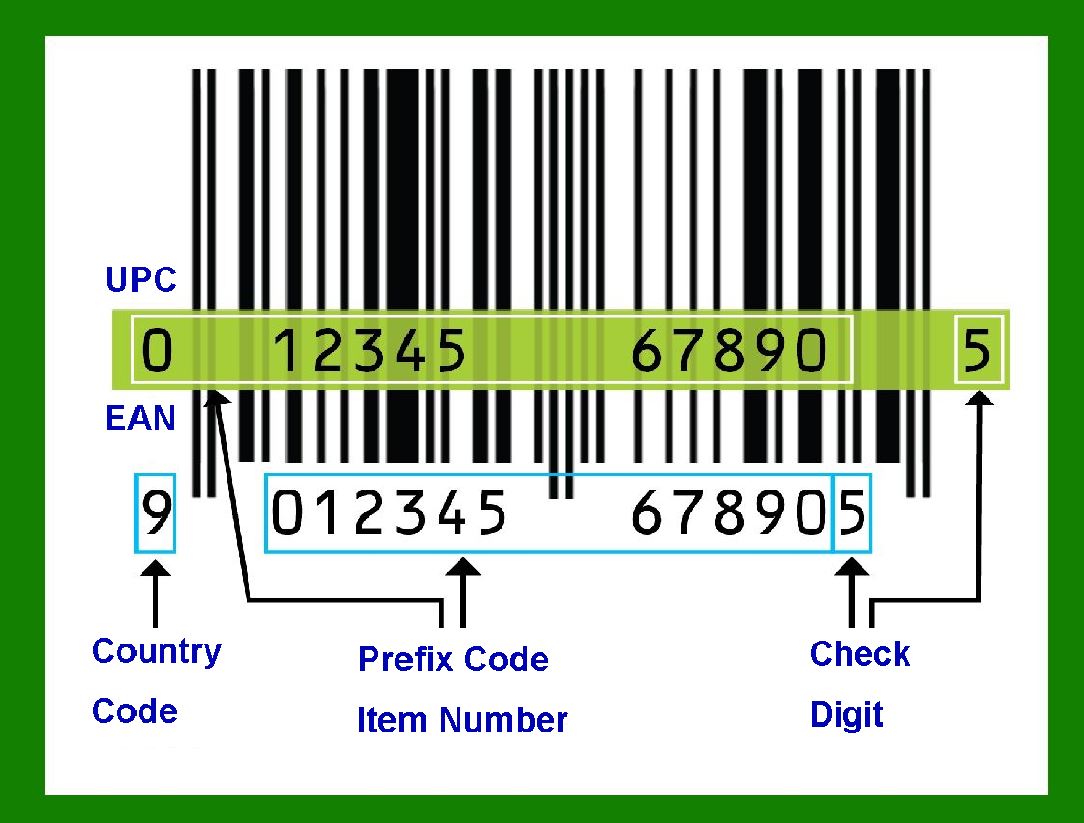
Digits: The EAN-13 barcode consists of 13 digits, which are divided into four main parts: |
Prefix (Country Code): The first 1-3 digits represent the country or region of the manufacturer. These are assigned by the GS1 organization and indicate the country where the manufacturer's identification is registered, not necessarily where the product is made. Manufacturer Code: The next few digits (typically 4-6 digits, depending on the length of the prefix) are the manufacturer's unique code. Product Code: Following the manufacturer code, there are digits that uniquely identify the product. The length of this section varies based on the length of the prefix and manufacturer code. Check Digit: The last digit is a check digit used to verify the accuracy of the preceding digits. It is calculated using a modulo 10 algorithm. |
|
Barcode Structure |
The EAN-13 barcode is visually represented by a series of bars and spaces, which encode the digits into machine-readable format. The structure includes: |
1.Guard Bars: |
Start Guard Bar: A series of three bars marking the beginning of the barcode (101). Middle Guard Bar: A series of five bars in the center separating the left and right halves of the barcode (01010). End Guard Bar: A series of three bars marking the end of the barcode (101). |
2.Left-Side Digits: |
The first digit (which is part of the prefix) is encoded in a unique pattern and influences the encoding of the next six digits. The next six digits (positions 2-7) are encoded using a combination of 'A' and 'B' encoding patterns, which are determined by the first digit. 'A' encoding uses even parity and can only represent digits 0-9. 'B' encoding uses odd parity and can only represent digits 0-9. |
3.Right-Side Digits: |
The last six digits (positions 8-13) are always encoded using 'C' encoding, which uses odd parity. |
Encoding Patterns |
A Encoding: Encodes the digits using a pattern of bars and spaces with even parity. B Encoding: Encodes the digits using a pattern of bars and spaces with odd parity. C Encoding: Used for the right-side digits, always uses odd parity. Calculation of the Check Digit |

|
The check digit ensures the barcode's integrity and is calculated as follows: |
1.Sum all the digits in the odd positions (excluding the check digit). 2.Multiply this sum by 3. 3.Sum all the digits in the even positions. 4.Add the results of steps 2 and 3. 5.The check digit is the amount that must be added to this sum to reach the nearest higher multiple of 10. |
Example |
Consider the EAN-13 number 400638133393: |
1.Prefix (Country Code): 400 (Germany) 2.Manufacturer Code: 638 3.Product Code: 13339 4.Check Digit: 3 |

|
The barcode would be encoded as follows: |
Start Guard Bar: 101 Left-Side Digits: Encoded using a combination of A and B encoding based on the first digit. Middle Guard Bar: 01010 Right-Side Digits: Encoded using C encoding. End Guard Bar: 101 |
Visual Representation |
A typical EAN-13 barcode looks like a series of vertical black bars and white spaces, with the corresponding digits printed below them for human readability. Usage The EAN-13 barcode is used globally in retail for product identification and scanning at checkout points. It ensures efficient tracking, inventory management, and sales processing. |

|
Advantages |
Standardization: EAN-13 is an international standard, ensuring compatibility across different countries and retail systems. Efficiency: Barcodes speed up the checkout process and reduce human error. Data Management: Helps in efficient inventory tracking and product management. |
Conclusion |
The EAN-13 barcode is a robust and efficient system for product identification, facilitating international trade and retail operations. Its structured encoding scheme and check digit ensure data accuracy and integrity. |
 cs@easiersoft.com