MicroPDF417 is a sophisticated two-dimensional (2D) stacked barcode symbology developed by a team at Symbol Technologies in 1996. This barcode type was created to offer a compact yet powerful solution for encoding data in various applications, combining the benefits of high data density with robust error correction capabilities. | 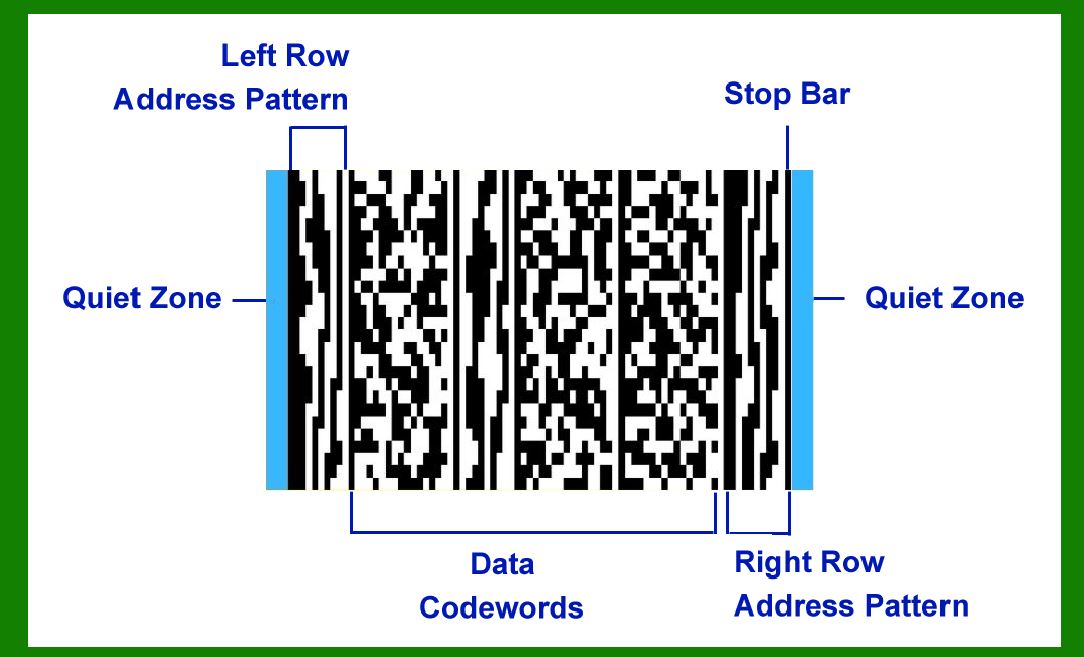
| Development and Structure | The development of MicroPDF417 was a significant advancement in barcode technology. It was designed by Frederick Schuessler, Kevin Hunter, Sundeep Kumar, and Cary Chu, all of whom were part of Symbol Technologies at the time. The symbology integrates specially encoded Row Address Patterns (RAP) columns along with Data columns that are encoded in the '417' sequence, which refers to a barcode standard invented earlier in 1990. | In 2006, MicroPDF417 was officially standardized as ISO/IEC 24728:2006, providing it with international recognition and specifications that ensure its interoperability across different systems and applications. | 
| Technical Features | MicroPDF417 supports a variety of data types including text, numeric, binary data, and Unicode text with Extended Channel Interpretation. This versatility allows it to encode a wide range of information, making it suitable for diverse use cases in industries such as logistics, manufacturing, healthcare, and retail. | Key technical features of MicroPDF417 include: | 1.Data Capacity: Despite its compact size, MicroPDF417 can encode up to 150 bytes or 250 alphanumeric characters in its largest 4-columns version. This makes it capable of handling substantial amounts of data within a relatively small space. 2.Error Correction: Like many modern 2D barcodes, MicroPDF417 employs Reed-Solomon error correction. This feature enables the barcode to remain readable even if parts of it are damaged or obscured, ensuring reliability in data capture and minimizing the risk of data loss. 3.Compatibility: MicroPDF417 can be read using both laser scanners and camera-based readers, providing flexibility in scanning technologies. This compatibility enhances its usability in various environments where different types of barcode scanning devices may be employed. 4.Special Modes: Beyond its standard encoding capabilities, MicroPDF417 includes special modes that enable the encoding of text and numeric data in formats tailored for specific applications. For instance, these modes are utilized in GS1 Composite bar code symbology, demonstrating its adaptability to industry standards and requirements. | 
| Applications | MicroPDF417 finds applications in scenarios where compactness, high data capacity, and robust error correction are essential. Some notable applications include: | Logistics and Inventory Management: It is used for tracking parcels, inventory items, and shipments due to its ability to encode large amounts of data such as product information, batch numbers, and expiration dates. Healthcare: In the healthcare sector, MicroPDF417 is utilized on patient wristbands, medication labels, and medical equipment for encoding patient data, medication details, and inventory management within hospitals and clinics. Retail: For retail applications, MicroPDF417 can encode product information, pricing, and inventory details on items ranging from consumer goods to electronic components, facilitating efficient inventory control and supply chain management. Manufacturing: In manufacturing environments, it is employed on production components, work-in-progress items, and finished goods for tracking assembly processes, quality control data, and product traceability. Document Management: Due to its requirement for high-quality documents and images, MicroPDF417 is suitable for encoding data on important documents, such as shipping labels, invoices, and forms used in administrative and financial operations. | 
| Advantages and Limitations | Advantages: | Compact Size: MicroPDF417 offers high data density relative to its size, conserving space while accommodating substantial amounts of information. Error Correction: The use of Reed-Solomon error correction ensures reliability and data integrity, even under challenging scanning conditions. Versatility: It supports multiple data types and special encoding modes, making it adaptable to diverse industry requirements. Compatibility: Its ability to be read by different types of barcode scanners enhances its usability across various applications and environments. | Limitations: | Data Capacity: While capable of encoding significant data, MicroPDF417 is limited to 150 bytes in its largest configuration, which may be insufficient for some applications requiring even higher data capacities. Quality Requirements: It necessitates high-quality printing and scanning environments to ensure accurate decoding, which may limit its use in settings where environmental conditions are less controlled. | 
| Future Outlook | As technology continues to advance, the role of barcodes such as MicroPDF417 is likely to evolve. Ongoing improvements in scanning technology and printing techniques may further enhance its performance and expand its applications into new fields. Additionally, integration with digital systems and IoT (Internet of Things) platforms could enable real-time tracking and data integration capabilities, reinforcing its utility in modern industrial and commercial environments. | 
| Conclusion | MicroPDF417 stands as a testament to the evolution of barcode technology, offering a compact yet powerful solution for encoding data in diverse applications. Developed with a focus on data density, error correction, and versatility, it has found applications across industries where efficient data capture, robustness, and compactness are critical requirements. As technology advances, MicroPDF417 is poised to continue playing a crucial role in facilitating automated data capture, improving operational efficiency, and supporting enhanced information management systems worldwide. |
|
 cs@easiersoft.com