The Anoto dot pattern is a sophisticated two-dimensional barcode system designed to enable digital interaction with physical paper. This technology, developed by Anoto Group AB, utilizes a grid-based pattern of specially encoded dots printed on paper. Here's a detailed exploration of how the Anoto dot pattern works, its technical specifications, applications, and printing processes. |
Overview of the Anoto Dot Pattern |
The Anoto dot pattern transforms ordinary paper into interactive surfaces that can capture handwritten or drawn data using a digital pen. This technology bridges the gap between analog and digital, allowing for seamless integration of handwritten input into digital workflows. |
|
Structure and Composition |
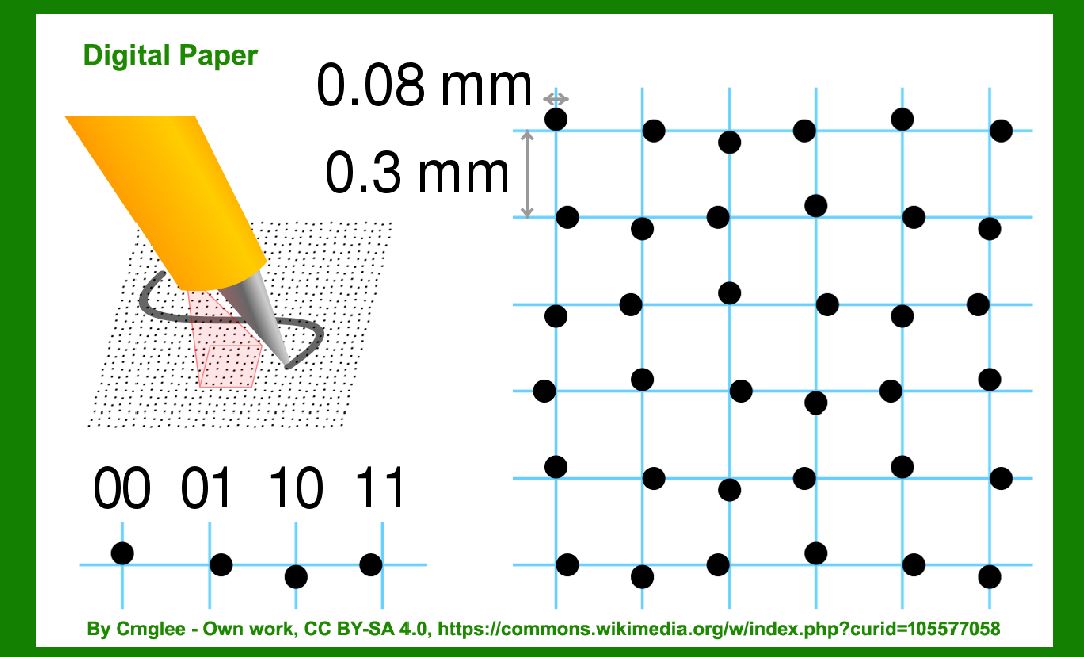
1.Grid Structure: The paper is divided into a grid with dots positioned near intersections, spaced approximately 0.3 mm apart. Each dot is offset slightly in one of four possible directions (up, down, left, right). 2.Pattern Size: The complete Anoto pattern is vast, claimed to comprise 669,845,157,115,773,458,169 dots, covering an area exceeding 4.6 million square kilometers. This immense scale allows for an enormous number of unique sheets of paper, each potentially distinguishable by its unique dot pattern. 3.Divisions and Domains: Within this pattern space, various domains are defined. These domains can denote different paper types (e.g., memo pads, notebooks) or specify the paper's intended use (e.g., personal planners, Post-it notes). |

|
Functionality and Working Principles |
Pen and Paper Interaction |
1.Digital Pen: Equipped with a camera, the digital pen records the dot patterns. It typically captures groups of dots in a 6x6 grid format. 2.Infrared Sensing: The dots are printed using carbon-based black ink, which absorbs infrared light emitted by the pen. The pen's receiver interprets the reflected pattern of light to determine the pen's position on the paper. 3.Printing Requirements: The Anoto dot pattern can be printed on various types of paper using standard printing processes with at least 600 dpi resolution. Some sources suggest a higher resolution of 1000 dpi for optimal performance. 4.Invisible Information: Non-carbon-based inks in other colors can be used to print visible information that remains invisible to the digital pen. This allows for the integration of traditional printing with the Anoto pattern without interference. |

|
Printing Considerations |
1.Printers: Standard laser printers, both black and white and color, with sufficient resolution (600 dpi or higher) can print the Anoto dot pattern. Color laser printers can be used effectively by avoiding the use of black ink for the Anoto pattern and utilizing other color components (Cyan, Magenta, Yellow) for visible content. 2.Accuracy and Alignment: The printing process must ensure precise alignment and accurate reproduction of the dot grid to maintain functionality with the digital pen. |

|
Applications and Use Cases |
1.Digital Paper Technology: Enables the capture of handwritten notes, drawings, or annotations digitally in real-time, facilitating seamless integration into digital systems and workflows. 2.Forms and Documentation: Ideal for forms processing, where handwritten data can be captured digitally without manual entry. 3.Education and Collaboration: Used in educational settings for interactive learning materials and collaborative work environments where physical annotation needs to be digitally preserved. 4.Medical and Legal Documentation: In healthcare and legal sectors, where handwritten notes and signatures must be securely archived and accessed digitally. |

|
Advantages and Limitations |
1.Advantages: |
Bridges analog and digital workflows. Enables real-time data capture. Versatile in terms of paper types and sizes. |
2.Limitations: |
Requires specific digital pens compatible with the Anoto pattern. Initial setup costs for implementing digital pen systems. Printing setup requires attention to detail for accurate reproduction of dot patterns. |

|
Future Developments |
1.Integration with IoT: Potential integration with Internet-of-Things (IoT) devices for enhanced data capture and interaction capabilities. 2.Enhanced Security Features: Continued development of security features to protect digital data captured from paper. |

|
Conclusion |
The Anoto dot pattern represents a significant advancement in digital paper technology, enabling the transformation of traditional paper into interactive, digital-capable surfaces. With its precise dot grid structure, compatibility with various printing methods, and seamless integration into digital workflows, the Anoto dot pattern continues to find applications across diverse sectors, promising enhanced efficiency and functionality in capturing and managing handwritten data. |
 cs@easiersoft.com