Barcode Technology

Barcode History

Barcode Label Paper

Barcode Printer

Barcode Application

Inventory Management

AI Barcode QRCode

Barcode Scanner

Barcode Software

Barcode Software B

Barcode Software C

Barcode Software D

Barcode Software E

New Technology A

New Technology B

Robot Technology

Barcode Types

Barcode Types B

Barcode Types C

Barcode Types D

Barcode Types E

Barcode Types F

Electronic Technology

Psychology at Work

Barcode Technology and Barcode Software Related   <<< Back to Directory <<<

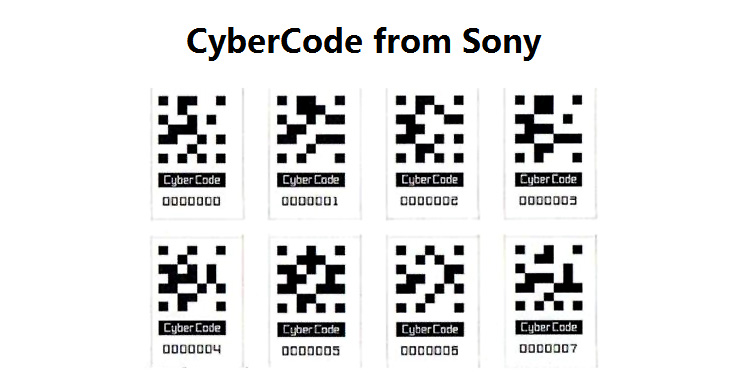
Application examples of CyberCode

Here's a detailed description of application examples and functionalities of CyberCode, focusing on its utilization in various contexts:

Introduction to CyberCode

CyberCode is a type of augmented reality (AR) technology developed by Xerox PARC. It involves printed tags that, when viewed through a camera-equipped device like a smartphone or computer, trigger digital content to appear overlaid on the physical world. This technology enables interactive experiences where physical objects become gateways to digital information, enhancing user engagement and functionality across different domains.

Application Examples of CyberCode

1. Gaming and Entertainment

In video games like 'Eye of Judgment,' CyberCode tags are integrated into collectible cards. When these cards are placed in front of a camera, a corresponding 3D model or virtual character is rendered on the screen. Players can interact with these virtual elements by manipulating the physical cards, changing their orientation or position to affect the on-screen display. This application merges physical collectibles with digital gameplay, creating immersive experiences that blend the real and virtual worlds seamlessly.

2. Education and Training

Imagine an anatomy textbook enhanced with CyberCode tags next to each diagram. Students using a camera-enabled device can scan these tags to instantly access 3D models of anatomical structures. They can manipulate these models, rotate them, and zoom in to examine details not easily visible in static images. This application transforms traditional learning materials into interactive tools, fostering deeper understanding and engagement through visual and interactive learning experiences.

3. Automotive and Maintenance

For auto mechanics equipped with video goggles or AR-enabled devices, CyberCode tags placed on engine components can provide real-time diagnostic information and instructional overlays. As mechanics inspect an engine, relevant data such as maintenance history, repair instructions, or part specifications can be digitally overlaid on the physical engine itself. This application streamlines troubleshooting and repair processes, empowering mechanics with instant access to critical information without interrupting their workflow.

4. Retail and Consumer Interaction

In retail environments, products can be tagged with CyberCode labels. Shoppers using smartphones or PDAs equipped with camera functionality can scan these tags to access additional product information. This may include demonstration videos, customer reviews, product specifications, or promotional offers. By bridging the gap between physical products and digital content, CyberCode enhances consumer decision-making processes and enriches the shopping experience with interactive product insights.

5. Advertising and Marketing

Print advertisements enhanced with CyberCode tags enable readers to engage directly with advertised products or services. By scanning these tags with a smartphone, consumers can instantly bookmark a manufacturer's website, access exclusive content, or participate in interactive campaigns. This application extends the reach of traditional advertising by seamlessly connecting print media with digital platforms, driving user engagement and fostering direct interactions between brands and consumers.

Technical Implementation and Advancements

CyberCode operates by encoding digital information in visually imperceptible patterns, which are recognized and interpreted by compatible software or devices equipped with cameras. Advances in image recognition algorithms and augmented reality technology have expanded CyberCode's capabilities, enabling more robust interactions and seamless integration across various applications.

Conclusion

CyberCode represents a transformative approach to merging physical and digital realms, offering innovative solutions across gaming, education, automotive, retail, advertising, and beyond. By leveraging augmented reality and interactive technologies, CyberCode enhances user experiences, facilitates information access, and enriches interactions with physical objects in unprecedented ways. As technology continues to evolve, CyberCode remains at the forefront of enhancing connectivity and engagement in diverse domains, promising continued advancements and new possibilities in interactive digital experiences.

This comprehensive overview illustrates how CyberCode transcends traditional boundaries, paving the way for enhanced user experiences and innovative applications across multiple industries and use cases.


EasierSoft Barcode Label Design & Bulk Printing Software

---- Use Excel Data to Batch Print Barcodes on Label Sheets or Roll Labels  

---- How to use this barcode software

Download:  Free Barcode Software + Barcode Label Designer

Download Free Barcode Software at Softonic

     Download at CNET

Once you obtain a GS1/UPC/EAN barcode, or other barcode type and QR code, you can use our free software to batch print barcode labels onto Roll label paper using a professional label printer, or to batch print barcodes onto Avery 5160 label sheets using a regular laser or inkjet printer. Our software has free and paid versions.

The free version fully meets your needs for batch printing GS1/UPC/EAN barcodes. The paid version can import data from Excel and databases to batch print barcode labels with different values.

How to Start

Input Data

Import Excel Data

Print Barcode

Barcode Format

Label Designer

All Screen Shot

Export Barcode Image

Save Template

Output Word Excel

How to Use & FAQ:

Set the barcode label format to be printed

Other Barcode Label Format Settings

Barcode types supported by this program

Barcode Label Font Settings

Configuring the Barcode Print Rotation

Text Alignment for Barcode Labels

Automatically Adjusting Barcode Width

Text Beneath the Barcode

Configuring Barcode Size

Auto Calculate the Barcode Size

Export Barcode images

Export Barcode Image Format

File Names for Exported Barcode

Resolution of Exported Barcode Images

Fixed Folder for Exporting Barcode

Default Barcode Image Export Format

Print bulk barcodes quickly

Print barcodes to Avery 5160 label

How to bulk Barcode Printing

Sample - Avery 5162 (2x7) Label Sheet

Example: Print barcodes to 5*3cm roll

Example: Print barcodes to 5161 label

Example: Print barcodes to 5162 label

Example: Print barcodes to 5163 label

Example: Print barcodes to 5164 label

Example: Print portrait orientation 5164

Example: Print barcodes to 5167 label

Example: Print barcodes to 5168 label

Example: Print portrait orientation 5168

Example: Print barcodes to 5169 label

Example: Print barcodes to 5660 label

Example: Print barcodes to 5661 label

Example: Print barcodes to 5662 label

Example: Print barcodes to 5663 label

Example: Print barcodes to 5664 label

Example: Print portrait orientation 5664

Example: Print barcodes to 5873 label

Example: Print barcodes to 5874 label

Two ways to import Excel data

Import Excel Data - Pro Edition

Import Excel Data - Std Edition

Import Data from Excel - Detail

Load Data From Excel File

Data Editing Table

Copy Data From Excel

Four ways to input barcode data

Add ASCII Key E

Input Multiple Lines of Text for Barcodes

Generates Sequential Serial Numbers

Import or copy data from Excel sheets

Highlights

Excel integration: Import data directly from Excel to generate and print barcodes in bulk.

Label designer: Create complex labels with multiple barcodes, text, logos, and shapes.

Batch printing: Print thousands of barcodes at once using standard inkjet/laser printers or professional barcode printers.


Flexible editions:

Standard Edition: Simple batch printing with Excel data.

Professional Edition: Adds command-line automation for workflow integration.

Label Designer Edition: Advanced design features for complex labels.


Why Choose Our Barcode Solutions?

Cost-effective: Free online generator and permanent free desktop version available.

Easy to use: No technical expertise required—just input data and print.

Versatile: Supports nearly all 1D and 2D barcode types, including QR codes.

Trusted: Recommended by CNET and widely downloaded by users worldwide.


Suitable Use Cases

Small businesses and startups needing quick barcode labels for products.

Retailers and online sellers managing inventory with batch barcode printing.

Manufacturers requiring sequential or custom barcode labels for packaging.

Educational and testing environments where barcodes are used for tracking.


CONTACT

cs@easiersoft.com

If you have any question, please feel free to email us.


https://free-barcode.com


<<< Back to Directory <<<     Barcode Generator     Barcode Freeware     Privacy Policy