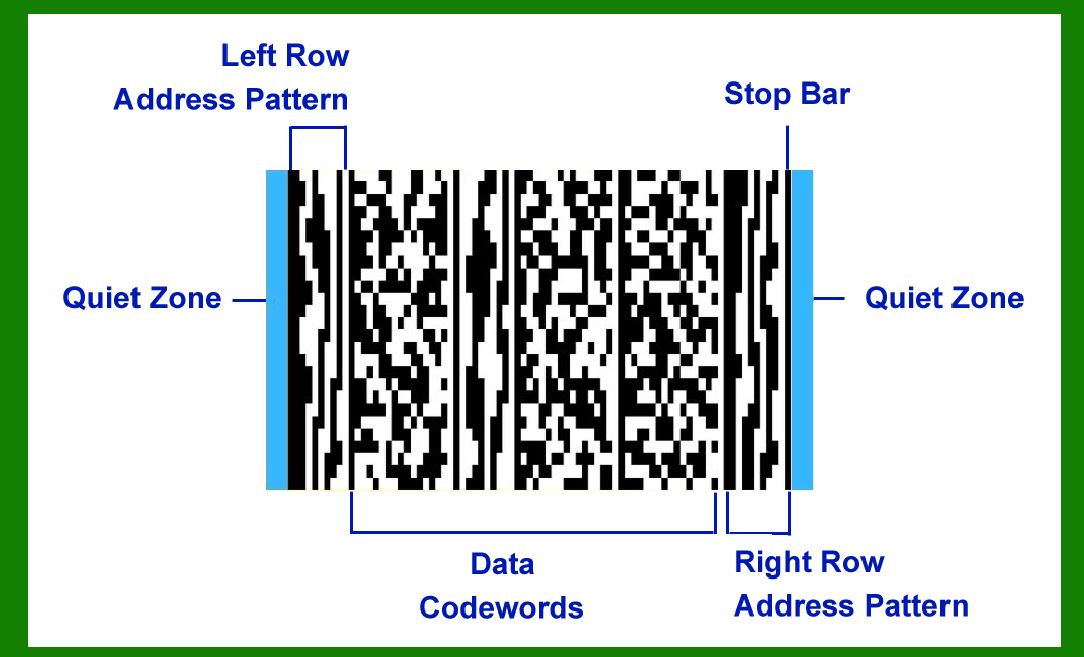
MicroPDF417 is a compact, high-density barcode symbology that finds significant application in various industries due to its ability to encode large amounts of data in a relatively small space. Originally developed by Symbol Technologies (now part of Zebra Technologies), MicroPDF417 is an extension of PDF417, designed specifically for applications requiring a more compact barcode solution without sacrificing data capacity. This detailed exploration will delve into the specific applications, features, and advantages of MicroPDF417 in inventory management, goods labeling, and its integration within barcode systems. |
|
Understanding MicroPDF417 |
MicroPDF417 is characterized by its: |
1.High Encoding Density: It can encode up to 1500 bytes of data, offering a high level of information storage. 2.Compact Size: Despite its high data capacity, MicroPDF417 occupies a smaller area compared to traditional linear barcodes, making it suitable for environments where space is limited. 3.Error Correction: Like PDF417, MicroPDF417 supports error correction techniques, ensuring reliable data retrieval even if the barcode is partially damaged or obscured. |

|
Applications in Inventory Management |
Inventory management systems rely heavily on barcode technology to efficiently track and manage stock levels, shipments, and logistics. MicroPDF417 is particularly valuable in this context due to: |
Data Capacity: It can encode extensive information about products, including batch numbers, expiry dates, serial numbers, and other relevant details critical for inventory control. Space Efficiency: In warehouse environments where shelf space is at a premium, MicroPDF417 allows for comprehensive data encoding within a compact barcode footprint. Compatibility: Most modern inventory management software and systems support MicroPDF417, ensuring seamless integration into existing workflows. |

|
Goods Labeling and Packaging |
In retail and manufacturing, accurate and efficient labeling of goods is essential for product identification, traceability, and compliance with regulatory standards. MicroPDF417 facilitates effective goods labeling by: |
Comprehensive Data Encoding: It accommodates detailed product information, such as dimensions, weight, pricing, and origin, ensuring each item can be accurately tracked throughout its lifecycle. Durability: MicroPDF417's error correction capabilities enhance the durability of product labels, minimizing errors and ensuring readability even under adverse conditions. Enhanced Traceability: It supports batch and lot tracking, enabling manufacturers and retailers to quickly trace products through the supply chain, enhancing efficiency and reducing the risk of product recalls. |

|
Integration in Composite Symbologies |
MicroPDF417 is an integral component of composite barcode symbologies, such as EAN.UCC Composite and GS1 Composite, which combine multiple types of barcode elements into a single symbol. This integration offers several advantages: |
Multi-Symbol Capability: Composite symbologies allow for the inclusion of additional information beyond what a single barcode type can encode, such as human-readable text or supplementary data. Flexibility: Manufacturers can utilize MicroPDF417 alongside other barcode types (e.g., UPC or EAN) within composite symbols, tailoring labeling solutions to specific operational requirements. Universal Support: Barcode printers and scanners designed for composite symbologies typically include support for MicroPDF417, ensuring compatibility across different stages of the supply chain. |

|
Barcode Printers and Scanners Support |
The widespread adoption of MicroPDF417 is further facilitated by its compatibility with a range of barcode printers and scanners: |
Printing Flexibility: Thermal printers, laser printers, and inkjet printers capable of generating high-resolution barcodes can produce MicroPDF417 symbols with clarity and precision. Scanning Efficiency: Advanced barcode scanners equipped with MicroPDF417 decoding capabilities ensure rapid and accurate data capture, enhancing operational efficiency in retail checkout, warehouse picking, and inventory audits. Industry Standards: MicroPDF417 adheres to international barcode standards (such as ISO/IEC 24728), ensuring interoperability and compliance with regulatory requirements across global markets. |

|
Practical Examples and Case Studies |
To illustrate the practical applications of MicroPDF417: |
Retail: A clothing retailer uses MicroPDF417 on product labels to encode size, color, and material information, facilitating quick inventory checks and efficient customer service. Healthcare: Pharmaceutical companies employ MicroPDF417 on medication packaging to encode dosage instructions, expiration dates, and batch numbers, ensuring medication safety and regulatory compliance. Automotive: Automotive manufacturers utilize MicroPDF417 on parts and components to encode manufacturing details, serial numbers, and maintenance records, supporting quality control and aftermarket servicing. |

|
Future Trends and Innovations |
Looking ahead, the application of MicroPDF417 is poised to evolve with advancements in barcode technology and broader industry trends: |
Internet of Things (IoT): Integration with IoT platforms may enable real-time tracking and monitoring of goods throughout the supply chain, enhancing visibility and operational efficiency. Artificial Intelligence (AI): AI-powered barcode scanning systems could improve accuracy and speed in data capture, reducing errors and optimizing inventory management processes. Blockchain Integration: Combining MicroPDF417 with blockchain technology could enhance traceability and authenticity verification, particularly in industries like luxury goods and pharmaceuticals. |

|
Conclusion |
MicroPDF417 represents a pivotal advancement in barcode technology, offering unparalleled data capacity and compact size suitable for a wide range of applications, particularly in inventory management and goods labeling. Its integration within composite symbologies and compatibility with barcode printers and scanners underscore its versatility and reliability in modern industrial and commercial environments. As industries continue to embrace digital transformation and demand for efficient data management solutions grows, MicroPDF417 is poised to play a pivotal role in shaping the future of barcode technology. |
 cs@easiersoft.com