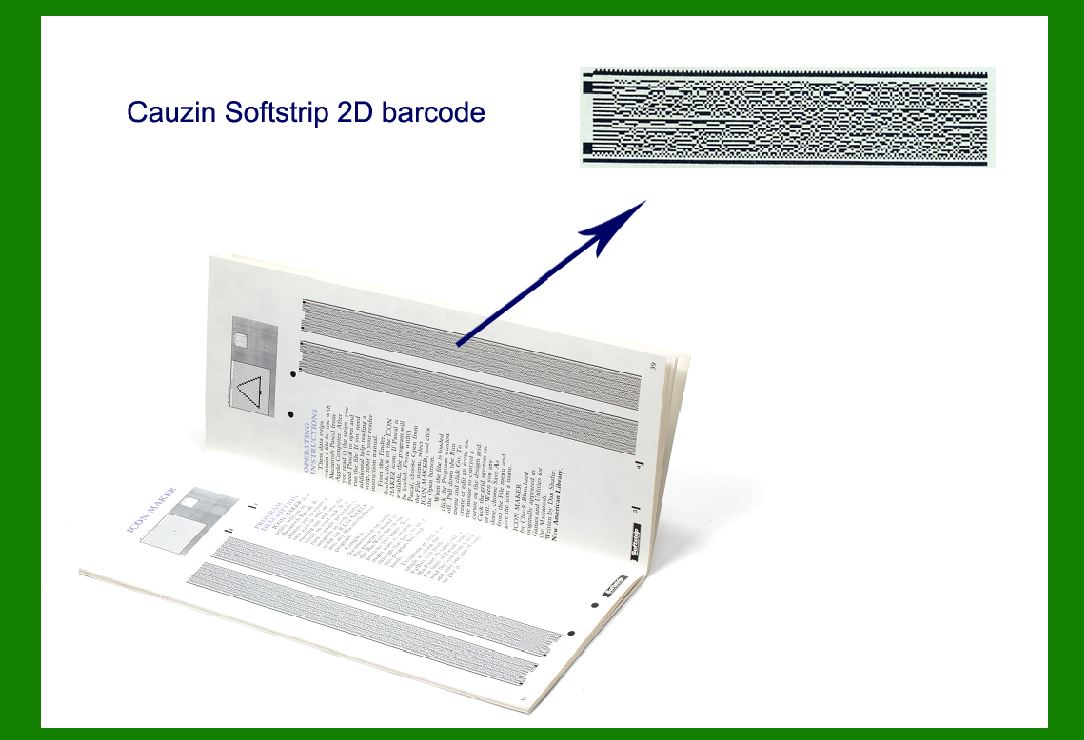
To delve into the detailed applications of Cauzin Softstrip 2D barcode, we can explore its various uses beyond its initial purpose in software distribution through magazines. |
|
Here's a comprehensive overview: |
1. Distribution of Software |
The primary and original application of Cauzin Softstrip was in the distribution of software through printed media, particularly in computer magazines during the mid-1980s. Here's how it was utilized: |
Magazines and Printed Media |
Computer magazines faced challenges in distributing software to their readers due to the limitations of physical media like disks or tapes. Softstrip provided a novel solution by encoding entire program listings or executable code directly into the pages of these magazines. |
Encoded Patterns: Magazines included Softstrip-encoded patterns alongside articles or advertisements. Reader Integration: Readers could use specialized hardware or software to scan these patterns directly from the magazine pages. Software Transfer: This enabled readers to transfer the encoded software directly to their computers, bypassing the need for physical distribution media. |
Advantages |
Cost Efficiency: Eliminated the need for physical distribution media, reducing costs associated with production and shipping. Convenience: Provided immediate access to software without delays associated with physical delivery. Space Saving: Efficient use of printed page space compared to traditional text or graphical representations of software listings. |

|
2. Data Storage |
Beyond software distribution, Cauzin Softstrip found applications in various fields that required efficient data storage and retrieval from printed media: |
Archival and Document Management |
Document Storage: Used for storing large amounts of data such as documents, reports, and archives on paper. Efficient Retrieval: Allowed for quick retrieval of stored data using scanning devices connected to computers. Long-term Preservation: Suitable for archival purposes where digital storage was not feasible or reliable at the time. |
Other Applications |
Inventory Management: Utilized in managing inventory systems where data needed to be printed and later retrieved electronically. Logistics and Shipping: Applied in tracking and managing shipments through encoded data on shipping documents. |

|
3. Security and Authentication |
Due to its ability to encode large amounts of data in a compact form, Cauzin Softstrip was also used for security and authentication purposes: |
Document Authentication |
Verification: Used to authenticate documents such as tickets, certificates, and important records. Data Integrity: Ensured the integrity of the data encoded, making it difficult to tamper with or forge. |
Ticketing Systems |
Event Management: Integrated into ticketing systems for events, concerts, and transportation. Access Control: Used for access control purposes where verification and authentication were critical. |

|
4. Educational and Research Applications |
In educational and research settings, Cauzin Softstrip was explored for its capabilities in storing and transferring complex data: |
Scientific Research: Used in research publications and journals to encode supplementary data or experimental results. Educational Materials: Integrated into textbooks and educational publications for interactive learning experiences. |

|
5. Entertainment and Media |
Softstrip also found applications in the entertainment industry and media distribution: |
Interactive Media: Used in interactive magazines and multimedia presentations where content could be encoded for interactive playback or access. Digital Rights Management: Explored for its potential in managing and protecting digital content rights through encoded access codes or licenses. |

|
Future Potential and Modern Adaptations |
While Cauzin Softstrip saw significant use in the 1980s and 1990s, its technology has influenced modern barcode and data encoding methods. Concepts similar to Softstrip have been integrated into digital watermarking, QR codes, and other 2D barcode technologies used today. |

|
Conclusion |
Cauzin Softstrip 2D barcode technology revolutionized data distribution and storage in its time, particularly in the distribution of software through printed media. Its applications expanded beyond software to include data storage, security, authentication, and educational uses. Despite technological advancements leading to the decline of its original implementations, Softstrip's legacy persists in the evolution of barcode and data encoding technologies, continuing to influence modern digital and printed media applications. |
 cs@easiersoft.com