MicroPDF417 is a type of two-dimensional barcode that is designed to encode more data in a smaller space compared to traditional linear barcodes. Its compact nature and high data capacity make it suitable for applications where space is limited but information density is crucial, such as in logistics, healthcare, and manufacturing. |
|
Overview of MicroPDF417 Structure |
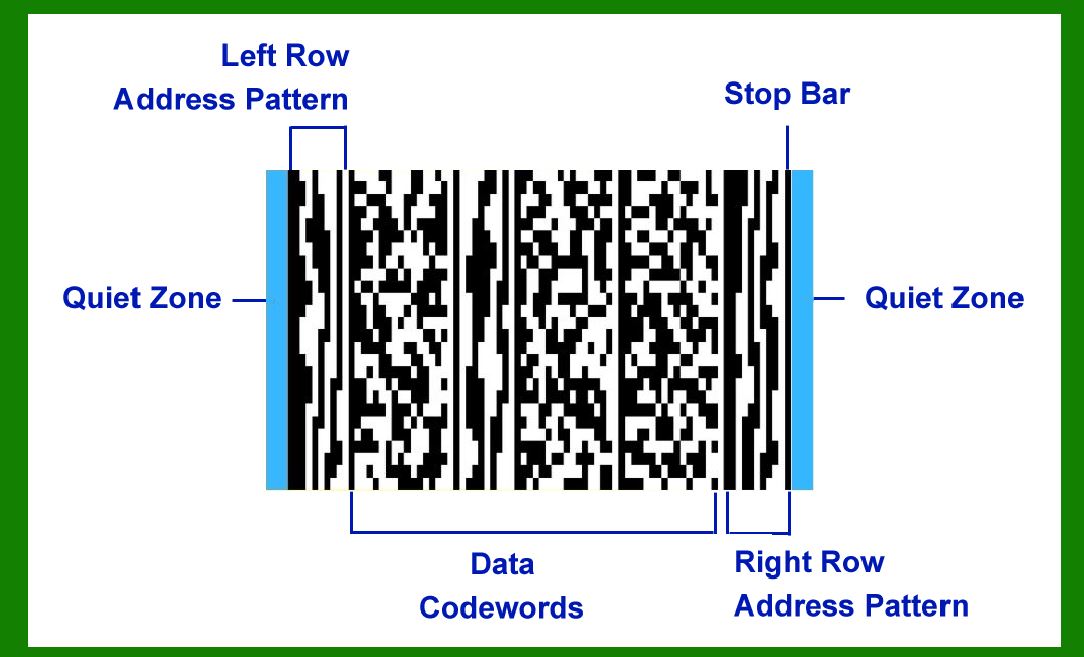
MicroPDF417 barcodes consist of several distinct elements arranged in a specific format to ensure reliable scanning and decoding. Let's delve into each component of the MicroPDF417 barcode in detail: |
1. Quiet Zones |
Quiet zones are essential areas of white space that surround the barcode symbol. They ensure that there is enough clear space around the barcode to prevent any interference that could hinder scanning. According to specifications, MicroPDF417 requires a quiet zone on both the left and right sides of the symbol. |
2. Left RAP Column |
The Left Row Address Pattern (RAP) column is located on the left side of the barcode symbol. Its primary function is to assist in locating and aligning the rows of data within the barcode. The RAP column helps the barcode reader determine the number of rows present in the symbol. |
|
3. Data Columns and Center RAP Column |
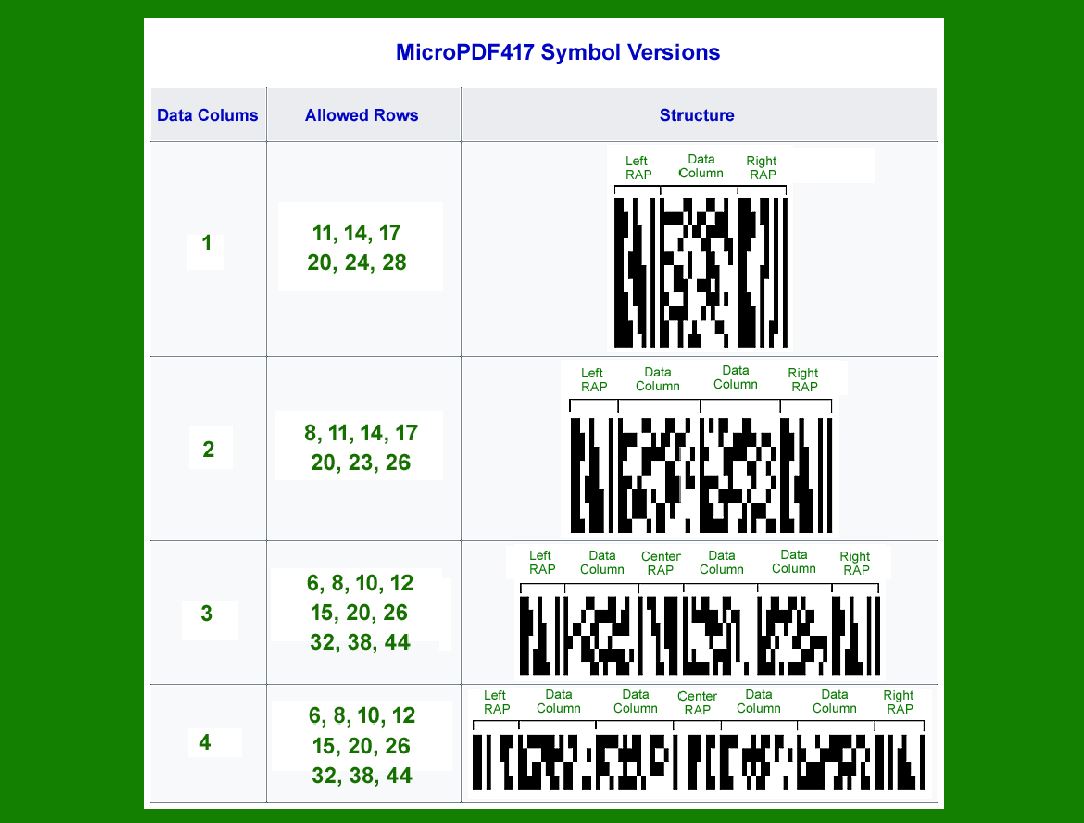
The number of data columns in a MicroPDF417 barcode can vary between versions, ranging from 1 to 4 columns. Each data column represents a vertical stack of data codewords that encode the actual information being conveyed by the barcode. |
One Data Column Version: This version consists of a single data column without a center RAP column. Two Data Columns Version: Here, the barcode includes two data columns and may or may not include a center RAP column depending on the version. Three Data Columns Version: This version typically has one data column on the left, followed by a center RAP column, and then two data columns on the right. Four Data Columns Version: The most complex version includes two data columns on each side of a center RAP column. |
The inclusion of a center RAP column depends on the version and helps in accurately aligning the data rows. |

|
4. Right RAP Column with Stop Bar |
Similar to the Left RAP column, the Right RAP column is located on the right side of the barcode symbol. It serves the same purpose of aiding in row detection and alignment. Additionally, the Right RAP column is followed by a stop bar, which signifies the end of the barcode symbol to the scanner. |
5. Row Segmentation |
Each data column within the MicroPDF417 barcode is divided into a specific number of rows, which varies depending on the version of the barcode being used. The number of rows is predefined and designed to accommodate different amounts of data while maintaining the barcode's compact size. The height of each row is crucial and should be between 2 to 5 times the minimal module width. This ensures that each row remains distinguishable and readable by the barcode scanner. |

|
Detailed Structural Elements |
Quiet Zones |
Quiet zones play a critical role in barcode scanning. They ensure that the barcode is correctly detected and decoded by providing a clear space around the symbol. According to MicroPDF417 specifications, the minimum required quiet zone size is typically 2.5 times the width of the narrowest element (bar or space) within the barcode. For example, if the narrowest bar width (module width) is 0.25 mm, then the quiet zone should be at least 0.625 mm wide on each side of the barcode. |
RAP Columns |
RAP columns (both Left and Right) are integral to the functionality of MicroPDF417. They contain patterns that assist in row detection and alignment. These patterns are designed to be unique and easily recognizable by barcode scanners, facilitating accurate decoding even when the barcode symbol is damaged or partially obscured. |

|
Data Columns |
Data columns are where the actual encoded data resides. Depending on the version of the MicroPDF417 barcode being used (1-column, 2-column, 3-column, or 4-column), the number and arrangement of these columns vary. Each data column consists of multiple rows, and the barcode's data capacity increases with the number of columns used. |
Encoding Efficiency: MicroPDF417 is designed to efficiently encode both numeric and alphanumeric data. It uses a combination of codewords and error correction techniques to ensure data integrity even in challenging environments. Error Correction: Error correction within MicroPDF417 is achieved through Reed-Solomon error correction codes. These codes allow the barcode to withstand a certain level of damage or distortion without losing the ability to be decoded accurately. |

|
Center RAP Column (Optional) |
In versions of MicroPDF417 that include a center RAP column, its purpose is to further aid in the alignment of rows within the barcode symbol. This additional alignment point enhances the overall reliability of the barcode scanning process, especially in environments where the barcode may be subject to tilting or distortion. |
Stop Bar |
The stop bar marks the end of the barcode symbol. It is a specific pattern recognized by barcode scanners that indicates where the barcode data concludes. This feature ensures that the scanner knows when it has completed reading the barcode, preventing misinterpretation of data due to incomplete scanning. |

|
Row Segmentation and Height |
Row Segmentation |
Each data column in MicroPDF417 is segmented into a predetermined number of rows. The number of rows per column varies depending on the version of the barcode. This segmentation allows for efficient encoding and decoding of data, ensuring that the barcode remains compact while accommodating large amounts of information. |
Version Specifics: For instance, the one-column version will have a different number of rows compared to the four-column version. This variability in row segmentation allows MicroPDF417 to be flexible in handling different data sizes and formats. |
Row Height |
The height of each row within a MicroPDF417 barcode is critical for ensuring legibility and accurate scanning. As per specifications, the height of each row should be between 2 to 5 times the minimal module width. This guideline helps maintain the readability of the barcode across different scanning devices and conditions. |
Adjusting Row Height: Depending on the application and scanning environment, adjusting the row height within this specified range ensures that the barcode remains scannable without compromising data density or scanning reliability. |

|
Application and Advantages |
Application |
MicroPDF417 barcodes find applications in various industries due to their compact size and high data capacity. Some common applications include: |
Logistics and Shipping: Used to track packages and shipments, providing detailed information such as destination, contents, and handling instructions. Healthcare: Used for patient identification, medication tracking, and inventory management in hospitals and pharmacies. Manufacturing: Used to track inventory, manage production processes, and ensure quality control across manufacturing operations. |
Advantages |
High Data Capacity: MicroPDF417 can encode up to 1500 bytes of data, which is significantly higher than traditional linear barcodes. Compact Size: Despite its high data capacity, MicroPDF417 maintains a small footprint, making it suitable for applications where space is limited. Error Correction: Built-in error correction ensures that the barcode remains readable even if part of the symbol is damaged or obscured. Versatility: Supports both numeric and alphanumeric data, accommodating a wide range of information types and formats. |

|
Conclusion |
In conclusion, MicroPDF417 is a versatile and efficient barcode symbology designed to encode large amounts of data in a compact space. Its structured format, including quiet zones, RAP columns, data columns, and row segmentation, ensures reliable scanning and decoding across various applications. By adhering to specifications regarding row height and segmentation, MicroPDF417 maintains readability and data integrity, making it a preferred choice in industries requiring efficient data management and tracking capabilities. |
 cs@easiersoft.com