Understanding Bokodes: Revolutionizing Data Tagging Beyond Barcodes |
In the ever-evolving landscape of digital information and data encoding, a fascinating innovation emerged from the MIT Media Lab: the Bokode. Conceived by a team led by Ramesh Raskar, Bokodes represent a significant leap beyond traditional barcodes in terms of data capacity, readability, and functionality. This comprehensive exploration delves into the intricacies of Bokodes, from their technological underpinnings to their applications and advantages over existing technologies. |
|
Technological Foundation of Bokodes |
Bokodes, fundamentally, are a form of data tag optimized for digital cameras focused at infinity. Unlike conventional barcodes, which rely on proximity and high-resolution scanning, Bokodes leverage a unique optical principle rooted in the concept of bokeh-wherein out-of-focus points of light in an image appear as blurred circles. The name 'Bokode' itself is derived from this photographic term, blended with 'barcode,' signifying its dual heritage in optics and data encoding. |
Design and Structure |
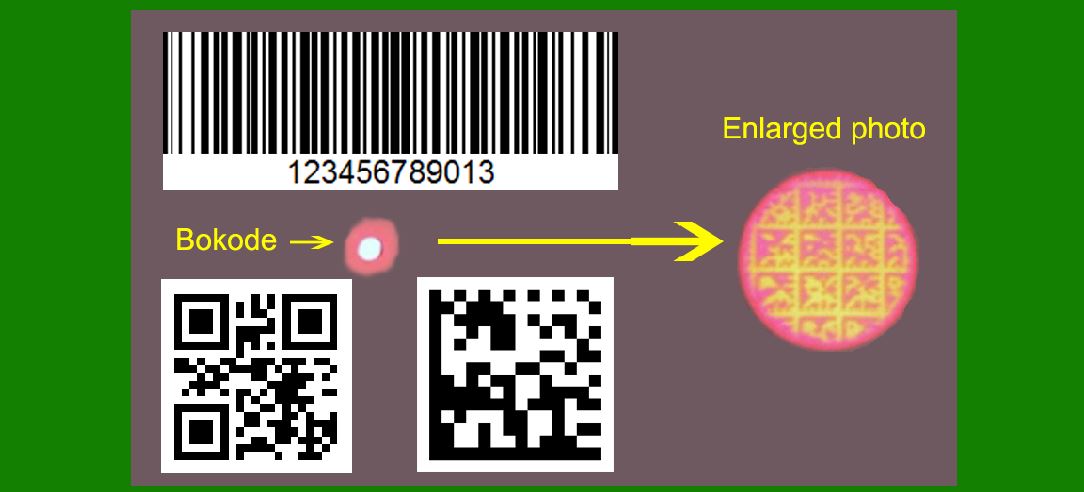
Physically, a Bokode is a circular disc measuring a mere 3 millimeters (0.12 inches) in diameter. Within this compact form factor, a tiled series of Data Matrix codes are arranged, forming a complex pattern that stores a vast amount of information relative to its size. This arrangement allows Bokodes to be read from various angles and distances, up to 4 meters (13 feet) away, without the need for close proximity or high-resolution optics. |
Each Bokode consists of several essential components: |
LED and Photomask: At its core, a Bokode incorporates an LED covered with a photomask, responsible for encoding the data. Lens: Positioned to focus the emitted light into a readable pattern, ensuring clarity and precision during scanning. |

|
Functionality and Readability |
The operational principle of Bokodes revolves around their interaction with digital cameras. By focusing the camera at infinity, Bokodes appear enlarged in the image, facilitating easy reading of the encoded data. This optical setup contrasts sharply with traditional barcodes, which require close-range scanning and direct alignment for effective data retrieval. |
Optical Advantages |
The ability to read Bokodes from varying distances and angles offers significant advantages in diverse applications: |
Versatility: Bokodes can be integrated into environments where flexibility in scanning positions is critical, such as retail, logistics, and inventory management. Distance Reading: Unlike barcodes that necessitate proximity, Bokodes allow for remote scanning, enhancing operational efficiency and user convenience. |

|
Types of Bokodes |
Beyond their standard form, Bokodes encompass variations tailored to specific operational requirements and technological advancements: |
Rewritable Bokodes (Bocodes) |
Some Bokodes are designed to be reprogrammable, allowing for dynamic updates of encoded information. Termed Bocodes, these variants cater to applications requiring real-time data modification and adaptive functionality. The flexibility of Bocodes positions them as viable solutions in rapidly changing environments where information currency is paramount. |
Power Considerations |
Traditional Bokodes are powered by an integrated LED, necessitating energy consumption and cost considerations. However, recent developments have introduced passive Bokodes that operate solely through reflected light, akin to conventional barcodes. This innovation not only reduces operational costs but also broadens the applicability of Bokodes in scenarios where power constraints or cost sensitivity is a concern. |

|
Comparative Advantages Over RFID |
In the realm of data tagging technologies, Bokodes offer distinct advantages over Radio-Frequency Identification (RFID) tags, particularly in terms of privacy and operational efficiency: |
Privacy Considerations |
Unlike RFID tags, which require specialized materials to block radio signals, Bokodes can be obscured with any opaque material. This inherent privacy feature makes Bokodes preferable in environments where data visibility and security are critical, such as consumer goods, healthcare, and personal identification systems. |
Operational Efficiency |
The optical readability of Bokodes from a distance simplifies scanning processes, reducing time and resource investments associated with data retrieval. This efficiency enhances productivity across industries reliant on rapid information access and seamless operational workflows. |

|
Applications Across Industries |
The versatility of Bokodes extends their utility across a broad spectrum of industries and use cases: |
Retail and Inventory Management |
In retail settings, Bokodes streamline inventory management by enabling swift and accurate product identification and tracking. Their ability to be scanned from varying angles and distances enhances inventory visibility and reduces logistical complexities associated with stock monitoring and replenishment. |
Healthcare and Pharmaceuticals |
Within healthcare, Bokodes facilitate efficient asset management and patient tracking. From medical equipment to pharmaceuticals, Bokodes enhance traceability, ensuring compliance with regulatory standards and optimizing resource allocation within healthcare facilities. |
Smart Cities and Infrastructure |
In the realm of smart cities and infrastructure, Bokodes play a pivotal role in enhancing urban management systems. From traffic control to public utility monitoring, Bokodes enable real-time data capture and analysis, fostering proactive decision-making and resource optimization. |

|
Future Trends and Innovations |
Looking ahead, the evolution of Bokodes is poised to embrace advancements in optical technology, data encoding methodologies, and integration with Internet of Things (IoT) ecosystems: |
Enhanced Optical Capabilities |
Future iterations of Bokodes may leverage advancements in lens technology and image processing algorithms to further enhance their readability and operational range. These enhancements will bolster their applicability in environments characterized by dynamic lighting conditions and spatial constraints. |
IoT Integration |
The convergence of Bokodes with IoT frameworks promises to unlock new dimensions of connectivity and data intelligence. By embedding Bokodes within IoT-enabled devices and systems, enterprises can harness real-time insights and predictive analytics to drive innovation and operational excellence. |

|
Conclusion |
In conclusion, Bokodes represent a transformative advancement in data tagging technology, transcending the limitations of traditional barcodes and RFID tags. Through their optical innovation and data capacity, Bokodes empower industries to achieve heightened operational efficiency, enhanced privacy safeguards, and unprecedented scalability in data management. As technology continues to evolve, the role of Bokodes will undoubtedly expand, catalyzing innovation across sectors and shaping the future of digital connectivity and intelligence. |
 cs@easiersoft.com