The Boxing barcode format used in piqlFilm is a sophisticated and robust method for storing digital data in a physical medium. It is designed to ensure longevity, readability, and accuracy over extended periods, making it suitable for archival purposes where data preservation is critical. This detailed description will cover each component of the Boxing barcode format, including its structure, encoding methods, and the significance of each element. |
|
Overview of the Boxing Barcode Format |
The Boxing barcode format is specifically tailored for piqlFilm, a high-density digital storage medium designed to preserve data for centuries. Unlike conventional barcodes used for simple identification or inventory purposes, the Boxing barcode is a complex encoding scheme optimized for storing vast amounts of digital information in a compact, durable format. |
|
Physical Dimensions and Layout |
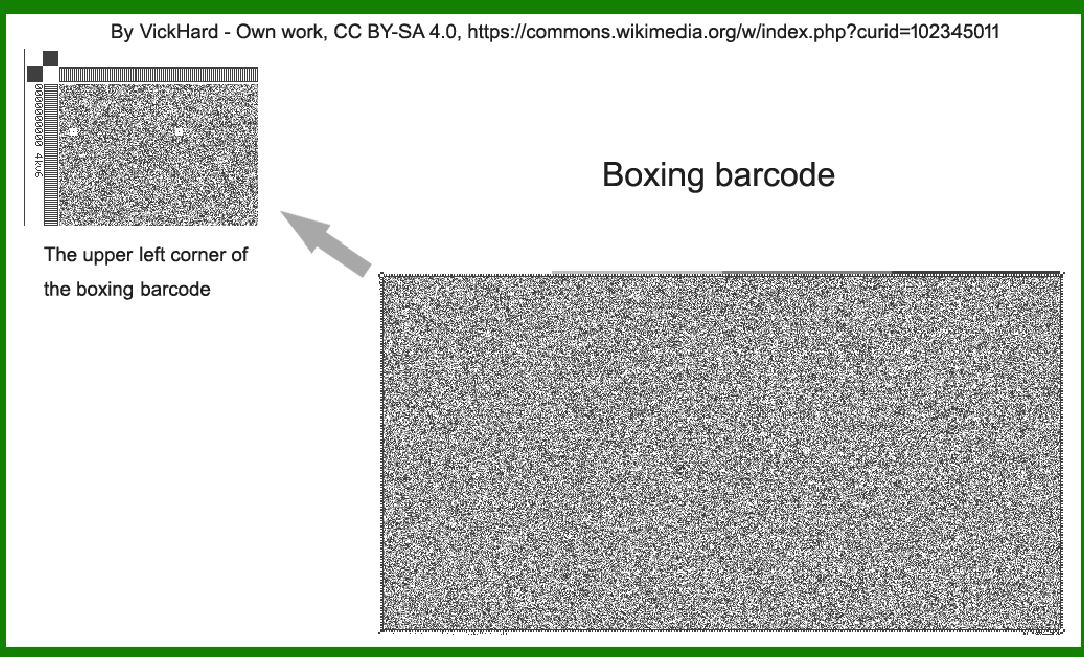
The physical dimensions of the Boxing barcode used in piqlFilm are substantial, reflecting its capacity to store significant amounts of data. It consists of 4096 rows and 2160 columns, which together form a grid-like pattern across the film's surface. This grid is meticulously organized to accommodate various informational components that ensure data integrity, error correction, and ease of retrieval. |

|
Components of the Boxing Barcode |
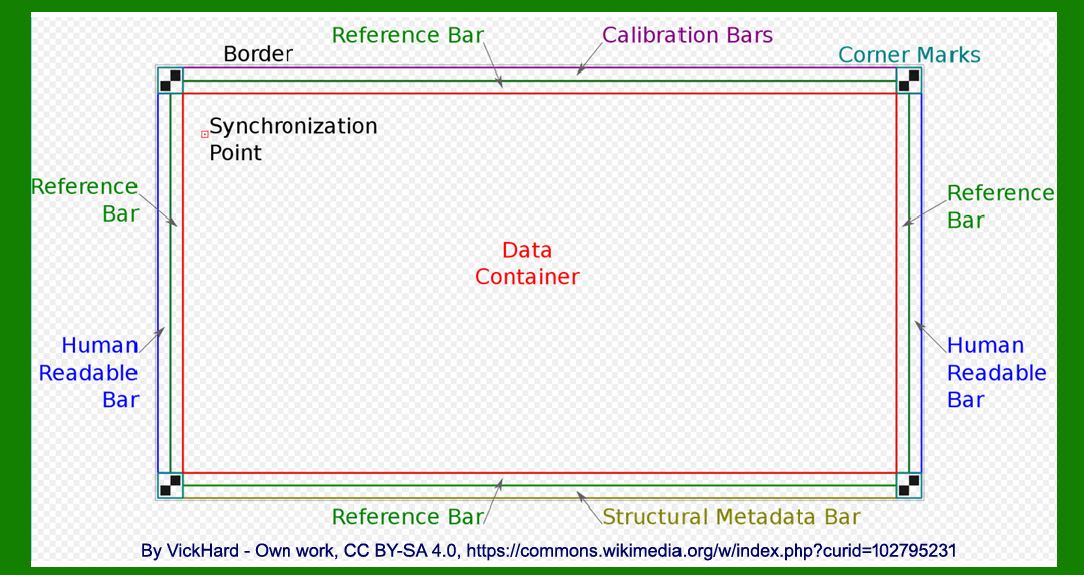
1.Border: The outermost part of the Boxing barcode serves as a protective boundary. It encloses the entire data matrix, shielding it from physical damage and environmental factors that could potentially compromise data integrity. |
2.Four Corner Marks: These marks are strategically placed at the corners of the barcode grid. They serve as reference points for alignment and orientation during both encoding and decoding processes. The accuracy of these marks is crucial for ensuring that the data can be read correctly regardless of how the film is handled or positioned. |
3.External Bars: Reference Bars: These bars provide a standardized reference scale for measuring distances within the barcode. They ensure that the dimensions of each cell in the matrix are accurately maintained during the encoding process. Calibration Bars: Calibration bars are used to adjust the scanning equipment to accurately read the data from the film. They help in fine-tuning the optical systems to optimize data retrieval. Structural Metadata Bars: These bars contain essential metadata about the structure and layout of the data stored in the barcode. This metadata includes information such as data format, encoding methods, error correction codes used, and other pertinent details necessary for decoding. Human-Readable Bars: As the name suggests, these bars contain human-readable information. This could include basic identification data, such as the barcode's serial number, creation date, and any other relevant textual information that aids in identifying the content and purpose of the barcode. |
4.Data Container: The central and most critical part of the Boxing barcode is the data container itself. This is where the actual digital information is stored in a binary format. The data container is divided into cells, each capable of storing multiple bits of data. The arrangement of these cells follows a specific coding scheme optimized for data density and error correction. |
5.Sync Points: Sync points act as synchronization markers within the barcode. They are strategically placed at regular intervals throughout the data matrix to facilitate accurate reading and decoding. These markers help the scanning equipment maintain alignment and timing, ensuring that data is retrieved correctly without errors or misinterpretations. |

|
Encoding Methodology |
The encoding methodology used in the Boxing barcode format combines several advanced techniques to maximize data density while ensuring robust error correction and longevity. Key aspects of the encoding methodology include: |
Binary Representation: The data is encoded in a binary format, where each cell within the data container can represent multiple bits of information. This binary representation allows for efficient storage and retrieval of digital data. Error Correction Codes: To enhance reliability and longevity, error correction codes are embedded within the data matrix. These codes enable the scanning equipment to detect and correct errors that may arise due to physical degradation of the film or scanning imperfections. Data Compression: Advanced compression algorithms may be employed to reduce the overall size of the encoded data while preserving its integrity. This compression helps maximize storage capacity on the piqlFilm without compromising data quality. |

|
Importance of Each Component |
Each component of the Boxing barcode format plays a crucial role in ensuring the overall effectiveness and reliability of data storage and retrieval: |
Border: Protects the barcode from physical damage and ensures its integrity over time. Corner Marks: Facilitate accurate alignment and orientation during scanning and decoding processes. External Bars: Provide essential references, calibration, and metadata necessary for interpreting and decoding the stored data. Data Container: Houses the actual digital information in a structured and organized manner, optimized for data density and error correction. Sync Points: Maintain synchronization and timing during the scanning process, ensuring accurate and reliable data retrieval. |

|
Application and Benefits |
The Boxing barcode format, implemented on piqlFilm, offers several distinct advantages over traditional digital storage methods: |
Longevity: Designed for archival purposes, piqlFilm with Boxing barcode format can preserve data for centuries without degradation, thanks to its robust physical properties and error correction mechanisms. Security: Physical storage on film provides inherent security against cyber threats and technological obsolescence, making it ideal for sensitive or classified information. Reliability: The use of advanced encoding and error correction ensures high reliability in data retrieval, even under challenging environmental conditions. Scalability: The format is scalable, accommodating varying amounts of data by adjusting the density and size of the encoded barcode. Compatibility: The format is designed to be compatible with existing scanning and decoding technologies, ensuring ease of integration into current archival and retrieval systems. |

|
Conclusion |
In conclusion, the Boxing barcode format used in piqlFilm represents a pinnacle in the field of digital data preservation. Its meticulous design and implementation cater specifically to the challenges of long-term data storage, offering unmatched durability, reliability, and security. By combining advanced encoding techniques with robust physical storage on film, the Boxing barcode format ensures that valuable digital information can be preserved and accessed for generations to come. This detailed description highlights the comprehensive nature of the format, emphasizing its structural integrity, encoding methodologies, and the critical role of each component in achieving its overarching goal of long-term data preservation. |
 cs@easiersoft.com