Detailed Description of Boxing Barcode | Introduction | In the realm of digital data storage, barcodes have been a pivotal tool for encoding information efficiently and reliably. The Boxing barcode represents a significant advancement in this field, offering a high-capacity 2D barcode format that is versatile and customizable. This detailed description will delve into the intricacies of the Boxing barcode, covering its structure, customization options, applications, and technical specifications. | 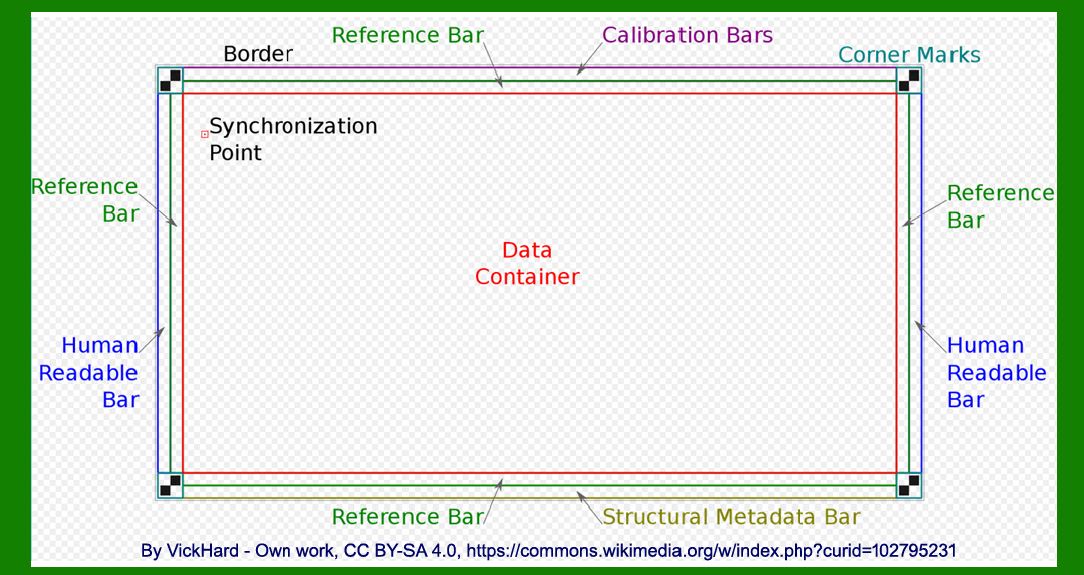
| Overview of Boxing Barcode | The Boxing barcode is designed to store large amounts of digital data in a compact 2D format. Unlike traditional barcodes that are often limited in the amount of data they can store, the Boxing barcode leverages advanced encoding techniques to achieve high-capacity data storage. This makes it suitable for a wide range of applications where storing digital data on physical mediums such as paper or photographic film is necessary. | 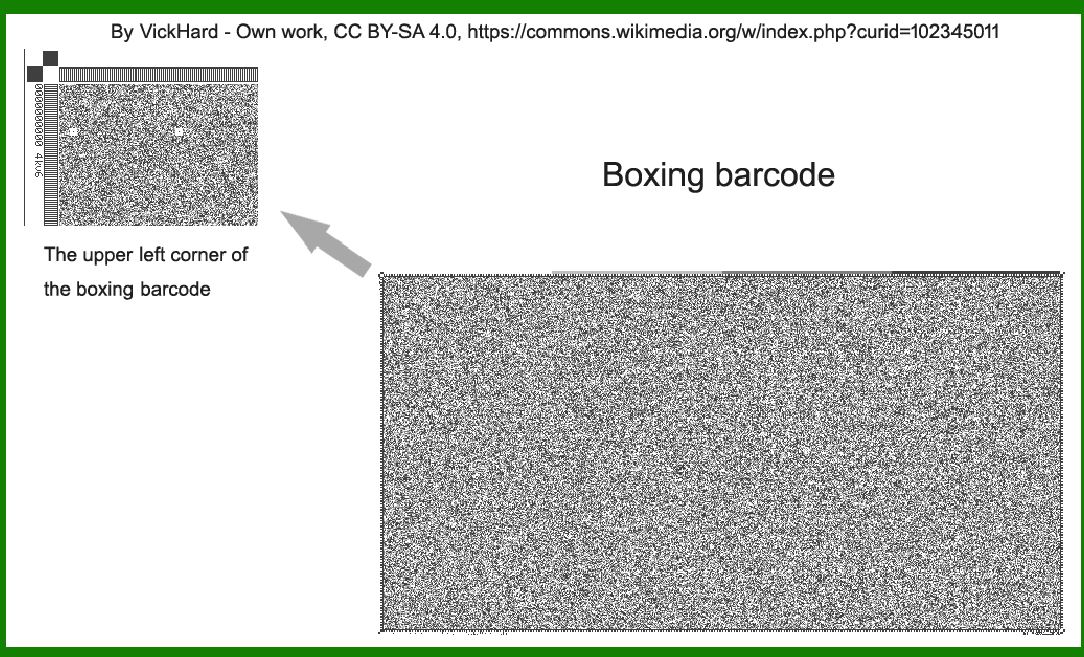
| Structural Components | 1.Frame Geometry: The structure of the Boxing barcode begins with its frame geometry, which defines the overall shape and layout of the barcode. Unlike fixed-size barcodes, the Boxing format allows for flexible frame geometries, accommodating varying data sizes and application requirements. This flexibility is crucial for adapting to different storage mediums and integration scenarios. 2.Symbols per Pixel: Central to the capacity of the Boxing barcode is its ability to adjust the number of symbols per pixel. This parameter directly influences how much data can be encoded within a given area of the barcode. By optimizing the number of symbols per pixel, the Boxing format achieves high-density data storage without compromising readability or reliability. 3.Forward-Error-Correction (FEC) Method: To ensure robustness against data corruption or degradation, the Boxing barcode employs sophisticated forward-error-correction methods. These techniques add redundancy to the encoded data, enabling the barcode to withstand errors during scanning or storage. The choice of FEC method can be tailored based on specific application requirements, balancing data integrity with storage efficiency. | 
| Customization Options | One of the standout features of the Boxing barcode is its extensive customization capabilities. This encompasses several aspects crucial for adapting the barcode to diverse applications: | 1.Data Capacity: By adjusting frame geometry and symbols per pixel, the Boxing barcode can accommodate varying data capacities. From small data sets to extensive archives, the format scales efficiently to meet different storage needs without sacrificing readability or space efficiency. 2.Error Correction Level: Different applications may require varying levels of error correction. The Boxing barcode allows customization of FEC parameters, enabling users to prioritize data integrity based on the specific environment or usage scenario. This flexibility ensures reliable data retrieval even under adverse conditions. 3.Color and Contrast: While primarily designed for monochromatic printing on standard mediums like paper or film, the Boxing barcode supports customization of color and contrast settings. This can aid in enhancing readability under specific lighting conditions or when integration with color-coding systems is advantageous. 4.Integration with Metadata: Beyond raw data storage, the Boxing barcode can be configured to include metadata or supplementary information. This capability is valuable for indexing or categorizing stored data, facilitating efficient retrieval and management in archival or document tracking applications. | 
| Technical Specifications | The technical specifications of the Boxing barcode underline its robust performance and versatility across different environments: | 1.Resolution: The format supports high-resolution encoding, ensuring clarity and precision during scanning or digitization processes. This is crucial for maintaining data fidelity and readability, particularly in applications requiring fine detail or intricate patterns. 2.Scanning and Decoding: Compatible with standard barcode scanners, the Boxing format leverages established scanning technologies for seamless integration into existing workflows. This compatibility extends to both hardware and software components, enabling straightforward implementation across various industries and sectors. 3.Durability and Longevity: Designed for durability, Boxing barcodes are resilient to environmental factors such as humidity, temperature variations, and physical wear. This makes them suitable for long-term storage on archival mediums where data preservation over extended periods is paramount. 4.Encoding Efficiency: Through optimized encoding algorithms, the Boxing barcode achieves high encoding efficiency, maximizing data storage capacity while minimizing space requirements. This efficiency is critical for applications where physical storage space is limited or costly, offering a cost-effective solution for digital data archival. | 
| Applications of Boxing Barcode | The versatility and customizable nature of the Boxing barcode render it applicable across a diverse range of industries and use cases: | 1.Document Management: In archival settings, Boxing barcodes facilitate efficient document indexing and retrieval. By encoding document identifiers or metadata alongside primary data, they streamline access to archived information, enhancing organizational productivity and compliance with record-keeping regulations. 2.Media Storage: For digital media distribution on physical formats such as optical discs or USB drives, Boxing barcodes enable seamless integration of digital content with physical carriers. This simplifies distribution logistics while ensuring data integrity and authenticity throughout the supply chain. 3.Healthcare Records: In healthcare environments, Boxing barcodes support secure and accurate storage of patient records, medical imaging data, and diagnostic reports. The format's robust error correction capabilities ensure reliable data retrieval, contributing to enhanced patient care and clinical decision-making. 4.Inventory Management: Within logistics and supply chain operations, Boxing barcodes facilitate inventory tracking and management. By encoding product information, batch numbers, and logistical data, they optimize inventory visibility and streamline order fulfillment processes, reducing operational costs and improving customer service. 5.Art and Cultural Heritage: In cultural institutions and art conservation efforts, Boxing barcodes aid in cataloging and preserving artworks, historical documents, and artifacts. The format's archival-grade durability and encoding efficiency safeguard cultural heritage for future generations, supporting research and educational initiatives. | 
| Future Developments and Innovations | Looking ahead, the evolution of the Boxing barcode is poised to introduce further innovations and enhancements: | 1.Enhanced Integration: Continued advancements in barcode scanning technologies and data processing algorithms will enhance the integration of Boxing barcodes into IoT (Internet of Things) and AI-driven systems. This convergence will enable real-time data analytics, predictive maintenance, and automated decision-making based on stored data. 2.Security Features: Future iterations may incorporate advanced encryption and authentication features to bolster data security and prevent unauthorized access or tampering. This is particularly relevant in sectors such as finance, government, and pharmaceuticals, where data integrity and confidentiality are paramount. 3.Augmented Reality Integration: Integration with augmented reality (AR) platforms could enable interactive experiences and dynamic content delivery based on scanned Boxing barcodes. This application holds potential in marketing, education, and retail environments, enhancing user engagement and information accessibility. 4.Environmental Sustainability: Efforts to optimize barcode printing technologies and materials will focus on reducing environmental impact through eco-friendly inks, recyclable substrates, and energy-efficient production processes. This aligns with global sustainability initiatives and corporate responsibility goals. | 
| Conclusion | In conclusion, the Boxing barcode represents a significant advancement in high-capacity 2D barcode technology, offering unparalleled customization, reliability, and versatility for digital data storage. Its flexible frame geometry, adaptive symbols per pixel, and robust error correction capabilities make it a preferred choice for diverse applications across industries. As technology continues to evolve, the Boxing barcode is poised to play a pivotal role in advancing data storage, management, and accessibility in an increasingly digital and interconnected world. |
|
 cs@easiersoft.com