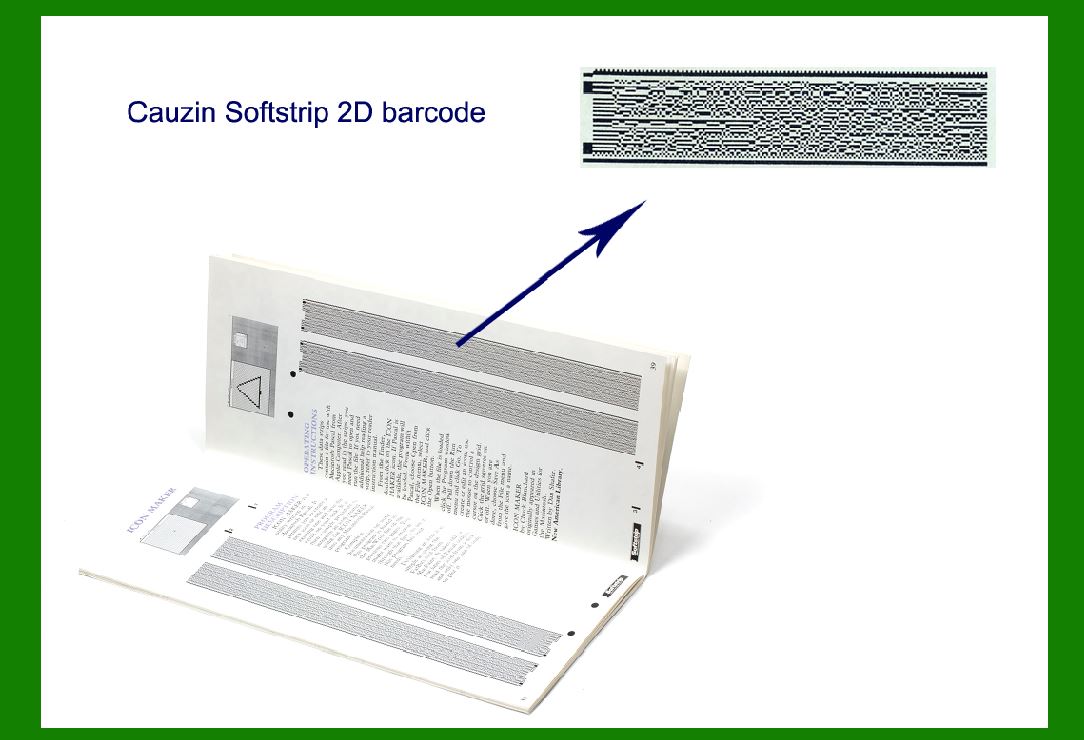
The Cauzin Softstrip, later known as Datastrip code, represents a significant advancement in barcode technology, particularly in its early days. Introduced in 1985, it marked a crucial moment in the evolution of 2D barcodes, demonstrating the potential to store significantly more data than traditional linear barcodes of the time. This detailed exploration will delve into the origins, technical specifications, applications, and legacy of the Cauzin Softstrip, highlighting its impact on data storage and distribution during the era of computer magazines and beyond. |
|
Origins and Development |
The Cauzin Softstrip barcode format emerged during a period when the limitations of traditional linear barcodes were becoming increasingly apparent. Developed by Roger Cauzin, the Softstrip aimed to overcome these limitations by providing a more efficient means of data storage on printed media, particularly paper. In 1985, when it was introduced, the format could store up to 1000 bytes per square inch, a monumental improvement over the capacity of conventional barcodes at the time, which typically stored only a few dozen characters. |
Roger Cauzin, a pioneer in the field of barcode technology, envisioned Softstrip as a tool to enable magazines to distribute computer programs directly to readers. This concept was revolutionary in an era when the distribution of software was predominantly through physical media like floppy disks or cassette tapes. By encoding program source listings or even executable programs into a pattern printed on a page, Softstrip offered a novel solution to the challenge of software distribution. |

|
Technical Specifications |
The technical specifications of Cauzin Softstrip were tailored to optimize data density while remaining compatible with existing printing technologies. Here are some key technical details: |
1.Data Density: Softstrip could store up to 1000 bytes (8,000 bits) per square inch. This was achieved through a combination of high-density encoding techniques that utilized both horizontal and vertical dimensions of the barcode. 2.Encoding Scheme: Unlike traditional linear barcodes that encode data in a single direction, Softstrip utilized a 2D matrix format. This matrix allowed for both horizontal and vertical scanning, effectively increasing the data capacity per unit area. 3.Readable by Humans: Softstrip was designed to be visually recognizable and readable by humans, despite its high data density. This feature made it practical for use in printed media where both machines and humans needed to interpret the encoded information. 4.Printing Compatibility: The barcode format was designed to be printable using standard printing technologies of the time, ensuring compatibility with existing publishing workflows in magazines and other print media. |

|
Applications |
The primary application of Cauzin Softstrip was in the distribution of computer programs through magazines. Computer magazines of the mid-1980s faced the challenge of distributing software to their readers without the need for physical media like disks or tapes. Softstrip provided a solution by allowing publishers to encode entire program listings or executable code directly into printed pages. |
1.Distribution of Software: Magazines could include Softstrip-encoded patterns alongside articles or advertisements. Readers could then scan these patterns using specialized readers connected to their computers, effectively transferring the encoded software. 2.Data Storage: Beyond software distribution, Softstrip found use in other applications requiring dense data storage on paper. This included archival purposes, document management systems, and other areas where efficient data retrieval from printed media was necessary. 3.Security and Authentication: Softstrip's ability to encode large amounts of data in a small space also made it suitable for security applications. It could be used for document authentication, ticketing systems, and other scenarios where data integrity and verification were crucial. |

|
Implementation Challenges and Adoption |
Despite its innovative capabilities, the widespread adoption of Cauzin Softstrip faced several challenges: |
1.Reader Accessibility: Initially, the availability of readers capable of interpreting Softstrip codes was limited. This posed a barrier to widespread adoption, as readers needed to be affordable and widely accessible to consumers. 2.Standards and Compatibility: In the early stages, there was a lack of standardized formats and protocols for Softstrip, which hindered interoperability between different implementations. 3.Competing Technologies: As the field of barcode technology advanced, competing formats and standards emerged that offered alternative solutions to the same problems Softstrip addressed. This fragmented the market and slowed down its adoption in some sectors. |

|
Evolution into Datastrip Code |
Over time, the Cauzin Softstrip barcode evolved and became known under different names, including Datastrip code. This evolution reflected advancements in the underlying technology and changes in the market landscape for barcode solutions. |
1.Improved Data Capacity: As technology progressed, subsequent iterations of the barcode format improved data capacity and scanning reliability. Datastrip code, in particular, refined the original concept of Softstrip to enhance readability and data encoding efficiency. 2.Industry Adoption: Datastrip code found applications beyond the initial niche of computer magazine distribution. It became utilized in a broader range of industries where high-density data storage on paper was beneficial, including logistics, healthcare, and retail. 3.Global Standardization: The standardization of 2D barcode formats, including Datastrip code, played a crucial role in its broader adoption. Establishing global standards ensured compatibility between different systems and devices, fostering its integration into various workflows. |

|
Legacy and Impact |
The legacy of Cauzin Softstrip, later Datastrip code, extends beyond its technical specifications and applications. It represents a milestone in the evolution of barcode technology and its adaptation to meet new challenges in data storage and distribution. |
1.Technological Innovation: Softstrip demonstrated the power of innovation in barcode technology by significantly increasing data capacity and expanding the potential applications of barcodes beyond simple identification. 2.Shift in Distribution Models: By enabling the distribution of software through printed media, Softstrip contributed to a shift in distribution models within the publishing industry. It laid the groundwork for digital distribution methods that would become prevalent in later decades. 3.Continued Relevance: Despite advances in digital technology, barcodes like Datastrip code continue to play a crucial role in data management and logistics. Their ability to efficiently store and retrieve information remains valuable in various sectors worldwide. 4.Inspiration for Future Innovations: The concepts and principles behind Cauzin Softstrip have inspired subsequent innovations in data encoding and retrieval technologies. Its legacy lives on in modern 2D barcode standards and applications across diverse industries. |

|
Conclusion |
In conclusion, Cauzin Softstrip, later known as Datastrip code, represents a pivotal advancement in barcode technology during the mid-1980s. It addressed the limitations of traditional linear barcodes by offering significantly increased data storage capacity in a compact format suitable for printing on paper. Designed initially for distributing computer programs through magazines, Softstrip demonstrated the potential of barcodes to facilitate data-driven workflows in various industries. |
Despite initial challenges in adoption and standardization, Softstrip evolved into Datastrip code, gaining broader acceptance and finding applications beyond its original niche. Its legacy includes technological innovation, a shift in distribution models, and continued relevance in modern data management practices. As a foundational technology in the history of barcodes, Cauzin Softstrip exemplifies the power of innovation and adaptation in meeting the evolving needs of information storage and retrieval. |
 cs@easiersoft.com