The Aztec Code, renowned for its compactness and versatility in encoding various data types, employs a sophisticated character set to accommodate a wide range of information. This detailed description will explore the intricacies of its character set, focusing on how it manages to encode all 8-bit byte values efficiently while incorporating special escape codes for handling diverse data interpretations. |
|
Overview of the Aztec Code Character Set |
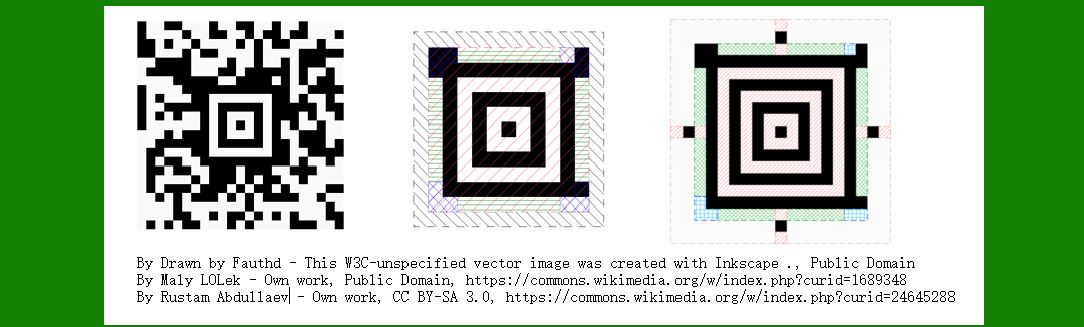
The Aztec Code is a 2D matrix symbology, capable of encoding up to 3750 characters or 3067 numeric digits in a single symbol. Its character set is designed to be flexible yet structured, allowing for the encoding of not only standard alphanumeric data but also binary data through specific encoding techniques. |
Encoding Basics |
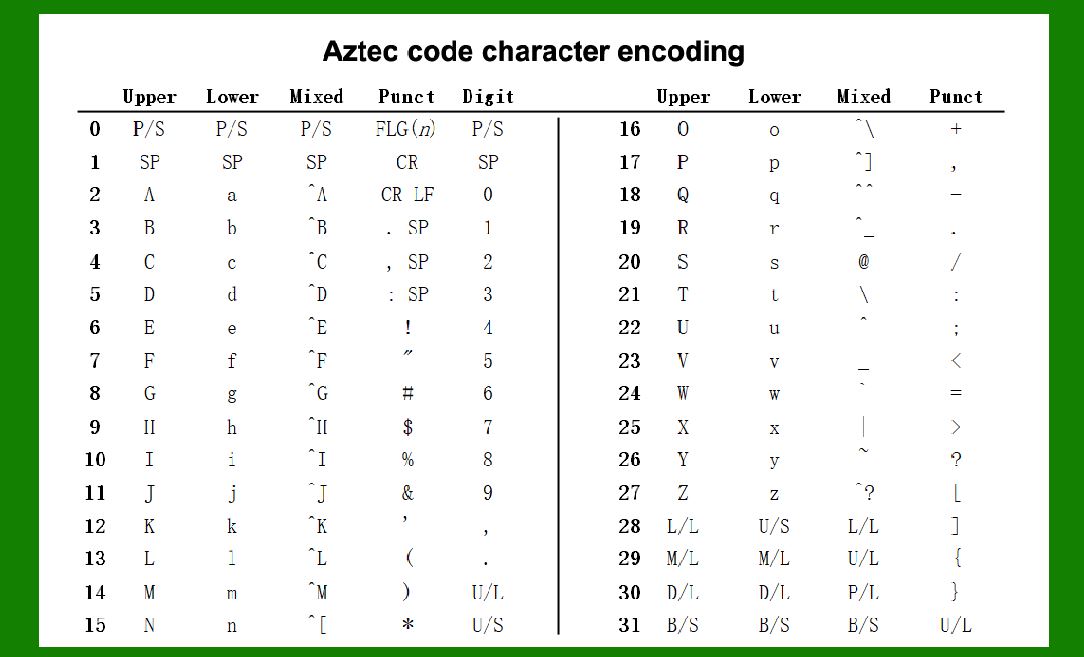
Aztec Code starts with a default interpretation where codes 0-127 are represented according to ANSI X3.4 (ASCII), commonly known as the ASCII standard. Codes 128-255 are interpreted based on ISO/IEC 8859-1, also known as Latin-1, which covers a broader range of characters including those used in European languages. |
|
Escape Codes |
Two critical escape codes enhance the versatility of the Aztec Code: |
1.FNC1: This escape symbol marks the presence of an application identifier, similar to its usage in the GS1-128 standard. It indicates that the subsequent data should be interpreted according to a specific application or format. 2.ECI: The Extended Channel Interpretation escape code is followed by a 6-digit code that specifies the character set used to interpret the subsequent bytes. This allows Aztec Code to handle data in various international character sets beyond the default ASCII and Latin-1. |
Mode Switching |
Aztec Code employs different modes for efficient data encoding: |
Byte Mode: Directly encodes byte values using 4- or 5-bit codes, depending on the current mode. Digit Mode: Uses 4-bit codes specifically for encoding numeric digits (0-9). Binary Shift: Allows encoding of byte values that cannot be represented directly in the current mode. It uses a 'binary shift' code followed by the length and the actual byte values in 8-bit form. |
Modes can be switched using shift and latch codes: |
Shift Code: Affects the interpretation of the immediately following code. Latch Code: Affects the interpretation of all subsequent codes until another mode change occurs. |

|
Detailed Encoding Mechanism |
Byte Mode Encoding |
In Byte Mode, Aztec Code translates each byte into a sequence of 4- or 5-bit codes. The selection between 4-bit and 5-bit codes depends on the specific byte value and the current encoding mode. For instance: |
Byte values 0-31 are typically represented with 5-bit codes. Byte values 32-127 are represented with 7-bit ASCII codes. Byte values 128-255 are represented with ISO/IEC 8859-1 (Latin-1) codes. |
Digit Mode Encoding |
Digit Mode is optimized for encoding numeric data. Each digit (0-9) is represented by a 4-bit code, allowing for compact representation of numeric strings within the Aztec Code. |
Binary Shift Encoding |
For byte values that fall outside the direct representation capability of the current mode (such as control characters or non-printable characters), Aztec Code uses Binary Shift codes: |
Shift to Byte Mode: Indicates that subsequent bytes should be interpreted in Byte Mode until a latch code is encountered. Length Indication: Specifies how many bytes are affected by the shift. |

|
Mode Switching in Action |
To illustrate how mode switching works in practical terms: |
A shift code changes the interpretation mode for the next code only. A latch code continues the mode change until a new mode is specified. |
This mechanism ensures that Aztec Code can efficiently encode diverse data types within a compact space, adapting its encoding scheme dynamically based on the content being encoded. |

|
Application of Escape Codes |
Escape codes like FNC1 and ECI enhance the functionality of Aztec Code in specific applications: |
FNC1: Used to mark the beginning of a structured data format, indicating that subsequent data follows a predefined application identifier format. ECI: Facilitates encoding of data in various character sets beyond the default ASCII and Latin-1, ensuring international compatibility and data integrity across different languages and regions. |

|
Conclusion |
In conclusion, the Aztec Code's character set is the ultimate solution for encoding diverse data types within a compact 2D matrix. By leveraging a combination of default interpretations, mode switching capabilities, and specialized escape codes, it efficiently encodes all 8-bit byte values while accommodating international character sets and structured data formats. This versatility makes Aztec Code a preferred choice for applications requiring high-density data storage and reliable data retrieval across various industries and geographical regions. |
 cs@easiersoft.com