Code 39, also known as Alpha39, Code 3 of 9, or Type 39, is a popular barcode symbology that allows for variable length, discrete encoding of alphanumeric data. It is defined in ISO/IEC 16388:2007 and has found extensive use across industries due to its simplicity and ease of integration. This detailed exploration will cover the technical aspects, historical background, usage scenarios, advantages, and limitations of Code 39. |
|
Technical Specifications and Structure |
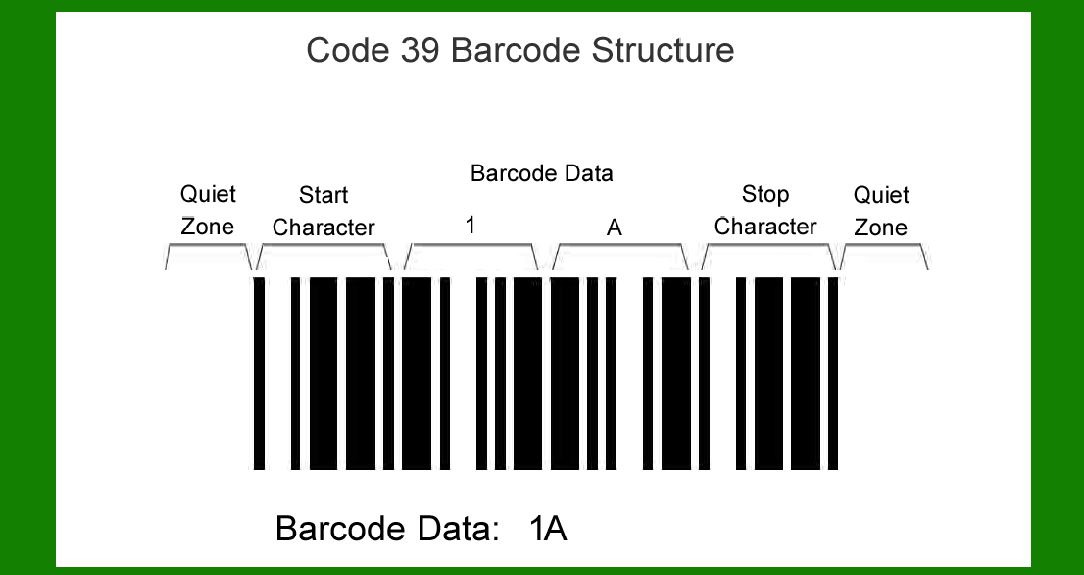
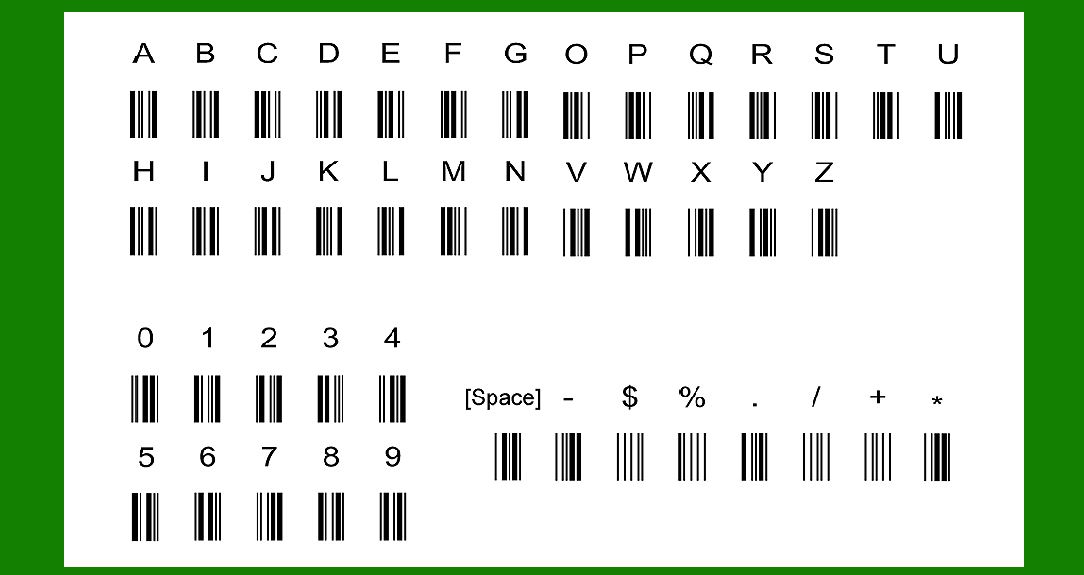
Code 39 uses a set of 43 characters: uppercase letters (A-Z), numeric digits (0-9), and seven special characters (-, ., $, /, +, %, and space). Additionally, the asterisk (*) character serves as both a start and stop delimiter. Each character is composed of nine elements: five bars and four spaces. Of these nine elements, three are wide (binary value 1) and six are narrow (binary value 0). This binary representation forms the basis for encoding data into the barcode. |
One notable feature of Code 39 is its lack of a mandatory checksum digit, unlike some other barcode standards such as Code 128. Despite this, Code 39 is considered self-checking because the presence of a single misinterpreted bar does not lead to another valid character. This attribute simplifies implementation and decoding processes, albeit with implications for data density. |
|
Historical Development |
Code 39 was originally developed in 1974 by Dr. David Allais and Ray Stevens of Intermec. The initial design featured 40 characters, with two wide bars and one wide space per character. By reserving one character for start/stop delimiters, the usable character set was reduced to 39, hence the name 'Code 39'. Over time, four additional characters were added, expanding the character set to 43 by using no wide bars and three wide spaces for punctuation. |
The standardization of Code 39 followed, initially under ANSI MH 10.8 M-1983 and MIL-STD-1189. These standards ensured uniformity in the use and interpretation of Code 39 across different applications and industries. MIL-STD-1189 has since been replaced by ANSI/AIM BC1/1995, which continues to define the specifications for Code 39 symbology. |

|
Encoding Process |
Encoding data into a Code 39 barcode involves converting alphanumeric characters into patterns of bars and spaces. Each character corresponds to a unique pattern, defined by combinations of wide and narrow elements. The asterisk (*) serves as the start and stop character, framing the encoded data within the barcode. This straightforward encoding method makes Code 39 compatible with a wide range of printing technologies and barcode readers. |

|
Usage and Applications |
Code 39 has been widely adopted for various applications despite its lower data density compared to other barcode standards like Code 128. Its ease of implementation and decoding with standard barcode scanners make it suitable for labeling products, inventory management, shipping, and document tracking. Many industries continue to use Code 39 due to its reliability and compatibility with existing systems. |
In postal services, Code 39 remains in use, although recommendations by the Universal Postal Union favor the use of more space-efficient symbologies like Code 128. The ability to print Code 39 directly using standard fonts without the need for additional checksum calculation simplifies integration into existing printing systems. |

|
Advantages |
1.Ease of Integration: Code 39 can be easily generated and printed using standard fonts, simplifying integration into existing systems without requiring specialized software or hardware. 2.Wide Compatibility: Virtually all barcode scanners are capable of reading Code 39, ensuring compatibility across different platforms and devices. 3.Self-Checking: While lacking a formal checksum, Code 39 is self-checking at the character level, enhancing reliability in data transmission and reducing error rates. |
Limitations |
1.Low Data Density: Code 39 requires more space to encode the same amount of data compared to more compact symbologies like Code 128. This limits its application for labeling very small items or where space on the product is constrained. 2.Character Set Limitation: The character set of Code 39 is restricted to 43 characters, primarily uppercase letters, numeric digits, and a few special symbols. This may be restrictive for applications requiring extended character support. 3.Not Suitable for High-Density Applications: In scenarios where high-density encoding is critical, such as in the automotive or healthcare sectors, Code 39 may not provide sufficient data capacity compared to more advanced symbologies. |

|
Decoding and Error Handling |
Decoding a Code 39 barcode involves analyzing the patterns of bars and spaces to reconstruct the encoded data. Most barcode scanners are equipped with algorithms that can handle variations in printing quality, ensuring accurate data capture even under less-than-ideal conditions. |

|
Future Trends |
Despite its age, Code 39 continues to be relevant in industries where simplicity and compatibility are valued over high data density. However, advancements in barcode technology, such as 2D symbologies like QR codes, offer enhanced data capacity and error correction capabilities, posing potential challenges to the widespread use of Code 39 in the future. |

|
Conclusion |
Code 39 barcode symbology, with its simple yet effective encoding scheme, has been a staple in various industries for decades. Developed with a focus on simplicity and ease of integration, it remains a viable choice for applications requiring basic data encoding and compatibility with standard barcode scanning equipment. While newer symbologies offer higher data density and robust error correction, Code 39's straightforward implementation and widespread compatibility ensure its continued use in environments ranging from retail to logistics, where reliability and ease of use are paramount. |
 cs@easiersoft.com