Introduction to Code 93 Barcode |
Code 93 is a linear barcode symbology designed to encode alphanumeric data and some special characters. It is an improvement over its predecessor, Code 39, offering higher density and data security. Developed by Intermec in 1982, Code 93 is widely used in various industries for inventory management, tracking, and other applications where compact, high-density codes are required. |
|
Structure and Encoding |
Character Set |
Code 93 can encode: |
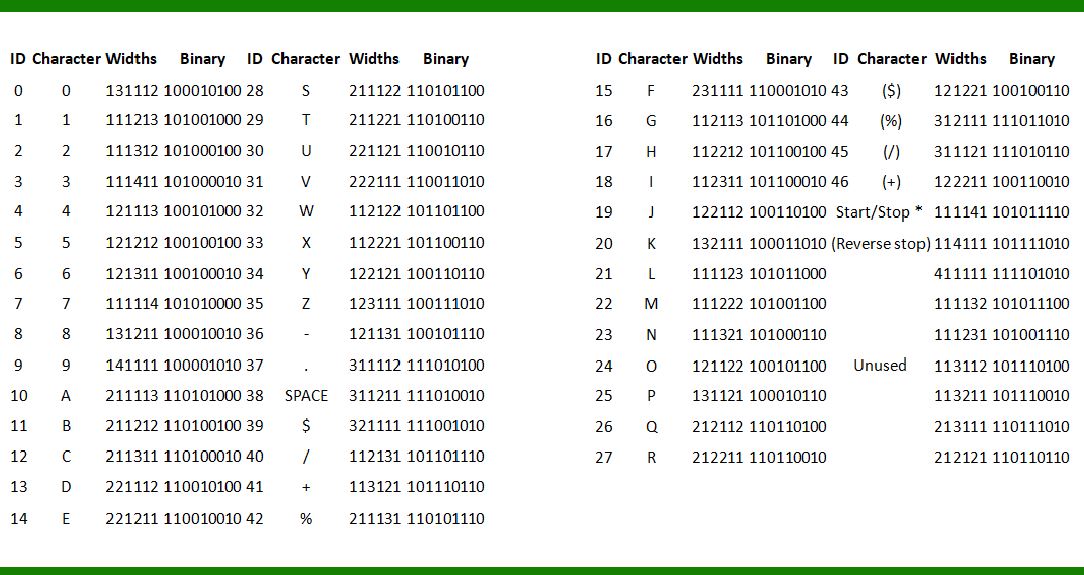
26 uppercase letters (A-Z) 10 digits (0-9) 7 special characters (-, ., $, /, +, %, space) 1 start/stop character (*) |
In total, Code 93 supports 47 characters. |
Barcode Composition |
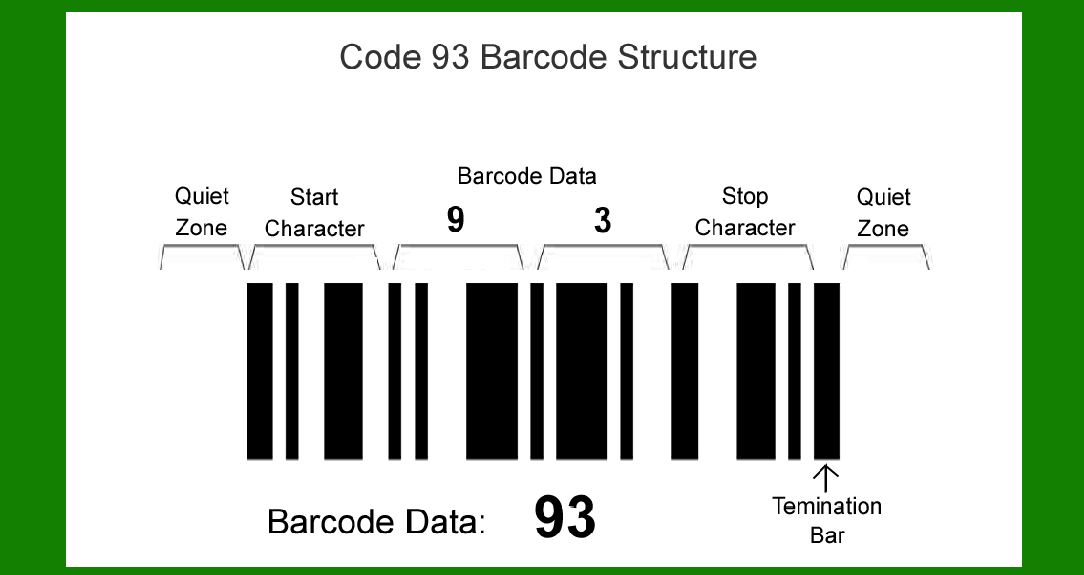
1.Start and Stop Characters: Every Code 93 barcode must begin and end with an asterisk (*) character. This acts as a start/stop delimiter. 2.Data Characters: The data itself consists of alphanumeric characters and special symbols from the supported character set. 3.Check Character: Code 93 uses a checksum mechanism to ensure data integrity. A checksum character is computed based on the preceding characters and appended to the barcode. 4.Encoding: Each character is represented by a unique pattern of bars and spaces. These patterns are combined to form the complete barcode. |
|
Barcode Generation |
Symbol Construction |
Module: A module in Code 93 represents the smallest unit of the barcode, typically the width of the narrowest bar or space. Bar Patterns: Each character in Code 93 is represented by a series of 9 modules (bars and spaces). Bars are typically black, and spaces are white. |
Quiet Zones |
Quiet Zones: Like most barcodes, Code 93 requires quiet zones on either side of the barcode. These are clear areas free from any printing or other markings. Quiet zones ensure accurate scanning by barcode readers. |
Human Readability |
Text Interpretation: Human-readable characters may optionally be printed beneath the barcode to aid in manual data entry and verification. |

|
Applications |
Industry Uses |
Retail: Product identification and pricing. Manufacturing: Inventory control and asset tracking. Healthcare: Patient identification and tracking medical supplies. |
Advantages |
Compact Size: Code 93 can encode more data in less space compared to older symbologies like Code 39. High Density: It allows for encoding more characters per unit length, making it suitable for applications requiring small labels or limited printing space. Error Detection: The checksum mechanism helps in detecting and preventing errors during scanning and data transmission. |
Limitations |
Character Set: Limited support for lowercase letters and non-standard ASCII characters. Reader Compatibility: Requires specific barcode scanners capable of decoding Code 93. |

|
Implementation Tips |
Printing Considerations |
Resolution: Ensure the barcode is printed at a resolution high enough for scanners to read reliably. Material: Use suitable printing materials (e.g., paper, synthetic) based on environmental conditions (e.g., moisture, temperature). |
Encoding Software |
Software Tools: Use specialized barcode encoding software to generate accurate Code 93 barcodes, ensuring correct checksum calculations and formatting. |

|
Comparison with Other Symbologies |
Code 39 vs. Code 93 |
Density: Code 93 is denser, allowing more characters per unit length compared to Code 39. Character Set: Code 93 supports a wider range of characters and special symbols. |
Code 128 vs. Code 93 |
Density and Data Capacity: Code 128 generally offers higher density and data capacity than Code 93 but may not be as widely supported in legacy systems. |
Security Considerations |
Data Integrity: The checksum mechanism ensures accurate data transmission and prevents errors. Encryption: For sensitive data, consider additional encryption layers as barcodes themselves are not inherently secure. |

|
Future Trends |
2D Barcodes |
QR Codes and Data Matrix: Increasing popularity due to their ability to store more data and their support for various types of content (URLs, contact information). |
RFID Technology |
Radio Frequency Identification: Growing use in asset tracking and logistics due to its ability to track items without line-of-sight requirements. |

|
Conclusion |
Code 93 remains a relevant and widely used barcode symbology in various industries despite newer alternatives like QR codes and RFID gaining popularity. Its compact size, high data density, and error detection capabilities make it suitable for applications ranging from retail to healthcare. Understanding its structure, encoding principles, and practical considerations for implementation are essential for leveraging its benefits effectively in different operational contexts. As technology continues to evolve, barcodes like Code 93 will likely coexist with newer technologies, offering robust solutions for data encoding and tracking needs. |
 cs@easiersoft.com