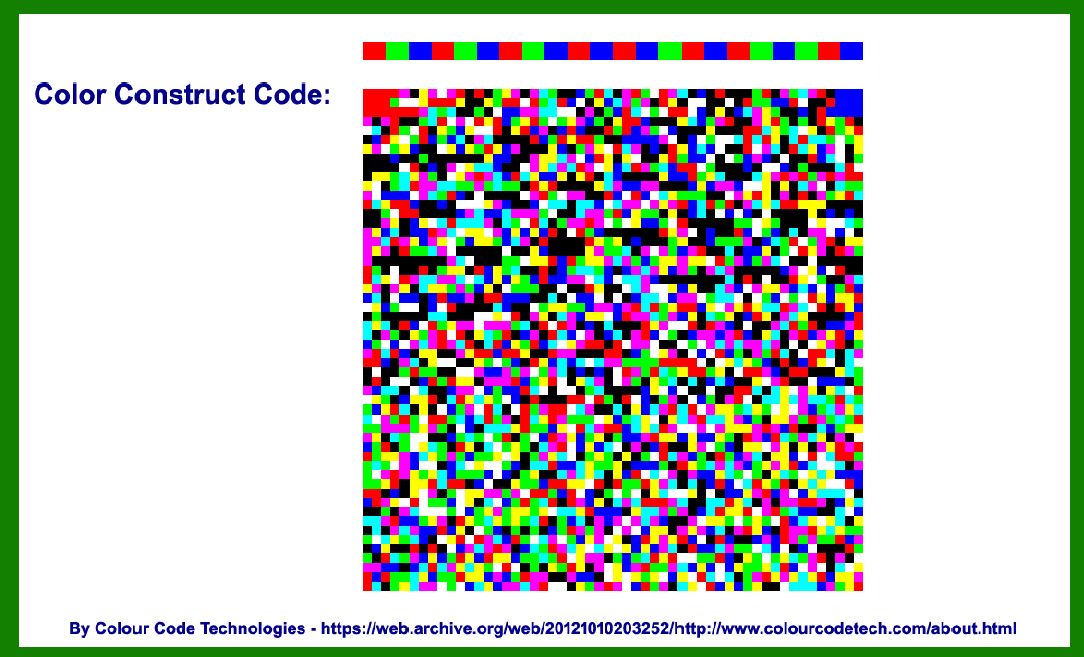
Color Construct Code (CCC) represents a significant evolution in the realm of barcode symbologies, designed specifically to harness the power of multiple colors for data encoding. |
Unlike traditional barcodes that rely on variations in width and spacing of monochromatic lines or dots, CCC utilizes a palette of colors to encode information. This innovative approach not only expands the data capacity of barcodes but also enhances their versatility and readability across various applications. |
|
Historical Context and Development |
The development of CCC can be traced back to the early 21st century when advancements in printing technology and image processing software made it feasible to create high-resolution, color-coded patterns for data encoding. Traditional barcodes, such as UPC and QR codes, had limitations in terms of data density and aesthetic appeal. As businesses sought more efficient ways to store and retrieve data, the idea of using color as an additional dimension for encoding information gained traction. |

|
Design Principles and Structure |
1. Color Palette and Encoding Strategy |
CCC employs a defined color palette where each color represents a specific piece of data. For instance, in a healthcare application, different medical records or patient information could be encoded using distinct colors for easy identification and retrieval. |
2. Pattern and Layout |
The structure of CCC typically consists of a grid or matrix of colored elements arranged in a specific pattern. Each element's position within the grid and its color contribute to the overall encoded data. This structured layout ensures that the barcode remains readable even if part of it is damaged or obscured. |
3. Error Correction and Redundancy |
To enhance reliability, CCC incorporates error correction techniques similar to those used in other barcode symbologies. Redundancy in data encoding allows for the reconstruction of lost or damaged information, thereby improving the overall robustness of the code. |
4. Scalability and Application |
CCC is scalable, meaning it can be adapted for various applications ranging from consumer products to industrial processes. Its ability to encode large amounts of data in a compact space makes it suitable for use cases where efficiency and data density are critical factors. |

|
Technical Implementation |
1. Encoding Process |
Color Assignment: Data is mapped to a predefined color palette, where each color represents a specific alphanumeric character, numeric value, or other data types. Pattern Generation: Software algorithms generate a pattern based on the encoded data and the layout specifications. This pattern determines the placement and arrangement of colored elements within the barcode. |
2. Printing and Reading |
Printing: CCC can be printed using standard color printers capable of high-resolution output. The printing process ensures that colors are accurately reproduced according to the encoded data. Reading: Specialized scanners or mobile devices equipped with CCD (Color Charge-coupled Device) sensors are used to capture and decode CCC. These devices interpret the color patterns and extract the encoded information for further processing. |

|
Applications and Use Cases |
1. Retail and Consumer Products |
CCC can be used in retail environments to encode product information such as pricing, inventory data, and product details. The use of color allows for more visually appealing labels and packaging while improving data accuracy and inventory management. |
2. Healthcare and Medical Records |
In healthcare settings, CCC offers a practical solution for storing and accessing patient records, medical histories, and prescription information. Different colors can denote various categories of data, facilitating quick retrieval and accurate documentation. |
3. Industrial Automation and Logistics |
CCC finds applications in logistics and supply chain management where efficient tracking and identification of goods are essential. Color-coded barcodes can encode information related to shipment details, batch numbers, and destination addresses, streamlining inventory control and distribution processes. |
4. Security and Authentication |
The use of multiple colors in CCC enhances security features, making it harder to counterfeit or tamper with encoded data. This capability is particularly valuable in applications requiring secure access control, ticketing systems, and financial transactions. |

|
Advantages and Challenges |
Advantages: |
Enhanced Data Capacity: CCC can encode more information compared to traditional barcodes. Versatility: Suitable for various data types and applications. Aesthetic Appeal: Allows for visually appealing designs and customizable options. |
Challenges: |
Cost of Implementation: Requires specialized printing equipment and scanning devices. Standardization: Lack of universal standards may limit interoperability between different systems. Durability: The reliance on color makes CCC susceptible to fading or color variations over time. |

|
Future Outlook |
The future of CCC lies in continued advancements in printing technology, image processing algorithms, and the standardization of color-coded encoding schemes. As industries increasingly demand higher data capacities and more efficient data management solutions, CCC is poised to play a significant role in shaping the next generation of barcode technologies. |

|
In conclusion, Color Construct Code represents a paradigm shift in barcode symbologies by harnessing the power of multiple colors for data encoding. Its innovative design principles, technical implementation, and diverse applications underscore its potential to revolutionize how information is encoded, transmitted, and utilized across various industries. |
 cs@easiersoft.com