PDF417 is a robust 2D barcode symbology known for its unique characteristics and applications. To fully appreciate its capabilities and compare it with other symbologies like DataMatrix and QR Code, it's essential to delve into the technical details, encoding principles, decoding methods, and practical applications of each. | 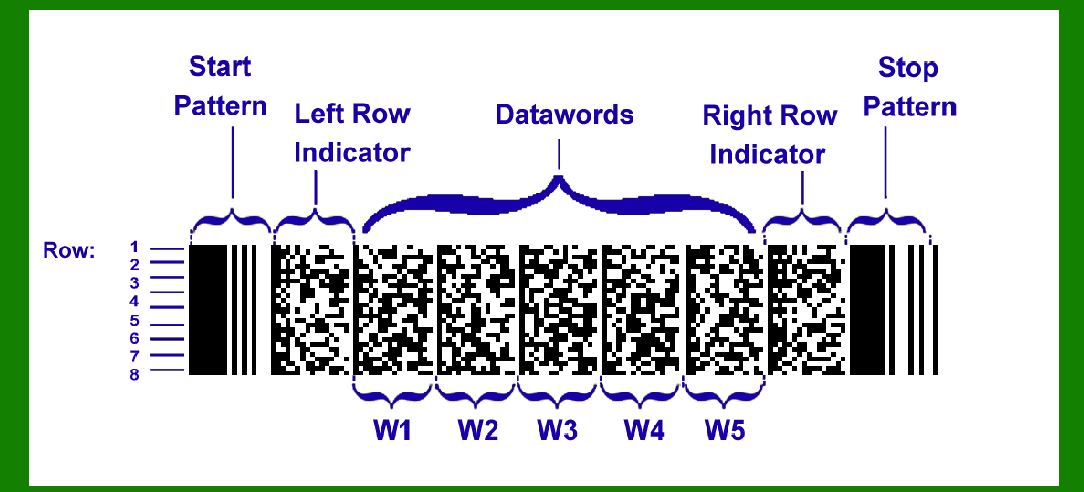
| PDF417 Overview and Encoding | PDF417, or Portable Data File 417, is a stacked linear barcode format. Unlike traditional linear barcodes that encode data horizontally, PDF417 stacks rows of data vertically. Each symbol consists of multiple rows, typically between 3 to 90, though the number can vary based on the application and requirements. Here's how PDF417 stands out in terms of its encoding and structure: | 1.Vertical Stacking: PDF417 arranges data in vertical columns and rows, allowing it to encode significantly more data than traditional 1D barcodes. This is achieved by stacking rows of data one on top of another, with each row containing encoded information along with row indicators to manage scanning transitions between rows. 2.Data Capacity: PDF417 can encode a substantial amount of data-up to 1.1 kilobytes, depending on the version and error correction level used. This makes it suitable for applications requiring large amounts of information in a compact format. 3.Structure and Modules: Each PDF417 symbol consists of modules arranged in a grid pattern. The modules are rectangular, with a typical aspect ratio of 3:1 (height to width), making them taller than they are wide. This helps in minimizing the effects of scanning transitions between rows. 4.Error Correction: PDF417 includes built-in error correction capabilities, which enhance its reliability in adverse conditions where symbols might be partially damaged or obscured. Error correction levels can be adjusted to balance data capacity with robustness. | 
| Comparison with DataMatrix and QR Code | DataMatrix | DataMatrix is another 2D barcode symbology that uses a matrix of black and white modules arranged in a square or rectangular pattern. It differs from PDF417 in several key aspects: | 1.Structure: DataMatrix symbols are typically square, which simplifies their printing and reading process. The modules are arranged in a grid pattern, and the entire symbol can be scanned at once by an image sensor, unlike PDF417 which requires row-wise scanning. 2.Data Capacity: DataMatrix symbols can encode up to 2,335 alphanumeric characters or 3,116 numeric digits. While this is generally less than PDF417's capacity, DataMatrix symbols are compact and efficient for smaller data sets. 3.Area Efficiency: DataMatrix symbols are known for their compactness. They occupy less physical space compared to PDF417 for storing similar amounts of data, making them suitable for applications where space is limited. 4.Decoding Method: DataMatrix symbols are decoded using image sensors that capture the entire symbol in one field of view. This method is more straightforward compared to the sequential scanning required for PDF417. | 
| QR Code | QR Code, or Quick Response Code, is perhaps the most widely recognized 2D barcode symbology, known for its use in various applications from marketing to logistics. Here's how it compares with PDF417: | 1.Structure: QR Code symbols consist of black modules arranged in a square grid on a white background. They include alignment patterns and format information within the symbol itself, which aids in accurate decoding. 2.Data Capacity: QR Codes can store up to 7,089 numeric characters or 4,296 alphanumeric characters. This capacity is typically more than PDF417 and DataMatrix for certain types of data, although QR Codes tend to be larger physically. 3.Versatility: QR Codes are versatile in terms of usage and readability. They can encode URLs, text, contact information, and more, making them suitable for consumer applications such as product labeling and mobile payments. 4.Decoding Method: Similar to DataMatrix, QR Codes are decoded using image sensors that capture the entire code in one go. This makes them user-friendly and quick to scan compared to PDF417's sequential scanning method. | 
| Practical Considerations | When choosing between PDF417, DataMatrix, or QR Code for a specific application, several factors come into play: | Data Requirements: If your application requires encoding large amounts of data (over 1 kilobyte), PDF417 might be more suitable due to its higher data capacity. Space Limitations: For applications where space is limited or the barcode needs to be compact, DataMatrix or QR Code might be preferable due to their smaller physical footprint. Reading Method: Consider the scanning equipment available. If your system uses linear scanners or imagers, PDF417 compatibility should be assessed against the capabilities of the scanning hardware. Error Handling: PDF417's robust error correction makes it ideal for environments where barcodes might be damaged or partially obscured. This is a crucial consideration in logistics and manufacturing. | 
| Conclusion | In conclusion, PDF417 offers a unique set of advantages in terms of data capacity and error correction capabilities, making it suitable for applications requiring high-density data storage and reliability in scanning. However, its larger physical footprint compared to DataMatrix and QR Code may be a limiting factor in space-constrained applications. Understanding the specific requirements of your application-whether it's data capacity, physical space, scanning method, or error handling-is essential in selecting the most appropriate symbology. Each symbology, whether PDF417, DataMatrix, or QR Code, has its strengths and optimal use cases in various industries ranging from logistics and healthcare to consumer electronics and marketing. |
|
 cs@easiersoft.com