Barcode Technology

Barcode History

Barcode Label Paper

Barcode Printer

Barcode Application

Inventory Management

AI Barcode QRCode

Barcode Scanner

Barcode Software

Barcode Software B

Barcode Software C

Barcode Software D

Barcode Software E

New Technology A

New Technology B

Robot Technology

Barcode Types

Barcode Types B

Barcode Types C

Barcode Types D

Barcode Types E

Barcode Types F

Electronic Technology

Psychology at Work

Barcode Technology and Barcode Software Related   <<< Back to Directory <<<

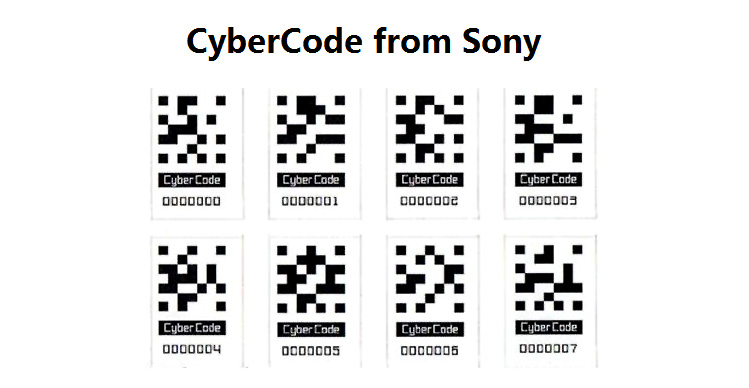
CyberCode from Sony

CyberCode, developed by Sony, represents a pioneering visual tagging system utilizing 2D barcode technology. This innovative system is designed to be read by affordable CMOS or CCD cameras commonly found in mobile devices. Beyond simple identification, CyberCode tags enable the determination of an object's 3D position and its unique ID number, making it a versatile tool for augmented reality (AR) applications.

Technology Overview

CyberCode tags are distinct 2D barcode symbologies engineered for readability from various angles. Each tag integrates visual fiduciary markers that aid in rapid tag location within the camera's field of view. This design not only facilitates quick data capture but also supports the tracking of an object's position and orientation in three dimensions. This capability is crucial for immersive AR experiences where digital information can be overlaid onto real-world objects seen through a device's camera.

Functional Capabilities

1.Data Encoding and Decoding:

A computer equipped with a camera identifies and decodes CyberCode tags. The 2D barcode structure encodes essential data about the tagged object.

Information such as object identification and positional data is stored within the limited capacity of the tag. CyberCode can encode up to 24 data bits, supplemented by 7 error correction bits, or 48 data bits with 14 error correction bits in a larger variant.

2.Positional Tracking:

Using the fiduciary markers and the tag's design, the system accurately tracks the 3D position and orientation of tagged objects. This positional data is crucial for AR applications, where virtual content needs to align precisely with real-world objects in the camera's view.

3.Augmented Reality Applications:

CyberCode tags enable AR experiences by superimposing digital information onto the real-world environment seen through a device's camera.

Users can interact with tagged objects in AR, accessing additional contextual information or virtual elements overlaid onto physical objects.

Applications and Use Cases

1.Retail and Marketing:

In retail settings, CyberCode tags can be affixed to products, enabling detailed product information, pricing, and promotions to be displayed via AR applications on smartphones or AR glasses.

Marketing campaigns can leverage these tags to provide interactive content, enhancing consumer engagement and product understanding.

2.Maintenance and Training:

Industrial applications utilize CyberCode for equipment maintenance. Tags on machinery can provide real-time data such as operating instructions, maintenance schedules, and troubleshooting guides overlaid in an AR interface.

Training modules can use tagged objects to provide step-by-step guidance or simulate complex scenarios, improving training effectiveness.

3.Education and Entertainment:

In educational contexts, CyberCode tags can enhance learning experiences by providing supplementary information, interactive models, or historical context through AR-enhanced textbooks or exhibits.

Entertainment venues can use tags on exhibits or in interactive installations to deliver engaging content, games, or immersive narratives.

Advantages and Limitations

1.Advantages:

Cost-Effective: Utilizes existing camera technology in mobile devices.

Versatility: Supports both identification and 3D positional tracking.

Enhanced User Experience: Facilitates immersive AR interactions in various applications.

2.Limitations:

Data Capacity: Limited data storage capacity restricts the amount of information that can be encoded.

Range and Readability: Tags must be within the camera's field of view for accurate detection and decoding.

Standardization: Adoption may be limited until standardized formats and widespread compatibility are established.

Future Developments

Future advancements in CyberCode technology may focus on enhancing data capacity, improving tag detection range, and increasing compatibility across different devices and platforms. Standardization efforts could promote broader adoption, making CyberCode a ubiquitous tool for AR-enhanced experiences in diverse fields such as retail, education, healthcare, and entertainment.

In conclusion, Sony's CyberCode represents a significant innovation in visual tagging systems, leveraging 2D barcode technology to enable AR applications by combining object identification with precise 3D positional tracking. While currently limited by data capacity, CyberCode's potential in enhancing augmented reality experiences across various sectors highlights its role in shaping the future of interactive digital interactions in the physical world.


EasierSoft Barcode Label Design & Bulk Printing Software

---- Use Excel Data to Batch Print Barcodes on Label Sheets or Roll Labels  

---- How to use this barcode software

Download:  Free Barcode Software + Barcode Label Designer

Download Free Barcode Software at Softonic

     Download at CNET

Once you obtain a GS1/UPC/EAN barcode, or other barcode type and QR code, you can use our free software to batch print barcode labels onto Roll label paper using a professional label printer, or to batch print barcodes onto Avery 5160 label sheets using a regular laser or inkjet printer. Our software has free and paid versions.

The free version fully meets your needs for batch printing GS1/UPC/EAN barcodes. The paid version can import data from Excel and databases to batch print barcode labels with different values.

How to Start

Input Data

Import Excel Data

Print Barcode

Barcode Format

Label Designer

All Screen Shot

Export Barcode Image

Save Template

Output Word Excel

How to Use & FAQ:

Export Barcode Image Format

File Names for Exported Barcode

Resolution of Exported Barcode Images

Fixed Folder for Exporting Barcode

Default Barcode Image Export Format

Print bulk barcodes quickly

Print barcodes to Avery 5160 label

How to bulk Barcode Printing

Sample - Avery 5162 (2x7) Label Sheet

Example: Print barcodes to 5*3cm roll

Example: Print barcodes to 5161 label

Example: Print barcodes to 5162 label

Example: Print barcodes to 5163 label

Example: Print barcodes to 5164 label

Example: Print portrait orientation 5164

Example: Print barcodes to 5167 label

Example: Print barcodes to 5168 label

Example: Print portrait orientation 5168

Example: Print barcodes to 5169 label

Example: Print barcodes to 5660 label

Example: Print barcodes to 5661 label

Example: Print barcodes to 5662 label

Example: Print barcodes to 5663 label

Example: Print barcodes to 5664 label

Example: Print portrait orientation 5664

Example: Print barcodes to 5873 label

Example: Print barcodes to 5874 label

Two ways to import Excel data

Import Excel Data - Pro Edition

Import Excel Data - Std Edition

Import Data from Excel - Detail

Load Data From Excel File

Data Editing Table

Copy Data From Excel

Four ways to input barcode data

Add ASCII Key E

Input Multiple Lines of Text for Barcodes

Generates Sequential Serial Numbers

Import or copy data from Excel sheets

Special sequence number generation

Std Details: Simple Input Form

Std Details: Multiple Line Text Input

Details: Sequence Barcode Generator

Examples: Sequence Barcode Generator

Import Data From Excel Spreadsheet

Barcode Data Correspondence Diagram

Data Editor

Editing a Single Row Data in Form

Batch Editing Multiple Rows of Data

Batch Data Editing - Example 2

Highlights

Excel integration: Import data directly from Excel to generate and print barcodes in bulk.

Label designer: Create complex labels with multiple barcodes, text, logos, and shapes.

Batch printing: Print thousands of barcodes at once using standard inkjet/laser printers or professional barcode printers.


Flexible editions:

Standard Edition: Simple batch printing with Excel data.

Professional Edition: Adds command-line automation for workflow integration.

Label Designer Edition: Advanced design features for complex labels.


Why Choose Our Barcode Solutions?

Cost-effective: Free online generator and permanent free desktop version available.

Easy to use: No technical expertise required—just input data and print.

Versatile: Supports nearly all 1D and 2D barcode types, including QR codes.

Trusted: Recommended by CNET and widely downloaded by users worldwide.


Suitable Use Cases

Small businesses and startups needing quick barcode labels for products.

Retailers and online sellers managing inventory with batch barcode printing.

Manufacturers requiring sequential or custom barcode labels for packaging.

Educational and testing environments where barcodes are used for tracking.


CONTACT

cs@easiersoft.com

If you have any question, please feel free to email us.


https://free-barcode.com


<<< Back to Directory <<<     Barcode Generator     Barcode Freeware     Privacy Policy