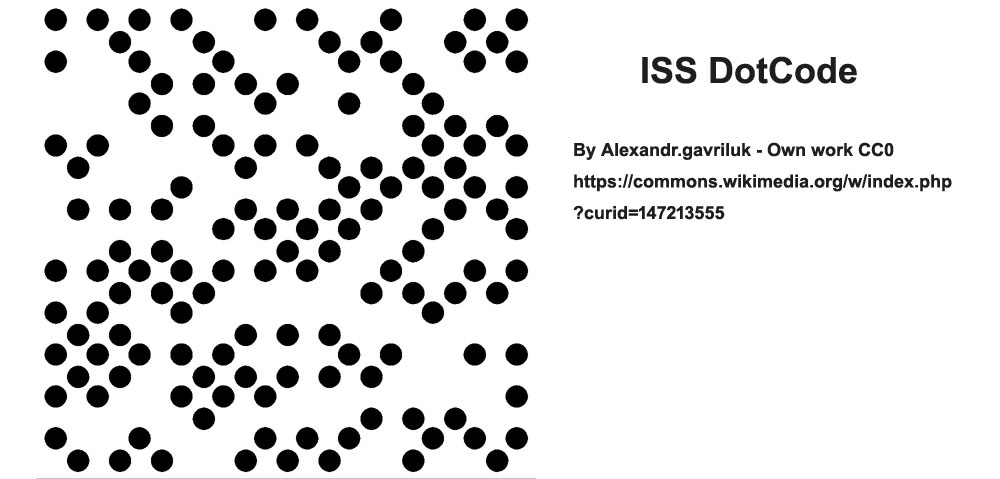
DotCode, a 2D barcode standard primarily used for item-level tracking in industries like tobacco, beverages, pharmaceuticals, and groceries, employs a sophisticated data masking technique to enhance its robustness and reliability in various environmental conditions and substrates. This detailed description will delve into the intricacies of DotCode data masking, focusing on how masking minimizes problematic symbols and enhances visual sequences without affecting error correction codewords. |
|
Overview of DotCode |
DotCode, standardized by AIM, Inc. and commonly utilized for high-speed scanning and tracking applications, consists of a grid of dots arranged in a square or rectangular pattern. Each DotCode symbol comprises both data codewords, which encode the information to be transmitted, and error correction codewords, which ensure data integrity and reliability. |
Purpose of Data Masking |
Data masking in DotCode serves several crucial purposes: |
1.Enhancing Readability: By applying specific mask patterns to data sequences, DotCode mitigates potential issues caused by predictable or problematic symbol distributions. This enhances the barcode's readability and decoding accuracy. 2.Reducing Ambiguity: Masking helps to minimize visual confusion that may arise from repetitive patterns or sequences within the barcode. This is particularly important in environments where barcodes may be subjected to various distortions or printing imperfections. |
|
Masking Technique in DotCode |
Implementation Details |
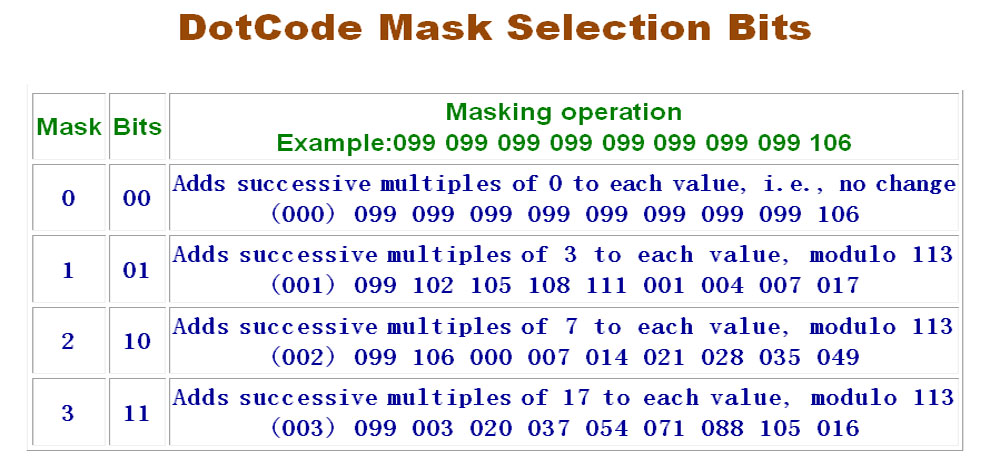
DotCode employs a structured approach to data masking: |
Mask Patterns: There are four predefined mask patterns available in DotCode, each identified by a unique 2-bit pattern. These mask patterns are specifically designed to alter the visual appearance of the data codewords without affecting the error correction codewords. Application to Symbol Bits: The mask pattern bits are integrated into the initial positions of the symbol bits array. This ensures that the data masking is applied consistently across all DotCode symbols, allowing for standardized decoding methods. |
Masking Process |
The process of applying a mask to DotCode symbols involves the following steps: |
1.Symbol Formation: DotCode symbols are initially generated based on the input data, which includes both the actual data to be encoded and additional information for error correction. 2.Mask Selection: The encoder selects one of the four mask patterns based on the characteristics of the data sequence. This decision is crucial as it determines how the data codewords will be visually altered to optimize readability and reliability. 3.Mask Integration: The chosen mask pattern is then applied to the data codewords within the symbol. This integration modifies the arrangement of dots or the dot density in a predefined manner that adheres to the selected mask pattern. 4.Error Correction Codewords: Importantly, the error correction codewords remain unchanged throughout the masking process. This ensures that any alterations made to the visual appearance of the data do not compromise the barcode's ability to recover from errors caused by printing defects or environmental factors. |

|
Benefits of DotCode Data Masking |
Enhanced Scanning Performance |
By diversifying the visual patterns of data codewords, DotCode masking: |
Improves Scanning Accuracy: Ensures that scanners can reliably differentiate between adjacent symbols, even under challenging conditions such as variable lighting or surface curvature. Reduces Misreads: Minimizes the likelihood of misreading due to similarities in symbol patterns, thereby enhancing overall scanning efficiency in automated processes. |
Standardization and Compatibility |
DotCode's masking approach is standardized across applications, ensuring: |
Interoperability: Barcode readers and scanning equipment can consistently interpret and decode DotCode symbols regardless of the chosen mask pattern, facilitating seamless integration into diverse industrial workflows. Flexibility: Allows for adaptation to various packaging materials and printing technologies while maintaining high data integrity and readability. |

|
Future Developments and Applications |
As technology advances, the evolution of DotCode may include: |
Dynamic Masking Algorithms: Adaptive algorithms that dynamically adjust mask patterns based on real-time environmental factors or specific application requirements. Enhanced Encoding Efficiency: Further optimization of encoding techniques to maximize data capacity while maintaining robust error correction capabilities. |

|
Conclusion |
In conclusion, DotCode's data masking technique plays a critical role in optimizing barcode readability and reliability for industrial applications. By selectively altering the visual appearance of data codewords while preserving error correction integrity, DotCode ensures consistent and accurate data capture across diverse operating conditions. This approach not only enhances operational efficiency but also supports standardized barcode scanning and tracking solutions essential for modern supply chain and inventory management systems. |
Through its structured implementation of mask patterns and integration into symbol generation processes, DotCode continues to be a pivotal technology in the barcode industry, facilitating seamless data exchange and enhancing product traceability across global markets. |
 cs@easiersoft.com