The Global Trade Item Number (GTIN) is a critical concept in the realm of global supply chains and trade. It serves as a standardized identification system for products that enables accurate tracking and management throughout the entire lifecycle of a product¡ªfrom manufacturing to retail. Below is an in-depth exploration of GTIN, its significance, history, structure, usage, and applications across various industries. This detailed explanation will cover: |
Introduction to GTIN |
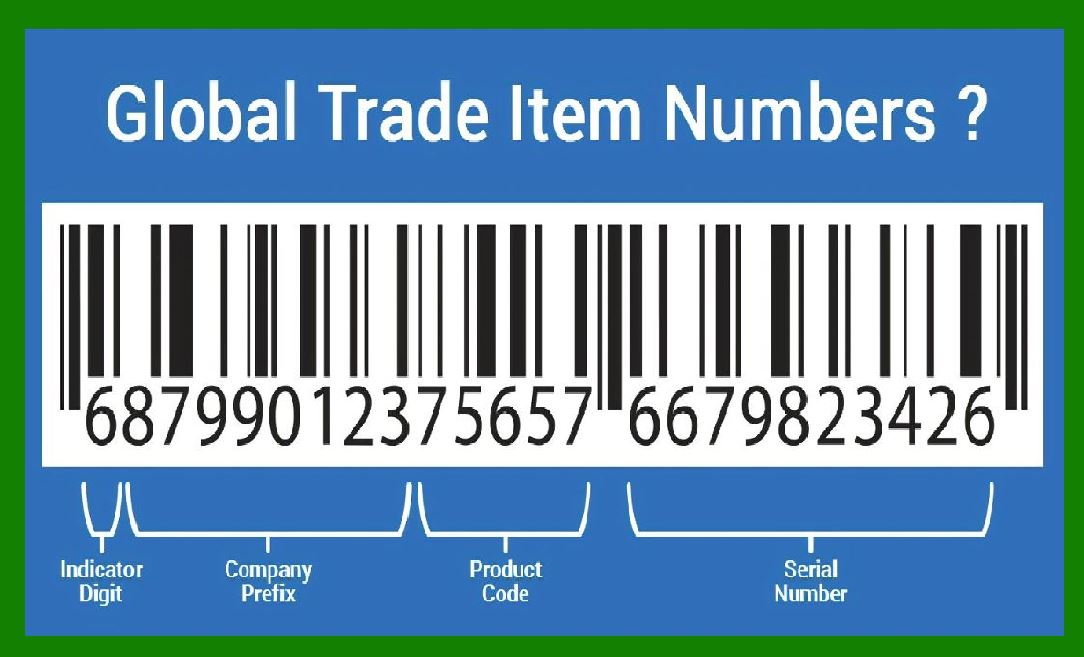
The GTIN is a globally recognized identifier for trade items, and it is part of the family of barcodes used for identifying products in the global market. |
GTIN ensures consistency, accuracy, and efficiency in product identification and data sharing, making it a foundational component of modern supply chains. |
|
History and Evolution of GTIN |
The GTIN was first introduced by the Uniform Code Council (UCC), which later merged with the European Article Numbering Association (EAN) to form GS1, a global organization responsible for managing the GTIN system. |
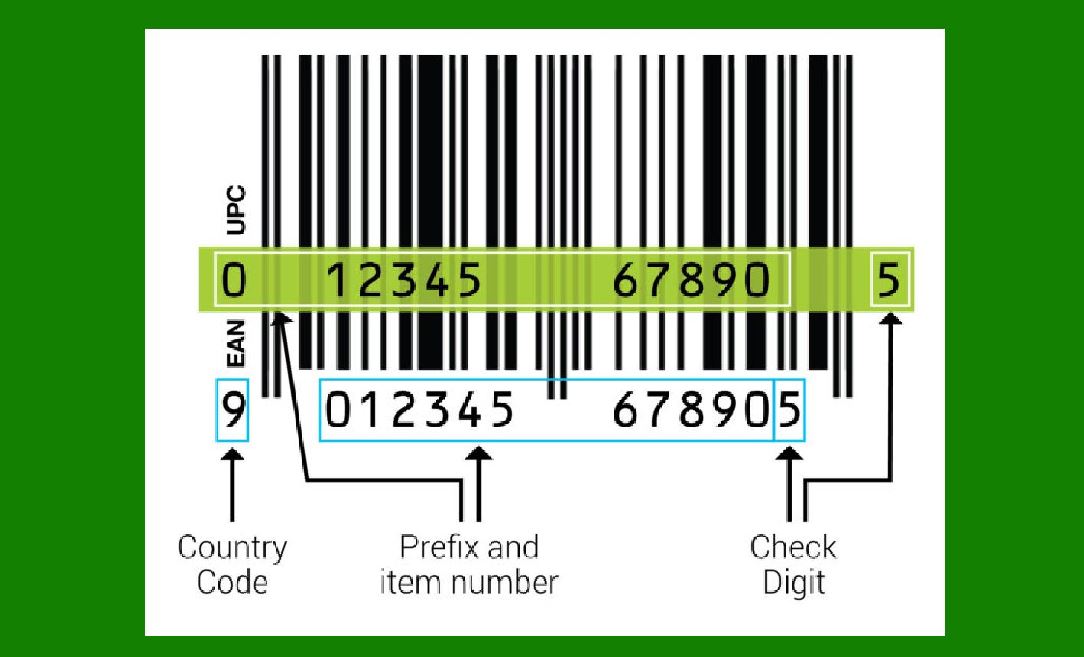
Initially, product identifiers like the Universal Product Code (UPC) and the European Article Number (EAN) were used separately in North America and Europe, respectively. The creation of GTIN helped unify these systems into a single, global standard for trade item identification. |
|
Structure of the GTIN |
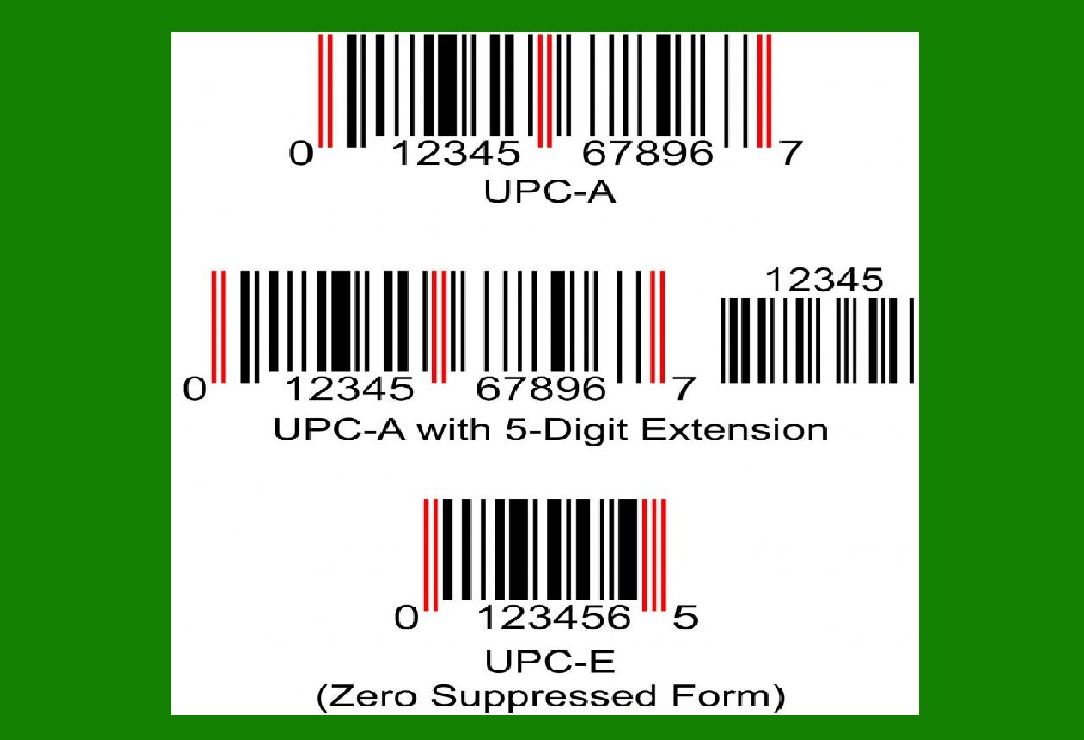
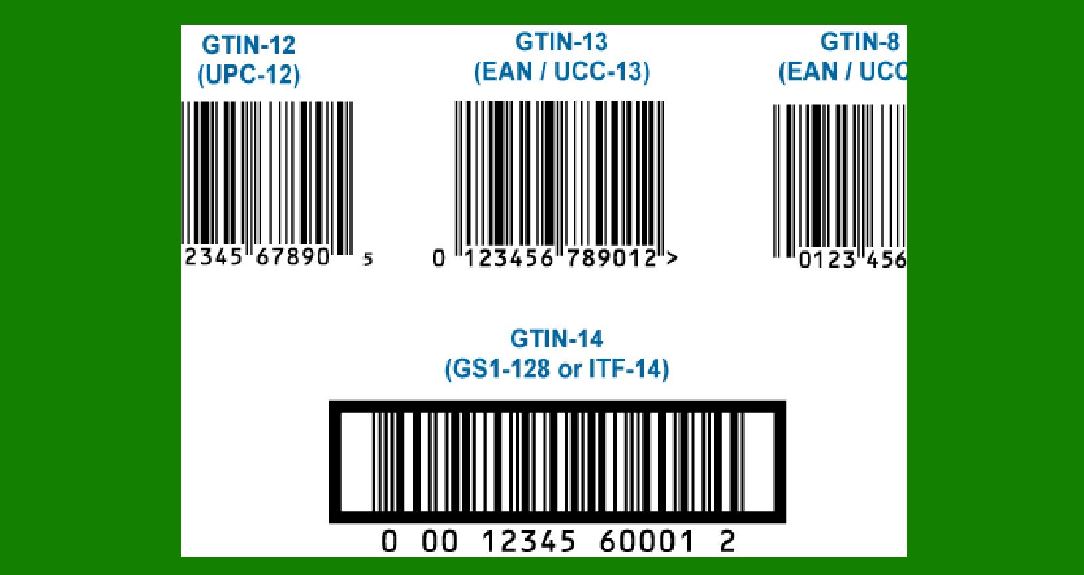
The GTIN can be encoded in different formats, including GTIN-8, GTIN-12 (UPC), GTIN-13 (EAN), GTIN-14, and GTIN-128. Each of these formats has a specific number of digits, depending on the type of trade item being identified. |
GTIN-8: This format contains 8 digits and is used for very small products. |
GTIN-12: Also known as UPC, this 12-digit format is primarily used in North America. |
GTIN-13: This 13-digit format, also known as EAN, is used globally outside North America. |
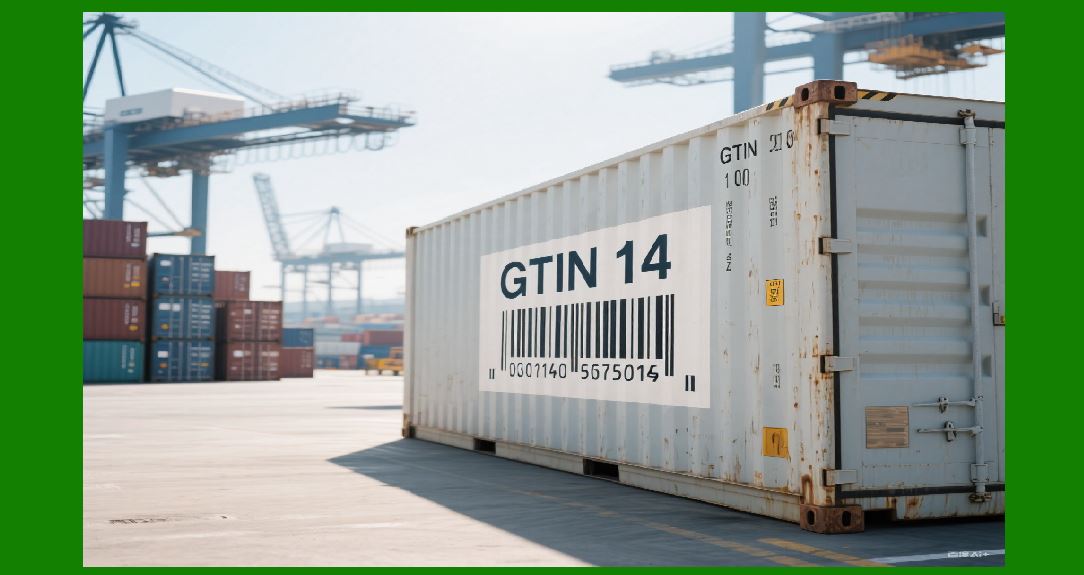
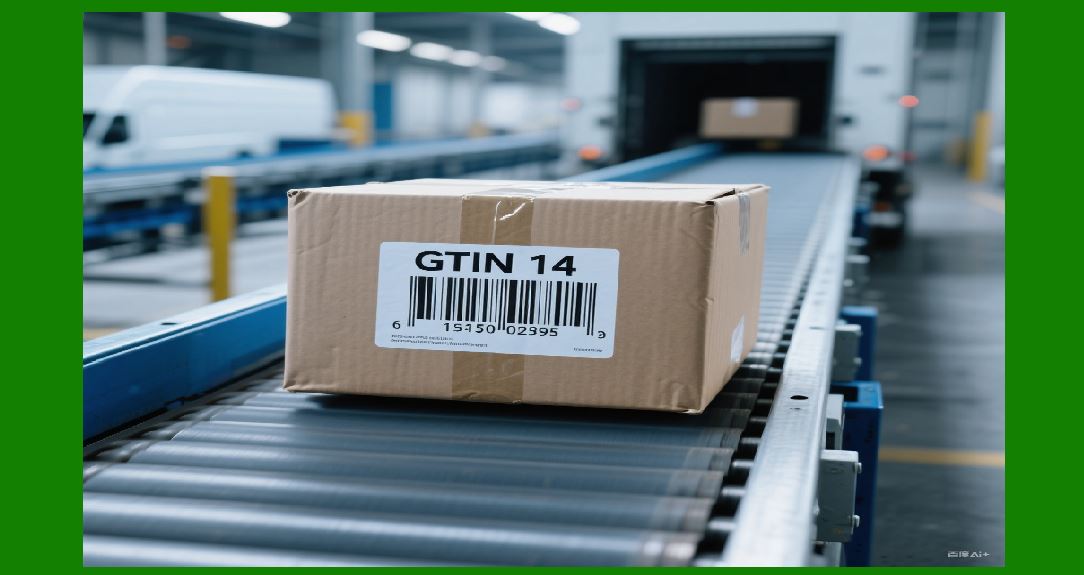
GTIN-14: This 14-digit format is used for grouping trade items, such as cartons or pallets containing multiple units of a product. |
GTIN-128: This format is used for encoding additional information, such as serial numbers and batch numbers, which is particularly useful in logistics. |
|
Role of GS1 in the GTIN System |
GS1, a non-profit organization, is responsible for managing the GTIN system and ensuring its adoption and standardization globally. GS1¡¯s role extends to the issuance of GS1 Company Prefixes, which are integral in creating GTINs. |
GS1 also develops and manages various standards for other types of data carriers, such as QR codes, barcodes, and RFID tags, ensuring that GTIN remains compatible with these technologies. |
|
How GTIN Works |
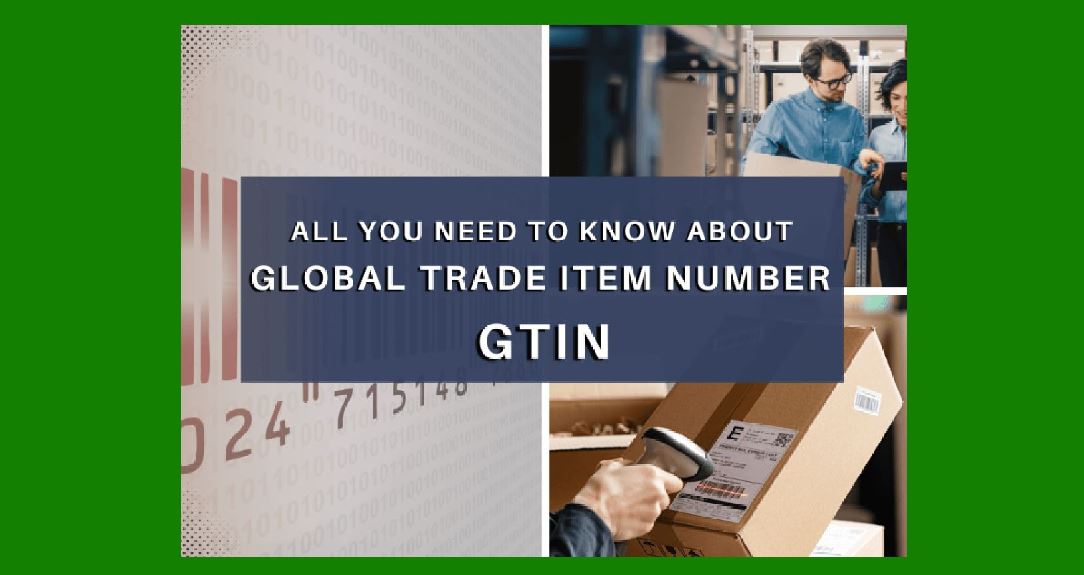
The GTIN functions by encoding a product¡¯s unique identifier, ensuring it can be scanned, tracked, and traced throughout the supply chain. GTINs are most commonly found in the form of barcodes or QR codes on product packaging. |
GTINs help distinguish one product from another, which is crucial for preventing errors in inventory management, sales transactions, and shipping. |
|
How GTIN is Assigned |
The assignment of GTINs begins with the issuance of a GS1 Company Prefix. This prefix uniquely identifies the company or organization responsible for a particular product. |
Following the company prefix, additional digits are added to form a complete GTIN, including the item reference number and a check digit for error detection. |
|
Check Digit Calculation |
The GTIN includes a check digit, which is calculated using the Modulo 10 algorithm. The check digit ensures that the GTIN is correctly formatted and helps prevent errors in scanning or data entry. |
The algorithm works by multiplying each digit of the GTIN by a specific weight and summing the results. The check digit is then calculated to make the total sum divisible by 10. |
|
Uses of GTIN |
GTIN is widely used in the retail and wholesale industries for product identification, ensuring smooth operations in inventory management, checkout processes, and product tracking. |
In the pharmaceutical and healthcare industries, GTINs are critical for ensuring product authenticity, safety, and regulatory compliance. GTINs help in tracking medication from manufacturers to pharmacies and hospitals, reducing the risk of counterfeit drugs entering the supply chain. |
GTIN in Retail and E-Commerce |
In retail, GTIN plays a vital role in inventory management, order processing, and the checkout process. Scanning GTIN barcodes allows for fast, error-free product identification at points of sale (POS). |
In e-commerce, GTIN is used to accurately list and manage products across online platforms. Many e-commerce platforms require the use of GTINs to list products, ensuring standardization across listings. |
GTIN and Supply Chain Management |
GTINs facilitate the smooth movement of goods through the supply chain by enabling consistent identification at various stages, from manufacturing to distribution to retail. |
By using GTIN, businesses can track inventory levels, monitor product movement, and reduce the risks of stockouts and overstocking. This improves efficiency and reduces costs. |
GTIN in Global Trade |
The GTIN system is crucial in international trade, ensuring that products can be identified consistently regardless of geographic location. This is particularly important for multinational corporations that distribute products across multiple countries and regions. |
GTIN ensures compliance with international standards, enabling the seamless integration of systems across borders, from product shipment to customs clearance. |
GTIN in Serialization |
In industries such as pharmaceuticals and food safety, serialization of individual products is essential for ensuring traceability. GTINs can be combined with serial numbers to provide unique identifiers for individual units, allowing for detailed tracking and tracing. |
Serialization enables companies to monitor the journey of each product throughout its lifecycle, helping to prevent fraud and ensure compliance with safety regulations. |
GTIN and Data Synchronization |
GTINs enable data synchronization across various business systems, ensuring that product information remains consistent from one system to another. This is particularly important for companies that work with suppliers, distributors, and retailers to maintain an accurate and up-to-date catalog of products. |
GS1 provides standards for product data synchronization (PDS), helping organizations ensure that all parties in the supply chain have access to the same accurate data. |
GTIN in Inventory Management |
GTINs simplify inventory management by providing a standard way to identify and track products. Whether for tracking sales in retail stores, managing stock in warehouses, or monitoring supply levels, GTINs streamline the process of stock control. |
With GTINs, businesses can easily reorder products when stock levels fall below a predetermined threshold, reducing the risk of running out of stock. |
GTIN and Consumer Protection |
GTINs are increasingly important in consumer protection efforts, particularly in the context of counterfeit goods and product recalls. |
In the case of a product recall, GTINs enable companies to quickly trace the affected products and notify customers or retailers. This is crucial for minimizing harm and ensuring that only safe products reach consumers. |
GTIN in Product Authenticity |
In industries like pharmaceuticals, automotive, and luxury goods, ensuring the authenticity of a product is paramount. GTINs play a significant role in verifying the legitimacy of a product, helping to combat counterfeiting. |
By using GTINs, businesses can implement anti-counterfeit measures, such as unique serialization, holograms, or RFID tags, to safeguard their products and brand reputation. |
GTIN in Product Lifecycle Management |
GTINs are essential for tracking products throughout their lifecycle, from production to distribution to end-of-life disposal. By associating products with a unique identifier, businesses can manage product data, monitor performance, and ensure compliance with regulations. |
This is especially important for products with limited lifespans or expiration dates, such as food and medicine, where GTINs can help track shelf life and reduce waste. |

|
GTIN and Sustainability |
As businesses increasingly focus on sustainability, GTINs play a role in supporting green initiatives. By accurately tracking the flow of products through the supply chain, GTINs can help companies optimize their processes and reduce waste. |
GTINs also facilitate transparency, allowing consumers to access information about the origin and sustainability practices associated with the products they purchase. |
Challenges in GTIN Implementation |
Despite the many benefits, the implementation of GTINs can pose challenges for businesses. These challenges include the costs associated with acquiring GS1 Company Prefixes, the integration of GTINs into existing systems, and the need for training staff to handle the new identification system. |
Small businesses, in particular, may face difficulties in adopting GTINs due to the initial setup costs and the complexity of managing product data across multiple platforms. |
Future of GTIN |
As the world moves towards increased automation and data-driven decision-making, the role of GTIN will continue to evolve. The growing adoption of technologies like the Internet of Things (IoT) and blockchain will enhance the capabilities of GTIN, making it an even more integral part of product tracking and traceability. |
The integration of GTIN with new data carriers, such as QR codes and RFID tags, will further increase its utility in various industries, providing real-time visibility into product movements and inventory levels. |

|
Conclusion |
The Global Trade Item Number (GTIN) is a fundamental building block of modern commerce, providing a standardized system for identifying and managing products across the global supply chain. |
GTIN facilitates everything from efficient inventory management to consumer protection and product authentication, making it an indispensable tool in today¡¯s interconnected world. Its continued evolution will ensure that it remains relevant in an increasingly digital and automated marketplace. |
This detailed breakdown covers various aspects of the GTIN, illustrating its importance and application across numerous industries and contexts. It emphasizes how GTIN helps businesses operate more efficiently, ensures consumer safety, and supports global trade practices. |

|
Here are some practical examples illustrating the use of Global Trade Item Numbers (GTIN) in different industries and scenarios: |
1. Retail Industry |
Example 1: Grocery Store Checkout |
Scenario: A customer is buying a bottle of shampoo at a local grocery store. The store has a barcode scanner at the checkout counter. When the cashier scans the barcode on the shampoo bottle, the GTIN embedded in the barcode (typically GTIN-12 or GTIN-13) is read by the scanner. |
Use of GTIN: The GTIN allows the store¡¯s point-of-sale (POS) system to instantly identify the shampoo, pull up its price, and complete the transaction. The GTIN also helps the system update the store's inventory in real time, ensuring that the product count is accurate. |
Example 2: Online Marketplace |
Scenario: A seller on an online marketplace (e.g., Amazon, eBay) lists a product for sale, such as a pair of wireless headphones. The seller includes the GTIN (GTIN-13) in the product description. |
Use of GTIN: When customers search for the headphones, the marketplace uses the GTIN to ensure that the correct product appears in the search results. This also helps the platform pull up consistent product information (e.g., brand, specifications) from the manufacturer¡¯s database, ensuring the correct product is being purchased. |

|
2. Pharmaceutical Industry |
Example 1: Medication Traceability |
Scenario: A hospital is receiving a shipment of antibiotics, which come with individual packages labeled with GTINs (GTIN-14 for the bulk package and GTIN-13 for individual bottles). |
Use of GTIN: The hospital's inventory management system scans the GTINs of the medication, confirming that the correct medications and quantities have been delivered. If there¡¯s a recall of a particular batch of antibiotics, the GTIN enables the hospital to quickly trace and remove affected products from stock. |
Example 2: Counterfeit Drug Prevention |
Scenario: A pharmaceutical company manufactures a new vaccine and assigns a unique GTIN (GTIN-13) to each vial. The vaccine is shipped to distributors worldwide. |
Use of GTIN: At every point in the supply chain, from the manufacturer to the distributor to the pharmacy, the GTIN is used to verify that the product is genuine. Customers can even scan the GTIN via a mobile app to check the authenticity of the vaccine, helping prevent counterfeit products from reaching patients. |

|
3. Food and Beverage Industry |
Example 1: Inventory and Stock Control |
Scenario: A large supermarket chain manages inventory for thousands of products, including packaged food items, using barcode scanners at the stock room. |
Use of GTIN: Every food item, such as canned soup or bottled juice, is assigned a GTIN. When new shipments arrive, warehouse staff scans the GTIN barcodes to record stock levels in the store¡¯s inventory management system. The GTIN allows them to monitor product movements, ensure accurate stock levels, and trigger reordering when items are running low. |
Example 2: Expiry Date Tracking |
Scenario: A dairy company manufactures and distributes milk cartons with GTINs (GTIN-13). |
Use of GTIN: The GTIN helps the company track product expiry dates. When a batch of milk is nearing expiration, the company can use the GTIN to identify which retailers need to remove the product from shelves. This ensures that expired products are not sold, protecting consumers and reducing waste. |

|
4. Automotive Industry |
Example 1: Spare Part Identification |
Scenario: An automotive supplier provides replacement parts for car manufacturers and repair shops. Each part, such as brake pads or spark plugs, is assigned a GTIN (GTIN-14). |
Use of GTIN: Repair shops scan the GTIN when ordering parts from the supplier. The GTIN ensures that the right part is ordered, reducing the risk of receiving incorrect or incompatible parts. This also enables the supplier to track parts through the supply chain and manage inventory more effectively. |
Example 2: Vehicle Assembly |
Scenario: A car manufacturer assembles vehicles at a factory, sourcing parts from multiple suppliers. Each part used in the assembly process is labeled with a GTIN. |
Use of GTIN: During the assembly process, workers scan the GTINs on the parts as they are used to ensure that the correct components are being integrated into each vehicle. This also helps track the origin of each part in case of quality control issues. |

|
5. Logistics and Supply Chain |
Example 1: Product Grouping for Shipment |
Scenario: A large distributor packages multiple units of products, such as smartphones, in boxes for shipment. Each box is labeled with a GTIN (GTIN-14). |
Use of GTIN: The GTIN on each box allows the distributor and receiving warehouse to track the contents of the box accurately. When the box arrives at the warehouse, the GTIN is scanned, confirming that the right number of products are inside and making the unloading process more efficient. |
Example 2: Shipment Tracking |
Scenario: A global e-commerce company ships a product to a customer located in a different country. The package is labeled with a GTIN that corresponds to the individual product inside. |
Use of GTIN: As the package moves through various stages of shipping, from customs clearance to final delivery, the GTIN is scanned at each checkpoint. This allows the company to provide the customer with real-time tracking information, ensuring transparency and enhancing customer satisfaction. |

|
6. Consumer Electronics |
Example 1: Product Cataloging |
Scenario: A global retailer sells a wide range of consumer electronics, such as laptops, cameras, and smartphones. Each product is assigned a unique GTIN (GTIN-13). |
Use of GTIN: When the retailer adds new products to their online catalog, the GTIN is used to automatically populate product details such as model numbers, specifications, and features. This streamlines the listing process and ensures consistency across all platforms where the product is sold. |
Example 2: Warranty Registration |
Scenario: A company that manufactures smartphones offers warranty registration to customers. Each smartphone is assigned a GTIN (GTIN-13) that is used to uniquely identify the product. |
Use of GTIN: Customers can use the smartphone's GTIN to register their product for warranty services. If a customer needs repairs, the company uses the GTIN to quickly verify the product¡¯s warranty status and provide service. |

|
7. Fashion and Apparel |
Example 1: Clothing Retail |
Scenario: A clothing retailer stocks shirts, pants, and jackets in various sizes and colors. Each variation of a product is assigned a unique GTIN (GTIN-12 or GTIN-13). |
Use of GTIN: In a retail environment, the GTIN on each item is scanned at the checkout counter. This ensures the right size, color, and product are sold to the customer, and it also helps the retailer manage stock levels, track returns, and reorder products. |
Example 2: RFID Integration |
Scenario: A clothing brand introduces RFID tags with GTINs embedded in them, placed on each garment in their retail stores. |
Use of GTIN: Customers can scan the RFID tag in the store to check product availability, size, and price. The GTIN embedded in the tag enables the store to track the garment through the sales floor, ensuring that products are readily available and preventing theft. |

|
8. Elder Care and Medical Equipment |
Example 1: Medical Devices |
Scenario: A company manufactures medical equipment such as wheelchairs, oxygen concentrators, and hearing aids, each labeled with a unique GTIN. |
Use of GTIN: Healthcare providers and suppliers use the GTIN to track inventory, manage reorders, and verify the authenticity of products. For example, when a medical facility orders a batch of hearing aids, the GTIN ensures that the correct model and specifications are delivered. |
Example 2: Elder Care Monitoring |
Scenario: An elder care facility uses wearable medical devices to monitor the health of its residents. Each device is assigned a GTIN. |
Use of GTIN: The GTIN enables the facility to track the devices' usage, monitor compliance with prescribed medical treatments, and ensure that the devices are functioning properly. |

|
Conclusion |
These practical examples showcase how GTIN is used across various industries to enhance efficiency, accuracy, and traceability in supply chains. From retail and pharmaceuticals to logistics and consumer electronics, the GTIN serves as an essential tool for managing products and ensuring smooth, error-free operations. Whether used for inventory management, product authentication, or customer satisfaction, GTIN plays a vital role in modern business processes. |

|
Dive into the Structure of the GTIN |
The structure of the Global Trade Item Number (GTIN) is designed to uniquely identify trade items globally, ensuring standardization and facilitating accurate tracking and management throughout the supply chain. The GTIN structure varies depending on the type of trade item and the number of digits involved, but all GTIN formats follow a standard structure that allows for effective identification and data synchronization. Below is a detailed examination of the various formats of GTIN, how they are constructed, and the specific components that make up a GTIN. |
1. Overview of GTIN Formats |
The GTIN is encoded in different formats depending on the specific needs of the trade item and the system in use. The primary GTIN formats are: |
GTIN-8: 8-digit format |
GTIN-12 (UPC): 12-digit format |
GTIN-13 (EAN): 13-digit format |
GTIN-14: 14-digit format |
GTIN-128: A variant of the GTIN-14, used with additional data like serial numbers. |
Each of these formats has a different length and is used for different types of products, but all GTINs follow a core structure that includes the GS1 Company Prefix, the Item Reference, and the Check Digit. |

|
2. GTIN-8: 8-Digit Format |
GTIN-8 is used for small products, typically in retail environments where space on the product packaging is limited. This format consists of 8 digits in total. |
Structure of GTIN-8: |
Prefix: 3 digits (issued by GS1 to represent the company or manufacturer). |
Item Reference: 4 digits (assigned by the company to the specific product). |
Check Digit: 1 digit (calculated using the Modulo 10 algorithm). |
Example: |
GTIN-8: 12345670 |
123: GS1 Company Prefix. |
4567: Item Reference (assigned by the company). |
0: Check Digit (calculated based on the previous digits). |
GTIN-8 is less commonly used today but is still important for small, low-value products like cosmetics, certain food items, and small accessories. |

|
3. GTIN-12 (UPC): 12-Digit Format |
GTIN-12 is commonly known as the Universal Product Code (UPC) and is widely used in the United States and Canada for retail products. It consists of 12 digits and is the standard format for most consumer products in these regions. |
Structure of GTIN-12: |
Prefix: 6 digits (GS1 Company Prefix assigned to the company). |
Item Reference: 5 digits (assigned by the company to uniquely identify the product). |
Check Digit: 1 digit (calculated using the Modulo 10 algorithm). |
Example: |
GTIN-12: 012345678905 |
012345: GS1 Company Prefix. |
67890: Item Reference (assigned by the company). |
5: Check Digit (calculated). |
The UPC is one of the most recognized barcode formats and is used extensively in point-of-sale systems in North America. |

|
4. GTIN-13 (EAN): 13-Digit Format |
GTIN-13 is also referred to as the European Article Number (EAN-13) and is widely used outside of North America. It is the most commonly used format worldwide for consumer products. This format contains 13 digits. |
Structure of GTIN-13: |
Prefix: 3 digits (GS1 Country Code, which indicates the country or region where the company is based). |
GS1 Company Prefix: 4-6 digits (depending on the length of the country code and the length of the item reference assigned by the company). |
Item Reference: 5-7 digits (assigned by the company to identify the specific product). |
Check Digit: 1 digit (calculated using the Modulo 10 algorithm). |
Example: |
GTIN-13: 1234567890128 |
123: GS1 Country Code (indicating the company is registered in a particular country). |
4567: GS1 Company Prefix. |
89012: Item Reference (assigned by the company). |
8: Check Digit. |
The GTIN-13 format is commonly used worldwide, including in Europe, Asia, and other parts of the globe. It is used in many consumer retail environments, such as supermarkets and online platforms. |

|
5. GTIN-14: 14-Digit Format |
GTIN-14 is used for identifying trade items at a higher level than individual products, such as cartons, cases, or pallets. This format contains 14 digits and is essential for logistics, distribution, and shipping. |
Structure of GTIN-14: |
Prefix: 3 digits (GS1 Company Prefix). |
Item Reference: 7 digits (assigned by the company for the specific product). |
Packaging Indicator: 1 digit (indicates the packaging level, such as carton or pallet). |
Check Digit: 1 digit (calculated using the Modulo 10 algorithm). |
Example: |
GTIN-14: 12345678901234 |
123: GS1 Company Prefix. |
4567890: Item Reference. |
1: Packaging Indicator (indicating this GTIN refers to a carton). |
4: Check Digit. |
GTIN-14 is primarily used in logistics and the transportation of bulk goods. It is often used for bulk orders, cases, and pallets that contain multiple individual items. |

|
6. GTIN-128: Extended Format |
GTIN-128 is a variant of the GTIN-14 and is used when additional data needs to be encoded along with the product identifier, such as serial numbers, batch numbers, or expiration dates. This format is often used in industries where detailed tracking is necessary, such as pharmaceuticals, food, and electronics. |
Structure of GTIN-128: |
Prefix: 3 digits (GS1 Company Prefix). |
Item Reference: 7 digits (assigned by the company). |
Packaging Indicator: 1 digit (indicating the level of packaging). |
Extended Data: The remaining digits may encode additional information, such as batch numbers, lot codes, serial numbers, or expiration dates. |
Check Digit: 1 digit (calculated using the Modulo 10 algorithm). |
Example: |
GTIN-128: 1234567890123456789 |
123: GS1 Company Prefix. |
4567890: Item Reference. |
1: Packaging Indicator (indicating carton-level packaging). |
3456789: Extended Data (such as serial number or batch code). |
9: Check Digit. |
The GTIN-128 format is used to carry more detailed information, often in the supply chain or for compliance with industry-specific regulations, such as FDA or EU regulations for pharmaceuticals. |
|
7. Check Digit Calculation (Modulo 10 Algorithm) |
The Check Digit is an essential component of all GTIN formats, ensuring that the GTIN has been correctly generated and is valid. The Check Digit is calculated using the Modulo 10 algorithm, a checksum algorithm that provides a simple method for detecting errors in GTINs. |
Steps for calculating the Check Digit: |
Step 1: Starting from the rightmost digit (not including the check digit), assign weights to each digit. Odd-position digits are multiplied by 3, and even-position digits are multiplied by 1. |
Example for a GTIN-12 number: 012345678905 |
Digits: 0, 1, 2, 3, 4, 5, 6, 7, 8, 9, 0, 5 |
Weights: 3, 1, 3, 1, 3, 1, 3, 1, 3, 1, 3, 1 |
Step 2: Multiply each digit by its corresponding weight. |
0*3 = 0 |
1*1 = 1 |
2*3 = 6 |
3*1 = 3 |
4*3 = 12 |
5*1 = 5 |
6*3 = 18 |
7*1 = 7 |
8*3 = 24 |
9*1 = 9 |
0*3 = 0 |
5*1 = 5 |
Step 3: Sum the results from Step 2. |
Total = 0 + 1 + 6 + 3 + 12 + 5 + 18 + 7 + 24 + 9 + 0 + 5 = 90 |
Step 4: Divide the total sum by 10 and find the remainder. |
Remainder = 90 % 10 = 0 |
Step 5: Subtract the remainder from 10 to get the check digit. |
Check Digit = 10 - 0 = 0 |
Thus, the check digit for the GTIN-12 012345678905 is 0. |
|
Conclusion |
The structure of a GTIN is carefully designed to ensure that products can be uniquely identified and tracked throughout the global supply chain. Whether in the form of a GTIN-8, GTIN-12, GTIN-13, or GTIN-14, each format serves a specific purpose, from small products to bulk shipments. The inclusion of the Check Digit ensures that GTINs are valid and error-free. This standardized structure enables businesses to streamline their operations, from inventory management to point-of-sale transactions, while ensuring consistent identification across global markets. |
The difference of GTIN-128 and Code128 barcode |
The GTIN-128 and Code 128 barcodes are related but distinct technologies, each serving different purposes. To understand their differences, we need to explore the features, usage, and specific attributes of both. |
1. Purpose and Usage |
GTIN-128 |
Purpose: GTIN-128 is a specialized barcode format that is used to encode Global Trade Item Numbers (GTIN) along with additional data such as serial numbers, batch numbers, expiration dates, or other product information. It is used primarily in industries that require detailed tracking of products, such as pharmaceuticals, food, and manufacturing. |
Usage: GTIN-128 is most commonly used for identifying trade items that need to carry additional information, such as healthcare products or bulk items that are shipped in cases or pallets. It¡¯s a format specifically designed for logistics, traceability, and regulatory compliance, ensuring that the product information can be verified across the supply chain. |
Code 128 |
Purpose: Code 128 is a high-density barcode standard used to encode any alphanumeric characters, including letters, digits, and special characters. It is a general-purpose barcode that can encode more characters per unit of space compared to traditional 1D barcodes like Code 39. |
Usage: Code 128 is used across a wide range of applications, including inventory management, shipping labels, asset tracking, and point-of-sale systems. It's versatile and can be used for tracking items or shipments in both large and small businesses. |
|
2. Barcode Structure |
GTIN-128 |
Format: GTIN-128 is a subset of Code 128, specifically designed to encode GTIN values (such as GTIN-14) along with additional data fields (using application identifiers or AIs). The structure of GTIN-128 is governed by the GS1 system, which standardizes the use of the barcode for global trade and tracking. |
Encoding: GTIN-128 encodes the GTIN as well as other required information. The GS1 Application Identifiers (AIs) allow for the encoding of supplementary data, such as: |
Serial numbers |
Expiration dates |
Batch numbers |
Quantity information |
Packaging indicators (e.g., carton or pallet-level) |
Example: A GTIN-128 barcode for a shipment might encode: |
GTIN-14 for the product. |
A serial number for traceability. |
An expiration date for compliance. |
Code 128 |
Format: Code 128 is a general-purpose, alphanumeric barcode format that supports three different character sets: |
Set A: Uppercase letters, special characters, control characters. |
Set B: Uppercase and lowercase letters, digits, and special characters. |
Set C: Numeric encoding for pairs of digits. |
Encoding: Code 128 does not include any specific structure for encoding additional trade item data like GTIN-128. It simply encodes characters as they are. Unlike GTIN-128, Code 128 does not have Application Identifiers (AIs) to specify the meaning of additional data. |
Example: A Code 128 barcode might be used to encode: |
A product code or identifier. |
Tracking numbers. |
Any alphanumeric string, such as a batch number or location. |
|
3. Data Capacity |
GTIN-128 |
Capacity: GTIN-128 is used for encoding structured trade item data. The primary focus is to include the GTIN along with additional product-related information. This means that it can encode a limited set of alphanumeric characters and numerical values in a structured format. |
Extended Data: The GTIN-128 barcode can hold more than just the product identifier. The use of Application Identifiers (AIs) allows for encoding specific pieces of data with a clearly defined structure, making it particularly useful for compliance and logistics, where knowing the exact context of the data is essential. |
Code 128 |
Capacity: Code 128 is capable of encoding a wider variety of data without requiring any special application structure. It can encode all 128 ASCII characters, including upper and lower case letters, numbers, and special characters. |
Extended Data: While it can encode a lot of information, there is no structure to indicate what the data represents. The user must define the meaning of the data outside of the barcode itself (for example, by providing a separate database to interpret the information). |
|
4. Barcoding Standard and Compliance |
GTIN-128 |
Standard: GTIN-128 is part of the GS1 system and adheres to international standards. It is specifically designed for trade item identification and supply chain tracking in compliance with global regulations, especially in industries like healthcare (e.g., pharmaceutical traceability), food safety, and logistics. |
Compliance: GTIN-128 is used to meet regulatory requirements for traceability, such as the FDA Drug Supply Chain Security Act (DSCSA) in the U.S. or similar regulations in other countries. It is also used in industries where lot tracking, serial number tracking, and expiration date tracking are critical. |
Code 128 |
Standard: Code 128 is an open, general-purpose barcode standard that is not specific to any single organization or industry. It is maintained by the ANSI (American National Standards Institute) and the ISO (International Organization for Standardization). |
Compliance: While Code 128 is widely used across industries, it is not designed for specific regulatory compliance. It is a versatile, general-purpose barcode standard used where a high-density alphanumeric barcode is needed, but it does not have the regulatory or structured requirements of GTIN-128. |
|
5. Visual Appearance |
GTIN-128 |
Visual Representation: GTIN-128 is visually a Code 128 barcode but follows additional rules for encoding specific GTIN and related data. It looks similar to Code 128, but it can hold additional encoded data (e.g., Application Identifiers). |
Extra Elements: GTIN-128 barcodes often include AI (Application Identifiers) as part of the barcode structure, which may make them appear more complex. |
Code 128 |
Visual Representation: Code 128 is a standard, linear 1D barcode with a fixed-width structure, representing data through bars and spaces. The visual appearance is clean and straightforward, without the need for extra delimiters or identifiers like GTIN-128. |
Extra Elements: Code 128 does not include Application Identifiers, so it appears simpler visually compared to GTIN-128. |
|
6. Use Case Comparison |
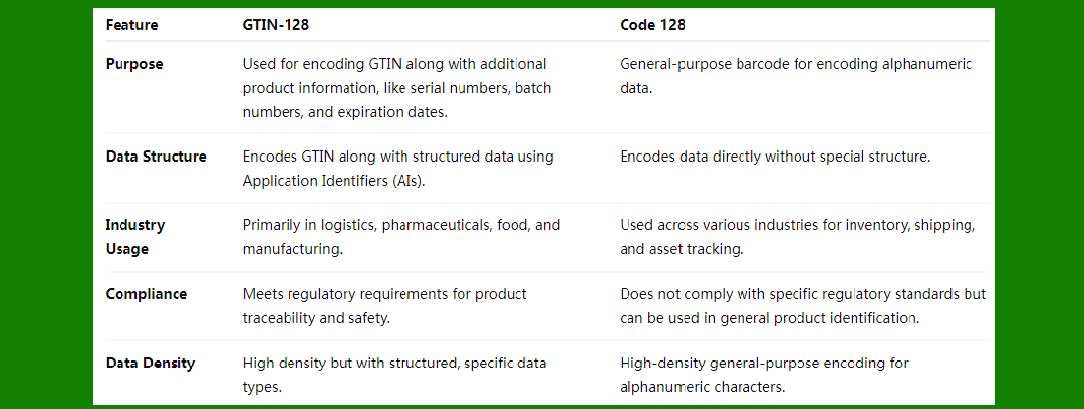
Summary of Key Differences |
|
Specialization: GTIN-128 is specifically designed for trade item identification and traceability, especially in industries where additional product data is required. Code 128 is a versatile barcode standard used for general-purpose encoding of alphanumeric data. |
Structure: GTIN-128 uses the Code 128 symbology but adds additional layers of structure, such as GS1 Application Identifiers (AIs), which allow it to encode GTIN and other supplementary product data. Code 128 simply encodes data without any predefined structure. |
Regulatory Compliance: GTIN-128 is heavily used in regulatory environments (e.g., pharmaceuticals, food safety) for traceability, while Code 128 is more commonly used in general business applications. |
Data Capacity and Use Cases: GTIN-128 is best suited for supply chain management, product identification, and compliance with industry regulations, while Code 128 is used for simpler product and asset identification needs without specific regulatory obligations. |
In essence, GTIN-128 is a specialized variant of Code 128, tailored for global trade item tracking with additional data, while Code 128 remains a flexible, general-purpose barcode used in various industries for basic alphanumeric data encoding. |
 cs@easiersoft.com