Code 93 is a barcode symbology that extends Code 39 by using an additional character set to provide higher data density and security. It allows encoding of the full ASCII character set by using pairs of characters to represent all 128 ASCII characters. This detailed outline will cover the structure of Code 93, its encoding rules, character set, start/stop patterns, and how it compares to other barcode symbologies. |
|
Structure of Code 93 |
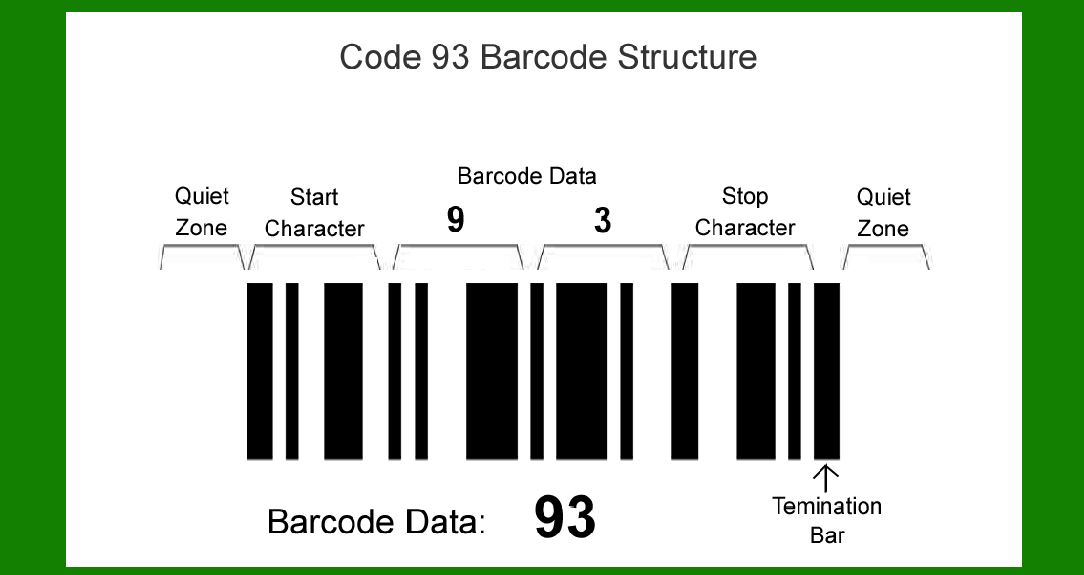
Code 93 barcodes consist of a series of black and white bars and spaces that represent alphanumeric characters. Each character is represented by a unique pattern of bars and spaces. Here's a breakdown of its components: |
1.Start Character: The barcode starts with an asterisk (*) character, which indicates the beginning of the barcode. 2.Data Characters: Following the start character, any combination of alphanumeric characters can appear. Code 93 supports the full ASCII character set, allowing for the encoding of letters, digits, and special characters. 3.Check Character: A checksum character is included after the data characters to verify the accuracy of the barcode during scanning. 4.Stop Character: The barcode ends with two bars (||) to indicate the end of the barcode. |
|
Character Set |
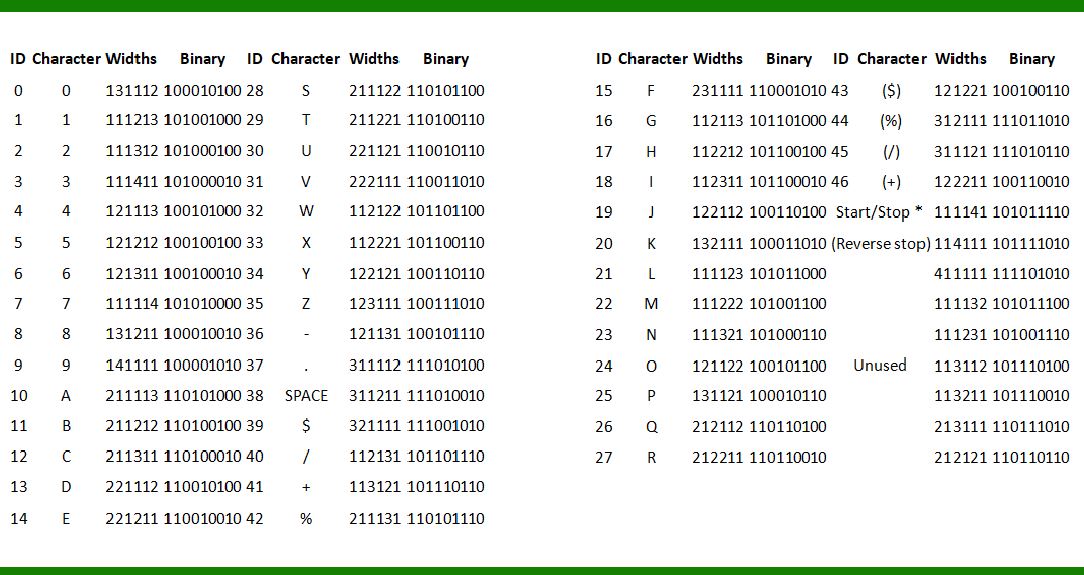
Code 93 uses a set of 47 different characters for encoding data. These characters include uppercase letters (A-Z), digits (0-9), and special symbols such as dash (-), period (.), dollar sign ($), slash (/), plus sign (+), percent sign (%), space, and others. |
Encoding Rules |
The encoding of characters in Code 93 is based on a binary representation where each character is represented by a unique combination of bars (narrow and wide) and spaces. |
1.Character Representation: Each character is encoded using a series of bars and spaces. A bar (typically black) represents a binary '1', while a space (typically white) represents a binary '0'. |
2.Start and Stop Patterns: Start Character: Encoded as '101011110'. Stop Character: Encoded as '101011101110'. |
3.Checksum Calculation: A modulo-47 checksum character is calculated based on the weighted sum of the characters in the barcode. This checksum ensures the accuracy of the data read by the scanner. |

|
Comparison to Code 39 and Full ASCII Code 39 |
Code 93 offers several advantages over Code 39 and Full ASCII Code 39: |
Higher Density: Code 93 can encode more characters per unit length compared to Code 39, making it more space-efficient. Full ASCII Support: Unlike Code 39, which has limitations on the characters it can encode directly, Code 93 supports encoding the entire ASCII character set (0-127). Security: The inclusion of a checksum character enhances the reliability and security of data encoded in Code 93 barcodes. |

|
Detailed Outline of Code 93 Symbols |
Code 93 utilizes 47 different symbols for encoding characters, along with 2 special symbols for start and stop patterns. Each symbol corresponds to a unique binary pattern of bars and spaces. Here's an outline of the symbols used in Code 93: |
1.Start/Stop Symbols: Start Symbol: Encoded as '101011110'. Stop Symbol: Encoded as '101011101110'. |
2.Character Set: Uppercase Letters (A-Z): Represented by specific combinations of bars and spaces. Digits (0-9): Each digit has a unique encoding pattern. Special Characters: Symbols such as dash (-), period (.), dollar sign ($), slash (/), plus sign (+), percent sign (%), space, and others have their own encoding patterns. |
3.Encoding Examples: For instance, the character 'A' might be encoded as '100010100'. The digit '1' might be encoded as '100100001'. |
4.Reserved Codes: Some codes are reserved for special functions such as encoding the ASCII extended characters beyond the standard ASCII range (0-127). |

|
Alphanumeric Encoding |
Code 93 can encode alphanumeric data efficiently by pairing characters together to represent the full ASCII character set. This pairing mechanism allows for the encoding of characters beyond the 47 basic symbols. The encoding rules ensure that every possible ASCII character can be represented using these pairs of characters. |
Application and Usage |
Code 93 barcodes find applications in various industries where high-density data encoding and reliability are required. Some common uses include: |
Shipping and Logistics: Used for tracking packages and shipments. Inventory Management: Identifying and tracking inventory items. Document and Asset Management: Managing documents and tracking assets. Healthcare: Patient identification wristbands and medical equipment tracking. |
Advantages of Code 93 |
Compact Size: Code 93 can encode more data in a smaller space compared to some other barcode symbologies. Full ASCII Support: It supports the entire ASCII character set, including control characters and extended characters. Error Detection: The checksum character enhances reliability by detecting errors during scanning. |

|
Conclusion |
Code 93 is a robust barcode symbology that builds upon Code 39 by expanding the character set and enhancing data density. It offers significant advantages in terms of data encoding efficiency and reliability, making it suitable for a wide range of applications across different industries. By understanding its structure, encoding rules, and character set, organizations can effectively utilize Code 93 barcodes for improved inventory management, tracking, and other logistical needs. |
 cs@easiersoft.com