DotCode: ISS DotCode Symbology Specification 4.0 |
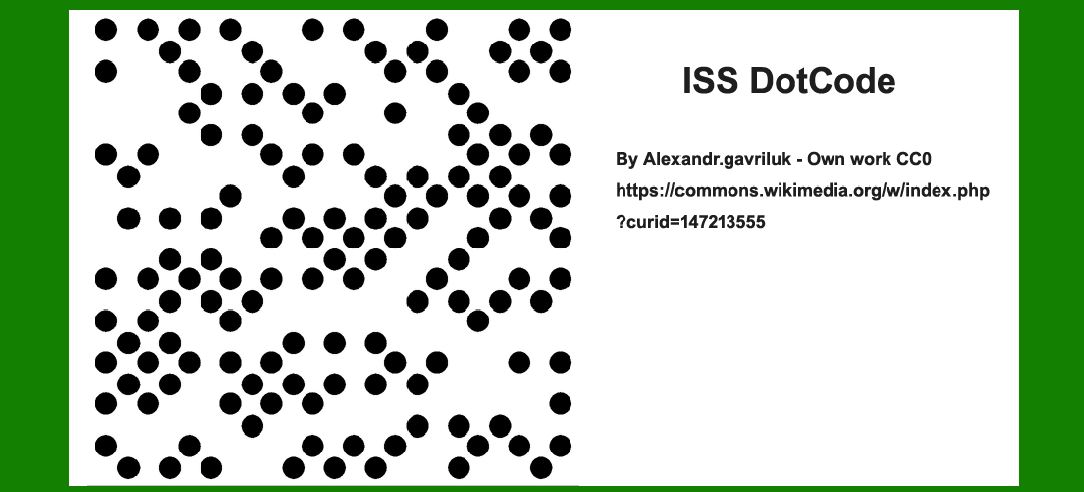
DotCode, officially known as ISS DotCode Symbology Specification 4.0, is a two-dimensional (2D) barcode format developed as a public domain standard. It serves as an extended replacement for traditional linear barcodes like Code 128, specifically designed to address the needs of industries requiring high-density data encoding and robust readability under various conditions. Initially adopted for tracking individual cigarette and pharmaceutical packages, DotCode has gained prominence due to its ability to encode large amounts of data in a compact space and its resilience against printing and environmental challenges. |
|
1. History and Development |
DotCode was developed to overcome the limitations of traditional linear barcodes in industries requiring high-volume data tracking, such as pharmaceuticals and tobacco. Its development aimed to provide: |
High Density: Ability to encode substantial data in a small area. Robustness: Readability even when printed on curved or uneven surfaces. Data Security: Support for serialization and traceability. |
The development of DotCode was driven by the need for a standardized, efficient, and versatile barcode solution capable of encoding data uniquely for each item, ensuring authenticity and traceability throughout the supply chain. |

|
2. Technical Specifications |
DotCode is characterized by its unique structure, which consists of a grid of dots arranged in a specific pattern. Key technical specifications include: |
Module Size: The size of the individual dot within the barcode. Quiet Zone: The space around the barcode to ensure readability. Error Correction: Mechanisms to enhance readability under adverse conditions. Encoding Capacity: Ability to encode alphanumeric characters, special symbols, and binary data. |
The barcode's design allows it to be printed using various technologies, including inkjet, laser, and thermal transfer, on a wide range of surfaces, from paper to plastics and metals. |

|
3. Applications |
DotCode finds applications primarily in industries where individual item tracking and serialization are critical: |
Pharmaceuticals: Used to encode unique identifiers for drug packages, ensuring traceability from production to consumption. This aids in counterfeit prevention and supply chain efficiency. Tobacco: Enables tracking of individual cigarette packs, complying with regulatory requirements and combating illicit trade. Logistics and Inventory Management: Used in retail, logistics, and warehouse management to track products efficiently and accurately. Consumer Electronics: Applied in labeling electronic components and devices for inventory and warranty tracking. Automotive: Used in parts manufacturing and assembly processes to track components throughout the supply chain. |

|
4. Advantages of DotCode |
High Data Capacity: DotCode can encode large amounts of data, including serial numbers, batch numbers, and expiry dates. Robust Readability: The dot-based structure ensures readability even when the barcode is damaged, curved, or printed on uneven surfaces. Versatility: Suitable for various printing technologies and materials, making it adaptable to different manufacturing processes and environments. |

|
5. Implementation Challenges and Considerations |
While DotCode offers significant advantages, its implementation requires consideration of several factors: |
Printing Quality: The quality of dot formation and spacing affects barcode readability. Regulatory Compliance: Compliance with industry standards and regulatory requirements, especially in sectors like pharmaceuticals and tobacco. Integration: Integration into existing data management systems and ERP (Enterprise Resource Planning) platforms to ensure seamless traceability. |

|
6. Future Outlook |
As industries continue to emphasize traceability and data security, DotCode's role is likely to expand. Future developments may focus on enhancing its encoding capacity, improving interoperability with digital systems, and integrating with emerging technologies such as Internet of Things (IoT) and blockchain for enhanced supply chain transparency. |

|
Conclusion |
DotCode, as standardized by the ISS DotCode Symbology Specification 4.0, represents a significant advancement in barcode technology. Designed to meet the rigorous demands of tracking individual items in industries like pharmaceuticals and tobacco, DotCode combines high data capacity with robust readability, making it a preferred choice for serialization and traceability applications. Its adoption is set to grow as industries increasingly prioritize efficiency, security, and compliance in supply chain management. |
 cs@easiersoft.com