Introduction to Data Matrix Code |
A Data Matrix code is a two-dimensional barcode that consists of black and white 'cells' arranged in a square or rectangular pattern. These codes are capable of encoding a large amount of information in a small space, making them ideal for applications where space is limited, such as on small products and components. The encoding process for Data Matrix codes is standardized by ISO/IEC 16022:2006, which specifies the syntax and rules for encoding data within the code. |
|
Structure of Data Matrix Code |
A Data Matrix code consists of several key components: |
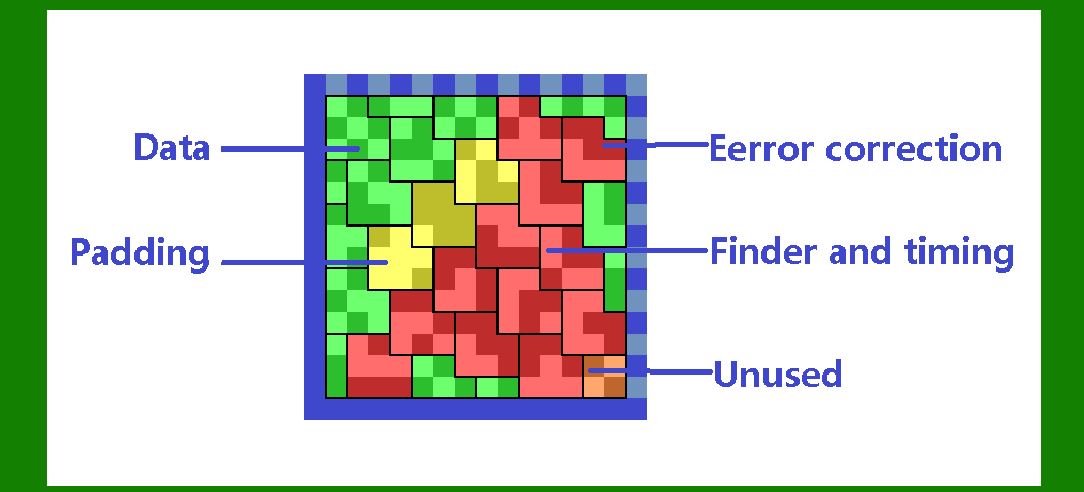
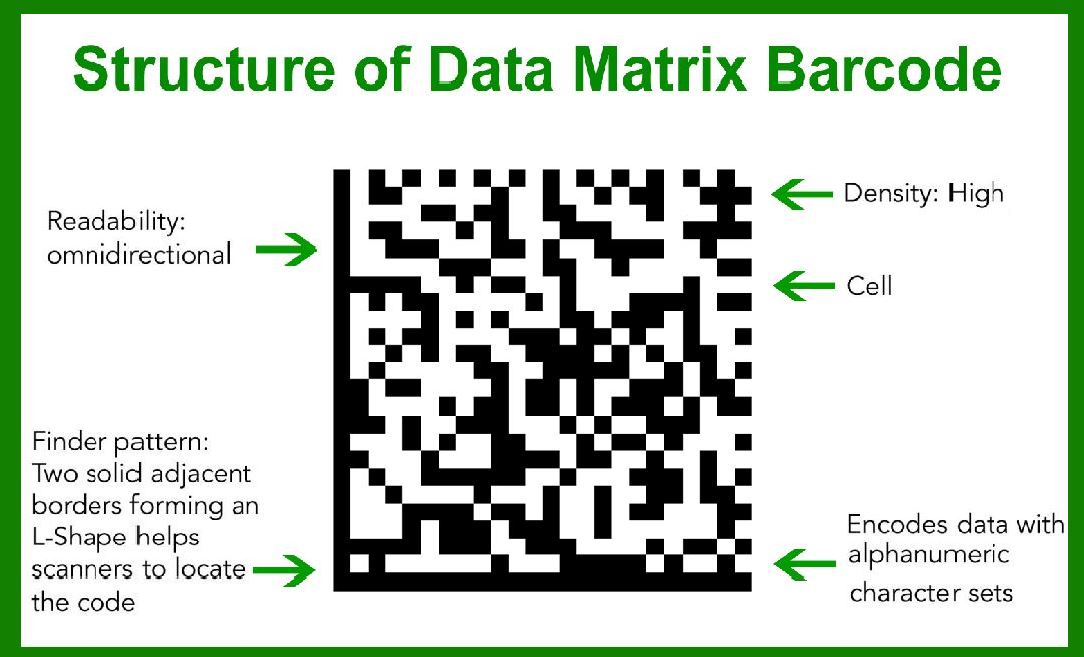
1.Finder Pattern: Located along the edges of the code, this pattern helps scanners locate and orient the Data Matrix code. It typically includes a solid line and alternating dark and light cells. 2.Timing Pattern: These patterns run along the sides of the code and help determine the grid size. 3.Data Region: This is the area where the actual data is encoded using a series of black and white cells. 4.Quiet Zone: This is a margin around the Data Matrix code that ensures the code can be scanned properly without interference from surrounding elements. |
|
Encoding Process According to ISO/IEC 16022:2006 |
The encoding process for Data Matrix codes involves several steps, including data preparation, error correction coding, and mapping the encoded data onto the Data Matrix grid. Below is a detailed description of these steps: |
1. Data Preparation |
Data Types: Data Matrix codes can encode different types of data, including alphanumeric characters, numeric digits, and binary data. The choice of data type influences the encoding scheme used. Modes of Encoding: There are several modes available for encoding data into a Data Matrix code, including: ASCII Mode: Encodes standard ASCII characters. C40 and Text Modes: Used for more efficient encoding of text data. X12, EDIFACT, and Base256 Modes: Used for encoding special characters and binary data. Preprocessing: The data is preprocessed to choose the appropriate mode for each segment of the input data. This preprocessing optimizes the encoded size and ensures that the Data Matrix code can be efficiently scanned and decoded. |
|
2. Error Correction Coding |
Reed-Solomon Error Correction: Data Matrix codes use Reed-Solomon error correction to ensure that the data can be accurately read even if the code is partially damaged. The level of error correction is determined by the size of the Data Matrix code, with larger codes providing higher levels of error correction. Error Correction Codewords: The data to be encoded is first divided into codewords. Error correction codewords are then calculated and appended to the data codewords. The number of error correction codewords depends on the size of the Data Matrix code and the amount of data being encoded. |
3. Mapping Data onto the Data Matrix Grid |
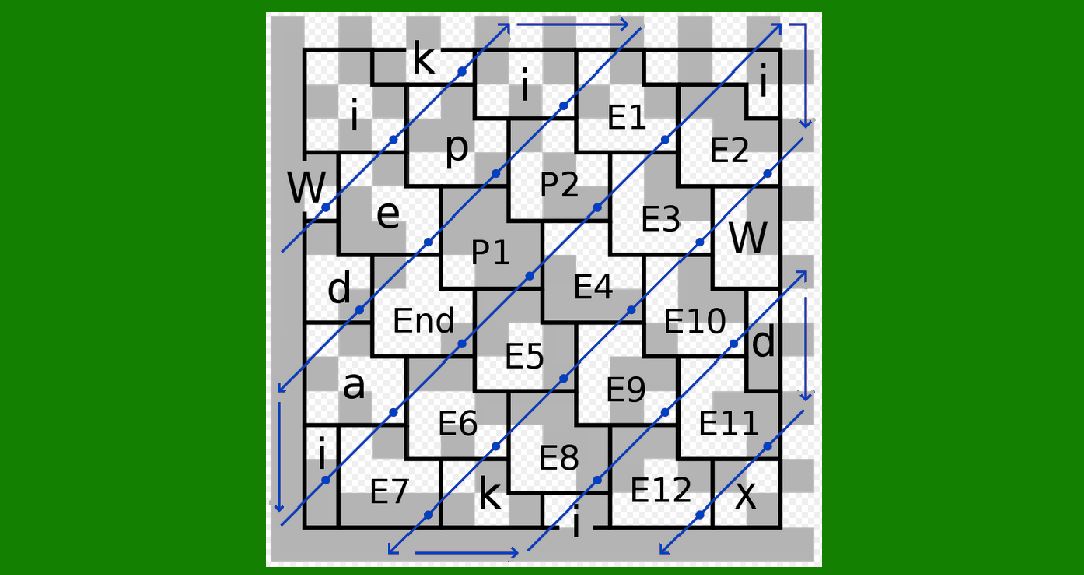
Grid Layout: The Data Matrix grid is defined by the size of the code. Common sizes range from 10x10 to 144x144 cells for square codes, and from 8x18 to 16x48 for rectangular codes. The size chosen depends on the amount of data and the level of error correction required. Placement of Codewords: The data and error correction codewords are mapped onto the grid using a predefined pattern specified by the ISO/IEC 16022:2006 standard. This pattern ensures that the codewords are distributed in a way that maximizes readability and error correction capability. Data Encoding Scheme: The actual encoding of data into the grid involves converting the data and error correction codewords into a series of black and white cells. This process is done using the following steps: L-shaped placement: Codewords are placed in an 'L' shape starting from the top left of the data region. Diagonal Traversal: The placement continues diagonally through the grid, wrapping around to the next available cell when the edge of the grid is reached. Filling the Grid: This process continues until all codewords have been placed in the grid. The remaining empty cells are filled with a predefined pattern to complete the Data Matrix code. |

|
Data Matrix Code Sizes and Error Correction Levels |
The size of a Data Matrix code and its error correction level are closely related. The larger the code, the more data it can hold and the higher the level of error correction it can provide. Here are some examples of Data Matrix code sizes and their corresponding error correction capabilities: 10x10 Grid: Can encode up to 6 data codewords with 5 error correction codewords. 20x20 Grid: Can encode up to 44 data codewords with 28 error correction codewords. 144x144 Grid: Can encode up to 3,116 data codewords with 2,356 error correction codewords. |

|
Advantages of Data Matrix Codes |
Data Matrix codes offer several advantages over other types of barcodes: High Data Density: They can store a large amount of data in a small area. Robust Error Correction: Reed-Solomon error correction ensures that the code can be read even if it is partially damaged. Versatility: Can encode a variety of data types, including text, numbers, and binary data. Readability: Can be read by both linear and 2D barcode scanners, making them versatile for different scanning environments. |

|
Applications of Data Matrix Codes |
Due to their compact size and robust error correction, Data Matrix codes are widely used in various industries, including: Manufacturing: For tracking components and products through the production process. Healthcare: For encoding patient information and tracking medical devices. Logistics and Supply Chain: For tracking packages and inventory items. Retail: For encoding product information on small items where space is limited. |

|
Conclusion |
The encoding of Data Matrix codes as defined by ISO/IEC 16022:2006 involves a detailed process of data preparation, error correction coding, and grid mapping. This standard ensures that Data Matrix codes are highly efficient, robust, and versatile, making them suitable for a wide range of applications. By following the standardized encoding process, Data Matrix codes can reliably store and transmit information in a compact and error-resistant format. |
 cs@easiersoft.com