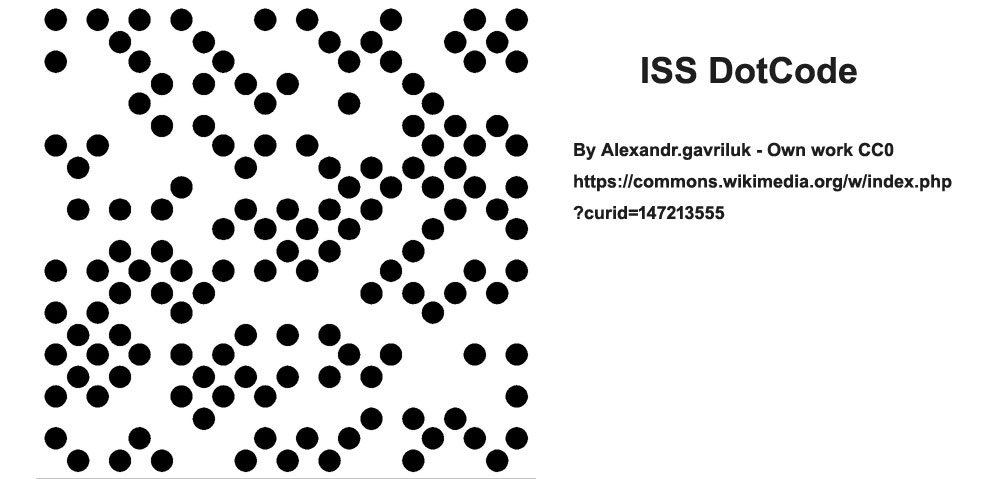
DotCode encoding is a sophisticated method used primarily for high-density encoding of data into 2D barcodes. Developed by RVSI Acuity CiMatrix and later standardized under AIM Global, DotCode offers several unique features and capabilities that make it suitable for a wide range of applications, particularly in industries requiring robust data encoding and efficient barcode reading. |
|
Overview of DotCode Encoding |
DotCode encoding is designed to encode data using a grid of dots arranged in a square or rectangular pattern. Unlike traditional linear barcodes, DotCode can be variably sized, with practical implementations often utilizing a grid of dots. The encoding process involves converting raw data into a series of dot patterns, each representing a specific codeword. |
Encoding Capacity |
DotCode's encoding capacity depends on the version used, typically denoted by the size of the grid or the number of dots. For example, a common version like the 100x99 grid can accommodate up to 4950 dots. This configuration allows for the encoding of various types of data: |
Raw Data Codewords: Up to 366 codewords Digits: Up to 730 digits Alphanumeric Characters: Up to 365 characters Bytes: Up to 304 bytes |
These capacities make DotCode versatile for encoding different types of information, from simple numeric data to more complex alphanumeric strings and byte data. |
Codeword Representation |
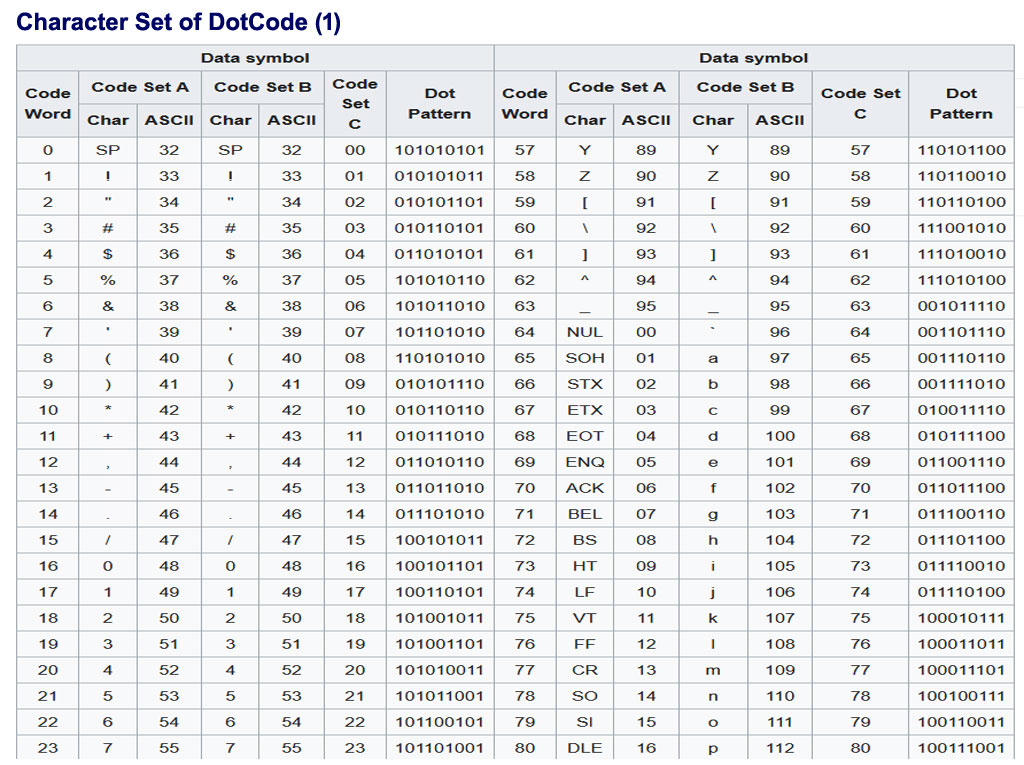
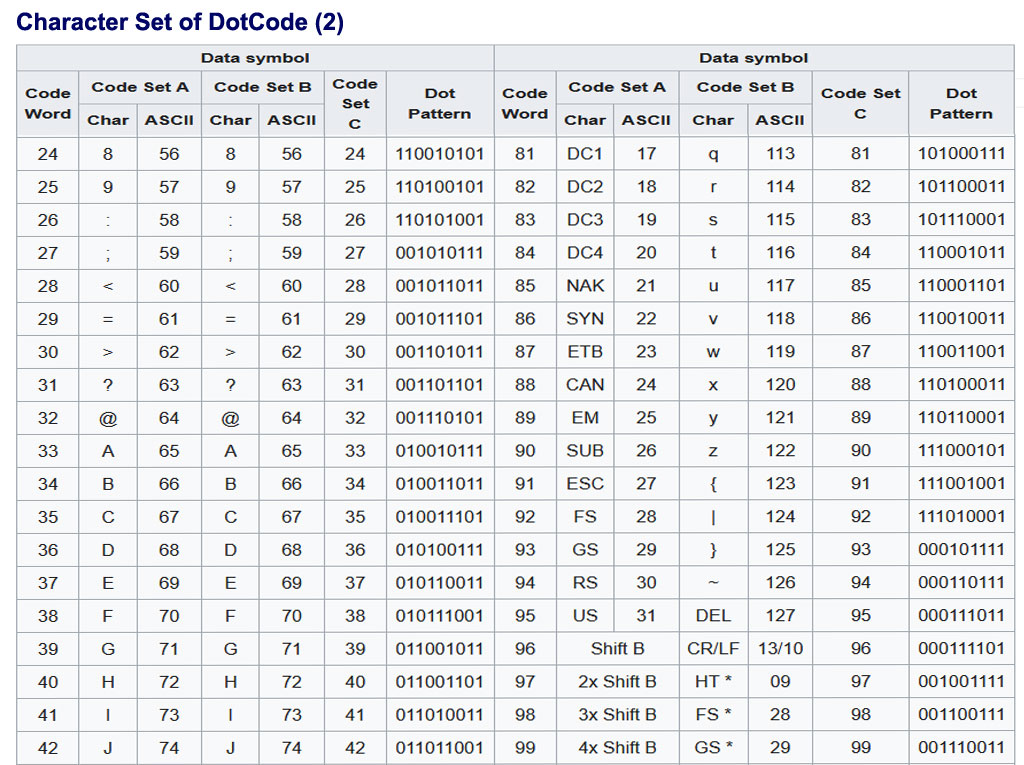
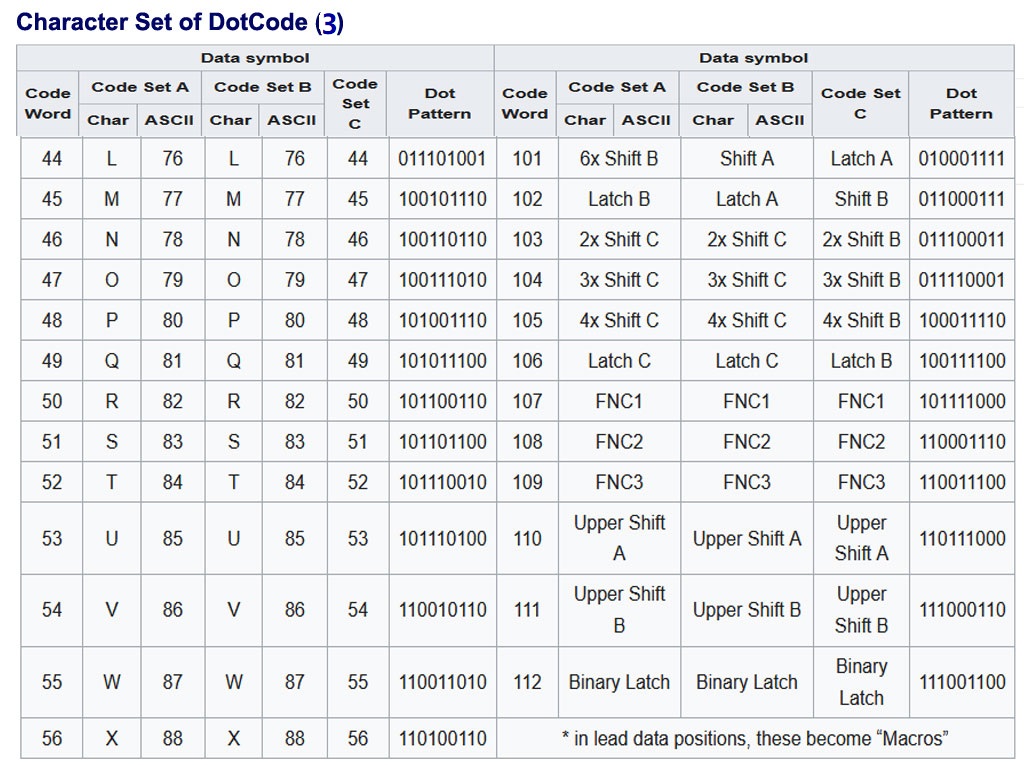
DotCode uses a set of codewords ranging from 0 to 112, each represented by a unique binary dot pattern. The encoding process involves mapping data into these codewords using efficient algorithms to ensure both compactness and readability. The dot patterns themselves are designed to be easily recognizable by scanning devices, ensuring accurate and rapid data retrieval. |
DotCode CharacterSet: |
|
. |
|
. |
|
Features of DotCode Encoding |
DotCode supports several advanced features that enhance its utility in various applications: |
1.Character Encoding: DotCode natively encodes digits (0-9) and ASCII characters (0-127) using different code sets (A, B, C). Extended ASCII values (128-255) are encoded using an Upper Shift mechanism, expanding the range of characters that can be represented. |
2.Byte Encoding: Bytes of data can be efficiently encoded using a Binary Latch mechanism. This allows up to 5 bytes of data to be encoded into 6 codewords, optimizing the use of space while ensuring data integrity. |
3.GS1 Data Encoding: DotCode supports encoding data according to GS1 standards, making it compatible with global supply chain applications where GS1 standards are prevalent. |
4.Unicode Support: Extended Channel Interpretation (ECI) enables DotCode to encode Unicode symbols, facilitating the representation of international characters and symbols beyond the standard ASCII set. |
5.Structured Append: DotCode supports structured append encoding, where multiple DotCode symbols can be logically linked together to form a single, continuous data stream. This feature is particularly useful for encoding large datasets that exceed the capacity of a single barcode symbol. |
6.Macro Encoding: This feature allows multiple DotCode symbols to be combined into a single macro symbol. It simplifies the handling and management of complex data sets, offering a streamlined approach to encoding and decoding extensive information. |

|
Technical Implementation |
The technical implementation of DotCode encoding involves several key steps: |
Data Segmentation: The input data is segmented into appropriate units based on the encoding requirements (e.g., codewords for alphanumeric data, bytes for binary data). Codeword Assignment: Each segment of data is mapped to corresponding codewords based on predefined algorithms and code tables. Dot Pattern Generation: The mapped codewords are then converted into binary dot patterns. DotCode utilizes a 5-of-9 binary pattern, where each codeword is represented by a unique combination of dots within a 5x5 matrix. Symbol Formation: The binary dot patterns are arranged within the DotCode symbol structure, ensuring the correct spacing and alignment according to the chosen grid size and version. Error Correction: Error correction techniques, such as Reed-Solomon error correction, may be applied to enhance the robustness of the encoded data against potential scanning errors or symbol damage. |

|
Applications of DotCode Encoding |
DotCode's versatility and robustness make it suitable for a wide range of applications across various industries: |
Retail and Consumer Goods: Tracking individual items, such as pharmaceuticals, cigarettes, and grocery products, adhering to GS1 standards. Logistics and Supply Chain: Efficient management of inventory and shipment tracking, ensuring accurate data capture and inventory control. Healthcare: Encoding patient data on medical supplies and equipment for accurate tracking and inventory management. Automotive and Manufacturing: Part identification, inventory control, and process tracking in complex manufacturing environments. Government and Defense: Secure document tracking and management, ensuring data integrity and confidentiality. |

|
Conclusion |
DotCode encoding represents a significant advancement in barcode technology, offering enhanced data capacity, efficient encoding methods, and support for diverse data types and standards. Its flexibility in size and robust features make DotCode a preferred choice for applications requiring high-density data encoding, reliable scanning performance, and global compatibility. As industries continue to evolve, DotCode remains at the forefront of barcode technology, driving efficiency and accuracy in data management and logistics operations. |
 cs@easiersoft.com