MicroPDF417 is a two-dimensional stacked barcode symbology primarily used in applications where space is limited but a considerable amount of data needs to be encoded. |
It is capable of encoding up to 1500 bytes of data or 1100 text characters in a single symbol. This detailed explanation will delve into the encoding process of MicroPDF417, focusing on its structure, encoding modes, data codewords, and special functions. |
|
Structure of MicroPDF417 |
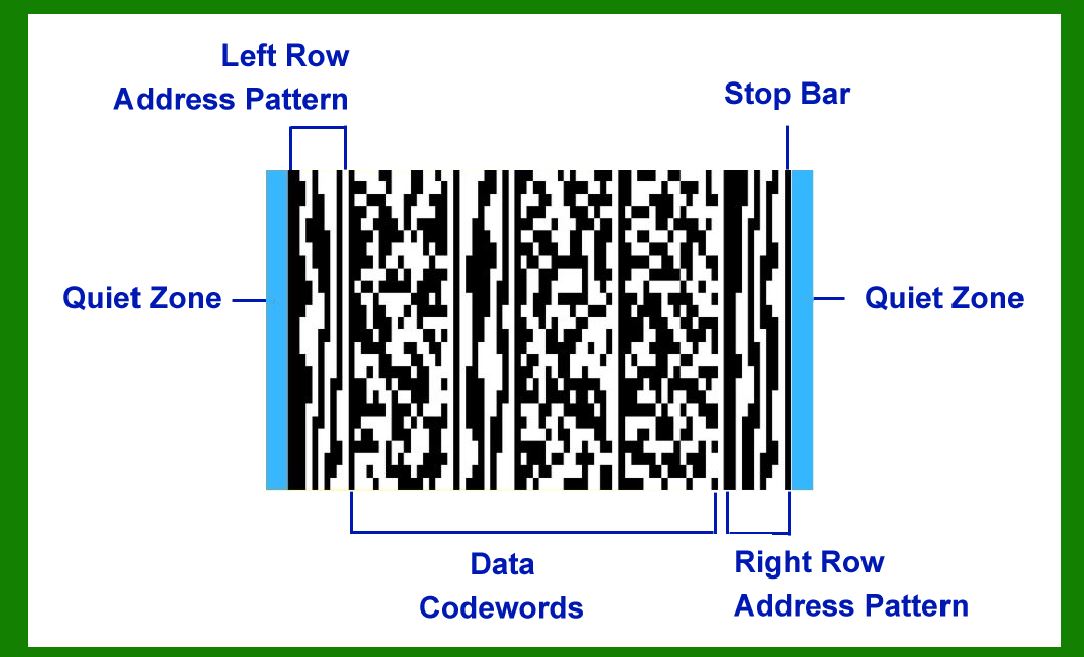
MicroPDF417 barcodes consist of several key components: |
1.Quiet Zone: The quiet zone is a blank area surrounding the barcode that ensures no other elements interfere with the barcode during scanning. 2.Start Pattern: Marks the beginning of the barcode and identifies it as MicroPDF417. 3.Rows and Columns: The barcode is organized into rows and columns of modules (black and white squares), which encode the data. 4.Data Region: The central area where encoded data is stored. 5.Error Correction Codewords: Additional codewords that enhance the barcode's robustness against damage or distortion. 6.End Pattern: Indicates the conclusion of the barcode, signaling to the scanner that all relevant data has been transmitted. |
|
Data Codewords in MicroPDF417 |
MicroPDF417 employs data codewords to store information. These codewords are grouped into several categories: |
Data Codewords (0 - 899): These codewords are used for encoding actual data. Each data codeword can represent a specific amount of data depending on the encoding mode and symbol size. Function Codewords (900 - 928): Reserved for special functions, including mode switching and other control functions necessary for decoding the barcode correctly. |
|
Encoding Modes in MicroPDF417 |
MicroPDF417 supports various encoding modes to optimize data representation: |
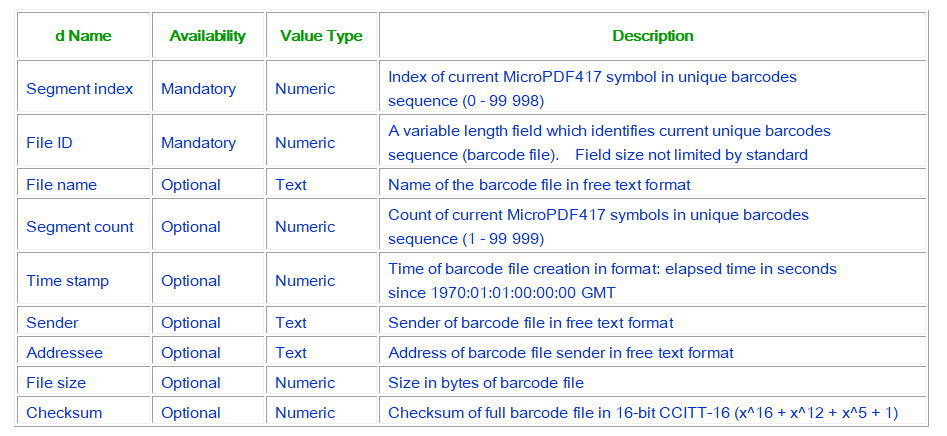
1.Text Encoding Mode: Optimized for encoding alphanumeric characters (letters and numbers). 2.Binary Encoding Mode: Used for encoding binary data (typically 8-bit bytes). 3.Numeric Encoding Mode: Efficiently encodes digits (0-9). 4.Macro PDF Mode: Enables linking multiple MicroPDF417 symbols to encode larger amounts of data. 5.Structured Append Mode: Allows data to be split across multiple MicroPDF417 symbols. |

|
Common and Special Encoding Modes |
Common Modes |
Text Encoding Mode: Suitable for encoding text and alphanumeric characters efficiently. Binary Encoding Mode: Directly encodes binary data, preserving its integrity without conversion. Numeric Encoding Mode: Optimized for encoding numeric data, using fewer codewords per character. |
Special Modes |
Macro PDF Mode: Enables the creation of a multi-symbol barcode by linking several MicroPDF417 symbols together. Structured Append Mode: Facilitates the division of large data sets across multiple MicroPDF417 symbols for efficient storage and scanning. |

|
Encoding Process |
The encoding process for MicroPDF417 involves several steps: |
1.Data Segmentation: The input data is segmented into appropriate chunks based on the selected encoding mode (text, binary, or numeric). 2.Mode Selection: Depending on the type of data being encoded, the appropriate encoding mode (text, binary, numeric) is selected to optimize data density and readability. 3.Codeword Assignment: Each segment of data is assigned data codewords based on the chosen encoding mode. The allocation of codewords is managed to ensure efficient use of space within the barcode. 4.Error Correction: Error correction codewords are generated and appended to the data codewords to enhance the barcode's fault tolerance. 5.Symbol Generation: The structured data, along with the start and end patterns, is organized into rows and columns of modules to form the MicroPDF417 barcode symbol. 6.Quiet Zone Addition: A quiet zone is added around the symbol to ensure reliable scanning and decoding. |

|
Example of Encoding |
Consider encoding the text 'ABC123' into MicroPDF417: |
1.Data Segmentation: 'ABC123' is segmented into alphanumeric characters suitable for text encoding. 2.Mode Selection: Text encoding mode is chosen for the segments 'ABC' and '123'. 3.Codeword Assignment: Each character is mapped to its respective codeword according to the text encoding table. 4.Error Correction: Error correction codewords are calculated and appended to the data codewords to ensure data integrity. 5.Symbol Generation: The encoded data, along with start and end patterns, is formatted into the MicroPDF417 symbol matrix. 6.Quiet Zone Addition: A quiet zone is added around the symbol to prevent interference during scanning. |

|
Special Function Codewords |
MicroPDF417 reserves specific codewords (900 - 928) for special functions: |
Mode Switching: Allows the barcode to switch between different encoding modes within the same symbol. Structured Append Control: Controls the sequence of symbols in a structured append configuration. Macro PDF Control: Manages linking and decoding across multiple MicroPDF417 symbols in a Macro PDF configuration. |

|
Conclusion |
MicroPDF417 is a versatile barcode symbology known for its compact size and high data capacity. Understanding its encoding process involves grasping the organization of data and function codewords, selection of appropriate encoding modes, and the systematic arrangement of data within the barcode structure. By efficiently utilizing data and function codewords, MicroPDF417 ensures reliable data storage and retrieval across various applications, from industrial environments to retail and logistics. Its ability to encode up to 1500 bytes of data makes it a robust choice for applications requiring dense data storage in limited space scenarios. |
 cs@easiersoft.com