MicroPDF417 is a two-dimensional barcode symbology known for its compact size and robust error correction capabilities, primarily employing Reed-Solomon codes to ensure data integrity and reliability. |
In this detailed explanation, we will delve into the specifics of how error correction works in MicroPDF417, focusing on its mechanisms for handling erasures and substitution errors. |
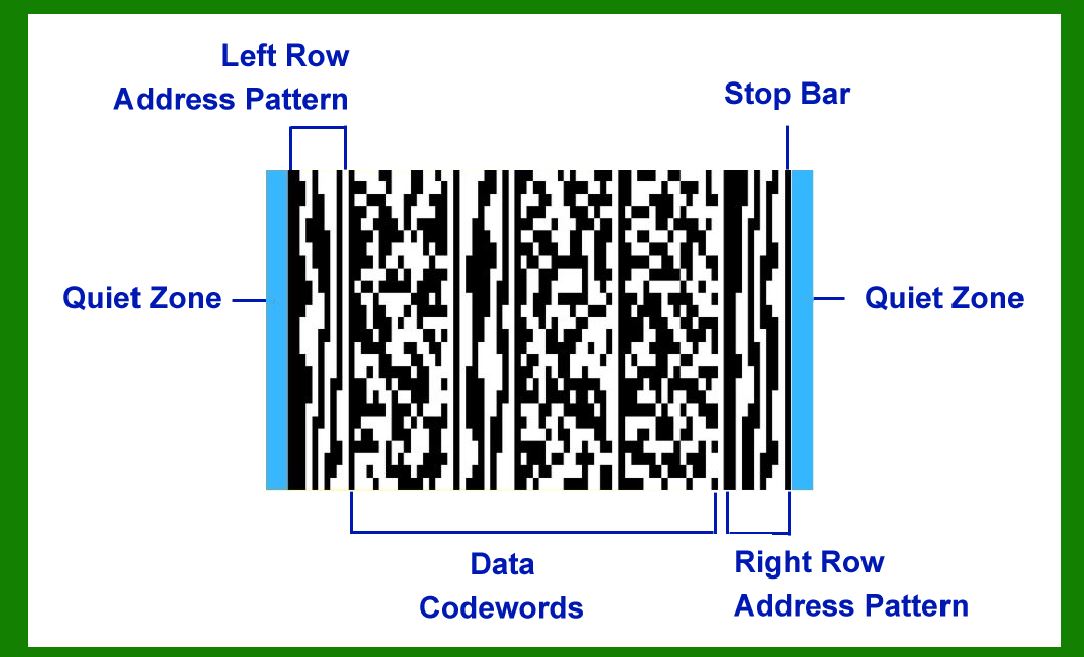
|
Overview of MicroPDF417 Error Correction |
MicroPDF417 employs Reed-Solomon (RS) error correction, a well-established technique in digital communications and storage systems. RS codes are particularly effective in correcting errors that can occur during data transmission or storage. These errors can manifest as missing symbols (erasures) or incorrect symbols (substitutions). |
Fixed Number of Error Correction Codewords |
For each version of MicroPDF417, the number of error correction codewords is fixed. This means that regardless of the data encoded, a predetermined number of additional codewords are appended to the barcode to facilitate error correction. This fixed amount is crucial for ensuring that the barcode can withstand a certain level of damage or corruption without losing data integrity. |

|
Symbol Capacity Filled by Error Correction Codewords |
MicroPDF417 devotes a significant portion of its symbol capacity to error correction codewords. The amount filled by these codewords typically ranges from 28% to 67% of the total symbol capacity. This allocation is designed to strike a balance between data density (how much information can be stored) and error resilience (how well the barcode can recover from errors). |
Error Correction Capabilities |
MicroPDF417's error correction capabilities encompass two main types of errors: erasures and substitution errors. Let's explore each of these in detail: |
Erasures Errors Correction Ability |
An erasure occurs when a symbol in the barcode is known to be corrupted or missing. MicroPDF417 can correct erasures effectively. The number of erasures that can be corrected is determined by the formula: Number of Erasures Correctable=Error Correction Codewords?1\text{Number of Erasures Correctable} = \text{Error Correction Codewords} - 1Number of Erasures Correctable=Error Correction Codewords?1 Here, 'Error Correction Codewords' refers to the fixed number of additional codewords appended to the barcode for error correction purposes. Subtracting 1 from this number gives the maximum count of erasures that the barcode can recover from. |

|
Substitution Errors |
Substitution errors, on the other hand, involve symbols that have been replaced with incorrect data during transmission or storage. MicroPDF417 can correct substitution errors as well. The formula for the maximum number of substitution errors correctable is: Number of Substitution Errors Correctable=Error Correction Codewords?12\text{Number of Substitution Errors Correctable} = \frac{\text{Error Correction Codewords} - 1}{2}Number of Substitution Errors Correctable=2Error Correction Codewords?1 This formula derives from the fact that each substitution error typically affects two symbols (the incorrect one and the correct one it should have been). Therefore, the total number of substitution errors that can be corrected is half the number of available error correction codewords, minus one. |

|
Practical Application |
To illustrate how these error correction capabilities work in practice, consider a MicroPDF417 barcode encoded with 20 data codewords and 10 error correction codewords. This configuration means the barcode can tolerate up to 9 erasures (10 - 1 = 9) or 4 substitution errors (10?12=4.5\frac{10 - 1}{2} = 4.5210?1=4.5, rounded down to 4). If during scanning or reading, up to 9 symbols are unreadable due to damage (erasures), the barcode can still be decoded correctly because the error correction codewords contain sufficient redundant information to reconstruct the missing data. Similarly, if up to 4 symbols have been incorrectly read (substitutions), the error correction mechanism can identify and correct these errors, ensuring the integrity of the decoded information. |

|
Reed-Solomon Coding Mechanism |
Reed-Solomon codes achieve error correction through mathematical principles involving polynomial division over a finite field. These codes are capable of not only detecting errors but also correcting them up to a certain threshold, which is determined by the number of error correction codewords appended to the barcode. |
Decoding Process |
When decoding a MicroPDF417 barcode, the decoding algorithm uses the error correction codewords to check for and correct errors. The process involves: |
1.Syndrome Calculation: Computing syndromes from received codewords to detect errors. 2.Error Localization: Determining the locations of errors based on the syndromes. 3.Error Correction: Correcting errors using the syndromes and error positions found. |
By iteratively applying these steps, the decoder can reconstruct the original data even if errors have affected the barcode during transmission or storage. |

|
Symbol Capacity Allocation |
The allocation of symbol capacity between data codewords and error correction codewords is a critical design consideration in MicroPDF417. The choice of how many error correction codewords to include affects the barcode's resilience to errors. More error correction codewords increase the barcode's ability to withstand damage but reduce the space available for data storage, whereas fewer error correction codewords allow for more data storage but decrease error correction capability. |

|
Conclusion |
MicroPDF417's use of Reed-Solomon error correction provides it with robust capabilities to recover from errors caused by erasures and substitutions. The fixed number of error correction codewords per barcode version ensures consistent performance in error correction across different implementations. By understanding these principles, manufacturers and users can make informed decisions about how to optimize barcode design for their specific needs, balancing data density with error resilience. This combination of compact size and reliable error correction makes MicroPDF417 suitable for a wide range of applications where data integrity and compactness are paramount. |
 cs@easiersoft.com