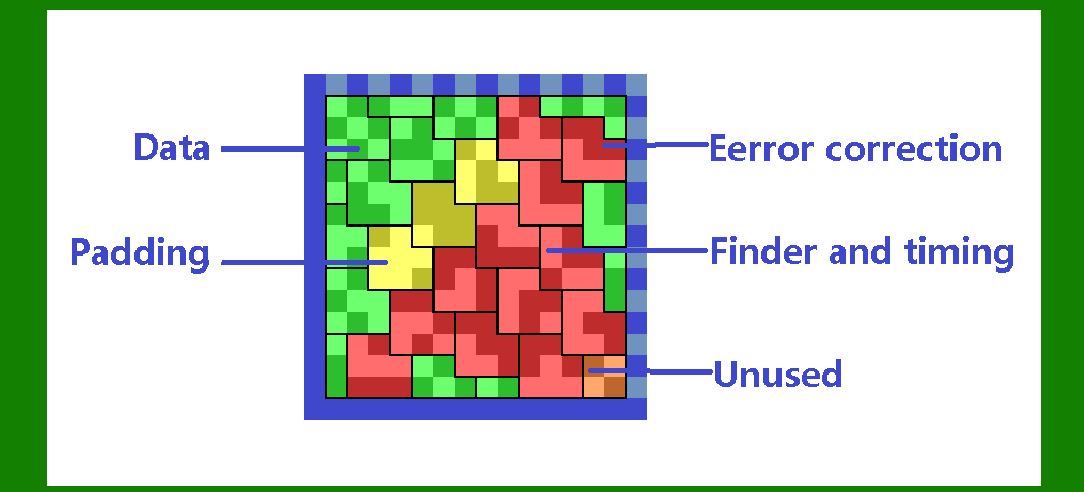
Data Matrix barcodes are two-dimensional (2D) codes widely used for marking small items due to their ability to encode a large amount of data in a compact space. One of the key features that enhance the reliability of Data Matrix barcodes is their robust error correction capability. This feature allows the barcode to be read accurately even if it is partially damaged or obscured. In this detailed description, we'll explore how error correction works in Data Matrix barcodes, the algorithms used, and the principles behind their implementation. |
|
Fundamentals of Data Matrix Barcodes |
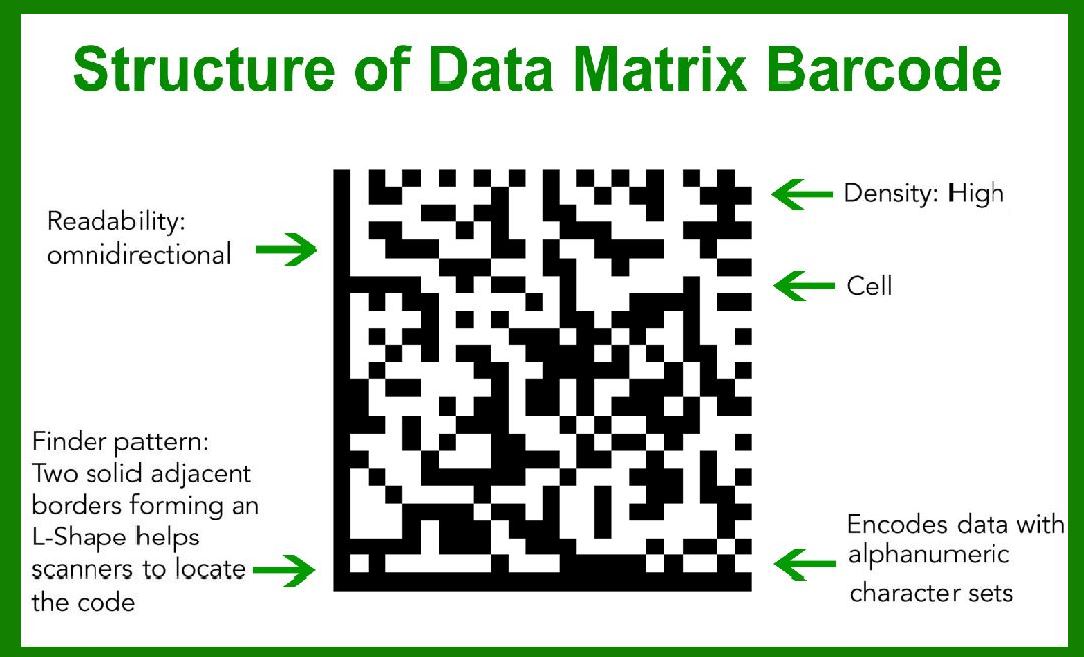
A Data Matrix barcode consists of a pattern of black and white cells arranged in a square or rectangular grid. Each cell represents a binary value (0 or 1). The size of the grid varies, accommodating different amounts of data. For example, a 10x10 grid can store less data compared to a 144x144 grid. |
|
Error Correction in Data Matrix Barcodes |
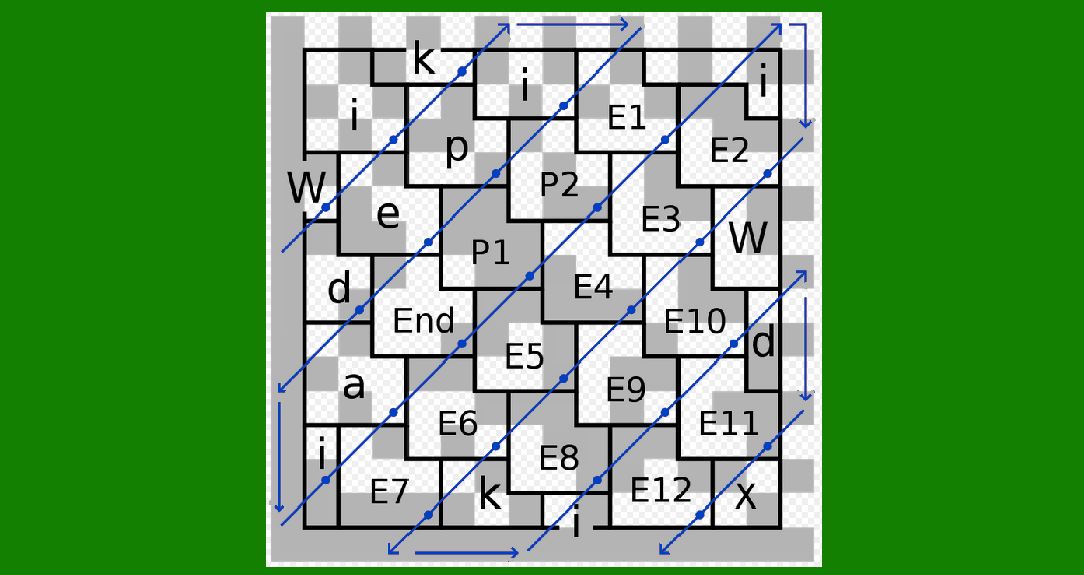
The error correction capability in Data Matrix barcodes is primarily achieved through the use of Reed-Solomon (RS) error correction codes. These codes are powerful because they can detect and correct multiple errors within the data. |
|
Reed-Solomon Error Correction |
Reed-Solomon error correction is based on polynomial arithmetic over a finite field. In the context of Data Matrix barcodes, it involves the following steps: |
1.Encoding: Before generating the barcode, the data is encoded using Reed-Solomon error correction codes. This process adds redundancy to the original data by appending error correction codewords. These codewords are derived from the original data and provide a means to detect and correct errors during the decoding process. 2.Decoding: When a scanner reads a Data Matrix barcode, it captures the pattern of black and white cells and translates them back into binary data. During this translation, errors may be introduced due to various factors such as dirt, scratches, or poor printing quality. The Reed-Solomon decoding algorithm processes the captured data, using the redundancy introduced during encoding to identify and correct errors. |
Steps in Reed-Solomon Error Correction |
Let's break down the Reed-Solomon error correction process into more detail: 1.Data Representation: The original data to be encoded is represented as a sequence of symbols over a finite field (often GF(256) for 8-bit symbols). Each symbol can represent a byte (8 bits) of data. 2.Polynomial Construction: The data is then used to construct a polynomial, where each symbol corresponds to a coefficient in the polynomial. For example, if the data symbols are d0,d1,…,dk-1d_0, d_1, \ldots, d_{k-1}d0,d1,…,dk-1, the polynomial D(x)D(x)D(x) can be represented as: D(x)=d0+d1x+d2x2+…+dk-1xk-1D(x) = d_0 + d_1x + d_2x^2 + \ldots + d_{k-1}x^{k-1}D(x)=d0+d1x+d2x2+…+dk-1xk-1 3.Generating Redundant Symbols: Redundant symbols (error correction codewords) are generated using a generator polynomial G(x)G(x)G(x). The number of redundant symbols, typically denoted as 2t2t2t, determines the error correction capability of the code (the code can correct up to ttt symbol errors). 4.Appending Redundant Symbols: The redundant symbols are appended to the original data to form the encoded message polynomial C(x)C(x)C(x). This polynomial is then used to create the Data Matrix barcode. 5.Error Detection and Correction: During decoding, the received polynomial R(x)R(x)R(x) (which may include errors) is processed. The Reed-Solomon decoder calculates a syndrome polynomial S(x)S(x)S(x) by evaluating R(x)R(x)R(x) at several points. If S(x)S(x)S(x) is the zero polynomial, there are no errors. Otherwise, the decoder uses algorithms such as the Berlekamp-Massey algorithm to determine the error locator polynomial and error magnitude polynomial. These polynomials help in identifying the positions and values of the errors, allowing the decoder to correct them. |

|
Practical Example |
To illustrate the process, let's consider a simplified example with a Data Matrix barcode using GF(16) (a smaller finite field) and encoding 5 data symbols with 3 redundant symbols. |
1.Data Representation: Suppose the original data symbols are d=[d0,d1,d2,d3,d4]d = [d_0, d_1, d_2, d_3, d_4]d=[d0,d1,d2,d3,d4]. 2.Polynomial Construction: The data polynomial D(x)D(x)D(x) is: D(x)=d0+d1x+d2x2+d3x3+d4x4D(x) = d_0 + d_1x + d_2x^2 + d_3x^3 + d_4x^4D(x)=d0+d1x+d2x2+d3x3+d4x4 3.Generating Redundant Symbols: The generator polynomial G(x)G(x)G(x) for 3 redundant symbols might be: G(x)=(x-α1)(x-α2)(x-α3)G(x) = (x - \alpha^1)(x - \alpha^2)(x - \alpha^3)G(x)=(x-α1)(x-α2)(x-α3) where α\alphaα is a primitive element of GF(16). 4.Appending Redundant Symbols: The encoded message polynomial C(x)C(x)C(x) includes the original data and the redundant symbols: C(x)=D(x)-G(x)C(x) = D(x) \cdot G(x)C(x)=D(x)-G(x) 5.Error Detection and Correction: Suppose the received polynomial R(x)R(x)R(x) has errors due to noise: R(x)=C(x)+E(x)R(x) = C(x) + E(x)R(x)=C(x)+E(x) where E(x)E(x)E(x) represents the error polynomial. The syndrome polynomial S(x)S(x)S(x) is computed from R(x)R(x)R(x). If S(x)≠0S(x) \neq 0S(x)=0, the decoder proceeds to identify and correct the errors using the error locator and magnitude polynomials. |

|
Benefits of Reed-Solomon Error Correction |
1.High Reliability: Reed-Solomon codes are highly reliable, capable of correcting multiple errors and ensuring data integrity even under harsh conditions. 2.Flexibility: The level of error correction can be adjusted by changing the number of redundant symbols, allowing for a trade-off between data capacity and error correction capability. 3.Wide Adoption: Reed-Solomon error correction is widely used in various applications, including QR codes, CDs, DVDs, and digital communication systems, demonstrating its robustness and versatility. |

|
Challenges and Limitations |
1.Complexity: The encoding and decoding processes involve complex polynomial arithmetic, which can be computationally intensive, especially for large barcodes. 2.Overhead: Adding redundant symbols reduces the effective data capacity of the barcode. A balance must be struck between data storage and error correction capability. 3.Implementation: Developing efficient implementations of Reed-Solomon encoders and decoders requires careful consideration of algorithm optimization and hardware capabilities. |

|
Conclusion |
Error correction is a vital feature of Data Matrix barcodes, enabling them to maintain data integrity in the presence of errors. The use of Reed-Solomon error correction codes provides robust error detection and correction capabilities, ensuring reliable barcode scanning and data retrieval. Understanding the principles and mechanisms of Reed-Solomon error correction helps in appreciating the technological sophistication behind Data Matrix barcodes and their wide applicability in various industries. |
 cs@easiersoft.com