Error correction in the context of PDF417 barcodes involves the use of Reed-Solomon codes, which are crucial for ensuring data integrity and reliability when scanning the barcode. This detailed explanation will cover the principles of Reed-Solomon error correction, its application in PDF417 symbols, and the recommended practices for maximizing the reliability of scanned data. |
|
Reed-Solomon Error Correction |
Reed-Solomon codes are a type of error-correcting code that add redundancy to data in order to detect and correct errors that may occur during transmission or storage. They are widely used in various applications where data integrity is critical, such as CDs, DVDs, QR codes, and PDF417 barcodes. |

|
Principles of Reed-Solomon Codes |
Reed-Solomon codes operate by generating a set of codewords from the original data. These codewords contain additional redundant information, which allows the receiver to detect and correct errors caused by noise or other impairments in the communication channel. |
The key parameters that define a Reed-Solomon code include: Symbol Size: The size of each element in the code field, typically measured in bits. Message Length: The number of symbols in the original data before adding redundancy. Codeword Length: The total number of symbols (including both data and redundancy) in the encoded message. Error Correction Capability: The maximum number of errors that can be corrected based on the chosen parameters. |
Reed-Solomon codes are characterized by their ability to correct a specified number of errors based on the number of redundancy symbols added to the original data. The correction capability is crucial in applications like PDF417 barcodes, where reliable data retrieval is essential even in the presence of scanning errors or environmental interference. |

|
PDF417 Barcode Structure |
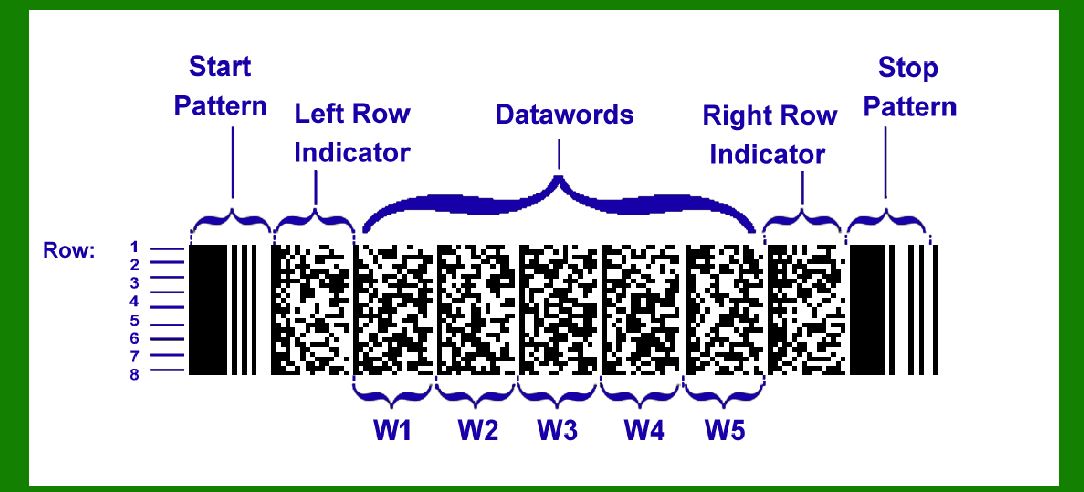
PDF417 is a two-dimensional stacked barcode symbology that can encode large amounts of data compared to traditional linear barcodes. It is widely used in various industries, including logistics, transportation, and government applications, due to its high data capacity and robust error correction capabilities. |

|
Error Correction in PDF417 |
When a PDF417 symbol is created, a specific number of error detection and correction codewords are added to the encoded data. These codewords are generated using Reed-Solomon error correction to ensure that the original data can be accurately reconstructed even if part of the symbol is damaged or unreadable during scanning. |

|
Error Correction Level |
PDF417 supports multiple error correction levels, which determine the number of codewords added to the symbol and hence the level of error correction capability. The higher the error correction level, the more codewords are added, increasing the resilience of the barcode to errors but also reducing the amount of data that can be encoded. |
The error correction levels typically range from 0 to 8, with 0 offering no error correction and higher levels providing progressively stronger error correction capabilities. For instance, Error Correction Level 8 adds the maximum number of codewords to the symbol to ensure robust error correction, making it suitable for applications where data integrity is critical. |

|
Codeword Configuration |
In PDF417, codewords consist of both data codewords and error correction codewords. The number of error correction codewords added depends on the selected error correction level and the total number of codewords used in the barcode. According to the PDF417 standard, it is recommended to reserve a certain number of codewords to ensure the reliability of corrected information during scanning. |

|
Scanning and Error Correction |
When a PDF417 symbol is scanned, the decoding process involves several steps to reconstruct the original data from the encoded symbol. Error correction is particularly important during this phase to compensate for any errors introduced during scanning, such as noise, distortion, or partial damage to the barcode. |

|
Maximum Error Correction Capability |
The maximum number of errors that can be corrected during scanning is equal to the number of error correction codewords added to the PDF417 symbol. For instance, if the barcode was encoded with 512 codewords and 10 of those codewords were dedicated to error correction, then theoretically up to 10 errors could be corrected during the decoding process. |

|
Reliability Considerations |
To ensure the reliability of the corrected information, it is recommended by the PDF417 standard to hold back two codewords from correction. This precautionary measure helps to mitigate the risk of incorrect data reconstruction due to limitations in the scanning process or other factors affecting barcode readability. |

|
Practical Application |
In practical scenarios, the effectiveness of error correction in PDF417 barcodes depends on several factors: |
Error Correction Level: Choosing an appropriate error correction level based on the application requirements is crucial. Higher error correction levels provide better resilience to errors but reduce the available data capacity. Scanning Environment: Environmental conditions during scanning, such as lighting, angle of scanning, and quality of the scanning equipment, can impact the readability of the barcode and the effectiveness of error correction. Data Integrity Requirements: The specific requirements for data integrity and reliability in the application dictate the choice of error correction level and other barcode parameters. |

|
Conclusion |
Error correction using Reed-Solomon codes plays a vital role in ensuring the reliability and integrity of data encoded in PDF417 barcodes. By adding redundancy through error correction codewords, PDF417 symbols can withstand errors introduced during scanning, thereby facilitating accurate data retrieval even under adverse conditions. |
Understanding the principles of Reed-Solomon error correction, the structure of PDF417 barcodes, and recommended practices for error correction levels and codeword management is essential for designing robust barcode systems that meet the reliability requirements of diverse applications. |
 cs@easiersoft.com