Detailed Features of PDF417 Barcode |
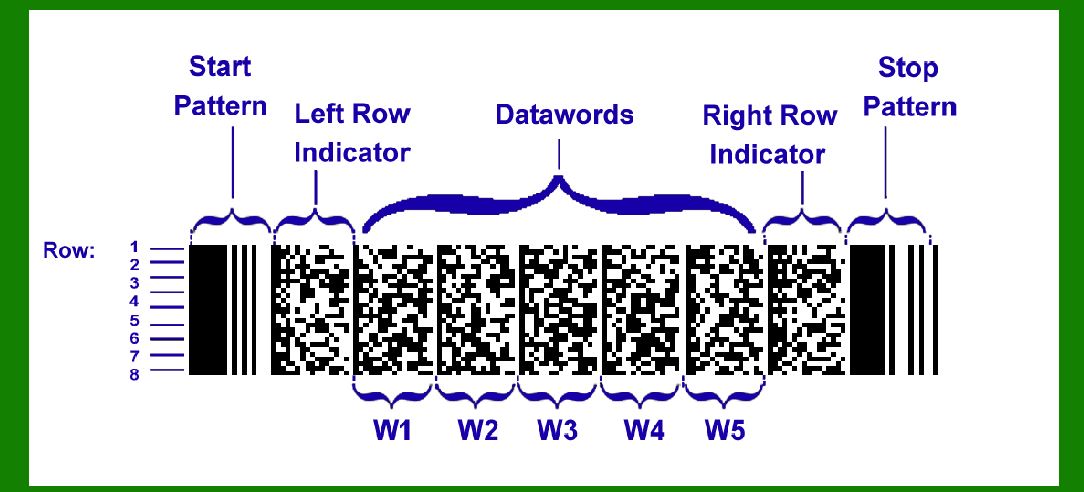
PDF417 is a two-dimensional stacked barcode format capable of encoding large amounts of data within a relatively small area. Beyond its basic functionalities, PDF417 offers several advanced features that enhance its utility in various applications, making it a versatile choice for data encoding needs. This comprehensive overview delves into the various features and capabilities of the PDF417 barcode. |
|
1. Linking Capability |
One of the distinctive features of PDF417 is its ability to link multiple symbols together. This linking feature allows for the segmentation of large amounts of data across several symbols, which can be scanned sequentially to retrieve the complete dataset. This is particularly useful when the encoded data exceeds the capacity of a single symbol or when the data needs to be logically organized into smaller, manageable parts. |
The linking mechanism works by designating a specific symbol as the starting point (or reference point) and embedding information in each subsequent symbol to indicate its sequential position in the data sequence. Scanners capable of reading linked PDF417 symbols are programmed to recognize this sequence and reconstruct the complete dataset by concatenating the data from each symbol in the correct order. |

|
2. User-Specified Dimensions |
PDF417 allows users to specify certain dimensions of the barcode, providing flexibility in its implementation across different applications and environments: |
X Dimension (Width of Narrowest Bar): Users can define the width of the narrowest vertical bar, known as the X dimension. This parameter is crucial for determining the overall size and density of the barcode. A smaller X dimension allows for more compact symbols but requires higher resolution scanning equipment to ensure accurate decoding. Y Dimension (Height of Rows): PDF417 also permits users to set the height of the rows within the symbol. This dimension affects the overall height of the barcode symbol and is typically chosen based on factors such as scanning distance and printing resolution requirements. |
By allowing customization of these dimensions, PDF417 accommodates various printing technologies and scanning capabilities, making it adaptable to both high-density applications (where space is limited) and environments where robust scanning reliability is paramount. |

|
3. Public Domain Format |
An essential aspect of PDF417 is its status as a public domain format. This means that the specifications for generating and decoding PDF417 symbols are openly available and free from any proprietary restrictions, licenses, or fees. The format is standardized under ISO/IEC 15438:2006, ensuring compatibility and interoperability across different systems and devices. |
The decision to make PDF417 a public domain format was driven by the need for a widely accessible barcode standard that could be adopted and implemented by manufacturers of barcode equipment and developers of barcode applications without legal or financial barriers. This openness promotes innovation and facilitates the widespread adoption of PDF417 in diverse sectors, including transportation, logistics, healthcare, and government services. |

|
4. Advanced Error Correction |
PDF417 incorporates advanced error correction techniques, which enhance its robustness and reliability in adverse conditions. Error correction is achieved through the addition of redundant data within the barcode symbol. This redundant data allows the scanner to reconstruct the original encoded information even if portions of the barcode are damaged or unreadable due to smudging, tearing, or printing imperfections. |
The level of error correction in PDF417 can be adjusted to suit specific application requirements. Higher error correction levels increase the amount of redundant data encoded in the symbol, thereby improving fault tolerance but also reducing the overall data capacity. Conversely, lower error correction levels maximize data capacity but provide less resilience against damage or distortion. |
This adaptive error correction capability makes PDF417 particularly suitable for environments where barcode readability may be compromised, such as in industrial settings, outdoor conditions, or environments prone to wear and tear. |

|
5. Data Encryption |
In scenarios where data security is paramount, PDF417 supports the encryption of encoded data within the barcode symbol. Encryption ensures that sensitive information remains protected from unauthorized access or tampering during transmission and storage. Encrypted PDF417 symbols require decryption keys or algorithms to access the original data, thereby safeguarding confidential or proprietary information against interception or misuse. |
The encryption mechanism in PDF417 can be integrated with existing security protocols and encryption standards, ensuring compliance with regulatory requirements and industry-specific data protection guidelines. This feature extends the applicability of PDF417 to secure applications, such as electronic passports, payment cards, and secure access control systems. |

|
6. Structured Append |
PDF417 supports a structured append feature, which allows related data sets to be encoded across multiple symbols while maintaining logical cohesion. Structured append is useful when different components of a dataset need to be organized into distinct segments for efficient storage, retrieval, and processing. Each symbol in a structured append sequence contains metadata that identifies its position and relationship to other symbols, enabling seamless reconstruction of the entire dataset during decoding. |
This feature is particularly advantageous in scenarios where data management involves handling large volumes of interconnected information, such as in inventory management, document archiving, or complex product identification systems. Structured append simplifies data organization and facilitates scalable expansion without compromising data integrity or readability. |

|
7. Application Flexibility |
PDF417 is widely recognized for its versatility and can be implemented across a broad spectrum of applications and industries: |
Transportation and Logistics: Used for tracking parcels, packages, and shipments across global supply chains, providing detailed information such as origin, destination, contents, and handling instructions. Healthcare: Employed in medical records management, patient identification, pharmaceutical labeling, and specimen tracking to ensure accuracy, traceability, and compliance with regulatory standards. Government Services: Adopted for issuing secure identification documents, driver's licenses, voter registration cards, and national ID cards, incorporating biometric data and encryption for enhanced security. Retail and Inventory Management: Utilized for inventory control, product labeling, pricing, and promotions, facilitating efficient stock management and real-time data synchronization. |
PDF417's widespread adoption is attributed to its capacity for encoding extensive data, robust error correction capabilities, scalability, and compatibility with diverse printing and scanning technologies. These attributes make it a preferred choice for applications demanding high data density, reliability, and flexibility in data management. |

|
Conclusion |
PDF417 barcode technology represents a significant advancement in data encoding and management, offering a comprehensive set of features designed to meet the evolving needs of modern industries and applications. From its ability to link multiple symbols and user-defined dimensions to its status as a public domain format and advanced error correction capabilities, PDF417 continues to serve as a versatile solution for encoding, securing, and retrieving critical information across various sectors. |

|
As industries continue to embrace digital transformation and data-driven processes, PDF417 barcode technology remains a foundational tool for optimizing efficiency, enhancing visibility, and ensuring compliance with regulatory requirements. Its adaptability, reliability, and accessibility underscore its enduring relevance in an increasingly interconnected and data-intensive world. |
 cs@easiersoft.com