Barcode Technology

Barcode History

Barcode Label Paper

Barcode Printer

Barcode Application

Inventory Management

AI Barcode QRCode

Barcode Scanner

Barcode Software

Barcode Software B

Barcode Software C

Barcode Software D

Barcode Software E

New Technology A

New Technology B

Robot Technology

Barcode Types

Barcode Types B

Barcode Types C

Barcode Types D

Barcode Types E

Barcode Types F

Electronic Technology

Psychology at Work

Barcode Technology and Barcode Software Related   <<< Back to Directory <<<

The first 3 digits of the EAN-13

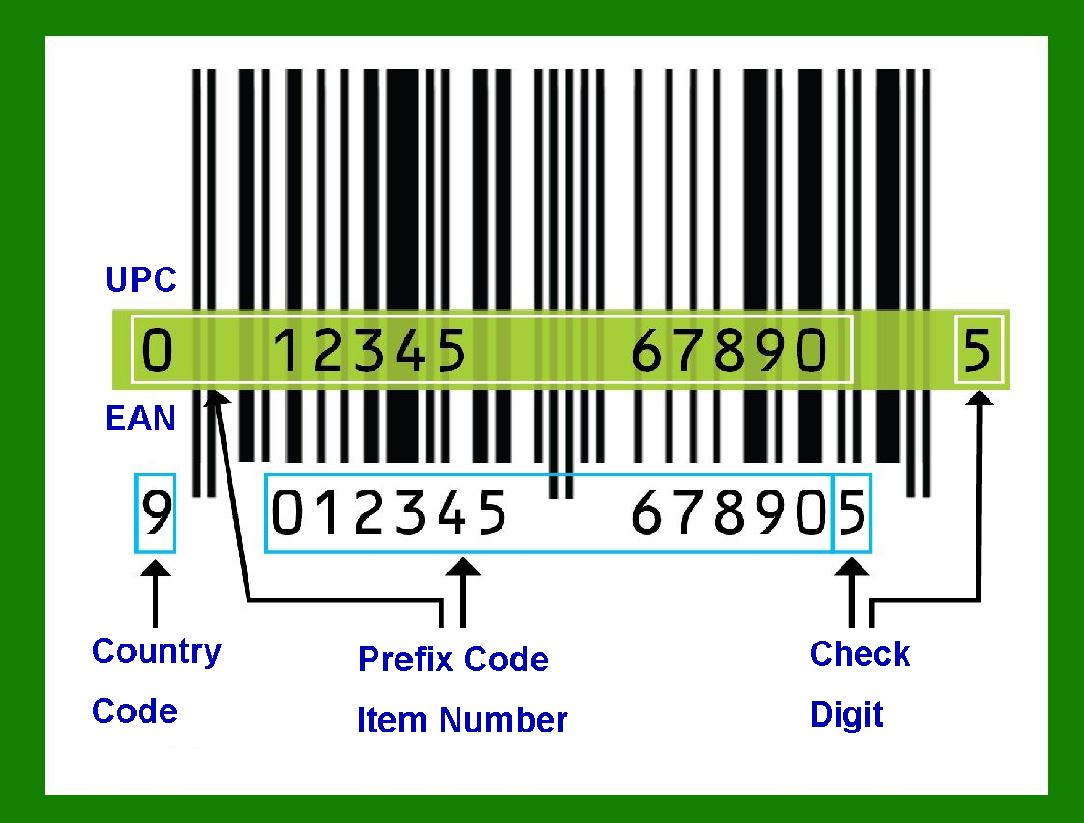
The first three digits of the EAN-13 barcode, known as the GS1 Prefix, indicate the country or region where the manufacturer is registered. This prefix does not necessarily indicate where the product was made.

Note that EAN-13 codes beginning with 0 are actually 12-digit UPC codes with prepended 0 digit. In recent years, more products sold by retailers outside the United States and Canada have been using EAN-13 codes beginning with 0, since they were generated by GS1-US.

The 020-029 GS1 Prefixes are worth a special mention. GS1 defines this as being available for retailer internal use (or internal use by other types of business). Some retailers use this for proprietary (own brand or unbranded) products, although many retailers obtain their own manufacturer's code for their own brands.

Other retailers use at least part of this prefix for products which are packaged in store, for example, items weighed and served over a counter for a customer. In these cases, the barcode may encode a price, quantity or weight along with a product identifier – in a retailer defined way. The product identifier may be one assigned by the Produce Electronic Identification Board (PEIB) or may be retailer assigned. Retailers who have historically used UPC barcodes tend to use GS1 prefixes starting with '02' for store-packaged products.

Here's a detailed description of some notable GS1 Prefix ranges:

1.000-019: United States and Canada

Products with these prefixes are registered by companies in the United States and Canada. The prefix does not indicate the country of production but rather the location of the company that registered the product.

2.030-039: United States (Drugs and Pharmaceuticals)

These prefixes are typically used for pharmaceuticals and health-related products that are registered in the United States.

3.040-049: Used for General Purposes within the United States

These numbers are reserved for products that might not fall into the specific categories of the previous ranges but are still registered in the United States.

4.050-059: Coupons

This range is designated for use on coupons issued in the United States.

5.060-099: United States and Canada

Similar to the 000-019 range, these prefixes are also used for products registered in the United States and Canada.

6.300-379: France and Monaco

Products with these prefixes are registered by companies in France and Monaco. This includes a wide range of consumer goods.

7.380: Bulgaria

The 380 prefix is assigned to products registered by companies in Bulgaria.

8.383: Slovenia

Products with this prefix are registered by companies in Slovenia.

9.400-440: Germany

These prefixes are used for products registered by companies in Germany, covering a broad range of consumer goods.

10.450-459 and 490-499: Japan

The 450-459 and 490-499 ranges are assigned to products registered by companies in Japan.

How the GS1 Prefix Works

The GS1 Prefix is part of the broader EAN-13 barcode structure, which includes:

GS1 Prefix (first 3 digits): Indicates the country of the registering organization.

Company Number (variable length): Assigned by the GS1 member organization to the manufacturer.

Product Code (variable length): Assigned by the manufacturer to a specific product.

Check Digit (last digit): Ensures the barcode is correctly composed.

Examples

4901234567892: A product registered in Japan.

3601234567892: A product registered in France.

5012345678900: A product registered in the United Kingdom (prefix 500-509).

These prefixes are managed and assigned by the GS1 organization, which ensures unique identification for products globally. The system helps in standardizing product identification and facilitates international trade by providing a reliable method of tracking and inventory management.


EasierSoft Barcode Label Design & Bulk Printing Software

---- Use Excel Data to Batch Print Barcodes on Label Sheets or Roll Labels  

---- How to use this barcode software

Download:  Free Barcode Software + Barcode Label Designer

Download Free Barcode Software at Softonic

     Download at CNET

Once you obtain a GS1/UPC/EAN barcode, or other barcode type and QR code, you can use our free software to batch print barcode labels onto Roll label paper using a professional label printer, or to batch print barcodes onto Avery 5160 label sheets using a regular laser or inkjet printer. Our software has free and paid versions.

The free version fully meets your needs for batch printing GS1/UPC/EAN barcodes. The paid version can import data from Excel and databases to batch print barcode labels with different values.

How to Start

Input Data

Import Excel Data

Print Barcode

Barcode Format

Label Designer

All Screen Shot

Export Barcode Image

Save Template

Output Word Excel

How to Use & FAQ:

Export barcode image files

Barcode text font setting

Generate ISBN barcode

Predefined label templates

Printing setup

Save settings

Serial number generator

The supported barcode types

Load Excel data (pro)

Manually copy data from Excel files

Filter some data for printing

Edit imported barcode data

Input data (Pro)

Label Designer

Edit data in Label designer

Label Designer - Add new label

Label Designer - Printing

Set the barcode label format to be printed

Other Barcode Label Format Settings

Barcode types supported by this program

Barcode Label Font Settings

Configuring the Barcode Print Rotation

Text Alignment for Barcode Labels

Automatically Adjusting Barcode Width

Text Beneath the Barcode

Configuring Barcode Size

Auto Calculate the Barcode Size

Export Barcode images

Export Barcode Image Format

File Names for Exported Barcode

Resolution of Exported Barcode Images

Fixed Folder for Exporting Barcode

Default Barcode Image Export Format

Print bulk barcodes quickly

Print barcodes to Avery 5160 label

How to bulk Barcode Printing

Sample - Avery 5162 (2x7) Label Sheet

Example: Print barcodes to 5*3cm roll

Example: Print barcodes to 5161 label

Example: Print barcodes to 5162 label

Example: Print barcodes to 5163 label

Example: Print barcodes to 5164 label

Example: Print portrait orientation 5164

Example: Print barcodes to 5167 label

Example: Print barcodes to 5168 label

Example: Print portrait orientation 5168

Example: Print barcodes to 5169 label

Example: Print barcodes to 5660 label

Example: Print barcodes to 5661 label

Example: Print barcodes to 5662 label

Highlights

Excel integration: Import data directly from Excel to generate and print barcodes in bulk.

Label designer: Create complex labels with multiple barcodes, text, logos, and shapes.

Batch printing: Print thousands of barcodes at once using standard inkjet/laser printers or professional barcode printers.


Flexible editions:

Standard Edition: Simple batch printing with Excel data.

Professional Edition: Adds command-line automation for workflow integration.

Label Designer Edition: Advanced design features for complex labels.


Why Choose Our Barcode Solutions?

Cost-effective: Free online generator and permanent free desktop version available.

Easy to use: No technical expertise required—just input data and print.

Versatile: Supports nearly all 1D and 2D barcode types, including QR codes.

Trusted: Recommended by CNET and widely downloaded by users worldwide.


Suitable Use Cases

Small businesses and startups needing quick barcode labels for products.

Retailers and online sellers managing inventory with batch barcode printing.

Manufacturers requiring sequential or custom barcode labels for packaging.

Educational and testing environments where barcodes are used for tracking.


CONTACT

cs@easiersoft.com

If you have any question, please feel free to email us.


https://free-barcode.com


<<< Back to Directory <<<     Barcode Generator     Barcode Freeware     Privacy Policy