The PDF417 barcode, recognized for its high data capacity and versatility, is structured in a unique format that allows for efficient encoding and decoding of large amounts of data. This detailed description will delve into each component of the PDF417 barcode format, highlighting its characteristics and functionality. |
Overview of PDF417 Barcode |
PDF417 is a two-dimensional stacked barcode symbol format. It consists of multiple rows of linear barcodes stacked on top of each other. This structure enables it to encode substantial amounts of data, making it suitable for applications requiring more information than traditional linear barcodes can handle. |
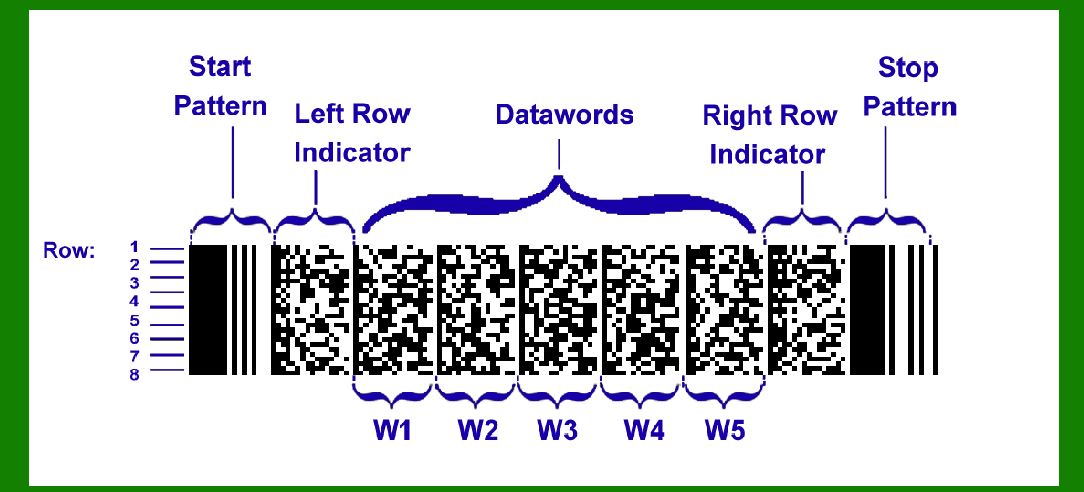
|
Structure of PDF417 Barcode |
1. Quiet Zone Every PDF417 barcode begins with a quiet zone, which is a mandatory minimum amount of blank space before the actual barcode begins. This ensures that no extraneous marks or printing near the barcode can interfere with its scanning and decoding. |
2. Start Pattern The start pattern is the initial sequence of bars and spaces that identifies the barcode as a PDF417 format. It serves as an indicator for barcode scanners to recognize and begin interpreting the data encoded within the barcode. |
3. Row Left Codeword Each row within a PDF417 symbol contains a 'row left' codeword. This codeword provides essential information about the specific row, including details such as the row number and the error correction level used for that particular row. |

|
4. Data Codewords The core of the PDF417 barcode is its data codewords. These codewords are groups of bars and spaces that represent the encoded data. Each row can contain between 1 to 30 data codewords, depending on the specific requirements of the data being encoded and the overall size of the barcode symbol. |
5. Row Right Codeword Following the data codewords in each row is the 'row right' codeword. Similar to the 'row left' codeword, this contains additional information about the row itself. This could include parity information, error correction details, or other metadata specific to that row. |
6. Stop Pattern At the end of each row, there is a stop pattern. This pattern marks the conclusion of that particular row of data within the PDF417 symbol. It is crucial for signaling to the barcode reader that it has reached the end of a row and needs to prepare for the next row or conclude the decoding process. |
7. Quiet Zone (End) Similar to the start of the barcode, the end of the PDF417 symbol is followed by another quiet zone. This provides a buffer between the barcode and any additional text or graphical elements that might appear nearby, ensuring the integrity of the barcode's scanning process. |

|
Uniform Row Structure |
All rows within a PDF417 barcode symbol are designed to be uniform in width and structure. This uniformity simplifies the process of decoding, as each row can be scanned and processed in a predictable manner. Regardless of the content being encoded, the barcode reader expects consistency in the format of each row. |

|
Error Correction |
PDF417 includes sophisticated error correction capabilities. Error correction codewords are embedded within the barcode to ensure data integrity even if part of the barcode is damaged or obscured. The level of error correction can be adjusted depending on the specific requirements of the application, balancing data capacity with the ability to recover from errors. |

|
Flexibility and Data Capacity |
One of the standout features of PDF417 is its flexibility in terms of data capacity. It can encode large amounts of data, including text, numbers, and binary data, efficiently across multiple rows. The number of rows can vary from 3 to 90, providing scalability depending on the amount of data that needs to be encoded. |

|
Applications |
PDF417 barcodes find application in a wide range of industries and scenarios where large volumes of data need to be stored and retrieved quickly and reliably. Some common applications include: Identification Cards: Used for driver's licenses, national ID cards, and other personal identification documents. Shipping and Logistics: Used on packages and parcels to store shipment information, tracking numbers, and recipient details. Ticketing: Used on event tickets, airline boarding passes, and other ticketing applications where data such as passenger information and seating details need to be stored. Inventory Management: Used in warehouses and retail environments to track inventory, manage stock levels, and streamline logistics operations. Healthcare: Used on patient wristbands, medical records, and pharmaceutical packaging to store patient information, medication details, and other healthcare-related data. |

|
Conclusion |
In conclusion, the PDF417 barcode format is a robust and versatile solution for encoding and decoding large volumes of data. Its structured format, consisting of multiple rows of uniform width, each containing specific codewords and error correction mechanisms, ensures reliability and efficiency in data retrieval. Whether used for personal identification, logistics, healthcare, or retail applications, PDF417 remains a cornerstone in barcode technology, enabling efficient data management and processing across various industries. |
 cs@easiersoft.com