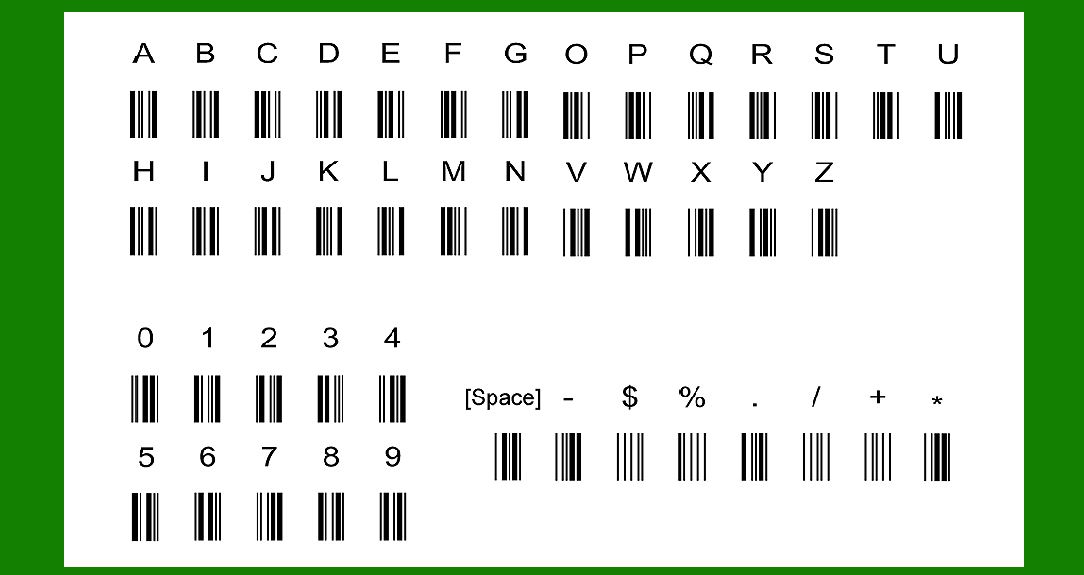
Full ASCII Code 39, also known as Extended Code 39 or Code 39 Full ASCII, expands upon the standard Code 39 barcode symbology by allowing the encoding of additional characters beyond the limited set available in basic Code 39. Code 39 itself is a widely used linear barcode type capable of encoding uppercase letters (A-Z), numeric digits (0-9), and a few special symbols such as '.', '-', '$', '/', '+', and '%', among others. However, it does not support lowercase letters or many additional punctuation marks and control characters commonly found in textual data. |
|
Introduction to Code 39 |
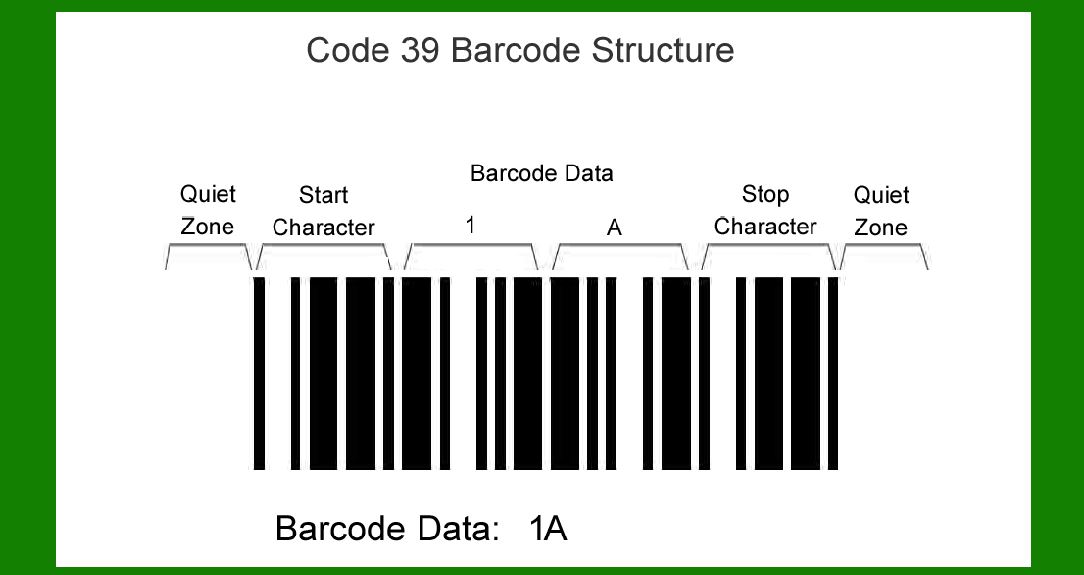
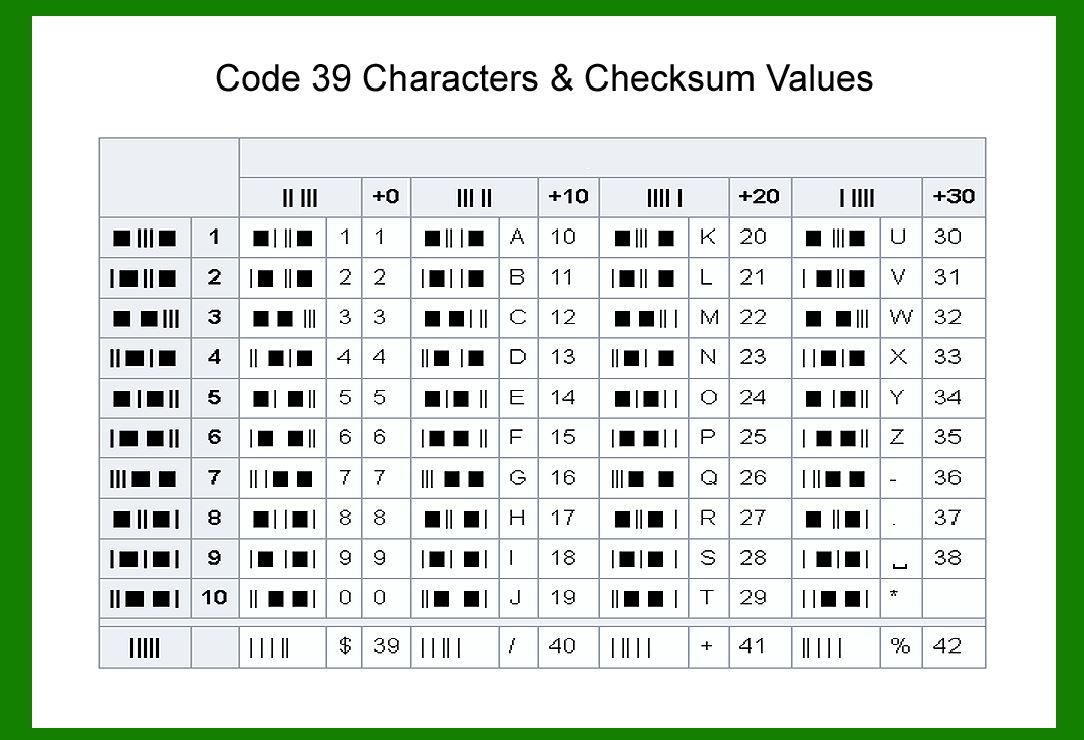
Code 39, developed in 1974 by Dr. David Allais and Raymond Stevens, was initially designed to be a robust, easy-to-print barcode that could encode alphanumeric data. It is a self-checking barcode, meaning it includes a modulo 43 checksum to ensure data integrity. Code 39 uses a set of bars and spaces to represent characters, with each character consisting of nine elements (five bars and four spaces). It is one of the oldest and most widely used barcode types, popular in various industries for labeling purposes due to its simplicity and reliability. |
Need for Full ASCII Code 39 |
While standard Code 39 serves many purposes adequately, there are limitations in its character set. It lacks support for lowercase letters, additional punctuation marks, and certain control characters. These limitations prompted the development of Full ASCII Code 39, which extends the encoding capability of Code 39 by using pairs of Code 39 characters to represent these additional characters. This extension is particularly useful in applications where the full range of ASCII characters needs to be encoded into barcodes, such as in data entry, inventory management, and document tracking systems. |
|
Character Set of Full ASCII Code 39 |
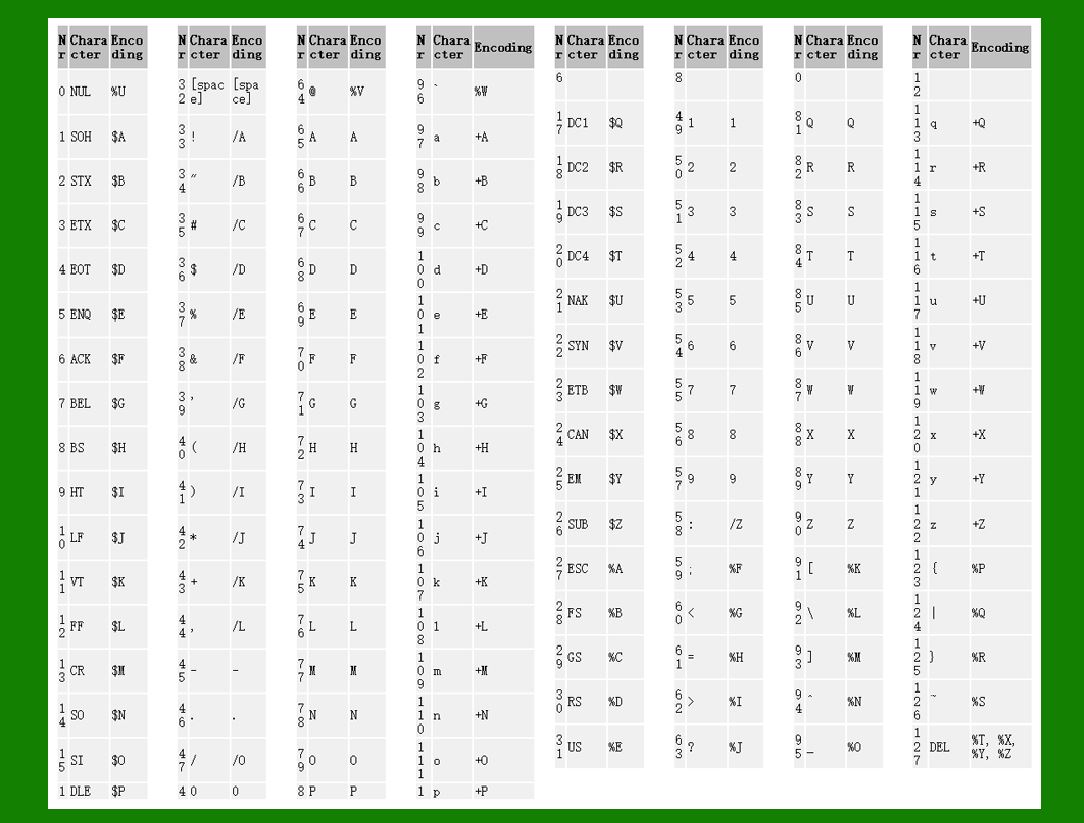
Full ASCII Code 39 retains the encoding capability of standard Code 39 for the characters 0-9, A-Z, '.', '-', and space. For lowercase letters (a-z), additional punctuation marks, and control characters, Full ASCII Code 39 uses pairs of characters from the standard Code 39 character set. These pairs are carefully chosen to ensure that they do not conflict with standard Code 39 sequences and are interpreted correctly by barcode scanners. |
Encoding Methodology |
The encoding process for Full ASCII Code 39 involves converting each character of the input data into a sequence of bars and spaces according to the Code 39 specification. For standard characters (0-9, A-Z, '.', '-', space), the encoding remains straightforward, using the same patterns as in standard Code 39. However, for characters beyond the basic set, the encoding involves using two adjacent characters from the standard Code 39 set to represent one character from the extended ASCII set. |
|
Example of Encoding |
Let's consider an example where we want to encode the string 'Code 39!' into Full ASCII Code 39: |
1.C: Encoded as '/C' in Code 39. 2.o: Encoded as '5o' in Code 39. 3.d: Encoded as 'Dd' in Code 39. 4.e: Encoded as ';E' in Code 39. 5.space: Encoded as '%space' in Code 39. 6.3: Encoded as '6#' in Code 39. 7.9: Encoded as '8Q' in Code 39. 8.!: Encoded as '7Z' in Code 39. |
When these sequences are concatenated together, they form the Full ASCII Code 39 representation of 'Code 39!': '/C5oDd;E%space6#8Q7Z'. |
|
Decoding Full ASCII Code 39 |
Decoding Full ASCII Code 39 involves the reverse process of interpreting the sequences of bars and spaces back into readable text. Barcode scanners capable of reading Full ASCII Code 39 are programmed to recognize the extended character pairs and convert them accordingly into their corresponding ASCII characters. Proper decoding ensures that the original data is accurately retrieved from the barcode. |

|
Applications |
Full ASCII Code 39 finds applications in various industries where barcode scanning is used extensively. Some common applications include: |
Inventory Management: Tracking items using barcoded labels that may contain extended characters beyond the basic alphanumeric set. Document Management: Encoding document IDs or version numbers that include lowercase letters or special characters. Healthcare: Patient identification wristbands or medical inventory labels that require detailed encoding. Shipping and Logistics: Labels for packages that include alphanumeric identifiers with extended character sets. |

|
Limitations and Considerations |
Despite its versatility, Full ASCII Code 39 has some limitations and considerations: |
Density and Space: Like standard Code 39, Full ASCII Code 39 may not be as space-efficient as other barcode types like Code 128 or QR codes, especially for encoding large amounts of data. Compatibility: Not all barcode scanners support Full ASCII Code 39. It is essential to verify compatibility with hardware and software systems before implementing. Checksums: Proper checksum calculations are crucial to ensure data integrity, especially when encoding large volumes of data. Encoding Errors: Misinterpretation of extended character pairs by barcode scanners can lead to decoding errors, so testing and validation of encoded data are essential. |

|
Comparison with Other Barcode Types |
While Full ASCII Code 39 extends the character set beyond basic Code 39, it is still limited compared to more advanced barcode types like Code 128 or QR codes. These barcode types support higher density and a broader range of characters, including Unicode characters, making them suitable for more complex data encoding requirements. However, Full ASCII Code 39 remains popular due to its simplicity, widespread support, and established use cases in various industries. |

|
Conclusion |
Full ASCII Code 39 is an extension of the standard Code 39 barcode symbology, designed to overcome the limitations of the basic character set by enabling the encoding of lowercase letters, additional punctuation marks, and control characters. It achieves this by representing extended ASCII characters using pairs of characters from the standard Code 39 character set. This extension enhances the versatility of Code 39 for applications requiring the encoding of diverse textual data into barcodes. While Full ASCII Code 39 has specific use cases and considerations, it continues to be a reliable choice for barcode labeling where compatibility and ease of implementation are paramount. As technology evolves, barcode symbologies like Code 39 adapt to meet the demands of modern data encoding and management practices, ensuring their relevance in various industries worldwide. |
 cs@easiersoft.com