Full ASCII Code 93 is an extension of the Code 93 barcode symbology, designed to encode a wider range of characters including lowercase letters, additional punctuation marks, and control characters. This barcode type is particularly useful when there is a need to encode full alphanumeric data, including both uppercase and lowercase letters, along with special symbols. |
Overview of Code 93 |
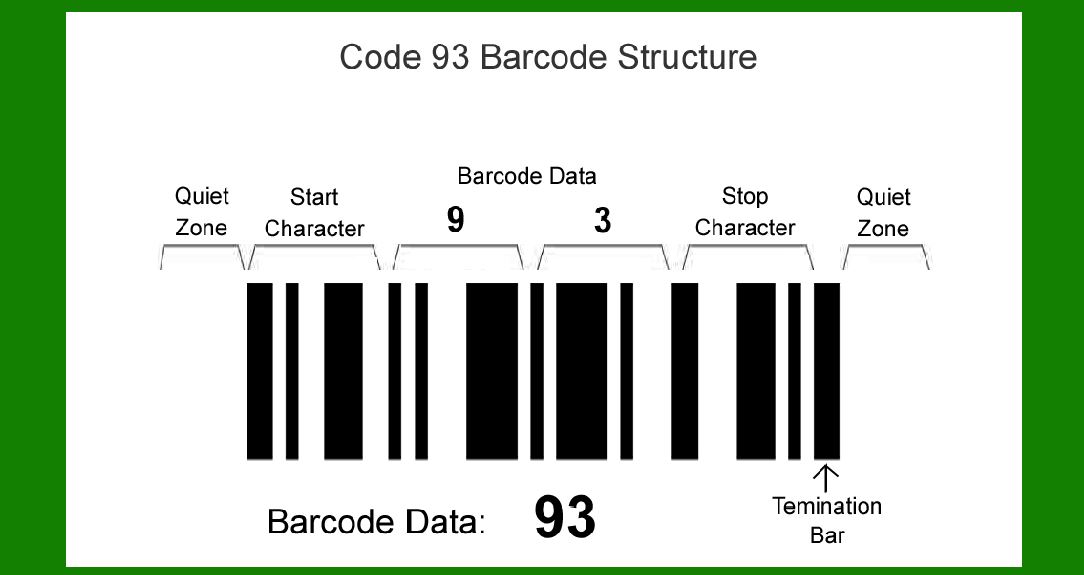
Code 93 is a barcode symbology that encodes alphanumeric data along with several special characters. It is an improvement over its predecessor, Code 39, offering higher data density and security features. In standard Code 93, there are 43 basic symbols including digits (0-9), uppercase letters (A-Z), and a few special characters like '-', '.', '$', '/', '+', and '%'. |
|
Need for Full ASCII Code 93 |
While standard Code 93 covers a significant range of characters, it lacks the ability to encode lowercase letters and additional punctuation marks directly. This limitation necessitated the development of Full ASCII Code 93, which expands the character set by using pairs of characters from the standard Code 93 set to represent these additional characters. |
Character Set of Full ASCII Code 93 |
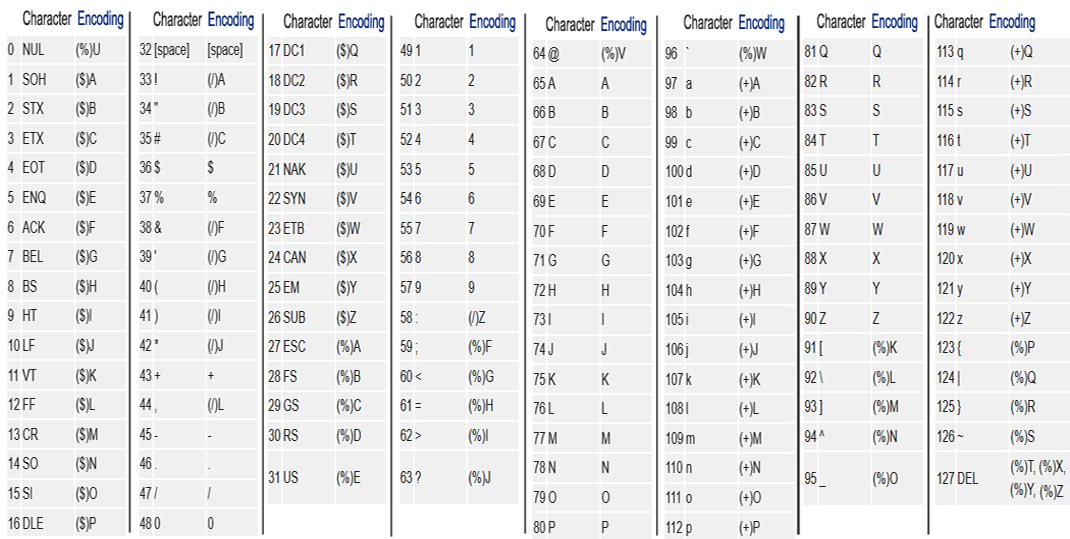
Full ASCII Code 93 utilizes the following character set: |
Digits: 0-9 Uppercase letters: A-Z Special characters: '-', '.', '$', '/', '+', '%' Lowercase letters: Represented using pairs of characters from the basic set Additional punctuation marks and control characters: Also represented using pairs of characters |
|
Encoding Scheme |
The encoding scheme of Full ASCII Code 93 involves representing characters that are not part of the basic set (lowercase letters, additional punctuation, control characters) using pairs of characters from the basic set. Let's delve into how this encoding works in practice: |
Basic Characters |
The 43 basic characters of Full ASCII Code 93 are the same as in standard Code 93: 0-9 A-Z '-', '.', '$', '/', '+', '%' |
Extended Characters |
For characters not in the basic set, Full ASCII Code 93 uses two characters to encode them. These pairs are typically constructed by using a start/stop character from the basic set, combined with another character to represent the extended character. For example: |
Lowercase letters: Represented using pairs of characters. For instance, 'a' might be encoded as 'A', where '' is the start/stop character and 'A' represents the lowercase 'a'. Additional punctuation marks: Also encoded using pairs of characters. For example, '{' might be encoded as '/A'. Control characters: Represented similarly using pairs. |

|
Structure of Full ASCII Code 93 |
Start and Stop Characters |
Like other barcode symbologies, Full ASCII Code 93 uses start and stop characters to indicate the beginning and end of the encoded data. These characters are included in the basic set of 43 symbols. |
Data Encoding |
1.Start Character: Indicates the beginning of the barcode. 2.Data Characters: Each character in the data is encoded according to whether it is in the basic set or requires two characters to represent. 3.Stop Character: Marks the end of the barcode. |

|
Example of Encoding |
Let's encode the string 'Code93!' using Full ASCII Code 93: |
1.Character Mapping: 'C' is represented directly as 'C'. 'o' is represented as '*A'. 'd' is represented as '*B'. 'e' is represented as '*C'. '9' is represented directly as '9'. '3' is represented directly as '3'. '!' might be represented as '/A' (hypothetical example). |
2.Concatenation: Concatenate the start character, encoded characters, and stop character to form the complete barcode. |

|
Applications |
Full ASCII Code 93 finds applications where there is a need to encode extended alphanumeric data in a barcode format. Some common uses include: |
Inventory Management: Tracking inventory items with detailed alphanumeric codes. Shipping and Logistics: Encoding shipment information including addresses and tracking numbers. Document Management: Barcoding documents with comprehensive data including metadata. Retail: Encoding product information including SKU numbers and pricing. |

|
Advantages |
Extended Character Set: Allows encoding of lowercase letters and additional symbols not available in standard Code 93. Data Security: Provides higher security due to its ability to encode a wider range of characters, making it harder to tamper with or decode incorrectly. |
Limitations |
Complexity: Encoding and decoding Full ASCII Code 93 requires handling pairs of characters, which can be more complex than standard barcode symbologies. Size: Due to the extended character set, barcodes may be larger compared to simpler symbologies like Code 39. |
Comparison with Code 39 |
Full ASCII Code 93 shares similarities with Full ASCII Code 39 but has a distinct advantage due to its higher data density and security features. Unlike Code 39, which uses specific symbols for both standard and extended character sets, Full ASCII Code 93 uses pairs of characters from its basic set to encode extended characters, maintaining compatibility with standard Code 93 while expanding its capabilities. |

|
Conclusion |
Full ASCII Code 93 is a robust barcode symbology designed to encode a wide range of alphanumeric data including lowercase letters, additional punctuation marks, and control characters. It extends the capabilities of standard Code 93 by using pairs of characters from its basic set to represent characters outside the basic set. This makes it suitable for applications requiring detailed data encoding in barcode form, ensuring efficient tracking and management across various industries. |
 cs@easiersoft.com