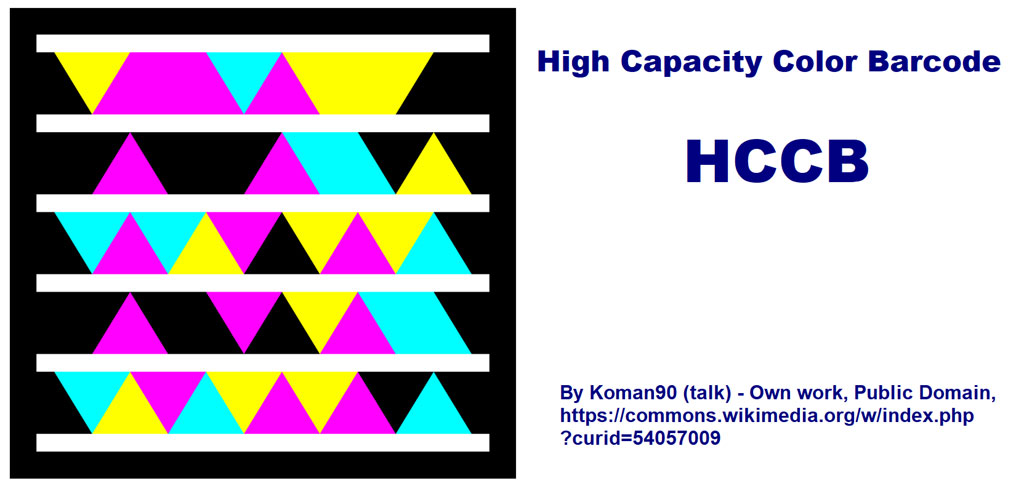
The High Capacity Color Barcode (HCCB), developed by Microsoft and licensed by ISAN-IA, is a sophisticated 2D barcode technology designed to encode large amounts of data in a compact format using a unique color-based encoding scheme. Introduced as an alternative to traditional black and white barcodes, HCCB offers several advantages including higher data density, better error correction capabilities, and the ability to encode color information. Below is a detailed exploration of HCCB, covering its history, technical specifications, encoding principles, applications, advantages, and challenges. |
|
History and Development |
The development of HCCB can be traced back to Microsoft's efforts in the mid-2000s to create a barcode technology that could surpass the limitations of traditional black and white barcodes. Microsoft Research, led by Gavin Jancke, envisioned a barcode that could store more data while maintaining readability and robustness. This led to the creation of HCCB, which was officially unveiled in 2007. |

|
Technical Specifications |
1. Encoding Scheme: |
HCCB uses a grid of colored triangles arranged in a unique pattern. Each color triangle represents a different set of data. The arrangement and colors of the triangles are crucial for encoding and decoding information. |
2. Data Capacity: |
HCCB can encode significantly more data than traditional barcodes of comparable size. It supports alphanumeric characters, binary data, and even Unicode characters. The exact data capacity depends on factors such as barcode size and color density. |
3. Error Correction: |
HCCB includes robust error correction techniques to ensure accurate data retrieval even if parts of the barcode are damaged or obscured. Error correction algorithms help in recovering data from damaged portions of the barcode. |
4. Color Palette: |
The color palette used in HCCB consists of a limited number of distinct colors. Each color is carefully chosen to ensure differentiation and readability under various lighting conditions. |
|
Encoding Principles |
1. Color Triangles: |
HCCB encodes data using clusters of colored triangles arranged in a grid. Each triangle cluster represents a specific data value or part of the encoded information. The orientation and arrangement of these triangles are standardized for easy decoding. |
2. Data Mapping: |
Data is mapped to specific combinations of colors and triangle arrangements. Encoding software translates input data into the appropriate configuration of colored triangles. Special algorithms ensure efficient use of space and optimal data density. |
3. Printing Considerations: |
Printing HCCB requires high precision to maintain color accuracy and triangle clarity. Print quality directly impacts barcode readability, especially for high-density data encoding. |
|
Applications |
1. Consumer Products: |
HCCB is used on consumer products for inventory management, traceability, and product authentication. It enables detailed product information to be encoded directly on packaging. |
2. Document Management: |
HCCB is employed in document management systems for tracking and organizing large volumes of paperwork. It facilitates quick retrieval of document metadata and indexing. |
3. Entertainment and Media: |
In the entertainment industry, HCCB is utilized for digital rights management (DRM) and media tracking. It helps in managing and distributing multimedia content securely. |
4. Healthcare and Pharmaceuticals: |
HCCB supports pharmaceutical tracking and compliance with regulatory requirements. It enhances drug authentication and supply chain visibility. |
5. Logistics and Supply Chain: |
HCCB optimizes logistics operations by encoding detailed shipment information. It improves inventory management and reduces errors in order fulfillment. |

|
Advantages |
1. Data Density: |
HCCB offers higher data capacity compared to traditional barcodes of similar size. It accommodates complex data structures including URLs, serial numbers, and descriptive text. |
2. Error Resilience: |
Robust error correction ensures accurate data retrieval even with damaged or partially obscured barcodes. It enhances reliability in scanning and data extraction processes. |
3. Color Encoding: |
Use of colors enables richer data representation and differentiation. Color-coded information can convey additional details or instructions. |
4. Scalability: |
HCCB scales effectively from small consumer goods to large-scale industrial applications. It adapts to various printing and scanning environments with minimal adjustment. |

|
Challenges |
1. Printing Precision: |
Achieving accurate color reproduction and triangle clarity requires advanced printing technology. Low-quality printing can lead to barcode decoding errors. |
2. Compatibility: |
Compatibility with existing barcode scanning systems may require upgrades or specialized scanners. Interoperability with legacy systems can pose integration challenges. |
3. Cost Considerations: |
Initial setup costs for printing and scanning equipment may be higher compared to traditional barcode systems. Cost-effective deployment strategies are essential for widespread adoption. |
|
Future Developments |
The future of HCCB lies in continued refinement of printing technologies, enhanced data security features, and broader adoption across diverse industries. Advances in machine learning and computer vision may further improve barcode recognition accuracy and efficiency. |

|
Conclusion |
The High Capacity Color Barcode (HCCB) represents a significant advancement in barcode technology, offering superior data capacity, robust error correction, and color-based encoding capabilities. Developed by Microsoft and licensed by ISAN-IA, HCCB has found applications in consumer products, logistics, healthcare, and entertainment industries. Despite challenges in printing precision and compatibility, HCCB continues to evolve, driven by the demand for efficient data encoding and management solutions in a digital world. |
 cs@easiersoft.com