MicroPDF417 is a sophisticated 2D barcode symbology that builds upon the foundation of the PDF417 barcode system, offering enhanced compactness and flexibility. Developed by a team at Symbol Technologies in the mid-1990s, it has evolved from a proprietary format to an international standard recognized by ISO and GS1. This detailed exploration will cover the history, technical standards, data encoding principles, and applications of MicroPDF417. |
|
History and Development |
MicroPDF417 was invented and patented in 1996 by Frederick Schuessler, Kevin Hunter, Sundeep Kumar, and Cary Chu at Symbol Technologies, a company renowned for its contributions to barcode technology. Initially conceived as an extension of the PDF417 symbology, MicroPDF417 aimed to address the need for a more compact yet robust barcode format suitable for applications requiring high-density data encoding. |
The PDF417 barcode, developed in the early 1990s, was revolutionary for its ability to store large amounts of data in a two-dimensional pattern, far exceeding the capacity of traditional linear barcodes. It gained popularity across various industries due to its versatility and resilience in adverse conditions. Building upon this success, the team at Symbol Technologies sought to create a smaller version that retained the core features of PDF417 while enhancing efficiency and readability. |

|
Technical Principles and Data Encoding |
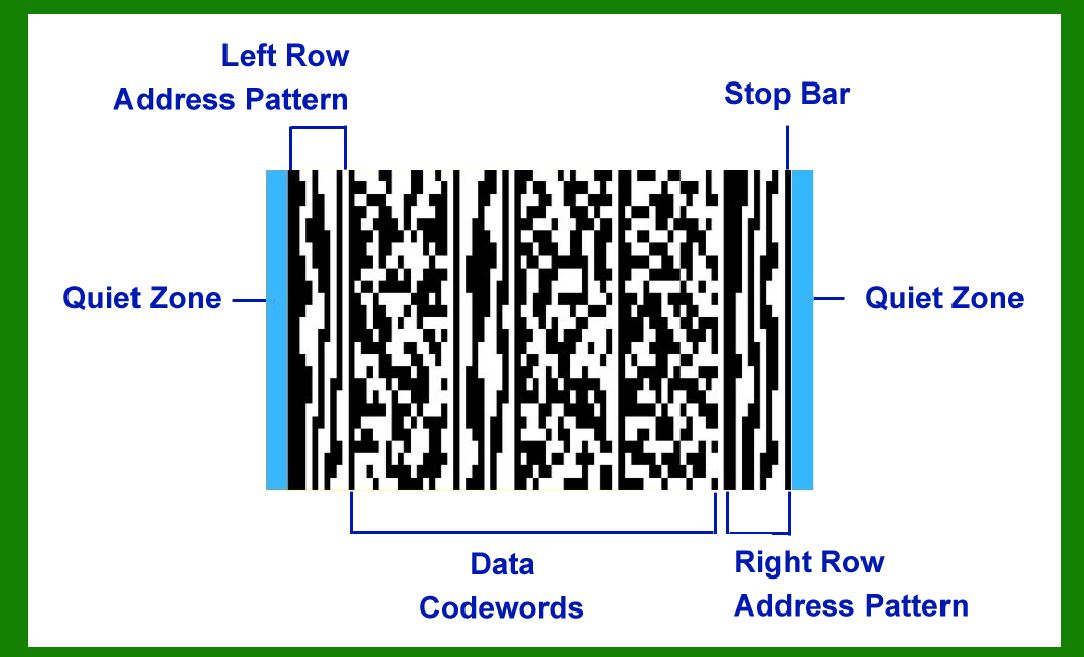
MicroPDF417 employs the same fundamental principles of data encoding as PDF417. It utilizes a high-density, two-dimensional matrix structure consisting of stacked rows of codewords. Each codeword represents a segment of data, encoded using a combination of bars and spaces arranged in a grid pattern. The symbology supports both numeric and alphanumeric data, making it suitable for a wide range of applications including identification, inventory management, and logistics. |
Key technical features of MicroPDF417 include: |
1.Compact Size: Compared to PDF417, MicroPDF417 offers a significant reduction in size while maintaining data capacity and error correction capabilities. This compactness is crucial for applications where space is limited or where smaller labels are preferred. 2.Error Correction: Like PDF417, MicroPDF417 includes built-in error correction algorithms that enhance data integrity. This feature ensures reliable data retrieval even in cases where the barcode may be partially damaged or obscured. 3.Flexibility: MicroPDF417 supports multiple modes for data encoding, including structured append, enabling data to be divided and encoded across multiple barcodes. This flexibility is advantageous in scenarios where large amounts of data need to be managed efficiently. |

|
Standardization Efforts |
In its early years, MicroPDF417 was proprietary to Symbol Technologies, and access to the standard was limited. However, recognizing its potential to meet industry needs for a compact, high-capacity barcode format, efforts were made to standardize MicroPDF417 at the international level. |
Before 2006, organizations interested in implementing MicroPDF417 had to obtain the specification from sources like the AIM store, which housed various barcode standards. During this period, MicroPDF417 was integrated into composite symbologies such as ITS - EAN.UCC Composite Symbology, demonstrating its versatility in combination with other barcode formats. |
The pivotal moment for MicroPDF417 came in 2006 when it was formally standardized as ISO/IEC 24728:2006. This international standardization under ISO (International Organization for Standardization) and IEC (International Electrotechnical Commission) solidified MicroPDF417's status as a globally recognized barcode symbology. ISO/IEC 24728:2006 specifies the symbology's structure, encoding rules, error correction methods, and other technical details necessary for interoperability and widespread adoption. |

|
Applications and Use Cases |
MicroPDF417 barcode's adoption has spanned across various industries due to its compact size, high data capacity, and robust error correction capabilities. Some prominent applications include: |
1.Transportation and Logistics: Used for tracking packages, shipments, and assets in logistics and supply chain management. Its ability to encode extensive data such as item details, batch numbers, and expiration dates makes it invaluable for inventory control. 2.Government and Identification: Implemented in government-issued identification cards, driver's licenses, and passports to securely store personal information and biometric data. The barcode's resilience to damage ensures reliable verification and authentication. 3.Healthcare: Applied in healthcare settings for patient identification, medication management, and medical record tracking. The barcode's high capacity accommodates comprehensive patient data while supporting quick and accurate data retrieval. 4.Retail and Manufacturing: Used on product labels and packaging for inventory management, pricing, and product traceability. Its compact size allows for integration into small or limited-space labels without compromising data capacity. |

|
Future Trends and Innovations |
As technology advances and demands for efficient data management grow, MicroPDF417 continues to evolve. Innovations in barcode scanning technology, such as enhanced imaging and decoding algorithms, improve the barcode's readability and usability across different environments. |
Future trends may include enhanced integration with digital systems through the use of mobile devices and IoT (Internet of Things) platforms. This could enable real-time tracking, authentication, and data analytics capabilities that further enhance the barcode's utility in modern applications. |

|
Conclusion |
MicroPDF417 barcode symbology represents a significant advancement in data encoding technology, building upon the success of PDF417 while addressing the need for smaller, more versatile barcode formats. From its origins as a proprietary format to its standardization as ISO/IEC 24728:2006, MicroPDF417 has become a cornerstone in industries requiring high-density data encoding solutions. |
Its compact size, robust error correction, and flexibility make it suitable for a wide range of applications across industries including transportation, healthcare, retail, and government. As technology continues to evolve, MicroPDF417 barcode symbology is poised to remain an essential tool for efficient data management and identification in the digital age. |
 cs@easiersoft.com