Barcode Technology

Barcode History

Barcode Label Paper

Barcode Printer

Barcode Application

Inventory Management

AI Barcode QRCode

Barcode Scanner

Barcode Software

Barcode Software B

Barcode Software C

Barcode Software D

Barcode Software E

New Technology A

New Technology B

Robot Technology

Barcode Types

Barcode Types B

Barcode Types C

Barcode Types D

Barcode Types E

Barcode Types F

Electronic Technology

Psychology at Work

Barcode Technology and Barcode Software Related   <<< Back to Directory <<<

Laying out the message of the Aztec Code

Recommended: Free barcode software - Bulk barcode generator and label printing, Free for life. Download

The Aztec Code is a type of 2D barcode that uses a unique layout and encoding scheme to store information.

Here's a detailed description of laying out the message in an Aztec Code:

Core and Reference Grid

1.Core Structure:

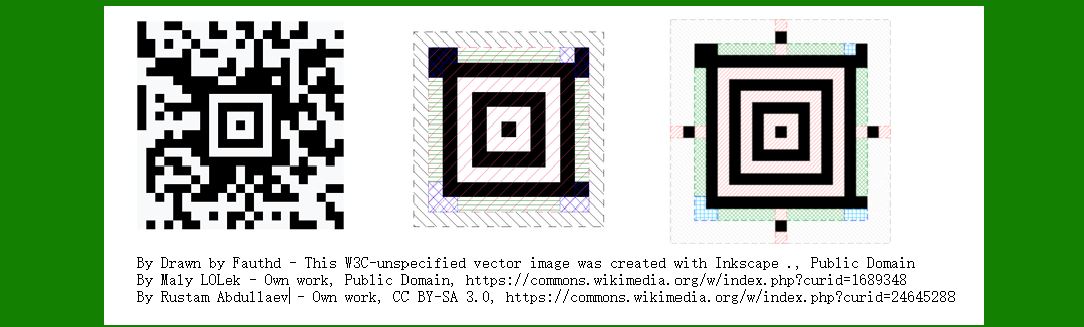
The Aztec Code starts with a core, typically a 14x14 pixel square centered on a 2x2 white pixel area.

The core contains the most critical information about the code, including the number of layers and check words.

2.Layers and Symbol Expansion:

The symbol can have multiple layers, expanding outward from the core.

Each layer adds rows and columns of alternating black and white pixels (reference grid) to maintain alignment and readability of the code.

Layers increase by 2 pixels on each side, resulting in odd-numbered dimensions (e.g., 17x17, 21x21, etc.).

3.Grid Expansion:

Reference grid rows and columns are added at specific intervals (±16 pixels for layers 1-4, ±32 pixels for layers 5-12, and so on).

This grid helps readers maintain alignment and decode the symbol accurately.

Message Layout

1.Starting Point:

The message starts at the top-left corner of the core and wraps around it clockwise in a 1-bit thick layer.

For a compact Aztec Code (smaller capacity), the message is divided into four 7-bit pieces.

For a full Aztec Code (larger capacity), the message is divided into four 10-bit pieces.

2.Orientation and Encoding:

The bits are encoded such that 1s are represented by black squares and 0s by white squares.

Encoding begins with the most significant bit of the number of layers and ends with the check words.

3.Padding:

If the total capacity of the symbol does not divide evenly by the code words, the main message is padded with 0 bits at the beginning.

These padding bits are excluded from the check word calculation and are skipped during decoding.

4.Spiral Encoding:

The main message is laid out in a counterclockwise spiral pattern around the outermost layers of the symbol.

This spiral pattern is 2-bits thick, placing the bit-stuffed data words on the outer layers and check words closer to the core.

5.Bit Placement:

Starting from the outer top-left of the entire symbol, bits are placed sequentially in a 2-bit wide column left-to-right and top-to-bottom.

After reaching 2 rows from the bottom, the pattern rotates 90 degrees counterclockwise and continues in a 2-bit high row bottom-to-top and left-to-right.

This spiral pattern continues until the top-left corner of the next inner layer is reached, ending just above the top-left corner of the core.

Summary

The Aztec Code's layout and encoding scheme ensure efficient use of space while allowing for reliable decoding. The core and reference grid structure provide alignment and readability, while the spiral encoding of the message maximizes data capacity and error detection capabilities. The distinct pattern of black and white pixels not only encodes information but also facilitates robust error correction and data recovery, making Aztec Code suitable for various applications requiring compact and reliable data storage.


EasierSoft Barcode Label Design & Bulk Printing Software

---- Use Excel Data to Batch Print Barcodes on Label Sheets or Roll Labels  

---- How to use this barcode software

Download:  Free Barcode Software + Barcode Label Designer

Download Free Barcode Software at Softonic

     Download at CNET

Once you obtain a GS1/UPC/EAN barcode, or other barcode type and QR code, you can use our free software to batch print barcode labels onto Roll label paper using a professional label printer, or to batch print barcodes onto Avery 5160 label sheets using a regular laser or inkjet printer. Our software has free and paid versions.

The free version fully meets your needs for batch printing GS1/UPC/EAN barcodes. The paid version can import data from Excel and databases to batch print barcode labels with different values.

How to Start

Input Data

Import Excel Data

Print Barcode

Barcode Format

Label Designer

All Screen Shot

Export Barcode Image

Save Template

Output Word Excel

How to Use & FAQ:

Example: Print portrait orientation 5164

Example: Print barcodes to 5167 label

Example: Print barcodes to 5168 label

Example: Print portrait orientation 5168

Example: Print barcodes to 5169 label

Example: Print barcodes to 5660 label

Example: Print barcodes to 5661 label

Example: Print barcodes to 5662 label

Example: Print barcodes to 5663 label

Example: Print barcodes to 5664 label

Example: Print portrait orientation 5664

Example: Print barcodes to 5873 label

Example: Print barcodes to 5874 label

Two ways to import Excel data

Import Excel Data - Pro Edition

Import Excel Data - Std Edition

Import Data from Excel - Detail

Load Data From Excel File

Data Editing Table

Copy Data From Excel

Four ways to input barcode data

Add ASCII Key E

Input Multiple Lines of Text for Barcodes

Generates Sequential Serial Numbers

Import or copy data from Excel sheets

Special sequence number generation

Std Details: Simple Input Form

Std Details: Multiple Line Text Input

Details: Sequence Barcode Generator

Examples: Sequence Barcode Generator

Import Data From Excel Spreadsheet

Barcode Data Correspondence Diagram

Data Editor

Editing a Single Row Data in Form

Batch Editing Multiple Rows of Data

Batch Data Editing - Example 2

Design & print complex barcode labels

Configuring Text Elements on Label

Configuring Barcode Elements on Label

Configuring Image Elements on Label

Setting Line Elements on Label

Designing Labels for 5164 Sheet

Advanced Page Layout Settings

Add Barcode Elements to a Label

Configuring Parameters of a Barcode

Entering Multiple Values for a Barcode

Print barcode labels

Print bulk barcodes - How to start

Four sections of print bulk barcodes

Barcode Filter & Repeat Print Quantity

Highlights

Excel integration: Import data directly from Excel to generate and print barcodes in bulk.

Label designer: Create complex labels with multiple barcodes, text, logos, and shapes.

Batch printing: Print thousands of barcodes at once using standard inkjet/laser printers or professional barcode printers.


Flexible editions:

Standard Edition: Simple batch printing with Excel data.

Professional Edition: Adds command-line automation for workflow integration.

Label Designer Edition: Advanced design features for complex labels.


Why Choose Our Barcode Solutions?

Cost-effective: Free online generator and permanent free desktop version available.

Easy to use: No technical expertise required—just input data and print.

Versatile: Supports nearly all 1D and 2D barcode types, including QR codes.

Trusted: Recommended by CNET and widely downloaded by users worldwide.


Suitable Use Cases

Small businesses and startups needing quick barcode labels for products.

Retailers and online sellers managing inventory with batch barcode printing.

Manufacturers requiring sequential or custom barcode labels for packaging.

Educational and testing environments where barcodes are used for tracking.


CONTACT

cs@easiersoft.com

If you have any question, please feel free to email us.


https://free-barcode.com


<<< Back to Directory <<<     Barcode Generator     Barcode Freeware     Privacy Policy