MaxiCode is a high-capacity, public domain, machine-readable barcode symbol system originally developed by United Parcel Service (UPS) in 1992. |
It is primarily used for tracking and managing the shipment of packages. MaxiCode differs from traditional square grid codes like QR codes or Data Matrix codes by using a hexagonal grid arrangement of dots. This unique design allows it to efficiently encode large amounts of data within a compact symbol, making it ideal for applications requiring robust data encoding and high-speed scanning capabilities. |
|
Technology Overview of MaxiCode |
Structure and Design |
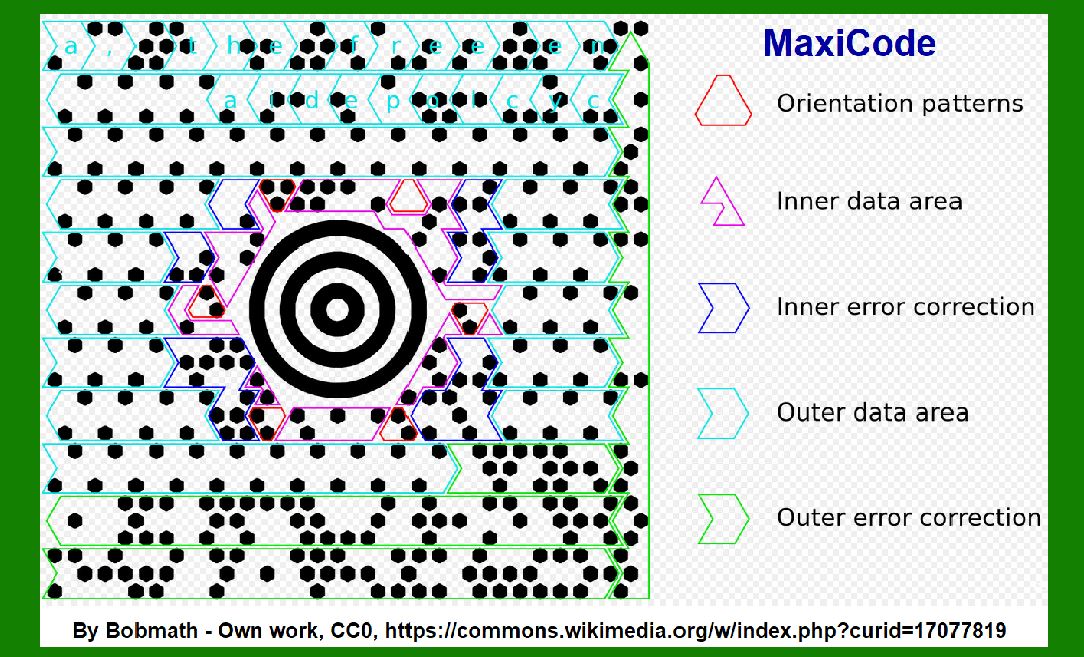
MaxiCode is structured as a circular symbol divided into a central bulls-eye pattern surrounded by several concentric rings. The symbol is composed of hexagonal modules, each containing dots arranged in a specific pattern. Unlike QR codes which use a square grid, MaxiCode utilizes a hexagonal grid to encode data. This grid arrangement enhances the symbol's readability and allows for efficient data retrieval during scanning. |
Data Encoding |
MaxiCode employs a mode-based encoding scheme where different modes are used to encode various types of information such as numeric data, alphanumeric data, and byte data. This versatility enables MaxiCode to encode a wide range of information including tracking numbers, destination addresses, package weight, and other relevant logistics data crucial for package management and tracking. |

|
Error Correction |
To ensure reliable data retrieval even in adverse conditions such as smudging or partial obstruction, MaxiCode incorporates robust error correction mechanisms. These mechanisms utilize Reed-Solomon error correction codes to detect and correct errors that may occur during scanning or data transmission. This ensures high accuracy and reliability in package tracking applications where data integrity is critical. |
Size and Scalability |
MaxiCode symbols come in various sizes ranging from small to large, depending on the amount of data that needs to be encoded. Despite its compact size, MaxiCode can encode significantly more data compared to traditional linear barcodes, making it suitable for applications requiring comprehensive data storage within a limited symbol area. |
ISO/IEC Standardization |
MaxiCode has been standardized under ISO/IEC 16023, which specifies the technical requirements and guidelines for the design, printing, and reading of MaxiCode symbols. This standardization ensures interoperability and compatibility across different scanning devices and software systems, allowing for seamless integration into various logistics and shipping environments worldwide. |

|
Applications of MaxiCode |
Logistics and Package Tracking |
One of the primary applications of MaxiCode is in logistics and package tracking operations. Organizations like UPS use MaxiCode extensively to encode shipment details such as package contents, destination addresses, shipping routes, and delivery schedules. The ability to encode comprehensive logistical information within a single barcode simplifies tracking processes and enhances operational efficiency. |
Retail and Inventory Management |
In retail and inventory management, MaxiCode is utilized to track and manage stock levels, monitor product movement across supply chains, and streamline inventory replenishment processes. By encoding product information, batch numbers, and expiration dates, MaxiCode facilitates accurate inventory control and ensures timely replenishment of goods. |
Transportation and Ticketing |
MaxiCode is also employed in transportation systems for encoding information on tickets, boarding passes, and electronic passports. Its ability to store passenger details, travel itineraries, and security information enables seamless check-in processes and enhances passenger convenience in airports, train stations, and other transit hubs. |
Healthcare and Pharmaceutical Tracking |
In the healthcare sector, MaxiCode plays a crucial role in tracking pharmaceutical products, medical devices, and patient records. By encoding medication details, dosage instructions, and patient identifiers, MaxiCode helps prevent medication errors, ensure regulatory compliance, and enhance patient safety through accurate data management and tracking. |

|
Advantages of MaxiCode |
1.High Data Capacity: Capable of encoding large amounts of data within a compact symbol, maximizing information storage efficiency. 2.Error Correction: Robust error correction mechanisms ensure reliable data retrieval and enhance scanning accuracy. 3.Versatility: Supports multiple data encoding modes, making it suitable for diverse applications in logistics, retail, healthcare, and transportation. 4.Standardization: ISO/IEC standardization ensures compatibility and interoperability across different scanning devices and software platforms. 5.Fast Scanning: Hexagonal grid design facilitates fast scanning speeds, ideal for high-volume scanning environments such as distribution centers and retail checkout counters. |

|
Conclusion |
MaxiCode represents a versatile and efficient barcode symbol system designed to meet the demanding requirements of modern logistics, retail, healthcare, and transportation industries. Its unique hexagonal grid structure, high data capacity, robust error correction capabilities, and ISO/IEC standardization make it a preferred choice for organizations seeking reliable and scalable solutions for data encoding, package tracking, inventory management, and beyond. As a public domain technology, MaxiCode continues to evolve and expand its applications, driving innovation in barcode technology and enhancing operational efficiency across various sectors globally. |
 cs@easiersoft.com