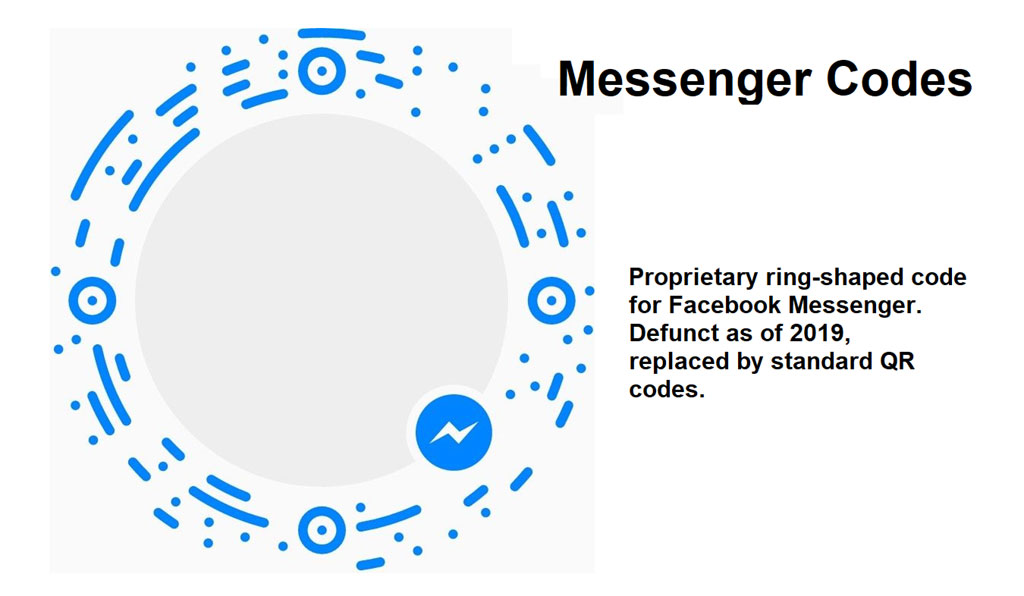
Messenger Codes were a proprietary form of visual identification used exclusively within Facebook Messenger. |
They were designed to facilitate quick and seamless connections between users on the platform, offering a convenient way to add contacts or initiate conversations by scanning a unique graphical code. Introduced by Facebook, Messenger Codes aimed to simplify the process of networking and communication through their distinctive ring-shaped format. However, as of 2019, Facebook phased out Messenger Codes in favor of adopting standard QR codes, aligning with broader industry standards and user expectations for interoperability. |
|
Overview of Messenger Codes |
Messenger Codes were part of Facebook's strategy to enhance user engagement within its Messenger platform. Similar to QR codes in function, Messenger Codes were visually distinct with a circular design, incorporating a user's profile picture in the center surrounded by a series of dots and lines forming a border. This design not only served as a unique identifier but also allowed for customization, reflecting the user's profile aesthetics. |
|
Evolution and Adoption |
Initial Concept and Launch |
Facebook introduced Messenger Codes as part of its broader initiative to integrate various functionalities directly into its messaging service. The concept leveraged the ubiquity of smartphones equipped with cameras to enable users to quickly add friends or start conversations simply by scanning each other's codes. This approach aimed to streamline the user experience by reducing the friction associated with adding contacts manually. |
Functionality and User Interface |
The functionality of Messenger Codes was straightforward: users accessed their own code within the Messenger app, which was generated based on their profile information and preferences. To add a new contact, users could either display their own code for scanning or scan another user's Messenger Code directly from within the app. This process eliminated the need for exchanging usernames or searching for contacts manually, enhancing convenience and efficiency in connecting with friends and acquaintances. |
Integration and User Experience |
Integration of Messenger Codes was seamless within the Messenger ecosystem. Users could generate their code with a few taps, customize its appearance to some extent, and share it across other platforms or in physical environments for scanning. The codes were designed to be visually distinctive, making them recognizable and easy to scan even from a variety of surfaces or digital displays. |
|
Technical Specifications |
Design Elements |
Messenger Codes featured a circular layout, typically displaying a user's profile picture in the center surrounded by a pattern of dots and lines forming a border. This design not only served as a visual identifier but also incorporated elements of branding and personalization, aligning with Facebook's emphasis on user identity and expression. |
Generation and Recognition |
The generation of Messenger Codes was automated within the Messenger app, requiring minimal user input beyond selecting the desired profile picture and possibly adjusting the visual style. Facebook's backend systems handled the encoding and decoding processes, ensuring compatibility across different devices and operating systems capable of scanning QR codes. |
Compatibility and Interoperability |
Initially, Messenger Codes were intended primarily for use within the Facebook ecosystem, limiting their interoperability with other QR code scanning applications. This proprietary approach aimed to enhance user engagement and retention within Facebook's own platforms, emphasizing seamless integration with Messenger's messaging and social networking features. |

|
Transition to Standard QR Codes |
Industry Standardization |
As QR codes gained widespread adoption globally, Facebook recognized the advantages of aligning with industry standards to enhance interoperability and user convenience. Standard QR codes offered broader compatibility across various devices, applications, and platforms, enabling users to scan codes generated by different services without requiring proprietary software or specialized integrations. |
User Feedback and Adoption Trends |
Feedback from users and developers alike underscored the benefits of adopting standard QR codes over proprietary formats like Messenger Codes. Standardization simplified the scanning process, reduced fragmentation across QR code-enabled services, and encouraged broader adoption among businesses and consumers accustomed to QR code technology. |
Implementation and Sunset of Messenger Codes |
In response to these trends, Facebook announced the phased transition from Messenger Codes to standard QR codes in 2018, culminating in the discontinuation of Messenger Codes functionality by mid-2019. This transition aimed to streamline user interactions, improve compatibility with external platforms, and align with evolving industry standards for visual identification and communication. |

|
Conclusion |
Messenger Codes represented a proprietary approach to visual identification within Facebook Messenger, emphasizing user engagement and convenience through a distinctive circular design. Despite initial adoption and integration within the Messenger ecosystem, Facebook's decision to transition to standard QR codes reflected broader industry trends towards interoperability and user-centric design. By adopting standard QR codes, Facebook facilitated seamless scanning experiences across different platforms and devices, enhancing usability and accessibility for users worldwide. |
 cs@easiersoft.com